linkedin
Krystal DMS logo
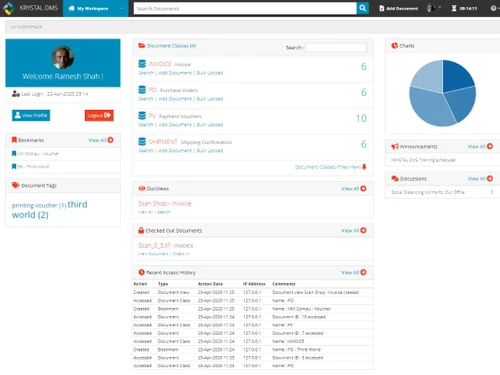
krystal dms workplace
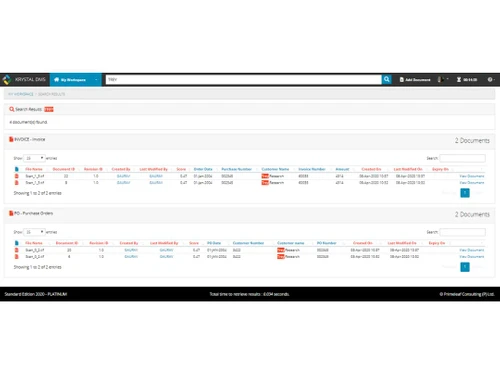
krystal dms global search
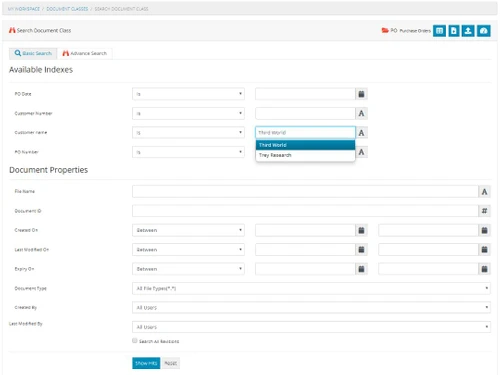
krystal dms advance search

Krystal DMS

Brand: Primeleaf

  • 5

  • 2 Ratings & 2 Reviews

Krystal DMS is a document management software that is designed to increase productivity. It enables one to carry out business operations in a more organized and accurate manner. This easy-to-use software allows one to spend more time on customer activities instead of concentrating on administrative and paper-based works. The licensing, support and implementation package of this document managemen...

See More

Have you used Krystal DMS before?

Share your insights for better experience

Add a Review
Starting Price
₹32,400 excl.GST
₹ 38,232 incl. GST

View plans

offer Save upto 18%, Get GST Invoice on your business purchase T&C
offer Buy Now & Pay Later, Check offer on payment page.
Buy Now
100% Genuine
Products
Best Price
Guaranteed
Safe & Secure
Payment
  • Description

  • Pricing

  • Features

  • Specification

  • Review

  • Compare

  • Alternatives

  • FAQ

Starting at ₹32,400
Buy Now

Krystal DMS Software Overview

What is Krystal DMS?

Krystal DMS is a document management software that is designed to increase productivity. It enables one to carry out business operations in a more organized and accurate manner. This easy-to-use software allows one to spend more time on customer activities instead of concentrating on administrative and paper-based works. The licensing, support and implementation package of this document management software is available for all types of organizations. 

Krystal DMS eases the way in which users process and manage their documents, thereby saving both money and time. Its simple UI allows any type of organizations to implement the software for their business requirements. It provides quick and seamless access, increased efficiency and more. You can manage all your documents at any time and from any place. The software streamlines and automates all your business processes without any hassle. Users can free up resources by scanning their documents on the go. Moreover, Krystal DMS is easy to install and configure.

What benefits does Krystal DMS offer?

Out of the several benefits of the software, some of them are:

  1. Access: It provides fast access to your documents, allowing you to find and manage them anywhere anytime.
  2. Problems Encountered and Solved: Krystal DMS comes with a solution that organizes every document so that one doesn’t have to worry whether it is saved or which is the correct version.
  3. Search By Name: Users just need to know the name of the document they are searching for and the software does the rest.
  4. Storage: All the documents are stored in a centralized and indexed repository. This makes the document(s) always available to the staff members, allowing them to have proper access to them. 

How does Krystal DMS help with workflow analysis?

The workflow technology of Krystal DMS uses electronic systems to monitor and manage business processes. Using the software, you can track the flow of work between individuals and departments. The software helps track the creation, reviewing and distribution of documents to manage workflow efficiently. Krystal DMS provides Workflow Analysis services that help an organization identify the root cause of any workflow issues and fix them accordingly. 

This eliminates any inefficiencies that are there in the workflow. After establishing collaboration with the key resources in the organization, Krystal DMS maps the current workflows and redesigns new ones. The application focuses on five key areas while providing analysis, which are employee satisfaction, customer satisfaction, cost, efficiency and quality. This helps in business optimization and cost reduction. 

Pricing of Krystal DMS

There are 3 pricing plans available for the software. They are:

  1. Standard Edition: This pack comes for Rs. 32400/- per year.
  2. Premium Edition: The premium edition of Krystal DMS comes for Rs. 64800/- per year.
  3. Enterprise Edition: This edition is priced at Rs. 252000/- per year.

All the cost details and activation and license key will be provided to you by our customer care team. We will be happy to support you with the tutorial and demo of Krystal DMS software as well at your scheduled time. You simply need to request a callback.

How does Krystal DMS help achieve document management?

Another key feature of the software is document management.

  1. Comprehensive Management: The document management feature of the software includes design, analysis, implementation, support and training.
  2. Integration: The software helps in streamlining and analyzing different work processes to integrate solutions into different complex environments.
  3. Client and Customer Collaboration: Krystal DMS helps clients unlock the information contained in documents. The software uses the latest processes and innovations to meet the customer’s project requirements.
  4. Automation: It helps organizations define their documents, manage their information and streamline the current processes for automation.
  5. Optimization: The software excels in optimizing the workflows for achieving the best collaboration between humans and technology.
Read more

Primeleaf Company Details

Founded Year:  -0001

KRYSTAL Document Management System, you can bid farewell to manual, paper-based processes and embrace a digital and automated approach. Our robust platform provides a centralized repository for all your documents.

Director/Founders Mr. Rahul Dipesh Kubadia, Mrs. Pooja Rahul Kubadia
Company Size 1-100 Employees

Krystal DMS Pricing & Plans

Standard Edition

Calculated Price

32400 Exclusive of all taxes
    • Users

      Users
      Users
    • Yearly

      Yearly
      Yearly

Key Features

  • Document Management

  • Document Storage

  • Document Scanning & Indexing

  • Document Sharing

  • Access Control

  • Global Document Index Search

  • Recycle Bin

  • Detailed Audit Reports

  • File Preview, Mark-up, & Annotations

Premium Edition

Calculated Price

64800 Exclusive of all taxes
    • Users

      Users
      Users
    • Yearly

      Yearly
      Yearly

Key Features

  • Document Management

  • Document Storage

  • Document Scanning & Indexing

  • Document Sharing

  • Access Control

  • Global Document Index Search

  • Recycle Bin

  • Detailed Audit Reports

  • File Preview, Mark-up, & Annotations

  • Web Based Scanning & Capture

  • Bulk Upload Documents

Enterprise Edition

Calculated Price

252000 Exclusive of all taxes
    • Users

      Users
      Users
    • Yearly

      Yearly
      Yearly

Key Features

  • Document Management

  • Document Storage

  • Document Scanning & Indexing

  • Document Sharing

  • Access Control

  • Global Document Index Search

  • Recycle Bin

  • Detailed Audit Reports

  • File Preview, Mark-up, & Annotations

  • Web Based Scanning & Capture

  • Bulk Upload Documents

Krystal DMS Features

  • icon_check Bulk Upload Documents
    One can upload multiple documents by the drag-and-drop procedure to a suitable drop spot defined for a document class.
  • icon_check Document Management
     You don’t need to create chaotic folder structures as management of documents is simple and easy with Krystal DMS.
  • icon_check Document Storage
    The software eliminates the time wasted on inefficient and unorganised files and folders, and lets you find documents easily.
  • icon_check Document Scanning & Indexing
    Users can scan the paper records of an organization using the browser-based scanning module. One can also quickly index the
  • icon_check Document Sharing
    Users can simply share the document(s) using the inbuilt document sharing capabilities of the software, saving both money and
  • icon_check Access Control
    One can define access control using ACL templates present in Krystal DMS. ACL templates easily manage permissions for accessing
  • icon_check Global Document Index Search
    Users can search and retrieve documents using the integrated document search technology of Krystal DMS.
  • icon_check Recycle Bin
    Administrators in an organization can view and restore the documents that have been deleted by the users in a click.
  • icon_check Document Transmittals
    This feature of the software makes the process of creation and release of transmittal packages fast and easy
  • icon_check Detailed Audit Reports
    System admins can review system audit reports containing precise information about resource usage and all domain activity any
  • icon_check File Preview, Mark-up, & Annotations
    Users can annotate, view, highlight and blackout the content of document file formats directly from the standard web browser
  • icon_check Automated Workflow
    The software automates the processes that are document-centric, reducing repeatability of operations and improving efficiency.
  • icon_check Web Based Scanning & Capture
    Users can scan the organization’s paper records using the browser-based scanning and capture module of Krystal DMS.

Krystal DMS Specifications

Supported Platforms
Windows Windows
Devices
Desktop Desktop
Deployment
Cloud-Based Cloud-Based
Suitable For
All Industries
Business Specific
All Businesses
Language
English

Explore the Best Alternative Solutions Similar to Your Business Size and Needs

Krystal DMS Reviews

5

Out of 5

img

Overall Rating

Based on
2 Verified Reviews

Rating Breakdown

  • Features 5
  • Value for Money 5
  • Ease of Use 5
  • Customer Support 5

100% Recommend this Product

Add Review

gaurav kubadia

Administrator

5

Reviewed on: Feb 25, 2020

Techjockey Verified

“Wonderful software...very user friendly..must buy ”

Pros

Document searching is very easy n quick

Cons

NO CONS

Aditya Maru

Administrator

User since: 6-12 months

5

Reviewed on: Feb 25, 2020

Techjockey Verified

“Simple and powerful DMS”

Pros

Look and configuration

Cons

NO CONS

Compare Krystal DMS With other Document Management Software

Products
Ratings
Pricing
Device Supported
Deployment
Supported Platforms
  • img

    Krystal DMS

  • 5

  • ₹ 32400.00 excl. GST

  • Desktop

    Mobile

  • Web based

    On Premises

  • Windows

    Mac OS

  • img

    docEdge DMS

  • 4.5

  • ₹ 750000

  • Desktop

    Mobile

  • Web based

    On Premises

  • Windows

    Mac OS

  • img

    Greenbox

  • 4.8

  • Price On Request

  • Desktop

    Mobile

  • Web based

    On Premises

  • Windows

    Mac OS

  • img

    Docuventa

  • 4.6

  • Price On Request

  • Desktop

    Mobile

  • Web based

    On Premises

  • Windows

    Mac OS

  • img

    FileGenix

  • 5

  • Price On Request

  • Desktop

    Mobile

  • Web based

    On Premises

  • Windows

    Mac OS

  • img

    FileHold

  • 4.3

  • Price On Request

  • Desktop

    Mobile

  • Web based

    On Premises

  • Windows

    Mac OS

  • img

    NetDocuments

  • 4.4

  • Price On Request

  • Desktop

    Mobile

  • Web based

    On Premises

  • Windows

    Mac OS

  • img

    iManage

  • 4.2

  • Price On Request

  • Desktop

    Mobile

  • Web based

    On Premises

  • Windows

    Mac OS

  • img

    Worldox

  • 4.2

  • Price On Request

  • Desktop

    Mobile

  • Web based

    On Premises

  • Windows

    Mac OS

  • img

    Zoho Docs

  • 4.0

  • ₹ 510

  • Desktop

    Mobile

  • Web based

    On Premises

  • Windows

    Mac OS

(0) Product(s) selected

Krystal DMS Alternatives

See All Krystal DMS Alternatives

Available

Price on Request

Available

Price on Request

Available

Price on Request

Available

Price on Request
Available

Price on Request
Starting Price:

₹4,000 /Month
Articles for Krystal DMS

See All Related Articles

How does Krystal DMS mark-up and give annotations to documents?

One can annotate, mark-up, highlight and blackout the document file format content from the standard web browser directly from the software.

Can I get a demo of Krystal DMS?

Yes, we will offer a live demo of Krystal DMS. You simply need to submit your contact details and schedule your preferred time, and our support team will get back to you with a tutorial of the software.

Does Krystal DMS have a mobile app version?

No, currently we don’t have a mobile app version for Krystal DMS. It is compatible only on Windows OS (or other OS like Ubuntu, Red Hat, Linux) on desktop devices.

What document formats does Krystal DMS support?

Krystal DMS enables users to create, organise, manage and distribute any kind of electronic document on any device or platform. You can store and manage file formats like Word processing documents, presentations, spreadsheets, forms, reports, audio, video, photographs, artwork, drawings, engineering documents, and many others.

What are the system requirements of Krystal DMS?

A minimum of 3.0 GHz Intel Xeon processor or AMD Athlon MP processor, or a better Dual-Core processor 2 GB RAM or higher A minimum of 200 GB free disk space, required for document storage Ethernet network interface Any Operating System of 64-bit

20,000+ Software Listed

Best Price Guranteed

Free Expert Consultation

2M+ Happy Customers

Terms and Condtions

close

Users with registered businesses can purchase goods from merchants on the platform to satisfy their business needs. Users are not permitted to utilize any products acquired through the platform for resale, advertising, business, or further distribution.

For each purchase made, users will receive a Tax Invoice (or 'GST invoice') that includes specific details such as:

  • the GSTIN of the user associated with their registered business, and

  • the specified Entity Name for their business.

It should be noted that not all products are eligible for GST Invoice. Only the products displayed by participating sellers with the 'GST-based Invoice Available' callout on the product description page would qualify.

Certain goods and services are not eligible to get a GST Invoice, including items with VAS, i.e., Value Added Services (e.g., Total Mobile Protection/Assured Buyback) and those involving an exchange offer at the time of purchase.

Users must ensure the accuracy of the GSTIN, and business entity name provided for the GST Invoice. Requests for corrections into GST Invoice would not be accommodated by Techjockey.com or any Seller, and any issues arising from user-provided information are the sole responsibility of users.

Techjockey.com is not liable for the GST Invoice or any associated input tax credit. To efficiently claim an input tax credit, users should select the registered place of business address as per the GST authority's data and follow the provisions of the GST Act and rules.

To claim an input tax credit, the delivery and billing addresses must match. Furthermore, input tax credits will not be granted if the delivery address and GSTIN on the invoice are from different states. In case of incorrect GST details provided during the order placement, the order will be canceled automatically.