USA
USA UAE
UAESmall Business
Designed for startups and growing businesses

See More


Brand: Greenbooks Imaging Services
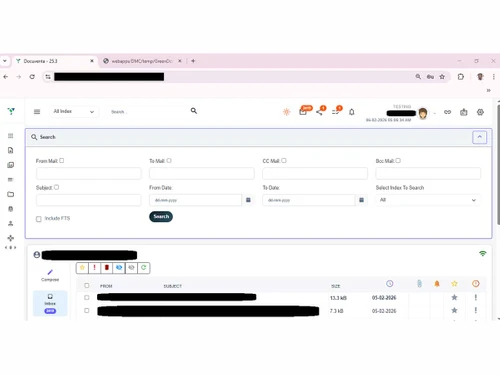
Docuventa is a document management software that helps businesses organize, store, and retrieve digital documents easily, improving efficiency and reducing paperwork.
See MoreHave you used Docuventa before?
Share your insights for better experience
Brand: Greenbooks Imaging Services
Founded Year: 2013
Greenbooks Imaging Services LLP is the Software Development Company in Tidel Park, Chennai offering Document Management Solutions (DMS Software), Digitization and Data Migration Services.
Looking for The Right Pricing?
Share your requirements and get a plan built around your business.
Price Available on Request
Get personalised Docuventa pricing that fits your needs. Our team will connect with you.
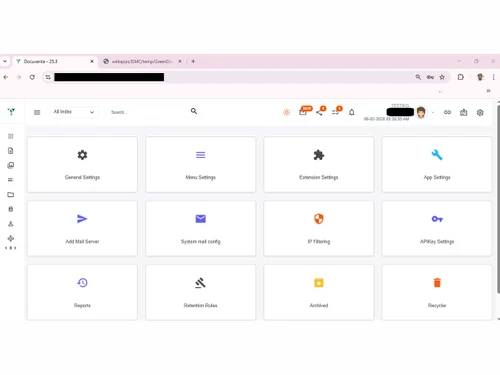
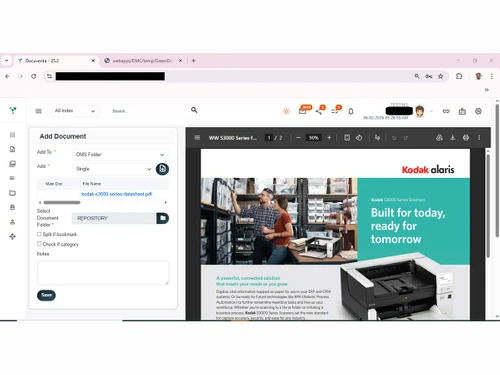
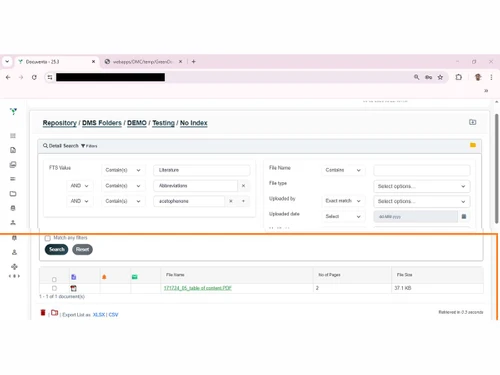
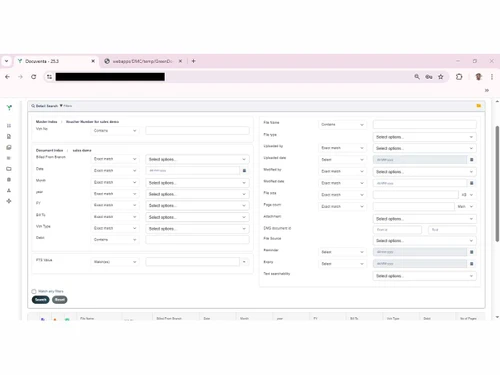
 Multi-Organization Configuration Centralized Installation & Control On-Premises / Private Cloud Hosting Role-Based Access Control (RBAC) Multi-Level Folder Structure Configurable Folder Indexing Advanced Document Search Document Sharing Document Reminders Audit Trail Built-In Document Viewer Email Archiving Direct Email-to-DMS Filing Automatic data capture Automated Backup Scheduler Integrated Calendar Geo-Fencing Access Control Multi-Factor Authentication (MFA) Captcha Login Protection Brute-Force Attack Protection IP Address Fencing
  Windows
  Android
  Desktop
  Mobile
  Tablet
  iPad
iPad  Cloud-Based
  Perpetual
Small Business
Designed for startups and growing businesses
Medium Business
Built for business growth and flexibility
Enterprises
Designed for complex and large-scale business needs
4.6
Out of 5

Overall Rating
Based on
2 Verified Reviews
Rating Breakdown
98% Recommend this Product
Add Review
Feb 9, 2026
Techjockey Verified
“Excellent DMS software compare to market leaders”
Economical software with loaded features.
Pros
Global Standard Security certified software, loaded with features & Functionality on par with Industry standard. Two Version upgrade in last one year and they have extended the prompt upgrade with patch updates. AI enabled query search option is most useful feature.
Cons
So far nothing
Reason to switch
Cost, features, local support response
Feb 5, 2026
Techjockey Verified
“Excellent product with features not available in other DMS”
Has AI integration, excellent visual workflow, highly configurable search. Collections and Categories feature is highly useful for organizing documents apart from the usual folders and metadata.
Pros
Features, Continuous development.
Cons
No major cons found.
Reason to switch
AI, Document categorisation, Collections, BPMN workflow

Docuventa
Price On Request
Desktop
Mobile
Web based
On Premises
Windows
Mac OS

EzeeFile Document Management System
Price On Request
Desktop
Mobile
Web based
On Premises
Windows
Mac OS
.jpg)
Greenbox
Price On Request
Desktop
Mobile
Web based
On Premises
Windows
Mac OS

docEdge DMS
₹ 750000
Desktop
Mobile
Web based
On Premises
Windows
Mac OS

FileGenix
Price On Request
Desktop
Mobile
Web based
On Premises
Windows
Mac OS
FileHold
Price On Request
Desktop
Mobile
Web based
On Premises
Windows
Mac OS

Krystal DMS
₹ 32400
Desktop
Mobile
Web based
On Premises
Windows
Mac OS
NetDocuments
Price On Request
Desktop
Mobile
Web based
On Premises
Windows
Mac OS
Worldox
Price On Request
Desktop
Mobile
Web based
On Premises
Windows
Mac OS
iManage
Price On Request
Desktop
Mobile
Web based
On Premises
Windows
Mac OS

Zoho Docs
₹ 510
Desktop
Mobile
Web based
On Premises
Windows
Mac OS
(0) Product(s) selected
Available
Price on Request
Available
Price on Request
Starting Price:
₹32,400 /Month
Available
Price on Request
Available
Price on Request
Available
Price on Request

Available
Price on Request
Available
Price on Request

Starting Price:
₹7,000 /Year

Available
Price on Request

Starting Price:
₹4,000 /Month

Docuventa price is available on request at techjockey.com.
Yes, Docuventa offers an Android mobile app.
Docuventa Software supports Windows and Android only.
No, Docuventa free trial is not available.
Docuventa software functions by centralizing document management, automating workflows, enabling collaboration, and providing secure storage and retrieval of documents in digital format to optimize business processes.
The typical users of Docuventa software include businesses across various sectors such as finance, healthcare, government, and construction, particularly those needing efficient document management and workflow automation.
Yes, Docuventa free demo is available at techjockey.com.
No, Docuventa Software is not available for free, but it offers various paid plans.
20,000+ Software Listed
Best Price Guranteed
Free Expert Consultation
2M+ Happy Customers
Terms and Condtions

Users with registered businesses can purchase goods from merchants on the platform to satisfy their business needs. Users are not permitted to utilize any products acquired through the platform for resale, advertising, business, or further distribution.
For each purchase made, users will receive a Tax Invoice (or 'GST invoice') that includes specific details such as:
the GSTIN of the user associated with their registered business, and
the specified Entity Name for their business.
It should be noted that not all products are eligible for GST Invoice. Only the products displayed by participating sellers with the 'GST-based Invoice Available' callout on the product description page would qualify.
Certain goods and services are not eligible to get a GST Invoice, including items with VAS, i.e., Value Added Services (e.g., Total Mobile Protection/Assured Buyback) and those involving an exchange offer at the time of purchase.
Users must ensure the accuracy of the GSTIN, and business entity name provided for the GST Invoice. Requests for corrections into GST Invoice would not be accommodated by Techjockey.com or any Seller, and any issues arising from user-provided information are the sole responsibility of users.
Techjockey.com is not liable for the GST Invoice or any associated input tax credit. To efficiently claim an input tax credit, users should select the registered place of business address as per the GST authority's data and follow the provisions of the GST Act and rules.
To claim an input tax credit, the delivery and billing addresses must match. Furthermore, input tax credits will not be granted if the delivery address and GSTIN on the invoice are from different states. In case of incorrect GST details provided during the order placement, the order will be canceled automatically.