USA
USA UAE
UAESmall Business
Designed for startups and growing businesses


See More
.jpg?d=350)



Brand: Discus Business Solution
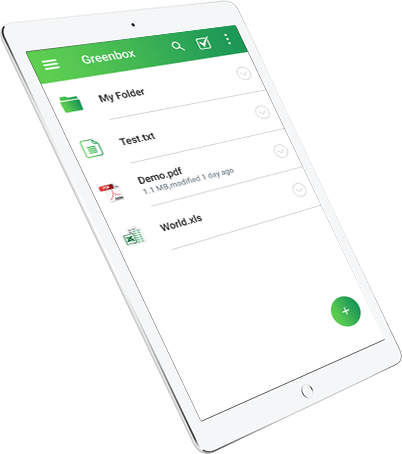
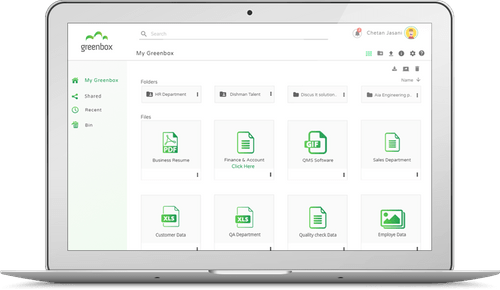
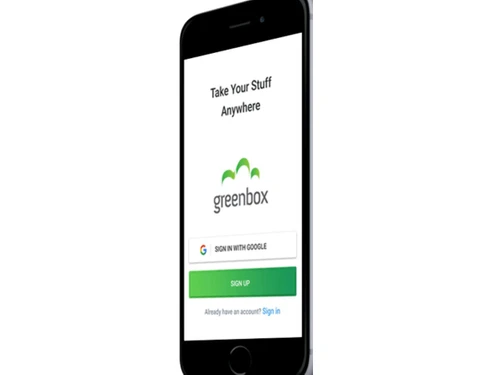
Greenbox is a powerful, secure, and easy-to-use online document management software that supports a paperless workplace. Greenbox DMS helps users to store, track, access and share documents while managing workflow operations on a high-performance platform. Anyone with access to files irrespective of where they are can do so in a secure manner due to the comprehensive safety features the system ut...
See MoreHave you used Greenbox before?
Share your insights for better experience
Brand: Discus Business Solution
Founded Year: 2009
Discus Business Solutions was established in 2009 with the vision to simplify work for enterprises by implementing systems that can quantify qualitative processes.
Looking for The Right Pricing?
Share your requirements and get a plan built around your business.
Price Available on Request
Get personalised Greenbox pricing that fits your needs. Our team will connect with you.
 Cloud Storage Custom Metadata Templates Admin Control Share & Collaborate Security Notification Encryption Web-based Platform Powerful Search File Format Support Bulk Upload Version Control Collaboration Workflow Audit Trail Access Control Security Controls Reminders & Notification Mobile App On-premise & Cloud Deployment Third-party software integration Training & Support

Watch the demo video to explore key features, real workflows, and how the software fits your business needs.
 Ubuntu
  Windows
  iOS
iOS  Android MacOS Windows(Phone)
  Desktop
  Mobile
  Cloud-Based
  Perpetual
Small Business
Designed for startups and growing businesses
Medium Business
Built for business growth and flexibility
Enterprises
Designed for complex and large-scale business needs
4.8
Out of 5

Overall Rating
Based on
3 Verified Reviews
Rating Breakdown
96% Recommend this Product
Add ReviewCustomers generally appreciate Greenbox for its user-friendly interface and comprehensive document management capabilities, making it a valuable tool for both individual and team use. Users highlight its effectiveness in organizing and tracking documents, often praising its value for money. However, some concerns have been raised regarding the availability of customer support and the usability of the mobile application. Overall, the sentiment is positive, with many recommending it for businesses seeking a reliable document management solution.

Feb 24, 2022
Techjockey Verified
“Easy to use Document Management System at a Great Value!”
Pros
It is so good for reviewing, approving, assigning, tracking, approving controlled documents.
Cons
There is nothing about this greenbox I'm unhappy with.
Reason to switch
Powerful search and security of the document are the best features provided by greenbox.
Feb 24, 2022
Techjockey Verified
“Best Low-Cost Document Management System!”
Pros
Greenbox is a comprehensive document management software with an intuitive and easy-to-learn interface. It helps seamlessly organize all the business documents.
Cons
Sometimes unavailability of customer support rest everything is amazing I can say.
Reason to switch
Greenbox is the best Time savings software. It provides many important features i.e Enhanced document security, Quick and easy document retrieval, collaboration, workflow, and so on.
Feb 17, 2022
Techjockey Verified
“The best software for a paperless office!”
Pros
Best file management for teams to work together and effectively It was awesome to use greenbox as a single user even as a team. greenbox is an awesome software with all the features that I need for me as well as my team. It is loaded with security and organizational features and does the job perfectly.
Cons
A mobile application can be more user-friendly.
Reason to switch
Security is the best feature provided by greenbox.
.jpg)
Greenbox
Price On Request
Desktop
Mobile
Web based
On Premises
Windows
Mac OS

EzeeFile Document Management System
Price On Request
Desktop
Mobile
Web based
On Premises
Windows
Mac OS

docEdge DMS
₹ 750000
Desktop
Mobile
Web based
On Premises
Windows
Mac OS

Docuventa
Price On Request
Desktop
Mobile
Web based
On Premises
Windows
Mac OS

FileGenix
Price On Request
Desktop
Mobile
Web based
On Premises
Windows
Mac OS
FileHold
Price On Request
Desktop
Mobile
Web based
On Premises
Windows
Mac OS

Krystal DMS
₹ 32400
Desktop
Mobile
Web based
On Premises
Windows
Mac OS
NetDocuments
Price On Request
Desktop
Mobile
Web based
On Premises
Windows
Mac OS
iManage
Price On Request
Desktop
Mobile
Web based
On Premises
Windows
Mac OS
Worldox
Price On Request
Desktop
Mobile
Web based
On Premises
Windows
Mac OS

Zoho Docs
₹ 510
Desktop
Mobile
Web based
On Premises
Windows
Mac OS
(2) Product(s) selected
Available
Price on Request
Available
Price on Request
Starting Price:
₹32,400 /Month
Available
Price on Request
Available
Price on Request
Available
Price on Request
Available
Price on Request
Available
Price on Request

Available
Price on Request

Available
Price on Request

Starting Price:
₹4,000 /Month



Yes, you can keep track of individual versions of a particular document and restore them as per your business needs.
The software uses 256-bit AES encryption to ensure complete security to its user’s data.
Yes, you can request an online demo of Greenbox. Our product experts will get back to you in real-time.
Yes, the software offers instant notifications when a particular document gets modified. It also sends categorized notifications for documents that need special attention.
No, the software does not have a dedicated mobile app as of now.
20,000+ Software Listed
Best Price Guranteed
Free Expert Consultation
2M+ Happy Customers
Terms and Condtions

Users with registered businesses can purchase goods from merchants on the platform to satisfy their business needs. Users are not permitted to utilize any products acquired through the platform for resale, advertising, business, or further distribution.
For each purchase made, users will receive a Tax Invoice (or 'GST invoice') that includes specific details such as:
the GSTIN of the user associated with their registered business, and
the specified Entity Name for their business.
It should be noted that not all products are eligible for GST Invoice. Only the products displayed by participating sellers with the 'GST-based Invoice Available' callout on the product description page would qualify.
Certain goods and services are not eligible to get a GST Invoice, including items with VAS, i.e., Value Added Services (e.g., Total Mobile Protection/Assured Buyback) and those involving an exchange offer at the time of purchase.
Users must ensure the accuracy of the GSTIN, and business entity name provided for the GST Invoice. Requests for corrections into GST Invoice would not be accommodated by Techjockey.com or any Seller, and any issues arising from user-provided information are the sole responsibility of users.
Techjockey.com is not liable for the GST Invoice or any associated input tax credit. To efficiently claim an input tax credit, users should select the registered place of business address as per the GST authority's data and follow the provisions of the GST Act and rules.
To claim an input tax credit, the delivery and billing addresses must match. Furthermore, input tax credits will not be granted if the delivery address and GSTIN on the invoice are from different states. In case of incorrect GST details provided during the order placement, the order will be canceled automatically.