 USA
USA UAE
UAESmall Business
Designed for startups and growing businesses
See More





Brand: Flextech Inc
TeraBox is a cloud storage service offering a large amount of free storage space for your photos, videos, and files.
See MoreHave you used TeraBox before?
Share your insights for better experience
Brand: Flextech Inc
Founded Year: 2020
Flextech Inc., established in June 2020, achieved a significant milestone as TeraBox surpassed 100 million global users. Upholding top-tier privacy and security
Looking for The Right Pricing?
Share your requirements and get a plan built around your business.
Price Available on Request
Get personalised TeraBox pricing that fits your needs. Our team will connect with you.
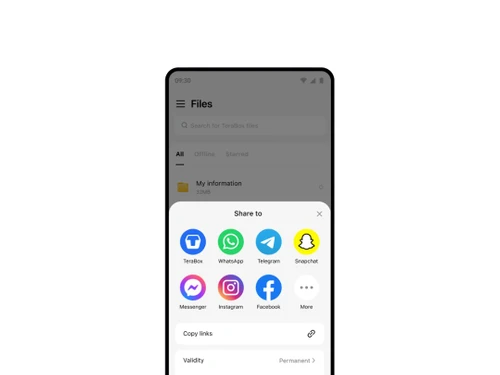
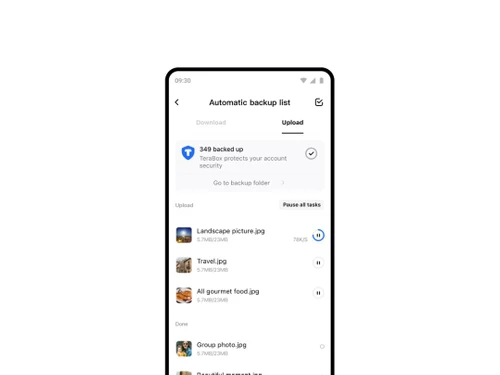
 File Transfer File Management Automatic Backup Data Security Offline Access Easy to Use Integrations Video Playback Encrypted Data Storage Multi-Device Syncing Large File Transmission Secure Link Sharing Remote Upload Tool Recycle Bin Recovery PDF Document Viewer

Watch the demo video to explore key features, real workflows, and how the software fits your business needs.
 Ubuntu
  Windows
  iOS
iOS  Android MacOS
  Linux
Linux  Desktop
  Mobile
  Tablet
  iPad
iPad  Cloud-Based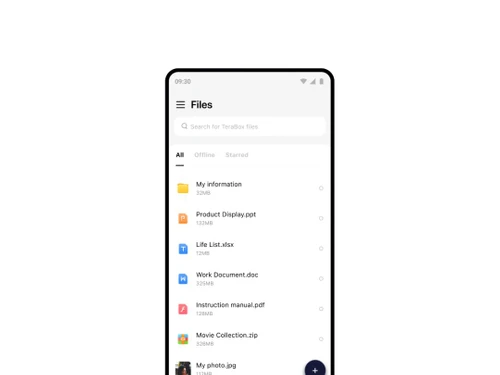

Small Business
Designed for startups and growing businesses
Medium Business
Built for business growth and flexibility
Enterprises
Designed for complex and large-scale business needs
4.3
Out of 5

Overall Rating
Based on
23 Verified Reviews
Rating Breakdown
88% Recommend this Product
Add ReviewUsers appreciate TeraBox for its generous free storage capacity, making it suitable for casual file storage and backups. The user-friendly interface is frequently mentioned as a positive aspect. However, common complaints include slow upload and download speeds, limited customer support, and concerns regarding data security. Additionally, many users find the presence of ads disruptive to their experience, and there are requests for more features and improved reliability. Overall, while TeraBox serves well for non-essential files, users express hesitance about trusting it with important data.
Pros
"TeraBox gives you 1TB of free space, which is great for storing photos and videos."
"TeraBox gives you 1TB of free space, which is great for storing photos and videos."
Cons
"It lacks some features like syncing with other cloud services."
"It lacks some features like syncing with other cloud services."
"It lacks some features like syncing with other cloud services."

Apr 14, 2025
Techjockey Verified
“Decent Free Storage, but Needs Improvement”
TeraBox is okay for free storage, but the app could use some improvements and additional features.
Pros
Offers a substantial amount of free storage space.
Cons
The app has bugs and needs more features.
Reason to switch
IDrive offers a more feature-rich and stable experience.
Apr 13, 2025
Techjockey Verified
“Good for Casual Use, but Not for Important Files”
I use TeraBox for casual file storage, but I wouldn't trust it with important documents.
Pros
Convenient for storing non-essential files.
Cons
Not suitable for storing sensitive or important data.
Reason to switch
Sync provides better security for sensitive files
Apr 1, 2025
Techjockey Verified
“Free Storage, but Limited Support”
While I like the free storage, getting help when issues arise is difficult with TeraBox.
Pros
Provides a lot of storage without cost.
Cons
Customer support is limited and not very helpful.
Reason to switch
Box offers better customer support and assistance.

TeraBox
Price On Request
Desktop
Mobile
Web based
On Premises
Windows
Mac OS

PikPak
Price On Request
Desktop
Mobile
Web based
On Premises
Windows
Mac OS

Zoho WorkDrive
₹ 170
Desktop
Mobile
Web based
On Premises
Windows
Mac OS

Microsoft OneDrive
₹ 415
Desktop
Mobile
Web based
On Premises
Windows
Mac OS

Mega
₹ 537
Desktop
Mobile
Web based
On Premises
Windows
Mac OS

Hostzop
₹ 950
Desktop
Mobile
Web based
On Premises
Windows
Mac OS

Mesh Drive
Price On Request
Desktop
Mobile
Web based
On Premises
Windows
Mac OS

Zata.AI
₹ 599
Desktop
Mobile
Web based
On Premises
Windows
Mac OS

Dropbox Business
Price On Request
Desktop
Mobile
Web based
On Premises
Windows
Mac OS

iCloud
Price On Request
Desktop
Mobile
Web based
On Premises
Windows
Mac OS

JioCloud
Price On Request
Desktop
Mobile
Web based
On Premises
Windows
Mac OS
(0) Product(s) selected
Starting Price:
$5 /Month
Starting Price:
$1 /Month

Starting Price:
$7 /Monthly

Available
Price on Request

Starting Price:
€2 /Monthly

Starting Price:
$1 /Monthly

Starting Price:
€5 /Monthly
Available
Price on Request

Available
Price on Request

Available
Price on Request
![11 Best Photo Storage Apps in 2026 [Paid & Free]](https://cdn.techjockey.com/blog/wp-content/uploads/2022/11/01165527/11-Best-Photo-Storage-Apps-in-2023-Paid-Free-_feature.jpg?d=265x163 "Blog - 11 Best Photo Storage Apps in 2026 [Paid & Free]")


TeraBox cloud storage price in India starts at INR 830 at techjockey.com.
Yes, TeraBox provides an iOS and Android mobile app.
TeraBox supports Ubuntu, Windows, MacOS, Linux, iOS and Android operating systems.
TeraBox provides 1TB of free cloud storage without any trial.
TeraBox is a cloud storage that allows users to store, manage, and access files online securely.
Individuals, students, professionals, and businesses who need cloud storage are potential users of TeraBox.
No, TeraBox doesn't provide any free demo.
Yes, TeraBox offers 1TB of free storage, with premium plans for extra features.
Yes, you can easily share files with others by providing them with a shareable link.
Yes, TeraBox provides file management features for organising, renaming, and categorising your files for easy access.
20,000+ Software Listed
Best Price Guranteed
Free Expert Consultation
2M+ Happy Customers
Terms and Condtions

Users with registered businesses can purchase goods from merchants on the platform to satisfy their business needs. Users are not permitted to utilize any products acquired through the platform for resale, advertising, business, or further distribution.
For each purchase made, users will receive a Tax Invoice (or 'GST invoice') that includes specific details such as:
the GSTIN of the user associated with their registered business, and
the specified Entity Name for their business.
It should be noted that not all products are eligible for GST Invoice. Only the products displayed by participating sellers with the 'GST-based Invoice Available' callout on the product description page would qualify.
Certain goods and services are not eligible to get a GST Invoice, including items with VAS, i.e., Value Added Services (e.g., Total Mobile Protection/Assured Buyback) and those involving an exchange offer at the time of purchase.
Users must ensure the accuracy of the GSTIN, and business entity name provided for the GST Invoice. Requests for corrections into GST Invoice would not be accommodated by Techjockey.com or any Seller, and any issues arising from user-provided information are the sole responsibility of users.
Techjockey.com is not liable for the GST Invoice or any associated input tax credit. To efficiently claim an input tax credit, users should select the registered place of business address as per the GST authority's data and follow the provisions of the GST Act and rules.
To claim an input tax credit, the delivery and billing addresses must match. Furthermore, input tax credits will not be granted if the delivery address and GSTIN on the invoice are from different states. In case of incorrect GST details provided during the order placement, the order will be canceled automatically.



