linkedin
Box logo
play Box: Simplify how you work
box frictionless security
box powerful e-signatures

Box

Brand: Box

  • 4.4

  • 5 Ratings & 1 Review

Box Collaboration Software offers secure and efficient document sharing, real-time collaboration, and seamless integration with popular productivity tools.

See More

Have you used Box before?

Share your insights for better experience

Add a Review
Starting Price
₹1,545 excl.GST
₹ 1,823 incl. GST

View plans

offer Save upto 18%, Get GST Invoice on your business purchase T&C
offer Buy Now & Pay Later, Check offer on payment page.
Buy Now
100% Genuine
Products
Best Price
Guaranteed
Safe & Secure
Payment
  • Description

  • Pricing

  • Features

  • Specification

  • Review

  • Compare

  • Alternatives

  • FAQ

Starting at ₹1,545
Buy Now

Box Software Overview

What is Box Software?

Box is a collaboration tool designed to streamline file storage, sharing, content management, collaboration, e-signature, publishing, and workflow processes. The platform allows users to securely store their information in the cloud and access it from anywhere at any time.

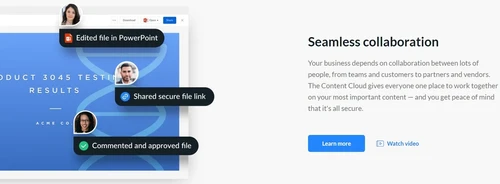
The cloud content management tool allows users to upload, organize, and manage their files and documents securely and organized. They can easily share files with colleagues, clients, and partners for seamless collaboration and efficient teamwork. It allows users to digitally sign documents and streamline the document approval process. This eliminates the need for printing, signing, and scanning physical documents, saving time and resources.

In addition to file storage and sharing, it also offers robust content management functionalities. Users can create, edit, and organize content within the platform, ensuring information is easily accessible and current. With version control and permission settings, users can maintain control over their content and determine who can access it. Multiple users can work on the same file simultaneously, leaving comments, making edits, and providing real-time feedback.

Why Choose Box System?

  • Intelligent Search: The collaboration tool lets users quickly find and retrieve files based on keywords, metadata, or content within documents.
  • File Versioning: It allows users to easily track and manage different file versions to ensure the ability to revert to previous versions if needed.
  • Audit Trails: The cloud content management tool allows administrators to monitor user activity, track file modifications, and ensure compliance with organizational policies.
  • Task Management: It allows users to create and assign tasks, set due dates, and track progress to enable effective task management and collaboration.
  • Content Preview: The software allows users to view and interact with file contents without downloading the file.
  • Metadata Management: It enables users to add and manage metadata to their files to categorize and search for specific files based on custom attributes.

Benefits of Box Collaboration Software

  • The collaboration tool allows users to track, compare, and manage different versions of files to ensure accuracy.
  • It provides file synchronization and backup features to ensure that files are automatically synced across devices and backed up in the cloud.
  • The software offers robust data governance features, including data retention policies, legal holds, and data classification to manage data by regulatory requirements.
  • The cloud content management tool provides insights and analytics on collaboration patterns, usage statistics, and content engagement.
  • It allows organizations to implement policies and controls to prevent accidental or unauthorized sharing of sensitive data.

Pricing of Box Collaboration System

Box Collaboration system pricing starts at INR 1,545 at techjockey.com.

The overall pricing model is based on different factors such as personalization, extra features required, total users, and the deployment type. Please feel free to request a call from our product experts if you want to learn more about our subscription plans or premium package deals.

Read more

Box Company Details

Founded Year:  2005

Box is an online file sharing and cloud content management service offering unlimited storage, custom branding, and administrative controls.

Director/Founders Aaron Levie, Dylan Smith, Jeff Queisser, Karen (Appleton ) Page, Sam Ghods
Company Size 1000+ Employees

Box Pricing & Plans

Business

Calculated Price

1545 Exclusive of all taxes
    • Users

      Users
      Users
    • Monthly

      Monthly
      Monthly

Key Features

  • Unlimited storage

  • 5GB file upload

  • External collaborators

  • Integrated Box AI

  • Extract Agents (API)

Business Plus

Calculated Price

2635 Exclusive of all taxes
    • Users

      Users
      Users
    • Monthly

      Monthly
      Monthly

Key Features

  • Unlimited storage

  • 15GB file upload

  • Unlimited external collaborators

  • Integrated Box AI

  • Extract Agents (API)

Enterprise

Calculated Price

3635 Exclusive of all taxes
    • Users

      Users
      Users
    • Monthly

      Monthly
      Monthly

Key Features

  • Unlimited storage

  • 50GB file upload

  • Unlimited external collaborators

  • Integrated Box AI

  • Extract Agents (API)

Box Features

  • icon_check Content Management
    Allows users to create, organize, and manage their files and documents in a centralized platform.
  • icon_check Contact Management
    Enables users to organize contacts, collaborate, and share files with specific individuals or groups.
  • icon_check Collaboration Tools
    Offers real-time editing, commenting, and task assignments to foster effective user collaboration.
  • icon_check Workflow
    Enables users to define and track the progress of tasks and approvals.
  • icon_check File Management
    Allows users to upload, organize, and search for files in a structured manner.
  • icon_check File Sharing
    Allows users to share files and folders with internal and external collaborators securely.
  • icon_check Project Management
    Enables users to create and manage projects, assign tasks, track progress, and collaborate with team members.
  • icon_check Box Sign
    Send and receive legally binding electronic signatures directly within the platform to accelerate your contract approval cycles.
  • icon_check Enterprise Security
    Protect your sensitive information with advanced encryption and multi-layered security controls built for large organizations.
  • icon_check Box Relay
    Create custom automation sequences for your content-centric workflows to eliminate bottlenecks and improve operational efficiency.
  • icon_check Infinite Storage
    Scale your business without limits by utilizing cloud storage plans that grow alongside your expanding library of digital assets.
  • icon_check Mobile Access
    Stay productive from anywhere in the world by accessing and editing your secure files through a feature-rich mobile application.
  • icon_check Box Canvas
    Brainstorm with your team on an infinite virtual whiteboard to turn your creative ideas into actionable project plans instantly.
  • icon_check Admin Console
    Manage your entire user base and monitor system activity through a centralized dashboard that provides deep operational insights.
  • icon_check App Integrations
    Connect your content seamlessly with over 1,500 popular business tools like Microsoft 365, Google Workspace, and Slack daily.
Box Demo Video play icon

Get Box Demo

Watch the demo video to explore key features, real workflows, and how the software fits your business needs.

Understand
Key Features
Personal
Demo Insights
Interactive
Demo Support

Box Specifications

Supported Platforms
Ubuntu Ubuntu Windows Windows iOS iOS Android Android MacOS MacOS Windows(Phone) Windows(Phone) Linux Linux
Devices
Desktop Desktop Mobile Mobile Tablet Tablet iPad iPad
Deployment
Cloud-Based Cloud-Based
Suitable For
All Industries
Business Specific
All Businesses
Business Size
Small Business Startups Medium Business Enterprises SMBs SMEs MSMBs MSMEs
Customer Support
Email Communities
Language
English
Training Resources
Videos

Explore the Best Alternative Solutions Similar to Your Business Size and Needs

Enterprises

Designed for complex and large-scale business needs

OutGrow

4.2

Scrintal

4.5

Wix

4.5

See More

Box Review

4.4

Out of 5

img

Overall Rating

Based on
1 Verified Review

Rating Breakdown

  • Features 4.3
  • Value for Money 4.5
  • Ease of Use 4.2
  • Customer Support 4.6

92% Recommend this Product

Add Review

Box Video Review

youtubeVideoId

4.3

“Box Cloud Storage Review 2024 | Thinking Outside the Box or a Waste of Time?”

Review by: Cloudwards

Compare Box With other Content Management Software

Products
Ratings
Pricing
Device Supported
Deployment
Supported Platforms
  • img

    Box

  • 4.4

  • ₹ 1545.00 excl. GST

  • Desktop

    Mobile

  • Web based

    On Premises

  • Windows

    Mac OS

  • img

    Grav

  • 4.2

  • Price On Request

  • Desktop

    Mobile

  • Web based

    On Premises

  • Windows

    Mac OS

  • img

    OpenText Web CMS

  • 4.5

  • Price On Request

  • Desktop

    Mobile

  • Web based

    On Premises

  • Windows

    Mac OS

  • img

    Wix

  • 4.5

  • Price On Request

  • Desktop

    Mobile

  • Web based

    On Premises

  • Windows

    Mac OS

  • img

    Cosmic AI

  • 4.1

  • Price On Request

  • Desktop

    Mobile

  • Web based

    On Premises

  • Windows

    Mac OS

  • img

    Scrintal

  • 4.5

  • Price On Request

  • Desktop

    Mobile

  • Web based

    On Premises

  • Windows

    Mac OS

  • img

    Wordable

  • 4.4

  • Price On Request

  • Desktop

    Mobile

  • Web based

    On Premises

  • Windows

    Mac OS

  • img

    Contentful

  • 3.9

  • Price On Request

  • Desktop

    Mobile

  • Web based

    On Premises

  • Windows

    Mac OS

  • img

    Bear CMS

  • 4.4

  • Price On Request

  • Desktop

    Mobile

  • Web based

    On Premises

  • Windows

    Mac OS

  • img

    Genei

  • 4.5

  • Price On Request

  • Desktop

    Mobile

  • Web based

    On Premises

  • Windows

    Mac OS

  • img

    Scalenut

  • 4.3

  • Price On Request

  • Desktop

    Mobile

  • Web based

    On Premises

  • Windows

    Mac OS

(2) Product(s) selected

Grav

4.2

Available

Price on Request

Starting Price:

$299 /Month

Starting Price:

$5 /Month

Starting Price:

$18 /Month

Available

Price on Request

Which operating system does Box Software Support?

Box software is compatible with Windows and macOS operating systems.

Is there any Box App?

The Box app is not available on Android and iOS devices.

What is the deployment type of Box System?

Box system supports web-based deployment.

How much does Box Collaboration Software cost?

Box Collaboration Software pricing starts from INR 1545 at techjockey.com.

Who are the potential users of Box?

Box is a versatile collaboration software designed to empower businesses of all sizes. Its potential users range from small startups seeking efficient file sharing to large enterprises aiming for streamlined teamwork, enabling seamless communication and secure document management across industries.

Is there any free trial or demo for Box Collaboration System?

Box Collaboration system demo is available for free with techjockey.com.

Is Box Collaboration Solution Free?

Box Collaboration Software does not offer a free trial.

How can you download Box Collaboration Software?

Box Collaboration Software is a web-based platform. So, you need not download any software or app to use it.

How does Box Collaboration Software work?

Box is a versatile collaboration software that allows teams to securely store, share, and collaborate on files and documents in real-time. With its intuitive interface and robust features, Box enables seamless communication, version control, and easy access to important files from anywhere, fostering efficient teamwork.

20,000+ Software Listed

Best Price Guranteed

Free Expert Consultation

2M+ Happy Customers

Terms and Condtions

close

Users with registered businesses can purchase goods from merchants on the platform to satisfy their business needs. Users are not permitted to utilize any products acquired through the platform for resale, advertising, business, or further distribution.

For each purchase made, users will receive a Tax Invoice (or 'GST invoice') that includes specific details such as:

  • the GSTIN of the user associated with their registered business, and

  • the specified Entity Name for their business.

It should be noted that not all products are eligible for GST Invoice. Only the products displayed by participating sellers with the 'GST-based Invoice Available' callout on the product description page would qualify.

Certain goods and services are not eligible to get a GST Invoice, including items with VAS, i.e., Value Added Services (e.g., Total Mobile Protection/Assured Buyback) and those involving an exchange offer at the time of purchase.

Users must ensure the accuracy of the GSTIN, and business entity name provided for the GST Invoice. Requests for corrections into GST Invoice would not be accommodated by Techjockey.com or any Seller, and any issues arising from user-provided information are the sole responsibility of users.

Techjockey.com is not liable for the GST Invoice or any associated input tax credit. To efficiently claim an input tax credit, users should select the registered place of business address as per the GST authority's data and follow the provisions of the GST Act and rules.

To claim an input tax credit, the delivery and billing addresses must match. Furthermore, input tax credits will not be granted if the delivery address and GSTIN on the invoice are from different states. In case of incorrect GST details provided during the order placement, the order will be canceled automatically.