linkedin
Wordable logo
play Wordable.io - Content Management Simplified
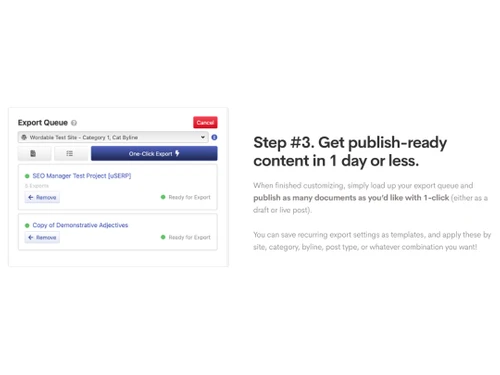
wordable export queue
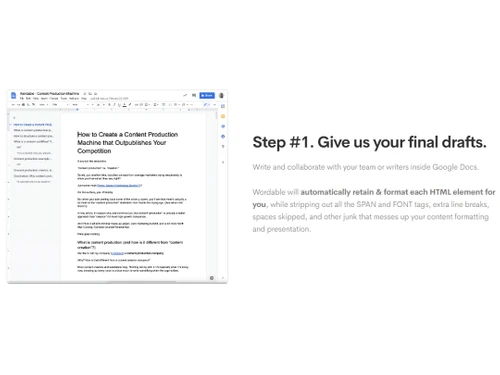
wordable final draft

Wordable

Brand: Wordable

  • 4.4

  • 3 Ratings & 3 Reviews

Effortlessly manage, collaborate, and optimize your content creation process with Wordable.

See More

Have you used Wordable before?

Share your insights for better experience

Add a Review
Starting Price
$50

View plans

100% Genuine
Products
Best Price
Guaranteed
Safe & Secure
Payment
  • Description

  • Pricing

  • Features

  • Specification

  • Review

  • Compare

  • Alternatives

  • FAQ

Starting at $50

Wordable Software Overview

What is Wordable Software?

Wordable is a cloud-based service application for transferring content from Google Docs to WordPress, Medium, and HubSpot. The content is optimized and ready in the proper format for publishing sites like WordPress. It ensures that the content is searchable, images are properly persevered, and the elements that make the blogs are included and aligned. It thus simplifies the tasks of the writers, bloggers, and content creators of marketing teams and gives them a platform to make their content go live in a few clicks.

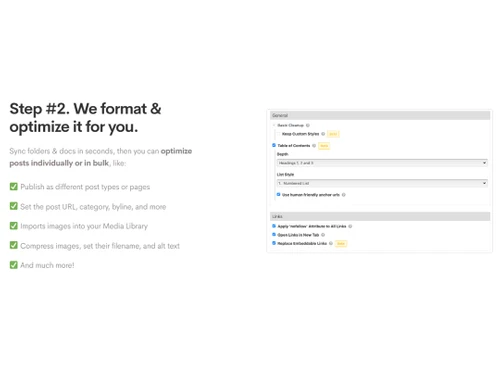
Wordable allows content export from Google Docs, retains each element, and formats each HTML element by stripping the extra line breaks, spaces, FONT tags, etc. It makes the formatting and presentation as required and enhances the aesthetic look of the page. It allows the optimization of posts in bulk as well as individually. You can publish different types of pages, import images in the library, compress pictures, set an import schedule, and perform many settings. It can be set to track document status for easy export and collaboration. It avoids duplication and allows us to stay updated on published content.

When Wordable finishes customization, the next step is to export and publish the document as a draft or live blog post in a few clicks. The export settings can be saved, and this task can be automated to save time. It also supports assistance in enhancing your publishing workflow, collaborating effectively, and reducing repetitive tasks.

Why Choose Wordable System?

Marketers use it for efficient content management. It enables the publishers to handle distributed writing teams and allows them to work in collaboration via Google Docs. Once the content is ready, files can be exported, scheduled for automatic export, and formatted, allowing the posting of hundreds of articles online each month.

It helps SaaS teams publish articles in English and automatically publish them in multiple languages. It enables agencies to manage client preferences and publish content across various sites with consistent settings. It optimizes the content for search engines, compresses images to reduce the page load time, and automatically saves the format for publishing.

Benefits of Wordable Content Management Software

  • Searchability:It helps in optimizing the content and improves its searchability.
  • Productivity:It increases work efficiency by streamlining, automating, and reducing time spent on manual work.
  • Load time:It reduces page load time by using compression techniques for heavy images.
  • Reduces publishing cost:It automates various tasks and saves manual work and thus reduces publishing costs.
  • Quality:It ensures consistency in publishing quality content regularly and on time.
  • Easy to use:It provides the right navigation support for easy usability.

Pricing of Wordable Content Management System

Wordable Content Management system pricing is available on request at techjockey.com.

The overall pricing model is based on different factors such as personalization, extra features required, total users, and the deployment type. Please feel free to request a call from our product experts if you want to learn more about our subscription plans or premium package deals.

Read more

Wordable Company Details

Founded Year:  2016

Wordable is a SaaS app that brings blog posts from Google Docs to Wordpress with the click of a button.

Director/Founders Wordable
Company Size 1-100 Employees

Wordable Pricing & Plans

wordable
Key Features
  • Email & Chat Support Included
  • 50+/month
  • Unlimited
Starting at $50
    • Monthly

      Monthly
      Monthly

Key Features

  • Email & Chat Support Included

  • 50+/month

  • Unlimited

Wordable Features

  • icon_check SEO Management
    Optimizes content, uses the right keywords, and improves search engine visibility for organic traffic.
  • icon_check File Management
    It efficiently organizes and manages all the files for importing and exporting.
  • icon_check Automatic Document Classification
    It automatically classifies documents and saves time sorting them.
  • icon_check Full Text Search
    It enables quick the location of specific content in the documents using the full-text search functionality.
  • icon_check Video Support
    It also provides tools for publishing customized videos and written content.
  • icon_check Customization Templates
    It allows customization of templates for quick and consistent export settings and looks.
  • icon_check Text Editing
    It allows editing and formatting content in Google Docs before publishing.
  • icon_check Image Editing
    It allows image enhancement and modification to enhance looks and reduce the loading time of pages.
Wordable Demo Video play icon

Get Wordable Demo

Watch the demo video to explore key features, real workflows, and how the software fits your business needs.

Understand
Key Features
Personal
Demo Insights
Interactive
Demo Support

Wordable Specifications

Supported Platforms
Windows Windows MacOS MacOS
Devices
Desktop Desktop Mobile Mobile
Deployment
Cloud-Based Cloud-Based
Suitable For
All Industries
Business Specific
All Businesses
Business Size
Small Business Startups Medium Business SMBs SMEs MSMBs MSMEs
Customer Support
Email
Language
English
Training Resources
Documentation Videos

Explore the Best Alternative Solutions Similar to Your Business Size and Needs

Enterprises

Designed for complex and large-scale business needs

OutGrow

4.2

Scrintal

4.5

Wix

4.5

See More

Wordable Reviews

4.4

Out of 5

img

Overall Rating

Based on
3 Verified Reviews

Rating Breakdown

  • Features 4.1
  • Value for Money 4.3
  • Ease of Use 4.6
  • Customer Support 4.5

96% Recommend this Product

Add Review

Wordable Video Reviews

youtubeVideoId

4.8

“Wordable io Review”

Review by: SaaSTrac

youtubeVideoId

4.4

“Wordable io Review How to import from Google Docs into Wordpress”

Review by: Brooks Conkle

youtubeVideoId

4.1

“Wordable io Review”

Review by: Pete McPherson DYEB

Compare Wordable With other Content Management Software

Products
Ratings
Pricing
Device Supported
Deployment
Supported Platforms
  • img

    Wordable

  • 4.4

  • Price On Request

  • Desktop

    Mobile

  • Web based

    On Premises

  • Windows

    Mac OS

  • img

    Grav

  • 4.2

  • Price On Request

  • Desktop

    Mobile

  • Web based

    On Premises

  • Windows

    Mac OS

  • img

    OpenText Web CMS

  • 4.5

  • Price On Request

  • Desktop

    Mobile

  • Web based

    On Premises

  • Windows

    Mac OS

  • img

    Wix

  • 4.5

  • Price On Request

  • Desktop

    Mobile

  • Web based

    On Premises

  • Windows

    Mac OS

  • img

    Cosmic AI

  • 4.1

  • Price On Request

  • Desktop

    Mobile

  • Web based

    On Premises

  • Windows

    Mac OS

  • img

    Scrintal

  • 4.5

  • Price On Request

  • Desktop

    Mobile

  • Web based

    On Premises

  • Windows

    Mac OS

  • img

    Contentful

  • 3.9

  • Price On Request

  • Desktop

    Mobile

  • Web based

    On Premises

  • Windows

    Mac OS

  • img

    Bear CMS

  • 4.4

  • Price On Request

  • Desktop

    Mobile

  • Web based

    On Premises

  • Windows

    Mac OS

  • img

    Genei

  • 4.5

  • Price On Request

  • Desktop

    Mobile

  • Web based

    On Premises

  • Windows

    Mac OS

  • img

    Scalenut

  • 4.3

  • Price On Request

  • Desktop

    Mobile

  • Web based

    On Premises

  • Windows

    Mac OS

  • img

    MarketMuse

  • 4.4

  • Price On Request

  • Desktop

    Mobile

  • Web based

    On Premises

  • Windows

    Mac OS

(0) Product(s) selected

Wordable Alternatives

See All Wordable Alternatives

Grav

4.2

Available

Price on Request

Starting Price:

$299 /Month

Starting Price:

$5 /Month

Starting Price:

$18 /Month

Available

Price on Request

Available

Price on Request
Articles for Wordable

See All Related Articles

Which operating system does Wordable Software Support?

Wordable software is compatible with Windows and macOS operating systems.

Is there any Wordable App?

Wordable app is not available on Android and iOS devices.

What is the deployment type of Wordable System?

Wordable system supports web-based deployment.

How much does Wordable cost?

Wordable pricing is available on request at techjockey.com.

Who are the potential users of Wordable?

Wordable can be used by content creators, bloggers, website owners, and anyone looking for content management software.

Is there any free trial or demo for Wordable?

The Wordable demo is available for free with techjockey.com.

Is Wordable Free?

Wordable does not offer any free trial.

How can you download Wordable?

Wordable is a web-based platform. So, you need not download any software or app to use it.

How does Wordable work?

Wordable is a user-friendly content management software that simplifies publishing optimized content. Users can effortlessly publish their content with just one click, eliminating the need for virtual assistants, interns, or staff management. It offers do-it-yourself and ready-to-use exports, allowing users to choose the option that suits their needs.

20,000+ Software Listed

Best Price Guranteed

Free Expert Consultation

2M+ Happy Customers

Terms and Condtions

close

Users with registered businesses can purchase goods from merchants on the platform to satisfy their business needs. Users are not permitted to utilize any products acquired through the platform for resale, advertising, business, or further distribution.

For each purchase made, users will receive a Tax Invoice (or 'GST invoice') that includes specific details such as:

  • the GSTIN of the user associated with their registered business, and

  • the specified Entity Name for their business.

It should be noted that not all products are eligible for GST Invoice. Only the products displayed by participating sellers with the 'GST-based Invoice Available' callout on the product description page would qualify.

Certain goods and services are not eligible to get a GST Invoice, including items with VAS, i.e., Value Added Services (e.g., Total Mobile Protection/Assured Buyback) and those involving an exchange offer at the time of purchase.

Users must ensure the accuracy of the GSTIN, and business entity name provided for the GST Invoice. Requests for corrections into GST Invoice would not be accommodated by Techjockey.com or any Seller, and any issues arising from user-provided information are the sole responsibility of users.

Techjockey.com is not liable for the GST Invoice or any associated input tax credit. To efficiently claim an input tax credit, users should select the registered place of business address as per the GST authority's data and follow the provisions of the GST Act and rules.

To claim an input tax credit, the delivery and billing addresses must match. Furthermore, input tax credits will not be granted if the delivery address and GSTIN on the invoice are from different states. In case of incorrect GST details provided during the order placement, the order will be canceled automatically.