linkedin
Scrintal logo
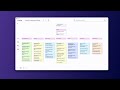
play Scrintal: A beautifully designed visual note taking and mind mapping app for visual learners
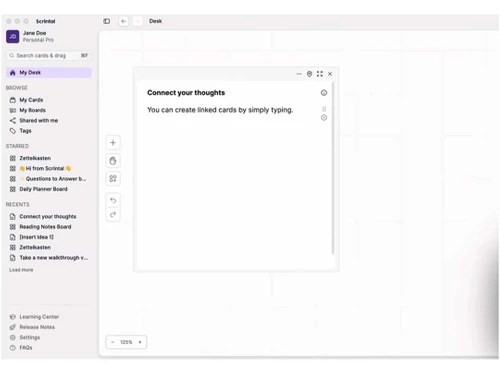
Scrinta-desk
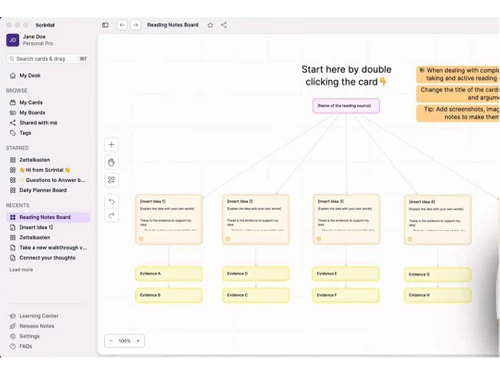
Scrinta note-taking

Scrintal

Brand: Scrintal

  • 4.5

  • 4 Ratings

Scrintal is a powerful content management software streamlining collaboration and enhancing productivity, offering robust version control and seamless integration with popular tools.

See More

Have you used Scrintal before?

Share your insights for better experience

Add a Review

Price Available on Request

Questions about pricing or customization? We’re here to help, just a click away.

100% Genuine
Products
Best Price
Guaranteed
Safe & Secure
Payment
  • Description

  • Pricing

  • Features

  • Specification

  • Review

  • Compare

  • Alternatives

  • FAQ

Scrintal Software Overview

What is Scrintal?

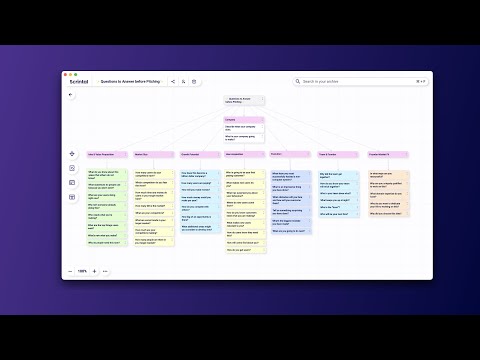
Scrintal is an innovative content management software that revolutionizes capturing and organizing information. The platform allows users to create, connect, and explore ideas dynamically and intuitively by integrating mind mapping and networked notetaking. It also allows you to attach files, images, and links to your mind maps for easy reference and access to relevant resources.

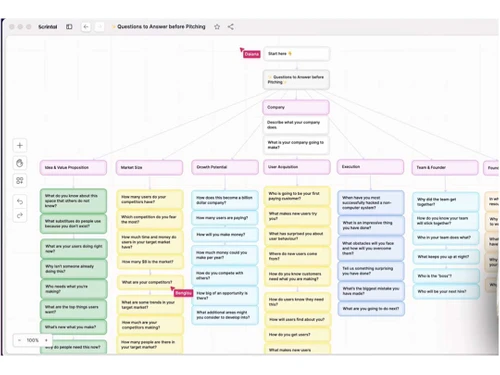
The visual note-taking tool allows you to map out your thoughts and ideas using visual mind maps that provide a clear and structured representation of your thinking process. The intuitive interface allows adding, rearranging, and connecting nodes to create a visual network of concepts and relationships.

The mind-mapping platform harnesses the power of networked notetaking to create connections and associations between different pieces of information. This interconnected approach allows for a more holistic and comprehensive understanding of complex topics and the ability to uncover new insights and patterns.

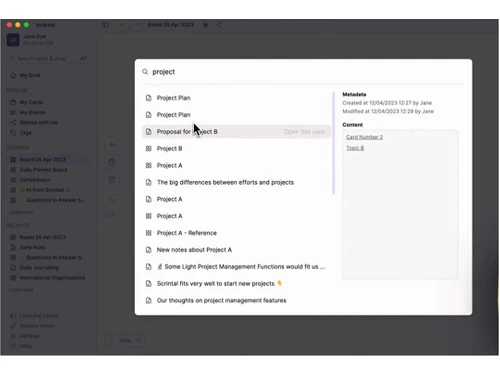
Scrintal also provides powerful search functionality, allowing users to find specific content quickly. Its advanced capabilities include keyword search, filtering options, and metadata tagging, enabling users to locate desired content based on various criteria. This feature enhances productivity and saves valuable time by eliminating the need to manually browse through folders and files.

Why Choose Scrintal?

Scrintal provides easy navigation features, such as zooming in and out and panning, to help you explore and navigate large mind maps. It allows you to showcase your mind maps in presentation mode to present and share your ideas visually and engagingly. You can easily monitor the progress of tasks and milestones within your mind maps to ensure projects stay on track and deadlines are met.

The mind mapping platform allows you to set reminders and receive notifications for important tasks or deadlines associated with your mind maps. Users can leave comments and provide feedback directly on specific elements within the mind map. It allows you to speed up your workflow with various keyboard shortcuts that make navigating and editing mind maps more efficient. The platform offers access to a marketplace of pre-designed mind map templates created by other users to save time creating new mind maps.

Benefits of Scrintal Content Management Software

  • It provides a visual and intuitive interface for mapping out ideas, concepts, and relationships.
  • Using simple drag-and-drop actions, you can easily rearrange and reorganize elements within your mind maps.
  • The platform allows you to assign tags and labels to different elements within your mind maps for easy searching and filtering of information.
  • It allows you to attach files, documents, or images to your mind maps to provide additional context and references.
  • The mind mapping platform allows you to search for specific keywords or topics within your mind maps to find relevant information.

Scrintal Pricing

Scrintal pricing starts at USD 9 techjockey.com.

The pricing model is based on different parameters, including extra features, deployment type, and total users. For further queries related to the product, you can contact our product team and learn more about the pricing and offers.

Read more

Scrintal Company Details

Founded Year:  2020

Scrintal is a web app that provides networked note-taking, mind-mapping whiteboard, and digital knowledge solutions.

Director/Founders Arda Ertem, Ece Kural, Furkan Bayraktar
Company Size 1-100 Employees

Scrintal Pricing & Plans

Scrintal Beta Early Access Plan
Key Features
  • Unlimited boards
  • Unlimited cards
  • Unlimited file uploads
  • Real-time collaboration

Calculated Price

$ 9 Exclusive of all taxes
    • Users

      Users
      Users
    • Monthly

      Monthly
      Monthly

Key Features

  • Unlimited boards

  • Unlimited cards

  • Unlimited file uploads

  • Real-time collaboration

Scrintal Features

  • icon_check Collaboration
    Collaborate with others in real-time to facilitate teamwork and collective idea generation.
  • icon_check Create
    Create mind maps and notes to capture thoughts and ideas in a visual and organized format.
  • icon_check Connect
    Connect nodes and create associations between different pieces of information for a deeper understanding of concepts.
  • icon_check Organize
    Structure and categorize mind maps and notes for easy retrieval and reference.
  • icon_check Note-Taking
    Combine the power of mind mapping with networked note-taking for capturing and organizing information.
  • icon_check Mind Mapping
    Enables the visual structuring of thoughts by connecting related cards with lines to illustrate hierarchies and workflows.
  • icon_check Board Export
    Allows users to export entire visual boards into various formats like PDF or Markdown for external sharing and distribution.
  • icon_check Daily Notes
    Generates a dedicated space for chronological entries to help users track progress and capture fleeting ideas every single day.
  • icon_check Hierarchical Folders
    Organizes various boards into a traditional folder structure to provide an additional layer of systematic content control.
  • icon_check Backlink View
    Displays a comprehensive list of all other cards that reference the current note to provide deep contextual understanding.
  • icon_check Link Preview
    Generates a visual snapshot of hyperlinked websites directly within the card to provide context without leaving the platform.
  • icon_check Archive Utility
    Moves completed or outdated boards into a secondary storage area to keep the primary workspace focused on current projects.
  • icon_check Canvas Zoom
    Features smooth zooming capabilities to transition easily between a bird's-eye view and detailed note-level perspectives.
Scrintal Demo Video play icon

Get Scrintal Demo

Watch the demo video to explore key features, real workflows, and how the software fits your business needs.

Understand
Key Features
Personal
Demo Insights
Interactive
Demo Support

Scrintal Specifications

Supported Platforms
Ubuntu Ubuntu Windows Windows MacOS MacOS
Devices
Desktop Desktop Mobile Mobile
Deployment
Cloud-Based Cloud-Based
Suitable For
All Industries
Business Specific
All Businesses
Business Size
Small Business Startups Medium Business Enterprises SMBs SMEs MSMBs MSMEs
Customer Support
Phone Email Communities
Language
English
Training Resources
Documentation Videos

Explore the Best Alternative Solutions Similar to Your Business Size and Needs

Enterprises

Designed for complex and large-scale business needs

OutGrow

4.2

Wix

4.5

Scalenut

4.3

See More

Scrintal Review

4.5

Out of 5

img

Overall Rating

Based on
4 Verified Ratings

Rating Breakdown

  • Features 4.7
  • Value for Money 4.5
  • Ease of Use 4.1
  • Customer Support 4.7

80% Recommend this Product

Add Review

Techjockey Trusted Reviews from Verified Users

No reviews are currently available for Scrintal. Discover similar Content Management Software reviews

  • Wix

    4.5

    Whats great - Wix, I felt, can be symbolized as the Tesla among traditional website builders. It's reliable and packed with amazing feature... read more

  • Umbraco CMS

    3.7

    Whats great - Umbraco has been reliable for managing multiple websites. It’s flexible enough to handle different projects and makes it easy... read more

  • Wordpress

    4.3

    Whats great - Anyone can use it without having prior knowledge. Also, beginners can also create their own website within just a few hours. read more

Compare Scrintal With other Content Management Software

Products
Ratings
Pricing
Device Supported
Deployment
Supported Platforms
  • img

    Scrintal

  • 4.5

  • Price On Request

  • Desktop

    Mobile

  • Web based

    On Premises

  • Windows

    Mac OS

  • img

    Grav

  • 4.2

  • Price On Request

  • Desktop

    Mobile

  • Web based

    On Premises

  • Windows

    Mac OS

  • img

    OpenText Web CMS

  • 4.5

  • Price On Request

  • Desktop

    Mobile

  • Web based

    On Premises

  • Windows

    Mac OS

  • img

    Wix

  • 4.5

  • Price On Request

  • Desktop

    Mobile

  • Web based

    On Premises

  • Windows

    Mac OS

  • img

    Cosmic AI

  • 4.1

  • Price On Request

  • Desktop

    Mobile

  • Web based

    On Premises

  • Windows

    Mac OS

  • img

    Wordable

  • 4.4

  • Price On Request

  • Desktop

    Mobile

  • Web based

    On Premises

  • Windows

    Mac OS

  • img

    Contentful

  • 3.9

  • Price On Request

  • Desktop

    Mobile

  • Web based

    On Premises

  • Windows

    Mac OS

  • img

    Bear CMS

  • 4.4

  • Price On Request

  • Desktop

    Mobile

  • Web based

    On Premises

  • Windows

    Mac OS

  • img

    Genei

  • 4.5

  • Price On Request

  • Desktop

    Mobile

  • Web based

    On Premises

  • Windows

    Mac OS

  • img

    Scalenut

  • 4.3

  • Price On Request

  • Desktop

    Mobile

  • Web based

    On Premises

  • Windows

    Mac OS

  • img

    MarketMuse

  • 4.4

  • Price On Request

  • Desktop

    Mobile

  • Web based

    On Premises

  • Windows

    Mac OS

(0) Product(s) selected

Scrintal Alternatives

See All Scrintal Alternatives

Grav

4.2

Available

Price on Request

Starting Price:

$299 /Month

Starting Price:

$5 /Month

Starting Price:

$18 /Month

Available

Price on Request

Available

Price on Request
Articles for Scrintal

See All Related Articles

Which operating system does Scrintal support?

Scrintal is compatible with Windows and macOS operating systems.

Is there any Scrintal App?

Scrintal app is unavailable on Android and iOS devices.

What is the deployment type of Scrintal?

Scrintal supports web-based deployment.

How much does Scrintal Cost?

Scrintal pricing starts at INR 208 techjockey.com.

Who are the potential users of Scrintal?

Scrintal can be used by a content creator, blogger, website owners, and anyone looking for content management software.

Is there any free trial or demo for Scrintal?

Scrintal demo is available for free with techjockey.com.

Is Scrintal Free?

Scrintal does not offer any free trial.

How can you download Scrintal?

Scrintal is a web-based platform. So, you need not download any software or app to use it.

How does Scrintal work?

Scrintal is a versatile web application that seamlessly blends mind mapping and networked notetaking. It empowers users to effectively organize and interlink their ideas within a single platform, enabling a holistic approach to thought organization and exploration.

20,000+ Software Listed

Best Price Guranteed

Free Expert Consultation

2M+ Happy Customers

Terms and Condtions

close

Users with registered businesses can purchase goods from merchants on the platform to satisfy their business needs. Users are not permitted to utilize any products acquired through the platform for resale, advertising, business, or further distribution.

For each purchase made, users will receive a Tax Invoice (or 'GST invoice') that includes specific details such as:

  • the GSTIN of the user associated with their registered business, and

  • the specified Entity Name for their business.

It should be noted that not all products are eligible for GST Invoice. Only the products displayed by participating sellers with the 'GST-based Invoice Available' callout on the product description page would qualify.

Certain goods and services are not eligible to get a GST Invoice, including items with VAS, i.e., Value Added Services (e.g., Total Mobile Protection/Assured Buyback) and those involving an exchange offer at the time of purchase.

Users must ensure the accuracy of the GSTIN, and business entity name provided for the GST Invoice. Requests for corrections into GST Invoice would not be accommodated by Techjockey.com or any Seller, and any issues arising from user-provided information are the sole responsibility of users.

Techjockey.com is not liable for the GST Invoice or any associated input tax credit. To efficiently claim an input tax credit, users should select the registered place of business address as per the GST authority's data and follow the provisions of the GST Act and rules.

To claim an input tax credit, the delivery and billing addresses must match. Furthermore, input tax credits will not be granted if the delivery address and GSTIN on the invoice are from different states. In case of incorrect GST details provided during the order placement, the order will be canceled automatically.