 USA
USA UAE
UAESmall Business
Designed for startups and growing businesses

See More


Brand: Umbraco
Umbraco is a leading open-source CMS built on .NET, offering flexibility, ease of use, and seamless digital content management across websites, apps, and devices. With extensive customization, strong security, and robust community support, it's ideal for businesses of all sizes.
See MoreHave you used Umbraco CMS before?
Share your insights for better experience
Brand: Umbraco
Founded Year: 2005
Umbraco is the friendliest, most flexible, and fastest-growing open-source .NET CMS in the world. It is used by more than 500,000 companies and web solutions around the world, from small business brochure sites to complex multilingual corporate websites.
Looking for The Right Pricing?
Share your requirements and get a plan built around your business.
Price Available on Request
Get personalised Umbraco CMS pricing that fits your needs. Our team will connect with you.
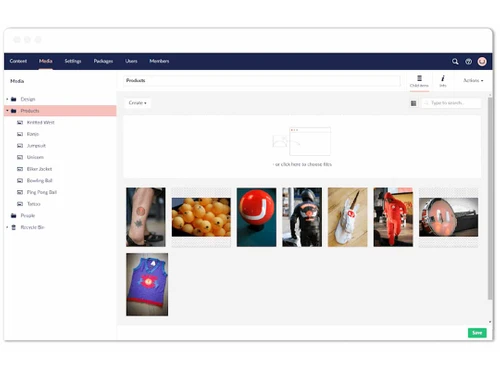
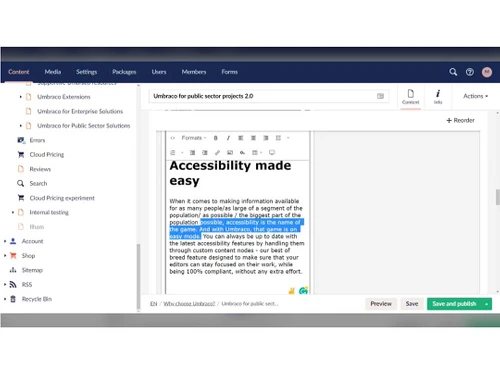
 Content Versioning Revision History Multi-Site Management Cache Management Media Library Document Management Multi-Language Content
  Windows
  Desktop
  Cloud-Based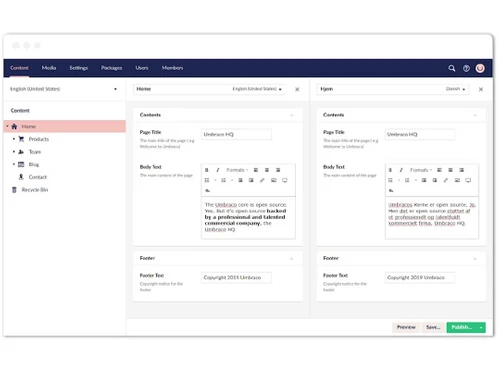
Small Business
Designed for startups and growing businesses
Medium Business
Built for business growth and flexibility
Enterprises
Designed for complex and large-scale business needs
3.7
Out of 5

Overall Rating
Based on
14 Verified Reviews
Rating Breakdown
81% Recommend this Product
Add ReviewUmbraco CMS receives generally positive feedback for its user-friendly interface and flexibility, making it a solid choice for managing website content across various company sizes. Users appreciate the strong community support and continuous updates, which enhance its usability for both technical and non-technical users. However, common complaints include a lack of comprehensive community documentation and limited customization options, particularly for advanced features. Some users also note the learning curve associated with certain functionalities, which may require additional training or support.
Pros
"Once you get familiar with Umbraco, it becomes very easy to use. Coming from a WordPress background, I found some features in Umbraco easier to manage and implement."
"Using Umbraco makes managing content on the website really easy. I can quickly update the website multiple times a day without it feeling like a huge task."
"Umbraco offers a lot of useful features for managing website content, especially if you need something that integrates well with other technologies like React or Angular."
Cons
"The main issue comes when developers don’t fully understand Umbraco. "
"One thing that stands out is the effort needed to learn Razor, especially if you're new to this environment. "
"One thing I’d like to see is more options for customizing the back office. "


Jun 18, 2024
Techjockey Verified
“Strong CMS with Minor Challenges in Integration”
Umbraco is a solid platform for managing multiple websites, offering flexibility and strong community support.
Pros
Umbraco has been reliable for managing multiple websites. It’s flexible enough to handle different projects and makes it easy to keep content updated. The community support is also a big plus, with lots of resources available to help you out.
Cons
One challenge I’ve faced is integrating Umbraco with some third-party tools.
Reason to switch
We chose Umbraco because it offers the right balance of flexibility and support, even though integrating with other tools requires more effort.
Jul 23, 2024
Techjockey Verified
“A Friendly CMS”
Umbraco has been a pleasure to work with, and its continuous updates keep it fresh and useful. It’s accessible to users of all skill levels, which makes it a strong choice for our team.
Pros
Umbraco is welcoming to all users, whether you’re a developer or just handling content updates. The platform is constantly evolving, with new features being added regularly.
Cons
The only downside is that as the platform evolves, it can be hard to keep up with the latest features and best practices without additional training or community support.
Reason to switch
We chose Umbraco because it’s easy to use and continues to evolve, keeping our websites up to date with minimal effort.
Jul 23, 2024
Techjockey Verified
“Easy to Use Even Without a Technical Background”
Umbraco has made managing website content much easier for someone like me, who doesn’t come from a tech background. It’s user-friendly, and I can handle most of the tasks myself.
Pros
As someone without a technical background, I find Umbraco very easy to use. I can add content and images and make updates to client websites without needing much help. It’s a major selling point for us because if I can do it, so can our clients.
Cons
The only drawback is that when I need something beyond the basic features, like a new function or tool, I have to ask for help from someone with more coding experience.
Reason to switch
I switched to Umbraco because it offered more control over the website without being too complicated, even for someone with limited technical skills.

Umbraco CMS
Price On Request
Desktop
Mobile
Web based
On Premises
Windows
Mac OS
Grav
Price On Request
Desktop
Mobile
Web based
On Premises
Windows
Mac OS

OpenText Web CMS
Price On Request
Desktop
Mobile
Web based
On Premises
Windows
Mac OS

Wix
Price On Request
Desktop
Mobile
Web based
On Premises
Windows
Mac OS

Cosmic AI
Price On Request
Desktop
Mobile
Web based
On Premises
Windows
Mac OS

Scrintal
Price On Request
Desktop
Mobile
Web based
On Premises
Windows
Mac OS

Contentful
Price On Request
Desktop
Mobile
Web based
On Premises
Windows
Mac OS

Wordable
Price On Request
Desktop
Mobile
Web based
On Premises
Windows
Mac OS

Bear CMS
Price On Request
Desktop
Mobile
Web based
On Premises
Windows
Mac OS

Genei
Price On Request
Desktop
Mobile
Web based
On Premises
Windows
Mac OS

Scalenut
Price On Request
Desktop
Mobile
Web based
On Premises
Windows
Mac OS
(0) Product(s) selected
Available
Price on Request
Available
Price on Request
Starting Price:
$99 /Month
Starting Price:
$5 /Month

Starting Price:
$149

Starting Price:
€29

Starting Price:
$5

Starting Price:
$99

Starting Price:
$170

Starting Price:
$18 /Month

Available
Price on Request





Umbraco CMS is used for managing digital content across websites, apps, and devices. It's ideal for creating tailored digital experiences with flexibility, customization, and seamless integrations.
Yes, Umbraco CMS is open-source and free to use. However, additional services like Umbraco Cloud hosting or support plans come with a cost.
Yes, Umbraco is considered a good CMS due to its user-friendly interface, flexibility, strong security, and active community support, making it suitable for businesses of all sizes.
Umbraco is an open-source content management system (CMS) built on .NET technology, offering extensive customization and integration capabilities.
Yes, Umbraco provides APIs, enabling developers to extend its functionality, integrate with other systems, and create custom solutions.
Umbraco CMS is free, but hosting and support plans cost extra. Umbraco Cloud starts at $44/month, and Umbraco Heartcore (headless CMS) starts at $58/month. Support plans begin around $11,000/year.
To verify the security of Umbraco CMS, the first step is to examine the access levels by inspecting user roles and permissions. The second step is to check the audit logs to identify the users who modified the content and the time of modification. The last step is to safeguard the sensitive information by controlling the access, properly tagging the private fields, and transferring the data over HTTPS for secure communication.
0 0
To translate your Umbraco website, follow the steps given below:
0 0
To configure and install Umbraco, follow the steps given below:
Download and install the latest ‘.NET SDK’ on your system
Open a terminal/command prompt and run:

In the terminal, run:

Run the following command to start the project:

Open your browser and navigate to
https://localhost:5001 (or your configured port)
Follow the prompts to set up your admin account and configure the database
0 0
To create a simple form in Umbraco, follow the steps given below:
0 0
To create and delete additional environments on Umbraco, follow the steps given below:
0 0
20,000+ Software Listed
Best Price Guranteed
Free Expert Consultation
2M+ Happy Customers
Terms and Condtions

Users with registered businesses can purchase goods from merchants on the platform to satisfy their business needs. Users are not permitted to utilize any products acquired through the platform for resale, advertising, business, or further distribution.
For each purchase made, users will receive a Tax Invoice (or 'GST invoice') that includes specific details such as:
the GSTIN of the user associated with their registered business, and
the specified Entity Name for their business.
It should be noted that not all products are eligible for GST Invoice. Only the products displayed by participating sellers with the 'GST-based Invoice Available' callout on the product description page would qualify.
Certain goods and services are not eligible to get a GST Invoice, including items with VAS, i.e., Value Added Services (e.g., Total Mobile Protection/Assured Buyback) and those involving an exchange offer at the time of purchase.
Users must ensure the accuracy of the GSTIN, and business entity name provided for the GST Invoice. Requests for corrections into GST Invoice would not be accommodated by Techjockey.com or any Seller, and any issues arising from user-provided information are the sole responsibility of users.
Techjockey.com is not liable for the GST Invoice or any associated input tax credit. To efficiently claim an input tax credit, users should select the registered place of business address as per the GST authority's data and follow the provisions of the GST Act and rules.
To claim an input tax credit, the delivery and billing addresses must match. Furthermore, input tax credits will not be granted if the delivery address and GSTIN on the invoice are from different states. In case of incorrect GST details provided during the order placement, the order will be canceled automatically.



