 USA
USA UAE
UAESmall Business
Designed for startups and growing businesses

See More


Brand: CKSource Holding Ltd
CKEditor is a free and open-source WYSIWYG editor suitable for various CMS including linear contents across different system platforms. Its powerful features such as real-time collaboration, clean output formats and mobile-friendly design make it well suited for developers and content creators.
See MoreHave you used CKEditor before?
Share your insights for better experience
Brand: CKSource Holding Ltd
Founded Year: 2022
CKSource is the creator of CKEditor, and with more than 20 years’ experience creating WYSIWYG editors, we’re the experts in rich text editing. Our flagship product, CKEditor 5, is trusted by both Fortune 500 companies and hundreds of millions of users worldwide, for its almost limitless possibilitie
Looking for The Right Pricing?
Share your requirements and get a plan built around your business.
Price Available on Request
Get personalised CKEditor pricing that fits your needs. Our team will connect with you.
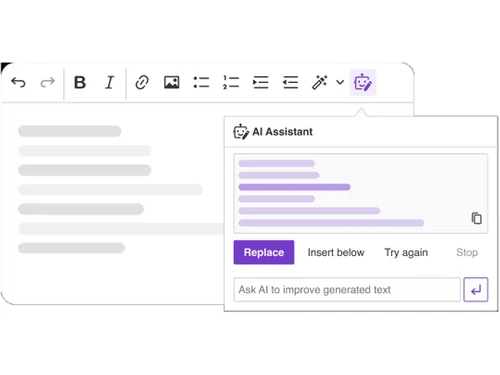
 Track Changes Comments Revision History Real-Time Collaboration AI Assistant Spell & Grammar Check Templates Slash Commands Table of Contents Document Outline
  Windows
  MacOS
MacOS  Linux
Linux  Desktop
  Cloud-Based

Small Business
Designed for startups and growing businesses
Medium Business
Built for business growth and flexibility
Enterprises
Designed for complex and large-scale business needs
3.8
Out of 5

Overall Rating
Based on
10 Verified Reviews
Rating Breakdown
81% Recommend this Product
Add ReviewUsers generally appreciate CKEditor for its user-friendly interface, extensive customization options, and effective support, making it suitable for both novice and advanced editing tasks. Many find it integrates well into various applications and enhances content creation processes. However, common complaints include the need for more detailed documentation, clearer pricing structures, and occasional issues with added formatting that requires manual adjustments. Despite these limitations, the overall sentiment remains positive, with many users recommending the tool for its reliability and feature set.
Pros
"An Excellent Tool for Web Content Editing with Useful Add-Ons"
"CKEditor fits well into various applications and provides many features including ai assistant, real time collaboration, templates and more."
"CKEditor is stable and reliable. It performs well with minimal issues. The customer support is also helpful."
Cons
"For more advanced tasks, CKEditor can be difficult to customize. It has a bit of a learning curve for developers trying to extend its functionalities. "
"The documentation could be more detailed for developers who need to utilize advanced features. "
"More detailed tutorials for advanced customization would be helpful. "

Aug 6, 2024
Techjockey Verified
“CKEditor is Great for Web Content”
CKEditor is effective for web content, offering easy-to-use and drag-and-drop functionality.
Pros
CKEditor is easy to use and comes with drag-and-drop functionality.
Cons
More detailed tutorials for advanced customization would be helpful.
Reason to switch
CKEditor was a better fit due to its advanced features and user experience.
Aug 20, 2024
Techjockey Verified
“A Good Choice for Advanced Editing”
CKEditor is well-suited for complex editing tasks, with many features and customization options.
Pros
CKEditor has many advanced features useful for difficult tasks. It is customizable and works well with other platforms.
Cons
The documentation could be more detailed for developers who need to utilize advanced features.
Reason to switch
I was looking for change.
Jun 18, 2024
Techjockey Verified
“CKEditor Makes Content Editing Easy”
CKEditor is great for content editing, suitable even for those with limited technical skills. It’s easy to set up and use, though it sometimes adds extra paragraphs that need fixing.
Pros
CKEditor is good for content editing, even for those who aren’t technically skilled. It’s simple to set up and offers flexibility.
Cons
CKEditor adds extra paragraphs that require manual adjustment.
Reason to switch
CKEditor made it easier for everyone on our team to manage content.

CKEditor
Price On Request
Desktop
Mobile
Web based
On Premises
Windows
Mac OS
Grav
Price On Request
Desktop
Mobile
Web based
On Premises
Windows
Mac OS

OpenText Web CMS
Price On Request
Desktop
Mobile
Web based
On Premises
Windows
Mac OS

Wix
Price On Request
Desktop
Mobile
Web based
On Premises
Windows
Mac OS

Cosmic AI
Price On Request
Desktop
Mobile
Web based
On Premises
Windows
Mac OS

Scrintal
Price On Request
Desktop
Mobile
Web based
On Premises
Windows
Mac OS

Contentful
Price On Request
Desktop
Mobile
Web based
On Premises
Windows
Mac OS

Wordable
Price On Request
Desktop
Mobile
Web based
On Premises
Windows
Mac OS

Bear CMS
Price On Request
Desktop
Mobile
Web based
On Premises
Windows
Mac OS

Genei
Price On Request
Desktop
Mobile
Web based
On Premises
Windows
Mac OS

Scalenut
Price On Request
Desktop
Mobile
Web based
On Premises
Windows
Mac OS
(0) Product(s) selected
Available
Price on Request
Available
Price on Request
Starting Price:
$99 /Month
Starting Price:
$5 /Month

Starting Price:
$149

Starting Price:
€29

Starting Price:
$5

Starting Price:
$170

Starting Price:
$18 /Month

Available
Price on Request

Available
Price on Request






Yes, CKEditor has a free version and an open-source license. Furthermore, you can get premium features and enterprise options if you take a paid plan.
To use CKEditor in HTML, simply embed the editor in your web page by including the CKEditor script in your HTML file, then replace a textarea with CKEditor using a JavaScript function.
CKEditor 5 is a WYSIWYG (What You See Is What You Get) rich text editor. It provides an intuitive interface for content creation with real-time editing, formatting tools, and collaboration features.
CKEditor is used for creating and editing rich text content within web applications. It's commonly integrated into content management systems, blogs, and e-commerce platforms to streamline content creation.
The latest version of CKEditor is CKEditor 5, which offers advanced collaboration features, mobile-friendly design, and customizable output formats, along with AI-powered content assistance.
To migrate form CKEditor 4 to CKEditor 5, follow the steps given below:
Remove CKEditor 4 from your project.
Install CKEditor 5 via npm or CDN:

Update your JavaScript code to initialize CKEditor 5 instead of CKEditor 4. Example:

Check the plugins that you used in CKEditor 4 and find their CKEditor 5 equivalents, as architecture of plugins is different.
If you used custom plugins or configurations, rewrite them using CKEditor 5’s new API and plugin system.
Test your editor to make sure that everything works as expected with CKEditor 5’s modern features and UI.
0 0
To upload files and images in CKEditor 4, follow the steps given below:
Download CKEditor from its official website.
Make sure you use the 'Standard' or 'Full' build, as these include the necessary plugins for file uploads.
Navigate to your CKEditor configuration file (typically
config.js ).
Add this line to enable file upload:
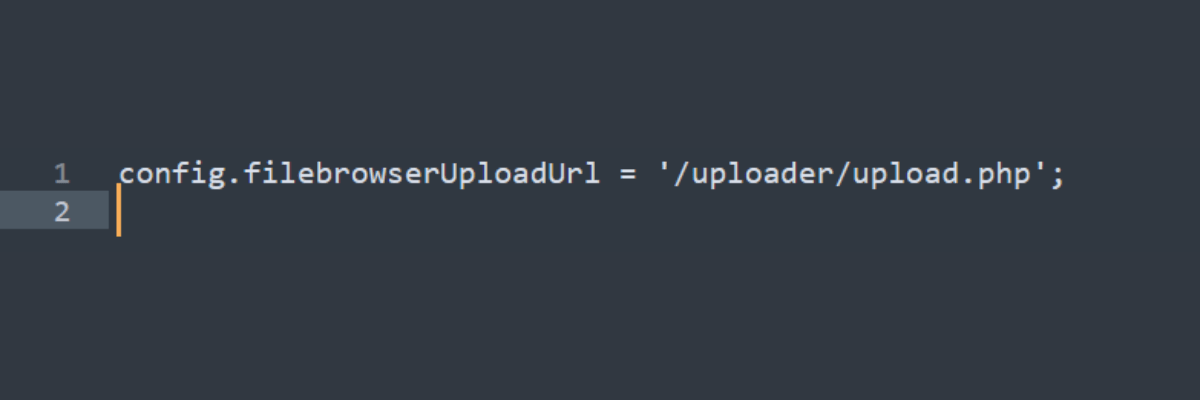
This points to a server-side script (e.g.
upload.php ) that handles the actual file uploads.
After setting everything up, open CKEditor and use the image or file button to open the dialog box.
In the dialog, you will see an Upload tab where you can select a file from your computer and upload it to the server.
Create the
upload.php file (or use another server-side language) to handle the file upload logic.
Configure the script to store the files on your server and return the file path to CKEditor after a successful upload.
After setting everything up, open CKEditor and use the image or file button to open the dialog box.
In the dialog, you will see an Upload tab where you can select a file from your computer and upload it to the server.
0 0
You can use the autosave functionality which automatically saves the editor content at regular intervals to prevent your content from getting lost in CKEditor 4.
0 0
The CKEditor 4 core team doesn’t work on MediaWiki integrations. If you need to utilize any other custom format like Wiki markup, you will have to alter the output format of the editor.
0 0
To embed videos, pictures and other media in CKEditor 4, you must use the ‘Media Embed’ plugin. To embed media in CKeditor 4, follow the steps given below:
0 0
20,000+ Software Listed
Best Price Guranteed
Free Expert Consultation
2M+ Happy Customers
Terms and Condtions

Users with registered businesses can purchase goods from merchants on the platform to satisfy their business needs. Users are not permitted to utilize any products acquired through the platform for resale, advertising, business, or further distribution.
For each purchase made, users will receive a Tax Invoice (or 'GST invoice') that includes specific details such as:
the GSTIN of the user associated with their registered business, and
the specified Entity Name for their business.
It should be noted that not all products are eligible for GST Invoice. Only the products displayed by participating sellers with the 'GST-based Invoice Available' callout on the product description page would qualify.
Certain goods and services are not eligible to get a GST Invoice, including items with VAS, i.e., Value Added Services (e.g., Total Mobile Protection/Assured Buyback) and those involving an exchange offer at the time of purchase.
Users must ensure the accuracy of the GSTIN, and business entity name provided for the GST Invoice. Requests for corrections into GST Invoice would not be accommodated by Techjockey.com or any Seller, and any issues arising from user-provided information are the sole responsibility of users.
Techjockey.com is not liable for the GST Invoice or any associated input tax credit. To efficiently claim an input tax credit, users should select the registered place of business address as per the GST authority's data and follow the provisions of the GST Act and rules.
To claim an input tax credit, the delivery and billing addresses must match. Furthermore, input tax credits will not be granted if the delivery address and GSTIN on the invoice are from different states. In case of incorrect GST details provided during the order placement, the order will be canceled automatically.



