 USA
USA UAE
UAESmall Business
Designed for startups and growing businesses

See More


Brand: Wordpress
WordPress CMS is your all-in-one tool for creating stunning websites, powering 43% of the web! With endless themes and plugins, it’s like building your dream site with digital LEGO. Whether you're blogging, selling products, or managing content, WordPress makes it easy and secure.
See MoreHave you used Wordpress before?
Share your insights for better experience
Brand: Wordpress
Founded Year: 2000
WordPress offers web publishing software that can use to create websites or blogs.
Looking for The Right Pricing?
Share your requirements and get a plan built around your business.
Price Available on Request
Get personalised Wordpress pricing that fits your needs. Our team will connect with you.
 Customization SEO Friendly Mobile Responsive Design High Performance High security Media Management Easy & Accessible
  Windows
  iOS
iOS  Android MacOS
  Desktop
  Mobile
  Cloud-Based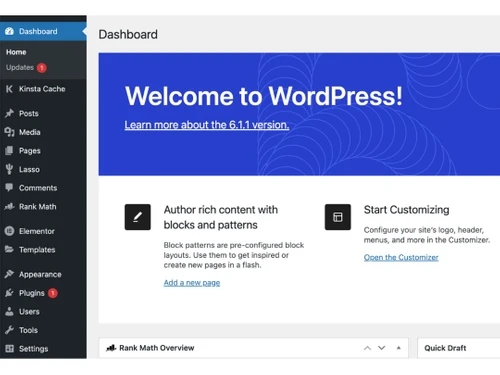
Small Business
Designed for startups and growing businesses
Medium Business
Built for business growth and flexibility
Enterprises
Designed for complex and large-scale business needs
4.3
Out of 5

Overall Rating
Based on
15 Verified Reviews
Rating Breakdown
93% Recommend this Product
Add ReviewOverall, users appreciate WordPress for its user-friendly interface and the ability to create websites without coding knowledge, making it accessible for beginners and experienced users alike. Many highlight the vast array of plugins and resources available, enhancing their website development experience. However, some users express concerns about occasional lags, the complexity of certain features, and the need for additional security measures. Despite these limitations, the platform remains highly recommended for its ease of use and flexibility in website management.
Pros
"Anyone can use it without having prior knowledge. Also, beginners can also create their own website within just a few hours."
"WordPress has a vast user base, which means there are many features, plugins, and resources available."
"WordPress is easy to create landing pages and blog posts without needing a developer. It offers easy to use templates."
Cons
"I expected it to be easier to build websites given how popular WordPress is. "
"The only thing I wish for is that some features were more accessible without having to upgrade to a paid plan. "
"It can be slightly tricky for a few people to find their way with WordPress UI initially. "



NAMRATA 
Content Writer
Feb 12, 2025
Techjockey Verified
“Get Your Content Published in Secs!”
you can easily publish your content without having the knowledge of coding. It just requires you to copy and paste your content, do basic formatting, and you are done!
Pros
Anyone can use it without having prior knowledge. Also, beginners can also create their own website within just a few hours.
Cons
Lags sometimes
Reason to switch
The free version doesn't allow the features I wanted.
Aug 13, 2024
Techjockey Verified
“Creating and managing my website was a smart move”
I’ve had a mostly positive experience with WordPress.
Pros
WordPress has a vast user base, which means there are many features, plugins, and resources available.
Cons
I expected it to be easier to build websites given how popular WordPress is.
Reason to switch
The broad range of plugins and resources available for WordPress made it the best option for my website needs.
Jun 20, 2024
Techjockey Verified
“WordPress Made My Website exact the same I wanted”
Using WordPress has been a great experience. Now, I’m able to design my website without needing much technical knowledge.
Pros
WordPress made it easy for me to design my website.
Cons
Nothing to dislike as such.
Reason to switch
I needed more control over my website’s design and functionality, which I couldn’t achieve with other platforms.

Wordpress
Price On Request
Desktop
Mobile
Web based
On Premises
Windows
Mac OS
Grav
Price On Request
Desktop
Mobile
Web based
On Premises
Windows
Mac OS

OpenText Web CMS
Price On Request
Desktop
Mobile
Web based
On Premises
Windows
Mac OS

Wix
Price On Request
Desktop
Mobile
Web based
On Premises
Windows
Mac OS
Cosmic AI
Price On Request
Desktop
Mobile
Web based
On Premises
Windows
Mac OS

Scrintal
Price On Request
Desktop
Mobile
Web based
On Premises
Windows
Mac OS

Contentful
Price On Request
Desktop
Mobile
Web based
On Premises
Windows
Mac OS

Wordable
Price On Request
Desktop
Mobile
Web based
On Premises
Windows
Mac OS
Bear CMS
Price On Request
Desktop
Mobile
Web based
On Premises
Windows
Mac OS

Genei
Price On Request
Desktop
Mobile
Web based
On Premises
Windows
Mac OS

Scalenut
Price On Request
Desktop
Mobile
Web based
On Premises
Windows
Mac OS
(0) Product(s) selected
Available
Price on Request
Available
Price on Request
Starting Price:
$99 /Month
Starting Price:
$5 /Month

Starting Price:
$149

Starting Price:
€29

Starting Price:
$5

Starting Price:
$99

Starting Price:
$170

Starting Price:
$18 /Month

Available
Price on Request


Yes, WordPress is free to use for anyone. You can download it and start creating your website without any cost. However, you might need to pay for hosting and premium features.
Yes, WordPress is a Content Management System (CMS). It helps you create, manage, and organize your website's content easily, even if you have no technical skills.
No, WordPress does not require coding knowledge. It has a simple dashboard and many themes and plugins that let you build and customize your site without any coding.
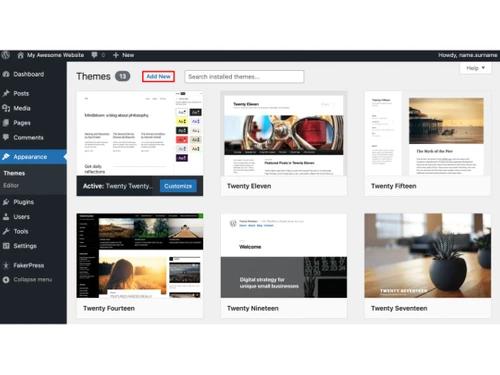
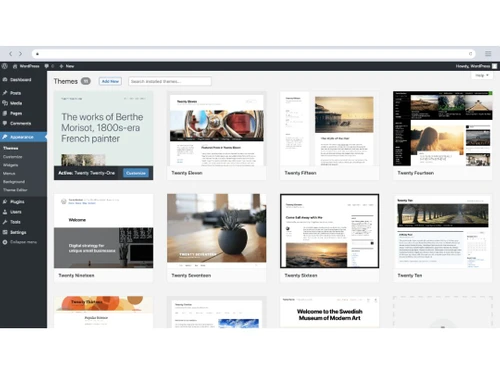
WordPress is a tool for building websites. It works by allowing you to choose themes and plugins to design and add features to your site. You can manage content through an easy-to-use dashboard.
No, wordpress.com and wordpress.org are not the same. Wordpress.com is a hosted service where your site is managed for you with some limitations. Wordpress.org provides free software that you can download and install on your own web host, giving you full control and customization over your website.
Yes, WordPress can be used for eCommerce. By using plugins like WooCommerce, you can turn your site into an online store with product listings, shopping carts, and payment options.
To integrate WordPress with a CRM, you can use various plugins designed for this purpose. These plugins help connect your site with CRM systems to manage customer relationships efficiently.
To create a website in WordPress, first, install WordPress on your web host. Then, choose a theme, customize it, and add plugins for extra features. Finally, start adding your content through the dashboard.
Some of the cleanest WordPress themes are as follows:
0 0
Some of the well-known backup plugins for WordPress are as follows:
0 0
Some good and free themes for WordPress are as follows:
0 0
Some of the ways you can protect your WordPress site from hackers are using strong passwords with 2FA, regularly updating themes and plugins, setting up a security plugin, limiting login attempts and enabling SSL etc.
0 0
Some of the best security plugins for WordPress are as follows:
0 0
20,000+ Software Listed
Best Price Guranteed
Free Expert Consultation
2M+ Happy Customers
Terms and Condtions

Users with registered businesses can purchase goods from merchants on the platform to satisfy their business needs. Users are not permitted to utilize any products acquired through the platform for resale, advertising, business, or further distribution.
For each purchase made, users will receive a Tax Invoice (or 'GST invoice') that includes specific details such as:
the GSTIN of the user associated with their registered business, and
the specified Entity Name for their business.
It should be noted that not all products are eligible for GST Invoice. Only the products displayed by participating sellers with the 'GST-based Invoice Available' callout on the product description page would qualify.
Certain goods and services are not eligible to get a GST Invoice, including items with VAS, i.e., Value Added Services (e.g., Total Mobile Protection/Assured Buyback) and those involving an exchange offer at the time of purchase.
Users must ensure the accuracy of the GSTIN, and business entity name provided for the GST Invoice. Requests for corrections into GST Invoice would not be accommodated by Techjockey.com or any Seller, and any issues arising from user-provided information are the sole responsibility of users.
Techjockey.com is not liable for the GST Invoice or any associated input tax credit. To efficiently claim an input tax credit, users should select the registered place of business address as per the GST authority's data and follow the provisions of the GST Act and rules.
To claim an input tax credit, the delivery and billing addresses must match. Furthermore, input tax credits will not be granted if the delivery address and GSTIN on the invoice are from different states. In case of incorrect GST details provided during the order placement, the order will be canceled automatically.



