linkedin
Zoho WorkDrive logo
play Manage Files and Folders - Zoho WorkDrive
zoho workdrive
zoho workdrive features

Zoho WorkDrive

Brand: Zoho Corporation

  • 4.5

  • 3 Ratings & 3 Reviews

Zoho WorkDrive is designed for businesses to securely store, manage, and share files. It offers team-driven storage, advanced security, and seamless integration with Zoho apps.

See More

Have you used Zoho WorkDrive before?

Share your insights for better experience

Add a Review
Starting Price
₹170 excl.GST
₹ 201 incl. GST

View plans

offer Save upto 18%, Get GST Invoice on your business purchase T&C
offer Buy Now & Pay Later, Check offer on payment page.
Buy Now
100% Genuine
Products
Best Price
Guaranteed
Safe & Secure
Payment
  • Description

  • Pricing

  • Features

  • Specification

  • Review

  • Compare

  • Alternatives

  • FAQ

Starting at ₹170
Buy Now

Zoho WorkDrive Software Overview

What is Zoho WorkDrive?

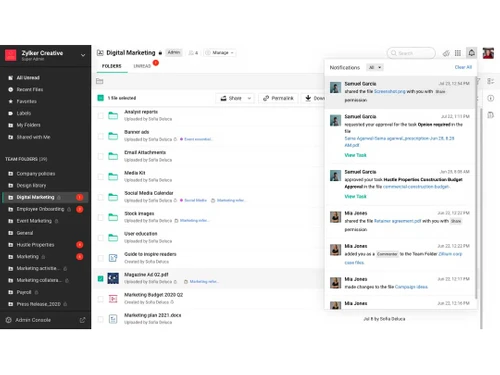
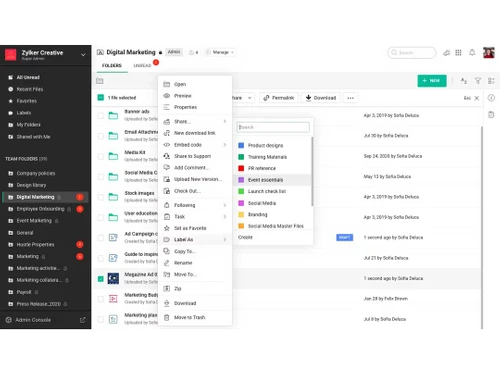
Zoho WorkDrive is an online file storage and content collaboration platform designed for modern teams, small businesses, and large enterprises. It helps teams store, share, manage, and work together on files of any size. WorkDrive offers a modern interface with secure team folders, granular access controls, and a built-in office suite. It supports a horizontal organizational structure, enabling quicker access to information so employees can make timely decisions and get more done.

This cloud storage platform integrates well with other Zoho tools like Zoho Projects, enhancing project management by automating workflows and ensuring seamless user synchronization. It also features tools like file versioning, external sharing, and AI-powered comment suggestions. Users can organize files using labels and data templates, and it supports previewing over 200 file formats. Additionally, WorkDrive allows users to create documents directly in the cloud and maintain brand consistency with template libraries.

Why Choose Zoho WorkDrive Cloud Storage Software?

  • Secure Cloud Storage: Provides encrypted and scalable cloud storage for businesses.
  • Real-Time Collaboration: Enables teams to work together with shared folders, file versioning, and built-in editing tools.
  • Seamless Integration: Works smoothly with Zoho applications and third-party tools for better productivity.
  • Granular Access Control: Allows role-based permissions to ensure data security and restricted access.
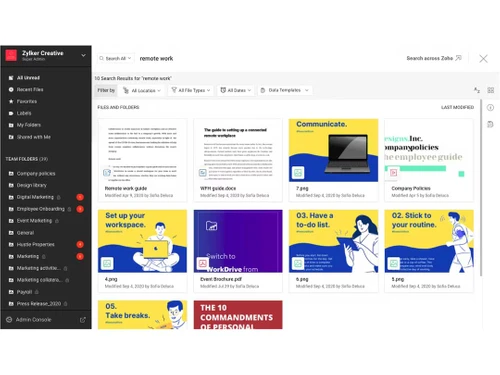
  • Advanced File Management: Features offline sync, activity tracking, and powerful search capabilities.
  • Cost-Effective Solution: Offers competitive pricing with flexible plans for different business needs.
  • Mobile & Remote Access: Accessible on multiple devices with mobile apps for on-the-go file management.

Benefits of Zoho WorkDrive Software

  • Seamless Integration with Zoho Projects: Enhances project management by automating workflows and ensuring consistent access controls across projects and files.
  • Client User Management: Allows controlled collaboration with external stakeholders by granting limited permissions, reducing email exchanges and enhancing productivity.
  • Built-in Productivity Tools: Includes Zoho Writer, Sheets, and Show for creating documents directly within WorkDrive, maintaining brand consistency and compliance with folder permissions.
  • AI-Powered Content Creation: Utilizes generative AI to suggest content ideas, draft emails, and generate images, enhancing creativity and efficiency.
  • AI-Driven Comment Suggestions: Helps craft clear feedback with instant suggestions for rephrasing and improving document comments.
  • Custom App Integration via Webhooks: Enables seamless communication between WorkDrive and other apps by setting up triggers for notifications on file activities.
  • Data Loss Prevention: Offers enhanced enterprise capabilities to protect sensitive data and prevent unauthorized access.
  • Optimized Performance Across Devices: Ensures seamless file synchronization and optimized performance for better user experience on various devices.

Zoho WorkDrive Pricing

Zoho WorkDrive price in India starts at INR 170 at techjockey.com.

The pricing model is based on different parameters, including extra features, deployment type, and the total number of users. For further queries related to the product, you can contact our product team and learn more about the pricing and offers.

Read more

Zoho Corporation Company Details

Founded Year:  1996

Zoho Corporation is an Indian multinational company that specialises in software development, cloud computing, and web-based business tools. It is best known for Zoho Office suite and its enterprise IT management division, ManageEngine

Director/Founders Sridhar Vembu / Tony Thomas
Company Size 1000+ Employees

Zoho WorkDrive Pricing & Plans

Starter (minimum 3 users)

Calculated Price

170 Exclusive of all taxes
    • Users

      Users
      Users
    • Monthly

      Monthly
      Monthly

Key Features

  • Storage starts at 1 TB/Team

  • After 10 users additional storage of 100 GB/new us

  • 10 GB upload limit per file

  • My Folders Team Folders

  • Zoho office suite Desktop and mobile apps

  • Granular access controls Sub-folder level sharing

  • Advanced Search Unlimited file versions

  • Client users Groups Templates

Team (minimum 3 users)

Calculated Price

340 Exclusive of all taxes
    • Users

      Users
      Users
    • Monthly

      Monthly
      Monthly

Key Features

  • Storage starts at 3 TB/Team

  • After 10 users additional storage of 300 GB/new us

  • 50 GB upload limit per file

  • Everything in the Starter plan +

  • Custom brand logo Access stats

  • File activity timeline

  • Team Folder activity timeline

  • Collect files

Business (minimum 3 users)

Calculated Price

680 Exclusive of all taxes
    • Users

      Users
      Users
    • Monthly

      Monthly
      Monthly

Key Features

  • Storage starts at 5 TB/Team

  • After 10 users additional storage of 500 GB/new us

  • 250 GB upload limit per file

  • Everything in the Team plan +

  • Custom domain Device management

  • Full content visibility and management

  • Manage all shared items

  • Manage all shared items

Zoho WorkDrive Features

  • icon_check Real-time Collaboration
    Work simultaneously with multiple team members on the same document and see their cursor movements and edits as they happen.
  • icon_check Admin Console Management
    Monitor team activity, manage storage limits, and govern security settings from a centralized dashboard for the whole team
  • icon_check Custom Branding
    Personalize the platform by adding your company logo and custom domain to provide a professional experience for all users.
  • icon_check Data Retention Policy
    Automate the cleanup of your storage by setting specific rules for how long deleted items should stay in the platform trash.
  • icon_check Team Collaboration
    Secure file sharing with versioning, file locking, and detailed access controls for better teamwork.
  • icon_check External Collaboration
    Share files via password-protected links, set expiration dates, and track file activities.
  • icon_check Productivity Tools
    Collect files using shared links, communicate via video, and integrate with Microsoft & Gmail.
  • icon_check Desktop Apps
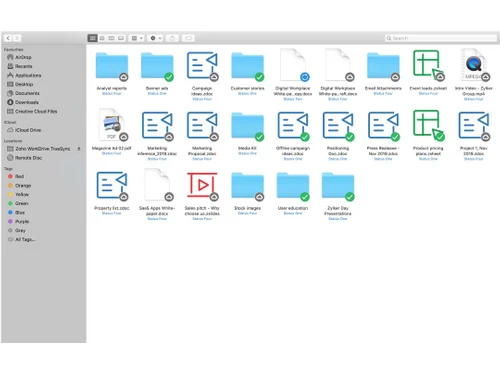
    Edit cloud files using local applications, sync data, and access files without consuming local storage.
  • icon_check Data Organization
    Use labels, metadata, and templates for quick and efficient file management.
  • icon_check Security & Admin
    256-bit encryption, device management, file recovery, and advanced admin controls for security.
  • icon_check Analytics & Reporting
    Monitor file activity, track storage usage, and generate reports for insights.
  • icon_check Integrations
    Seamlessly connect with Zoho apps, Zapier, and third-party tools to enhance functionality.
Zoho WorkDrive Demo Video play icon

Get Zoho WorkDrive Demo

Watch the demo video to explore key features, real workflows, and how the software fits your business needs.

Understand
Key Features
Personal
Demo Insights
Interactive
Demo Support

Zoho WorkDrive Specifications

Supported Platforms
Windows Windows iOS iOS Android Android MacOS MacOS Linux Linux
Devices
Desktop Desktop Mobile Mobile iPad iPad
Deployment
Cloud-Based Cloud-Based
Suitable For
All Industries
Business Specific
All Businesses
Business Size
Small Business Startups Medium Business Enterprises SMBs SMEs MSMBs
Customer Support
Email Live Chat Forums
Language
English
Integration
API Integration
Training Resources
In Person Live Online Webinars Videos
AI Features
AI Integrated

Explore the Best Alternative Solutions Similar to Your Business Size and Needs

Zoho WorkDrive Reviews

4.5

Out of 5

img

Overall Rating

Based on
3 Verified Reviews

Rating Breakdown

  • Features 4.5
  • Value for Money 4.8
  • Ease of Use 4.5
  • Customer Support 4.5

83% Recommend this Product

Add Review

Zoho WorkDrive Video Reviews

youtubeVideoId

4.6

“Zoho WorkDrive Review & Tutorial: Is it Better Than Google?”

Review by: Kripesh Adwani

youtubeVideoId

4.6

“Zoho WorkDrive Cloud Storage Review - Usage Experience”

Review by: Ron Tester

youtubeVideoId

4.5

“Zoho WorkDrive Review: The Hidden Gem That Beats Google Drive?”

Review by: Cloudwards

Compare Zoho WorkDrive With other Cloud Storage

Products
Ratings
Pricing
Device Supported
Deployment
Supported Platforms
  • img

    Zoho WorkDrive

  • 4.5

  • ₹ 170.00 excl. GST

  • Desktop

    Mobile

  • Web based

    On Premises

  • Windows

    Mac OS

  • img

    TeraBox

  • 4.3

  • Price On Request

  • Desktop

    Mobile

  • Web based

    On Premises

  • Windows

    Mac OS

  • img

    PikPak

  • 4.1

  • Price On Request

  • Desktop

    Mobile

  • Web based

    On Premises

  • Windows

    Mac OS

  • img

    Mega

  • 4.3

  • ₹ 537

  • Desktop

    Mobile

  • Web based

    On Premises

  • Windows

    Mac OS

  • img

    Hostzop

  • 4.1

  • ₹ 950

  • Desktop

    Mobile

  • Web based

    On Premises

  • Windows

    Mac OS

  • img

    Mesh Drive

  • 4.1

  • Price On Request

  • Desktop

    Mobile

  • Web based

    On Premises

  • Windows

    Mac OS

  • img

    Zata.AI

  • 4.3

  • ₹ 599

  • Desktop

    Mobile

  • Web based

    On Premises

  • Windows

    Mac OS

  • img

    iCloud

  • 4.5

  • Price On Request

  • Desktop

    Mobile

  • Web based

    On Premises

  • Windows

    Mac OS

  • img

    Dropbox Business

  • 4.4

  • Price On Request

  • Desktop

    Mobile

  • Web based

    On Premises

  • Windows

    Mac OS

  • img

    JioCloud

  • 4.1

  • Price On Request

  • Desktop

    Mobile

  • Web based

    On Premises

  • Windows

    Mac OS

(0) Product(s) selected

Zoho WorkDrive Alternatives

See All Zoho WorkDrive Alternatives

Starting Price:

$5 /Month

Starting Price:

$1 /Month

Starting Price:

$7 /Monthly

Available

Price on Request

Starting Price:

€2 /Monthly

Starting Price:

€5 /Monthly

Available

Price on Request

Articles for Zoho WorkDrive

See All Related Articles

How much does Zoho WorkDrive Software cost?

The starting price in India is INR 170 on Techjockey.com.

Does Zoho WorkDrive Software have a mobile app?

Yes, Zoho WorkDrive has mobile apps for both Android and iOS devices.

Which operating systems support Zoho WorkDrive Software?

Zoho WorkDrive is compatible with Windows, MacOS, Android and iOS.

Is there a free trial available for Zoho WorkDrive Software?

Yes, Zoho WorkDrive offers a free trial for new users to explore its features.

How does Zoho WorkDrive Software work?

Zoho WorkDrive allows teams to store, share, and collaborate on files securely in the cloud.

Who uses Zoho WorkDrive Software?

Businesses, remote teams, freelancers, and educational institutions can benefit from Zoho WorkDrive.

Is a free demo offered for Zoho WorkDrive Software?

Yes, Zoho provides a free demo to help users understand its features and functionalities.

Can Zoho WorkDrive Software be used for free?

Zoho WorkDrive offers a free plan with limited storage and features.

Does Zoho WorkDrive Software have code-generation capabilities?

No, Zoho WorkDrive is a cloud storage and collaboration tool, not a code generator.

Can Zoho WorkDrive be installed on a local system?

No, Zoho WorkDrive is a cloud-based service and cannot be installed locally.

Does Zoho WorkDrive support file versioning?

Yes, Zoho WorkDrive allows you to track and restore previous versions of files.

20,000+ Software Listed

Best Price Guranteed

Free Expert Consultation

2M+ Happy Customers

Terms and Condtions

close

Users with registered businesses can purchase goods from merchants on the platform to satisfy their business needs. Users are not permitted to utilize any products acquired through the platform for resale, advertising, business, or further distribution.

For each purchase made, users will receive a Tax Invoice (or 'GST invoice') that includes specific details such as:

  • the GSTIN of the user associated with their registered business, and

  • the specified Entity Name for their business.

It should be noted that not all products are eligible for GST Invoice. Only the products displayed by participating sellers with the 'GST-based Invoice Available' callout on the product description page would qualify.

Certain goods and services are not eligible to get a GST Invoice, including items with VAS, i.e., Value Added Services (e.g., Total Mobile Protection/Assured Buyback) and those involving an exchange offer at the time of purchase.

Users must ensure the accuracy of the GSTIN, and business entity name provided for the GST Invoice. Requests for corrections into GST Invoice would not be accommodated by Techjockey.com or any Seller, and any issues arising from user-provided information are the sole responsibility of users.

Techjockey.com is not liable for the GST Invoice or any associated input tax credit. To efficiently claim an input tax credit, users should select the registered place of business address as per the GST authority's data and follow the provisions of the GST Act and rules.

To claim an input tax credit, the delivery and billing addresses must match. Furthermore, input tax credits will not be granted if the delivery address and GSTIN on the invoice are from different states. In case of incorrect GST details provided during the order placement, the order will be canceled automatically.