linkedin
iDrive logo
iDrive 2
iDrive 3
iDrive 4

iDrive

Brand: IDrive

  • 4.2

  • 3 Ratings & 3 Reviews

iDrive is a cloud storage software for enterprises and personal users enabling them to reserve all the data stored within their business computers and mobile devices. The software runs data back up in the background without affecting the actual productivity of its user’s computers. Moreover, it also retains the previous versions of all backed-up files within an individual account, which users c...

See More

Have you used iDrive before?

Share your insights for better experience

Add a Review
Starting Price
$70

View plans

100% Genuine
Products
Best Price
Guaranteed
Safe & Secure
Payment
  • Description

  • Pricing

  • Features

  • Specification

  • Review

  • Compare

  • Alternatives

  • FAQ

Starting at $70

iDrive Software Overview

What is iDrive?

iDrive is a cloud storage software for enterprises and personal users enabling them to reserve all the data stored within their business computers and mobile devices. The software runs data back up in the background without affecting the actual productivity of its user’s computers. Moreover, it also retains the previous versions of all backed-up files within an individual account, which users can restore as per their requirement. All data transferred and stored within iDrive are secured with 256-bit AES encryption ensuring proper security. Further, with iDrive, enterprises can also create multiple sub-accounts for their employees and business associates, allowing steady backup of unlimited PCs and mobiles.

How does iDrive Facilitate Easy Management of Your Data?

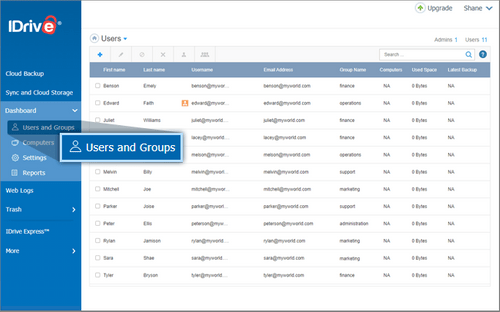
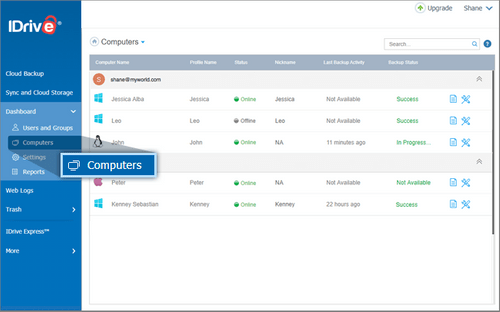
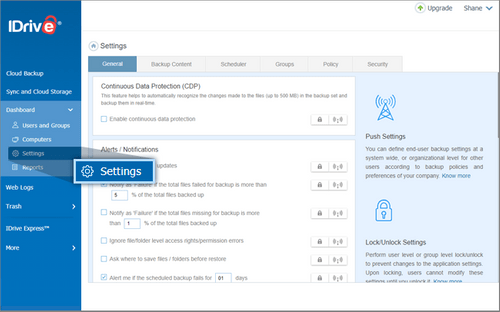
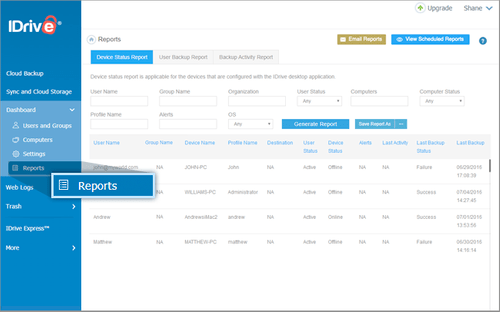
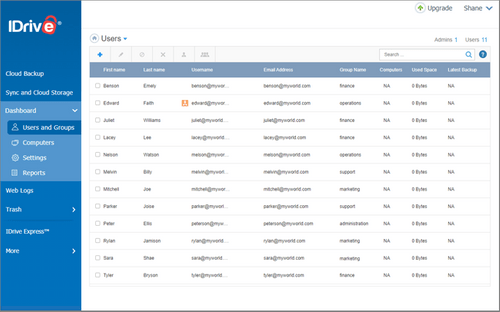
With iDrive’s dashboard, admins and IT managers can monitor the health of their backups at regular intervals. They can also perform the following tasks with ease:

  1. Create: Admins can generate separate accounts for individual users, they can organise them into multiple groups and schedule particular tasks to them.
  2. Manage: The dashboard can be used to monitor multiple account-related activities and manage data backups on remote computers.
  3. Make Changes: IT Managers can change the settings of particular backup sets and schedules across multiple devices.
  4. View: The dashboard facilitates seamless monitoring of information regarding utilization of storage space, recent backups and user-based sub-accounts.
  5. Report Generation: Admin users can generate detailed reports about the status of individual devices synced with iDrive accounts and backups processed through them. They can also create a list of multiple recipients and send scheduled reports to them over emails.

Pricing of iDrive

iDrive is available as per the following pricing options:

  1. iDrive Personal: The software charges Rs.4,865 per year offering 2TB storage.
  2. iDrive Business: The software charges Rs. 6,965 per year, offering 250GB storage space.

In case you are interested to know more about iDrive, do send us a callback request. Our customer care executives will get back to you on the date and time mentioned by you.

Compatible Platforms for iDrive

iDrive is compatible with Windows 7, 8, 8.1 and 10 versions, Mac OS version 10.10 and later. It also has a dedicated mobile app for Android and iOS platforms.

Benefits of iDrive

  1. Data Security: All data is secured with 256-bit AES encryption. You can also change privacy settings to the highest level by generating a private key for an individual account during sign up. iDrive runs third party reviews on their network infrastructure at regular intervals, to figure out service vulnerabilities.
  2. Create Sub-Accounts: Companies can create multiple sub-accounts for their staff or business associates, within the main iDrive account to facilitate unlimited backup and monitoring. Individuals having access to sub-accounts can back up any number of Macs PCs and smartphones with ease.
  3. Versatile File Backup: iDrive supports versatile file types for backup, including both open and locked files, along with MS Excel, QuickBooks, Outlook files and more.
Read more

IDrive Company Details

Founded Year:  2007

IDrive

Director/Founders Raghu Kulkarni,
Company Size 1-100 Employees

iDrive Pricing & Plans

IDrive Personal
Starting at $70
  • Options

    • Licenses

      Licenses
      Licenses
    • Yearly

      Yearly
      Yearly

Key Features

  • Multiple Backup Supports

  • Sync and share files

  • Advanced Snapshots

  • Versioning

  • Archiving

  • Manage Computers

  • Clone/Computer Backup

IDrive Business
Starting at $70
  • Options

    • Licenses

      Licenses
      Licenses
    • Yearly

      Yearly
      Yearly

Key Features

  • Multiple Backup Supports

  • Sync and share files

  • Advanced Snapshots

  • Versioning

  • Archiving

  • Manage Computers

  • Clone/Computer Backup

  • Data Protection

  • Mobile App

iDrive Features

  • icon_check Multiple Backup Supports
    You can easily backup essential data from unlimited Macs, mapped drives, PCs, Android and iOS devices within a single iDrive
  • icon_check Sync and share files
    With iDrive, you can sync backed up files and folders across all the linked devices without making any impact on the actual
  • icon_check Advanced Snapshots
    iDrive creates a historical view of the actual data stored within your account, enabling you to perform on-time recovery in case
  • icon_check Versioning
    The software retains all the previous versions of multiple files backed up in an individual account without making an impact on
  • icon_check Manage Computers
    You get access to robust reporting tools and can remotely manage, view and monitor the activities of their iDrive account. You
  • icon_check Clone/Computer Backup
    With iDrive, you can create file-level and user-level backups to secure their system. You can restore the entire version to the
  • icon_check Archiving
    The software does not delete any backed up data until they are manually deleted by individual users or they run archive cleanup
  • icon_check Data Protection
    iDrive automatically recognises the new changes in a file stored within its backup set and starts back up operations for those
  • icon_check Mobile App
    iDrive has a dedicated mobile app for Android and iOS devices, enabling you to backup all the contacts, photos, videos, SMS and
  • icon_check iDrive Express
    You can backup all data from their hard drive and return the temporary storage devices to iDrive. The software will resend the

iDrive Specifications

Supported Platforms
Windows Windows iOS iOS Android Android
Devices
Desktop Desktop Mobile Mobile
Deployment
Cloud-Based Cloud-Based
Suitable For
All Industries
Business Specific
All Businesses
Language
English
Compliance Regulation
SOC 2

Explore the Best Alternative Solutions Similar to Your Business Size and Needs

iDrive Reviews

4.2

Out of 5

img

Overall Rating

Based on
3 Verified Reviews

Rating Breakdown

  • Features 4
  • Value for Money 4.6
  • Ease of Use 4.1
  • Customer Support 4.3

96% Recommend this Product

Add Review

iDrive Video Reviews

youtubeVideoId

4.5

“IDrive Review Is It The Best Cloud Backup”

Review by: Cloudwards

youtubeVideoId

4.3

“IDrive Review How to restore your data”

Review by: Cloudbackuping

Dev Koushik

User

4.1

Reviewed on: Feb 1, 2021

Techjockey Verified

“frequent backup available”

Pros

very easy to backup and export data

Cons

NO CONS

Compare iDrive With other Email Backup Software

Products
Ratings
Pricing
Device Supported
Deployment
Supported Platforms
  • img

    iDrive

  • 4.2

  • Price On Request

  • Desktop

    Mobile

  • Web based

    On Premises

  • Windows

    Mac OS

(0) Product(s) selected

iDrive Alternatives

See All iDrive Alternatives

Starting Price:

$30 /License

What type of server clouds and databases can I back up using iDrive?

You can create back up for MS Exchange Server, VMware, System State, Linux Servers, Oracle Server, Office 365 Mailbox and more.

Is iDrive compliant with federal and legal regulations?

Yes, iDrive is in complete compliance with SOX, SEC/FINRA, HIPAA and GLBA.

Can I get a demo of iDrive?

Yes, you can send in an online demo request for iDrive. Our software experts will get back to you as per your preferred date and time.

What are the system requirements for using iDrive?

You need to have: RAM: 512MB RAM, Hard Disk: 10MB out of the total available space for installation and 20MB or more for local caching.

Does iDrive have a mobile app?

Yes, iDrive has a dedicated mobile app compatible with Android and iOS devices.

20,000+ Software Listed

Best Price Guranteed

Free Expert Consultation

2M+ Happy Customers

Terms and Condtions

close

Users with registered businesses can purchase goods from merchants on the platform to satisfy their business needs. Users are not permitted to utilize any products acquired through the platform for resale, advertising, business, or further distribution.

For each purchase made, users will receive a Tax Invoice (or 'GST invoice') that includes specific details such as:

  • the GSTIN of the user associated with their registered business, and

  • the specified Entity Name for their business.

It should be noted that not all products are eligible for GST Invoice. Only the products displayed by participating sellers with the 'GST-based Invoice Available' callout on the product description page would qualify.

Certain goods and services are not eligible to get a GST Invoice, including items with VAS, i.e., Value Added Services (e.g., Total Mobile Protection/Assured Buyback) and those involving an exchange offer at the time of purchase.

Users must ensure the accuracy of the GSTIN, and business entity name provided for the GST Invoice. Requests for corrections into GST Invoice would not be accommodated by Techjockey.com or any Seller, and any issues arising from user-provided information are the sole responsibility of users.

Techjockey.com is not liable for the GST Invoice or any associated input tax credit. To efficiently claim an input tax credit, users should select the registered place of business address as per the GST authority's data and follow the provisions of the GST Act and rules.

To claim an input tax credit, the delivery and billing addresses must match. Furthermore, input tax credits will not be granted if the delivery address and GSTIN on the invoice are from different states. In case of incorrect GST details provided during the order placement, the order will be canceled automatically.