 USA
USA UAE
UAESmall Business
Designed for startups and growing businesses


See More




Brand: Tesseract Learning
KREDO is an AI-powered learning management system (LMS) that helps organizations streamline operations, engage learners, and scale training programs.
See MoreHave you used KREDO before?
Share your insights for better experience
Brand: Tesseract Learning
Founded Year: 2015
Tesseract Learning is an award winning organization, working with global organizations to deliver digital learning & technology services starting from content to final execution, enabling them to equip their learners to perform their best and be future-ready.
Looking for The Right Pricing?
Share your requirements and get a plan built around your business.
Price Available on Request
Get personalised KREDO pricing that fits your needs. Our team will connect with you.
 Manual Account Setup Data Import/Export Automated User Actions Authoring Tool Resource Repository VILT Integration Attendance Tracking Participant Reporting Question Randomization Skill Mapping Learning Path Summary Multilingual Support Compliance Management Custom Branding

Watch the demo video to explore key features, real workflows, and how the software fits your business needs.
 Ubuntu
  Windows
  MacOS
MacOS  Linux
Linux  Desktop
  Cloud-Based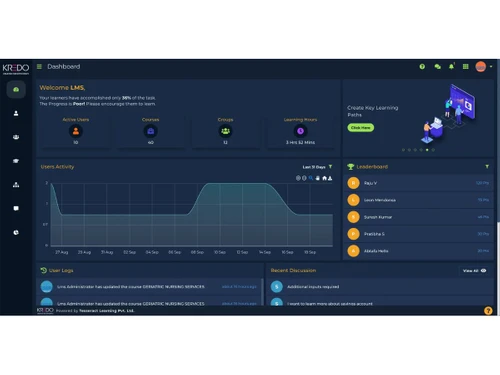
Small Business
Designed for startups and growing businesses
Medium Business
Built for business growth and flexibility
Enterprises
Designed for complex and large-scale business needs
4.2
Out of 5

Overall Rating
Based on
4 Verified Ratings
Rating Breakdown
80% Recommend this Product
Add ReviewTechjockey Trusted Reviews from Verified Users
No reviews are currently available for KREDO. Discover similar Corporate Learning Management Systems reviews

TalentLMS
Whats great - I adore how simple it is to create material in. You can incorporate a variety of components to make learning engaging for use... read more

Skills Caravan LXP
Whats great - Skills Caravan is the best way to keep track of all learning experiences in one place. Whether it be bookmarking a video from... read more

Paradiso LMS
Whats great - It integrates with the popular HR systems, making employee onboarding a breeze. and that we can create micro-learning modules... read more
KREDO
Price On Request
Desktop
Mobile
Web based
On Premises
Windows
Mac OS

Zoho Learn
₹ 60
Desktop
Mobile
Web based
On Premises
Windows
Mac OS

AlphaLearn LMS
Price On Request
Desktop
Mobile
Web based
On Premises
Windows
Mac OS
TalentLMS
Price On Request
Desktop
Mobile
Web based
On Premises
Windows
Mac OS
Innowork
Price On Request
Desktop
Mobile
Web based
On Premises
Windows
Mac OS

Edurigo
Price On Request
Desktop
Mobile
Web based
On Premises
Windows
Mac OS

Abara LMS
Price On Request
Desktop
Mobile
Web based
On Premises
Windows
Mac OS
Paradiso LMS
Price On Request
Desktop
Mobile
Web based
On Premises
Windows
Mac OS
Skills Caravan LXP
₹ 4000
Desktop
Mobile
Web based
On Premises
Windows
Mac OS

iSpring Learn
Price On Request
Desktop
Mobile
Web based
On Premises
Windows
Mac OS

Learnt AI
₹ 450
Desktop
Mobile
Web based
On Premises
Windows
Mac OS
(0) Product(s) selected
Starting Price:
$149 /month
Starting Price:
$599 /Month
Starting Price:
₹80 /User/Month
Available
Price on Request

Starting Price:
₹200,000 100 User/Month

Available
Price on Request

Available
Price on Request

Available
Price on Request

Available
Price on Request
Available
Price on Request
KREDO is an AI-powered Learning Management System (LMS) designed to help organizations streamline operations, engage learners, and drive impactful outcomes by enabling faster workforce training, onboarding, upskilling, and scaling learning.
KREDO pricing details are available on request on techjockey.com.
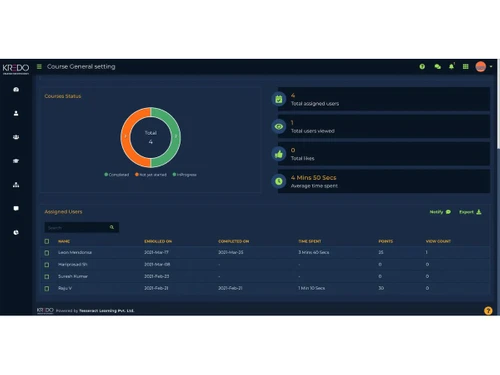
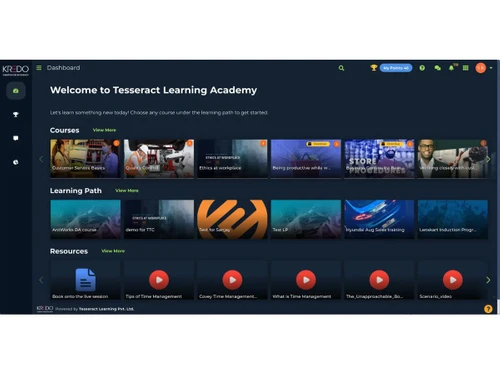
KREDO offers a comprehensive suite of features including User Management, Content Management with a built-in authoring tool, Virtual Meetings (VILT), Assessments, detailed Reports and Analytics, Gamification, and AI-powered capabilities like AI Course Authoring and Translation.
KREDO is designed for organizations across various industries looking to train their workforce, onboard new employees, upskill existing teams, and scale their learning initiatives efficiently using an AI-powered LMS.
KREDO leverages AI through features such as AI Course Authoring, AI Course Translation, AI-powered Text-to-Speech, and an AI Chatbot to enhance content creation, accessibility, and overall learner engagement.
KREDO supports a wide range of content types, allowing users to manage and deliver learning materials including documents, video files, SCORM 1.2/2004 packages, and audio files.
KREDO enhances learner engagement through gamification features like leaderboards, badges, points, and rewards, alongside an interactive UI, multi-language support, and performance boosters such as Memory Booster and Remediation.
Yes, KREDO offers extensive customization and branding options, enabling organizations to apply custom branding, create custom email notifications, and design custom certificates and badges to align with their corporate identity.
20,000+ Software Listed
Best Price Guranteed
Free Expert Consultation
2M+ Happy Customers
Terms and Condtions

Users with registered businesses can purchase goods from merchants on the platform to satisfy their business needs. Users are not permitted to utilize any products acquired through the platform for resale, advertising, business, or further distribution.
For each purchase made, users will receive a Tax Invoice (or 'GST invoice') that includes specific details such as:
the GSTIN of the user associated with their registered business, and
the specified Entity Name for their business.
It should be noted that not all products are eligible for GST Invoice. Only the products displayed by participating sellers with the 'GST-based Invoice Available' callout on the product description page would qualify.
Certain goods and services are not eligible to get a GST Invoice, including items with VAS, i.e., Value Added Services (e.g., Total Mobile Protection/Assured Buyback) and those involving an exchange offer at the time of purchase.
Users must ensure the accuracy of the GSTIN, and business entity name provided for the GST Invoice. Requests for corrections into GST Invoice would not be accommodated by Techjockey.com or any Seller, and any issues arising from user-provided information are the sole responsibility of users.
Techjockey.com is not liable for the GST Invoice or any associated input tax credit. To efficiently claim an input tax credit, users should select the registered place of business address as per the GST authority's data and follow the provisions of the GST Act and rules.
To claim an input tax credit, the delivery and billing addresses must match. Furthermore, input tax credits will not be granted if the delivery address and GSTIN on the invoice are from different states. In case of incorrect GST details provided during the order placement, the order will be canceled automatically.



