linkedin
iSpring Learn logo
play iSpring Learn LMS: Setup process from A to Z - iSpring learn LMS Demo
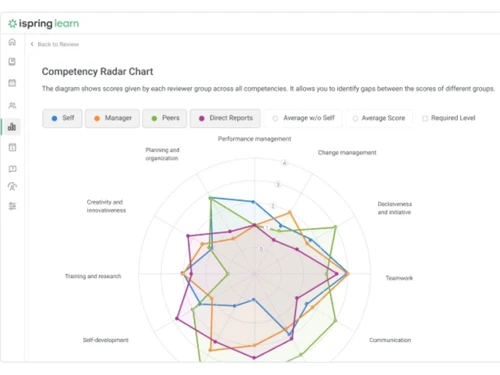
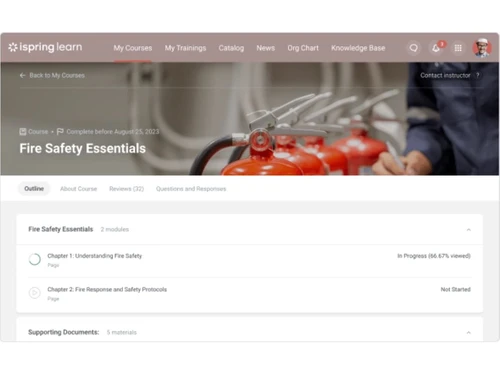
ispring learn -essentials
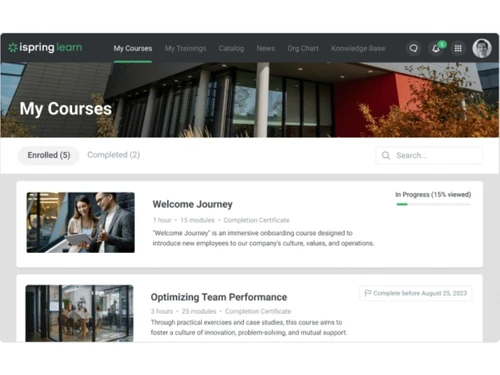
ispring learn -mycourses

iSpring Learn

Brand: iSpring

  • 4.5

  • 1 Rating & 1 Review

What is iSpring Learn Learning Management System iSpring Learn LMS is an intuitive learning management software that enables its users to launch online training for their employees. Users can upload e-learning contents directly onto the software or create courses from scratch and assign them to lear...

See More

Have you used iSpring Learn before?

Share your insights for better experience

Add a Review
Starting Price
$7

View plans

100% Genuine
Products
Best Price
Guaranteed
Safe & Secure
Payment
  • Description

  • Pricing

  • Features

  • Specification

  • Review

  • Compare

  • Alternatives

  • FAQ

Starting at $7

iSpring Learn Software Overview

What is iSpring Learn Learning Management System

iSpring Learn LMS is an intuitive learning management software that enables its users to launch online training for their employees. Users can upload e-learning contents directly onto the software or create courses from scratch and assign them to learners. They can create specific learning paths based on the requirement of any individual department.

Moreover, iSpring Learn LMS can automatically assign courses to users based on their job position, department, group and also offers various other filters. Users can create engaging content with video lectures, quizzes, screencasts, interactive assessments, e-books, along with dialogue simulations and publish it.

Where can iSpring Learn LMS be used?

  1. Product Training - Companies can offer real-time updates about their latest products and courses using iSpring Learn learning management system.
  2. Compliance Training - iSpring Learn LMS helps users to easily deliver and update content on their learning portal in order to ensure that their employees stay up to data.
  3. Onboarding - Companies can quickly introduce new hires to multiple products, processes, and corporate culture using the advanced platform offered by iSpring Learn LMS.
  4. Sales Training - With iSpring Learn LMS software, users can enhance the performance of their salesperson by sharing the best sales practices, assessing product knowledge, and offering training for enhancing their communication skills.
  5. Channel Training - iSpring learning management software enables its users to develop a global knowledge base for their partners and representatives. The elearning authoring tools ensures that everyone in your partner network stays updated with the corporate standards.

Pricing of iSpring Learn LMS Software

iSpring Learn LMS is available at $ 6.70 user/month, billed annually for hundred users on yearly basis.

Compatible Platforms for iSpring Learn LMS System

iSpring Learn LMS is compatible with Windows Vista, 7, 8 and 10 Versions. It also has a mobile app for Android and iOS platforms.

Benefits of iSpring Learn Course Management System

  1. Intuitive Training Manager - The learning management system helps manage training-related deadlines in an automated manner. It also helps send course-specific reminders and invites to the employees in real-time.
  2. Integrative Authoring Tool - iSpring Learn LMS features an award-winning authoring tool, helping its users to develop interactive quizzes, courses and multiple branching scenarios in real-time.
  3. Comprehensive Reports - With the comprehensive reports offered by iSpring Learn LMS, admins get to monitor the learning progress of each team member and make relevant decisions.
  4. Advanced-Data Security - iSpring Learn LMS is fully compliant with GDPR and similar data protection regulations. All training materials, statistics and personal data uploaded by its users are stored securely.
Read more

iSpring Company Details

Founded Year:  2001

iSpring Solutions is a global software company focused on providing professional eLearning solutions to corporate and educational clients.

Director/Founders Yury Uskov
Company Size 101-500 Employees

iSpring Learn Pricing & Plans

Start-[Billed annually]
Key Features
  • Training Management
  • Content Management
  • Content Authoring
  • Training Analytics
  • Mobile learning
  • Technical Support
Starting at $7
    • Users

      Users
      Users
    • Monthly

      Monthly
      Monthly

Key Features

  • Training Management

  • Content Management

  • Content Authoring

  • Training Analytics

  • Mobile learning

  • Technical Support

iSpring Learn Features

  • icon_check User Management
    Manage unlimited users and roles—admins, authors, learners—with bulk import, department/group assignments, and SSO.
  • icon_check Training Management
    Structure learning tracks, courses, and assessments with gated progression and notifications for completion.
  • icon_check Reporting
    Use interactive dashboards, custom & scheduled report exports, and detailed quiz and performance data.
  • icon_check Customization
    Brand your LMS with logos, themes, white-label mobile app, custom domains, and portal configuration.
  • icon_check Learning Portals and Sub-portals
    Create separate branded portals and sub-portals for departments, clients, or teams with tailored content.
  • icon_check Email Integration
    Automatically send notifications for enrollments, completions, reminders, and report summaries via email.
  • icon_check Content Management
    Upload & organize SCORM, video, PPT, PDF, audio content, and create interactive longreads within the LMS.
iSpring Learn Demo Video play icon

Get iSpring Learn Demo

Watch the demo video to explore key features, real workflows, and how the software fits your business needs.

Understand
Key Features
Personal
Demo Insights
Interactive
Demo Support

iSpring Learn Specifications

Supported Platforms
Windows Windows iOS iOS Android Android MacOS MacOS
Devices
Desktop Desktop Mobile Mobile Tablet Tablet iPad iPad
Deployment
Cloud-Based Cloud-Based Perpetual Perpetual
Suitable For
Manufacturing Education Healthcare Retail Automobiles Corporations Construction Non-Profit
Business Specific
All Businesses
Business Size
Small Business Medium Business
Customer Support
Email Communities
Language
English
Integration
API Integration
Training Resources
Videos
AI Features
AI Integrated

Explore the Best Alternative Solutions Similar to Your Business Size and Needs

iSpring Learn Review

4.5

Out of 5

img

Overall Rating

Based on
1 Verified Review

Rating Breakdown

  • Features 4
  • Value for Money 5
  • Ease of Use 4
  • Customer Support 5

90% Recommend this Product

Add Review

Ridhi Arora linkedin_verify

Human Resources

Industry: Human Resources User since: < 6 months

4.5

Reviewed on: Jan 4, 2023

Techjockey Verified

“Very useful platform!”

Pros

it is very useful, especially for product training and compliance training follow-ups. it has really saved our time and made each and every employee to be covered with ease

Cons

should have provided more options for content showcase options.

Reason to switch

It really helped in tracking and covering all the employees particularly in compliance trainings.

Compare iSpring Learn With other Corporate Learning Management Systems

Products
Ratings
Pricing
Device Supported
Deployment
Supported Platforms
  • img

    iSpring Learn

  • 4.5

  • Price On Request

  • Desktop

    Mobile

  • Web based

    On Premises

  • Windows

    Mac OS

  • img

    Zoho Learn

  • 4.3

  • ₹ 60

  • Desktop

    Mobile

  • Web based

    On Premises

  • Windows

    Mac OS

  • img

    KREDO

  • 4.2

  • Price On Request

  • Desktop

    Mobile

  • Web based

    On Premises

  • Windows

    Mac OS

  • img

    TalentLMS

  • 4.4

  • Price On Request

  • Desktop

    Mobile

  • Web based

    On Premises

  • Windows

    Mac OS

  • img

    AlphaLearn LMS

  • 4.3

  • Price On Request

  • Desktop

    Mobile

  • Web based

    On Premises

  • Windows

    Mac OS

  • img

    Innowork

  • 4.4

  • Price On Request

  • Desktop

    Mobile

  • Web based

    On Premises

  • Windows

    Mac OS

  • img

    Edurigo

  • 4.2

  • Price On Request

  • Desktop

    Mobile

  • Web based

    On Premises

  • Windows

    Mac OS

  • img

    Krademy LMS

  • 4.3

  • Price On Request

  • Desktop

    Mobile

  • Web based

    On Premises

  • Windows

    Mac OS

  • img

    Abara LMS

  • 3.8

  • Price On Request

  • Desktop

    Mobile

  • Web based

    On Premises

  • Windows

    Mac OS

  • img

    Paradiso LMS

  • 5

  • Price On Request

  • Desktop

    Mobile

  • Web based

    On Premises

  • Windows

    Mac OS

(0) Product(s) selected

iSpring Learn Alternatives

See All iSpring Learn Alternatives

Available

Price on Request

Starting Price:

$149 /month

Starting Price:

$599 /Month

Starting Price:

₹200,000 100 User/Month

Available

Price on Request

Available

Price on Request

How to upload content from iSpring Suite to iSpring Learn LMS system?

Click on the ‘Publish’ tab and select the ‘iSpring Learn’ tab, then sign in to your individual account and choose the course for which you want to upload the files.

Is it possible to integrate iSpring Learn LMS within my website?

Yes, users can set up a single sign-on. They can also integrate iSpring Learn with their system through API, provided they have a database of their own.

Can I get a demo of iSpring Learn LMS system?

Yes, Techjockey does provide live demos for iSpring Learn LMS for better understanding of the software.

What are the system requirements for installing iSpring Learn LMS?

You system needs to have: RAM - 2GB RAM, Processor - 2GHz AMD/Intel processor, Hard Disk - 1.5GB out of the total available space.

Does iSpring Learn LMS software have a mobile app?

Yes, iSpring Learn LMS has a mobile app for Android and iOS platforms

20,000+ Software Listed

Best Price Guranteed

Free Expert Consultation

2M+ Happy Customers

Terms and Condtions

close

Users with registered businesses can purchase goods from merchants on the platform to satisfy their business needs. Users are not permitted to utilize any products acquired through the platform for resale, advertising, business, or further distribution.

For each purchase made, users will receive a Tax Invoice (or 'GST invoice') that includes specific details such as:

  • the GSTIN of the user associated with their registered business, and

  • the specified Entity Name for their business.

It should be noted that not all products are eligible for GST Invoice. Only the products displayed by participating sellers with the 'GST-based Invoice Available' callout on the product description page would qualify.

Certain goods and services are not eligible to get a GST Invoice, including items with VAS, i.e., Value Added Services (e.g., Total Mobile Protection/Assured Buyback) and those involving an exchange offer at the time of purchase.

Users must ensure the accuracy of the GSTIN, and business entity name provided for the GST Invoice. Requests for corrections into GST Invoice would not be accommodated by Techjockey.com or any Seller, and any issues arising from user-provided information are the sole responsibility of users.

Techjockey.com is not liable for the GST Invoice or any associated input tax credit. To efficiently claim an input tax credit, users should select the registered place of business address as per the GST authority's data and follow the provisions of the GST Act and rules.

To claim an input tax credit, the delivery and billing addresses must match. Furthermore, input tax credits will not be granted if the delivery address and GSTIN on the invoice are from different states. In case of incorrect GST details provided during the order placement, the order will be canceled automatically.