USA
USA UAE
UAESmall Business
Designed for startups and growing businesses


See More





Brand: iSpring
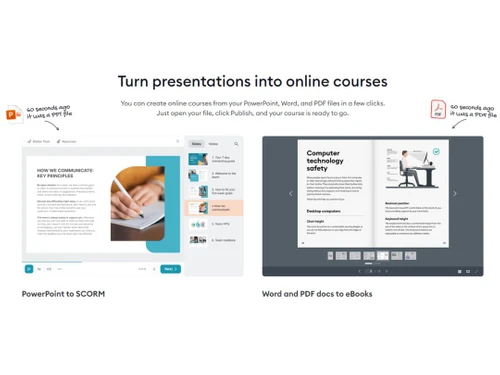
What is iSpring Suite 9.3 Course Management System iSpring Suite 9.3 is an intuitive course creation software that can be used to create interactive assessments, quizzes, learning videos, tutorials, screencasts and more in an efficient manner. Users can test the knowledge of their employees by desig...
See MoreHave you used iSpring Suite 9.3 before?
Share your insights for better experience
Brand: iSpring
Founded Year: 2001
iSpring Solutions is a global software company focused on providing professional eLearning solutions to corporate and educational clients.
This Product is Available Free Forever.
Start instantly with no fees, no subscriptions, and no commitments.
Free Forever Plan
Get started immediately at no cost. Upgrade anytime if your business demand more.
Free Forever Narration Templates Drag & Drop Multiple Branches/Locations Feedbacks Screen Recording Annotations Higher accessibility Color Adjustment Assessments

Watch the demo video to explore key features, real workflows, and how the software fits your business needs.
 Windows
  iOS
iOS  Android MacOS
  Desktop
  Mobile
  Cloud-Based
  Perpetual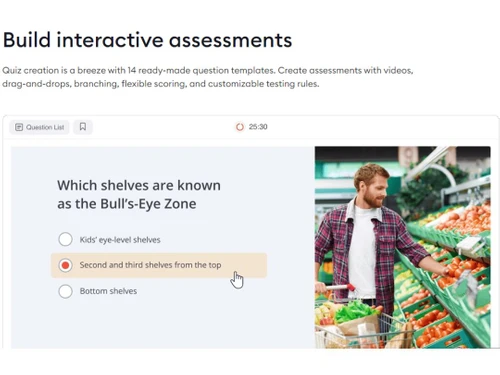
Small Business
Designed for startups and growing businesses
Medium Business
Built for business growth and flexibility
Enterprises
Designed for complex and large-scale business needs
4.7
Out of 5

Overall Rating
Based on
4 Verified Reviews
Rating Breakdown
92% Recommend this Product
Add ReviewUsers generally express high satisfaction with iSpring Suite 9.3, highlighting its ease of use, reliability, and strong customer support. Many appreciate its cost-effectiveness and the built-in features for quiz development. However, some users note limitations such as the need for improved global formatting options and better template management. Overall, the software is well-recommended for course and content authors, though there is room for enhancement in certain areas.
Pros
"This is the place to start in your search for software. TJ recommended 5 apps for our needs, one of which is the one we bought. Highly recommend Techjockey !"
"Ease of use, focus and quality of features, fair pricing and outstanding customer support and engagement."
"Easy to use, stable and reliable, inexpensive, built-it quiz results output, ability to collect and report additional user data"
Cons
"Template storage and reuse could be better. Versioning would be a great next step."
"Needs more global formatting capability, e.g. master slides; inability to send e-mail results to quiz takers; and no built-in PDF certificate"

Aug 15, 2018
Techjockey Verified
“Great idea”
Pros
This is the place to start in your search for software. TJ recommended 5 apps for our needs, one of which is the one we bought. Highly recommend Techjockey !
Cons
N/A
Aug 8, 2018
Techjockey Verified
“Trust these guys they do what they say”
Pros
They provided information I may not have found otherwise. We are considering two of the solutions they recommended, and at least one of them we were unlikely to know about otherwise. The followup calls from the solution providers were a little aggressive--but overall it was a worthwhile exercise and I would recommend Techjockey.
Cons
N/A
Mar 22, 2018
Techjockey Verified
“Best quiz development software”
Pros
Easy to use, stable and reliable, inexpensive, built-it quiz results output, ability to collect and report additional user data
Cons
Needs more global formatting capability, e.g. master slides; inability to send e-mail results to quiz takers; and no built-in PDF certificate

iSpring Suite 9.3
FREE
Desktop
Mobile
Web based
On Premises
Windows
Mac OS

Cuemath
₹ 827
Desktop
Mobile
Web based
On Premises
Windows
Mac OS

Early Steps Academy
Price On Request
Desktop
Mobile
Web based
On Premises
Windows
Mac OS

Learnyst
₹ 3499
Desktop
Mobile
Web based
On Premises
Windows
Mac OS

MIndSmith
Price On Request
Desktop
Mobile
Web based
On Premises
Windows
Mac OS

Pluralsight Skills
₹ 1254
Desktop
Mobile
Web based
On Premises
Windows
Mac OS

LearningStudioAI
Price On Request
Desktop
Mobile
Web based
On Premises
Windows
Mac OS

isEazy
Price On Request
Desktop
Mobile
Web based
On Premises
Windows
Mac OS

CyberMIS eLearning Campus
Price On Request
Desktop
Mobile
Web based
On Premises
Windows
Mac OS

WhiteHat Jr
Price On Request
Desktop
Mobile
Web based
On Premises
Windows
Mac OS

Catalyx
Price On Request
Desktop
Mobile
Web based
On Premises
Windows
Mac OS
(0) Product(s) selected
Starting Price:
$39
Starting Price:
₹1,254 /Month
Starting Price:
$39
Starting Price:
€63

Starting Price:
$116 /Month

Available
Price on Request

Starting Price:
$129

Available
Price on Request

Available
Price on Request

Available
Price on Request

Available
Price on Request
Users can view their created work using the preview mode before going in for final publication to get a view of how they will look within PCs, smartphones and tablets.
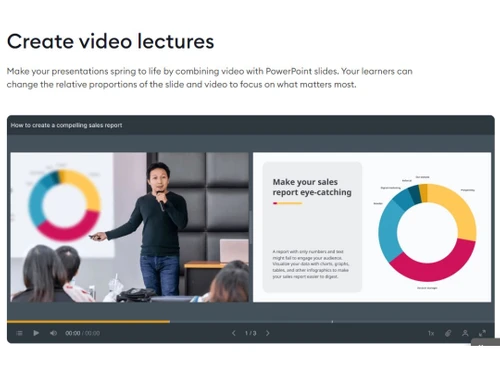
Users can add multiple layers as per their requirements. They can add audio, merge video from multiple tracks or showcase two videos at the same time using the multitrack feature of iSpring Suite 9.3.
Yes, Techjockey does provide online demos of iSpring Suite 9.3. You can send us a demo request as per your preferred time schedule.
You system needs to have: RAM: 4GB of RAM, Processor: 2.0GHz Dual-Core or Quad-Core Processor, Hard Disk: 2GB is needed for installing the software and 20GB for operating it.
Yes, iSpring Suite 9.3 has a dedicated mobile app for Android and iOS operated mobile devices
20,000+ Software Listed
Best Price Guranteed
Free Expert Consultation
2M+ Happy Customers
Terms and Condtions

Users with registered businesses can purchase goods from merchants on the platform to satisfy their business needs. Users are not permitted to utilize any products acquired through the platform for resale, advertising, business, or further distribution.
For each purchase made, users will receive a Tax Invoice (or 'GST invoice') that includes specific details such as:
the GSTIN of the user associated with their registered business, and
the specified Entity Name for their business.
It should be noted that not all products are eligible for GST Invoice. Only the products displayed by participating sellers with the 'GST-based Invoice Available' callout on the product description page would qualify.
Certain goods and services are not eligible to get a GST Invoice, including items with VAS, i.e., Value Added Services (e.g., Total Mobile Protection/Assured Buyback) and those involving an exchange offer at the time of purchase.
Users must ensure the accuracy of the GSTIN, and business entity name provided for the GST Invoice. Requests for corrections into GST Invoice would not be accommodated by Techjockey.com or any Seller, and any issues arising from user-provided information are the sole responsibility of users.
Techjockey.com is not liable for the GST Invoice or any associated input tax credit. To efficiently claim an input tax credit, users should select the registered place of business address as per the GST authority's data and follow the provisions of the GST Act and rules.
To claim an input tax credit, the delivery and billing addresses must match. Furthermore, input tax credits will not be granted if the delivery address and GSTIN on the invoice are from different states. In case of incorrect GST details provided during the order placement, the order will be canceled automatically.