linkedin
ActivePresenter logo
play How to use Activepresenter? - ActivePresenter Demo
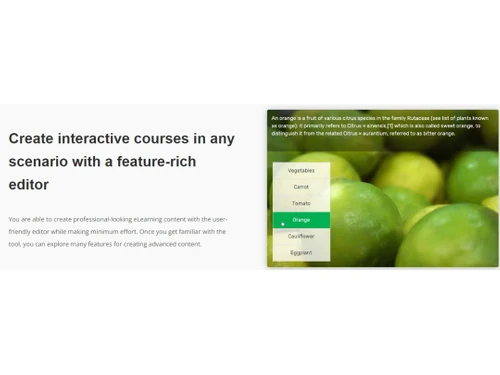
ActivePresenter-feature rich editor
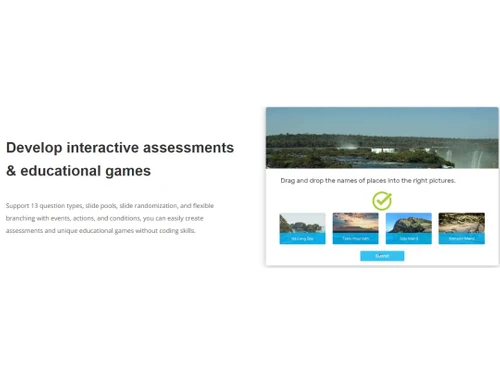
ActivePresenter-Interactive assessments

ActivePresenter

Brand: Atomi Systems

  • 4.1

  • 6 Ratings

ActivePresenter is an eLearning software with screencasting functions. Users can create interactive e-learning videos, presentations, demos and tutorials with ease. The elearning authoring software offers a wide variety of well-designed themes and expressive templates, helping its users to make their projects more attractive and intuitive in real-time. Moreover, by using ActivePresenter users get...

See More

Have you used ActivePresenter before?

Share your insights for better experience

Add a Review

Price Available on Request

Questions about pricing or customization? We’re here to help, just a click away.

100% Genuine
Products
Best Price
Guaranteed
Safe & Secure
Payment
  • Description

  • Pricing

  • Features

  • Specification

  • Review

  • Compare

  • Alternatives

  • FAQ

ActivePresenter Software Overview

What is ActivePresenter?

ActivePresenter is an eLearning software with screencasting functions. Users can create interactive e-learning videos, presentations, demos and tutorials with ease. The elearning authoring software offers a wide variety of well-designed themes and expressive templates, helping its users to make their projects more attractive and intuitive in real-time. Moreover, by using ActivePresenter users get access to a flexible event-action mechanism with which they can define multiple event scenarios as per their viewer’s responses. Further, users get to choose between two differkent themes within ActivePresenter and customize their look as per the requirement.

How can users boost their eLearning authoring with ActivePresenter?

  1. Responsive Design: With ActivePresenter, users get to convert their regular projects into responsive and intuitive videos. The created videos are fully responsive on all platforms. 
  2. Multiple Timelines: Users can create more than one timeline within a single slide to include different animations of a particular object. They can increase the interaction level by using actions to play additional timelines. 
  3. Smart Screen Capture: Users can easily capture a particular action within their screen by simply clicking on the mouse. They can turn the actions into slides and use them to explain a particular subject in a detailed manner.
  4. Microphone and Speaker Recording: Users can add narratives and voiceovers in their videos to enhance their quality.
  5. Webcam Recording: With ActivePresenter, users can record their computer screen and webcam simultaneously or in a separate way, as per their individual needs.  

Pricing of ActivePresenter eLearning Software

ActivePresenter eLearning and screencasting software is available as per the following pricing plans:

  1. ActivePresenter Standard: It is available at a price of ₹ 15,050.37.
  2. ActivePresenter Pro: It is available at a price of ₹ 30,176.37.

To know more about ActivePresenter pricing, you can send us a callback request. Our sales team will provide you all the necessary help.

Compatible Platforms for ActivePresenter E Learning Software

You can get ActivePresenter eLearning software for Windows and MacOS based devices. It also has a dedicated mobile app for Android and iOS operated mobile devices. 

Benefits of using ActivePresenter Elearning Software?

  1. Active Password Protection: Users can protect their projects by securing them with active high-security passwords in an accurate manner.
  2. Advanced Reports: The software monitors the learner’s results via the HTTP method and sends in reports to users at regular intervals. The data within the report are either in JSON or in XML format.
  3. Green Screen Video Effect: Users can integrate live-action footage within their video presentation or layer them as per chroma range to enhance the presentation level of their videos.
  4. Zoom-n-Pan: By using ActivePresenter eLearning software, users get access to a Zoom-n-Pan effect, which guides the viewers to different parts of the screen. Thus making the transition process smoother.
  5. Object Template: Users can create their own object template using different objects or groups of a particular project and reuse them in upcoming projects.
Read more

ActivePresenter Pricing & Plans

Looking for The Right Pricing?

Share your requirements and get a plan built around your business.

  • Define your business needs
  • Get customised pricing
  • Choose features that fit your workflow

Price Available on Request

Get personalised ActivePresenter pricing that fits your needs. Our team will connect with you.

ActivePresenter Features

  • icon_check Screen Capture
    Users can record the media played within their computer screen or capture the actions done by their mouse and add in annotations
  • icon_check Audio Editing
    Users can edit recorded and imported audio files. They can even record two audio files at the same time.
  • icon_check Video Editing
    With ActivePresenter, users can edit videos by simply importing them within the software. They can crop, split, cut, add and make
  • icon_check Image Editing
    By using ActivePresenter eLearning software, users get access to a built-in image editing system which helps them to modify any
  • icon_check Transitions
    ActivePresenter features a wide variety of transition-related effects, enabling its users to add those within their videos and
  • icon_check Animation
    Users can add multiple animations within the slides and videos created by them. They can also create text-based animations.
  • icon_check Changeable Cursor
    The software allows its users to record their mouse movements and transform them into cursor paths. Users can add more effects to
  • icon_check Closed Captions
    With ActivePresenter, users get to add in closed captions to offer more information on a particular topic. This feature is
  • icon_check Blur
    Users can refrain sensitive information from getting disclosed by blurring them within the videos and images.
  • icon_check Text to Speech
    ActivePresenter features an intuitive text to speech engine, using which users can convert any text into a full-fledged speech.
  • icon_check Templates
    Users get access to a wide variety of themes and templates that help them in creating multiple projects in real-time.
  • icon_check Spell Checker
    Working with text has been made easy with the advanced spell checker tool offered by ActivePresenter elearning software.
  • icon_check Quizzes
    The software consists of eleven different types of question schedules, enabling its users to create interactive quiz sessions in
  • icon_check Randomize
    With ActivePresenter, users get to create professional-looking quizzes that have side pools in them. It stops the clients from
  • icon_check Backup
    The software is capable of backing up its user’s data in real-time, ensuring that all data remains safe in case the computer
ActivePresenter Demo Video play icon

Get ActivePresenter Demo

Watch the demo video to explore key features, real workflows, and how the software fits your business needs.

Understand
Key Features
Personal
Demo Insights
Interactive
Demo Support

ActivePresenter Specifications

Supported Platforms
Windows Windows iOS iOS Android Android
Devices
Desktop Desktop Mobile Mobile Tablet Tablet iPad iPad
Deployment
Cloud-Based Cloud-Based Perpetual Perpetual
Suitable For
All Industries
Business Specific
All Businesses
Language
English

Explore the Best Alternative Solutions Similar to Your Business Size and Needs

ActivePresenter Review

4.1

Out of 5

img

Overall Rating

Based on
6 Verified Ratings

Rating Breakdown

  • Features 4.0
  • Value for Money 4.1
  • Ease of Use 3.8
  • Customer Support 4.4

90% Recommend this Product

Add Review

Techjockey Trusted Reviews from Verified Users

No reviews are currently available for ActivePresenter. Discover similar E-Learning Software reviews

  • Cuemath

    4.3

    Whats great - I started my career with 2 kids and today I teach 20 kids. All this in my Cuemath journey from 2018 to 2021. I came across Cu... read more

  • Vedantu

    4.4

    Whats great - The teachers at Vedantu are very friendly and explain everything really well. I feel more confident about tough subjects now. read more

  • Edureka

    4.3

    Whats great - To become industry-ready, you should have both the knowledge and the abilities to carry out tasks, which may be acquired thro... read more

Compare ActivePresenter With other E-Learning Software

Products
Ratings
Pricing
Device Supported
Deployment
Supported Platforms
  • img

    ActivePresenter

  • 4.1

  • Price On Request

  • Desktop

    Mobile

  • Web based

    On Premises

  • Windows

    Mac OS

  • img

    Cuemath

  • 4.2

  • ₹ 827

  • Desktop

    Mobile

  • Web based

    On Premises

  • Windows

    Mac OS

  • img

    Learnyst

  • 4.7

  • ₹ 3499

  • Desktop

    Mobile

  • Web based

    On Premises

  • Windows

    Mac OS

  • img

    MIndSmith

  • 4.5

  • Price On Request

  • Desktop

    Mobile

  • Web based

    On Premises

  • Windows

    Mac OS

  • img

    LearningStudioAI

  • 4.3

  • Price On Request

  • Desktop

    Mobile

  • Web based

    On Premises

  • Windows

    Mac OS

  • img

    iSpring Suite 9.3

  • 4.7

  • Price On Request

  • Desktop

    Mobile

  • Web based

    On Premises

  • Windows

    Mac OS

  • img

    isEazy

  • 4.5

  • Price On Request

  • Desktop

    Mobile

  • Web based

    On Premises

  • Windows

    Mac OS

  • img

    WhiteHat Jr

  • 4.4

  • Price On Request

  • Desktop

    Mobile

  • Web based

    On Premises

  • Windows

    Mac OS

(2) Product(s) selected

ActivePresenter Alternatives

See All ActivePresenter Alternatives

Starting Price:

€63

Available

Price on Request

Available

Price on Request

Articles for ActivePresenter

See All Related Articles

How is the object grouping feature of ActivePresenter useful for its users?

Users can group multiple objects within a slide to create a single object. They can rotate, change, resize or move the objects as per their own choice.

How is the FlexBox feature of ActivePresenter useful for its users?

With FlexBox, users can align and distribute space within the objects for a particular project in an automated way.

Can I get a demo of ActivePresenter E-Learning software?

Yes, Techjockey provides an online demo for ActivePresenter to make interested buyers aware of its functions.

How is the spotlight feature of ActivePresenter useful for its users?

Users can draw their viewer’s attention to a specific area within the screen by using the spotlight feature of ActivePresenter. They can add multiple styles and shapes to the spotlight as per their choice.

Does ActivePresenter have a mobile app?

ActivePresenter app is available for Android and iOS operated mobile devices.

20,000+ Software Listed

Best Price Guranteed

Free Expert Consultation

2M+ Happy Customers

Terms and Condtions

close

Users with registered businesses can purchase goods from merchants on the platform to satisfy their business needs. Users are not permitted to utilize any products acquired through the platform for resale, advertising, business, or further distribution.

For each purchase made, users will receive a Tax Invoice (or 'GST invoice') that includes specific details such as:

  • the GSTIN of the user associated with their registered business, and

  • the specified Entity Name for their business.

It should be noted that not all products are eligible for GST Invoice. Only the products displayed by participating sellers with the 'GST-based Invoice Available' callout on the product description page would qualify.

Certain goods and services are not eligible to get a GST Invoice, including items with VAS, i.e., Value Added Services (e.g., Total Mobile Protection/Assured Buyback) and those involving an exchange offer at the time of purchase.

Users must ensure the accuracy of the GSTIN, and business entity name provided for the GST Invoice. Requests for corrections into GST Invoice would not be accommodated by Techjockey.com or any Seller, and any issues arising from user-provided information are the sole responsibility of users.

Techjockey.com is not liable for the GST Invoice or any associated input tax credit. To efficiently claim an input tax credit, users should select the registered place of business address as per the GST authority's data and follow the provisions of the GST Act and rules.

To claim an input tax credit, the delivery and billing addresses must match. Furthermore, input tax credits will not be granted if the delivery address and GSTIN on the invoice are from different states. In case of incorrect GST details provided during the order placement, the order will be canceled automatically.