linkedin
Kubecost logo
play Kubernetes Cost Optimization and How You Can Save 30% on Your Kubernetes Spend
Kubecost Optimization
Kubecost Monitoring

Kubecost

Brand: Stackwatch

  • 4.6

  • 4 Ratings

Kubecost simplifies cloud cost management, offering granular visibility and optimization tools for Kubernetes deployments.

See More

Have you used Kubecost before?

Share your insights for better experience

Add a Review
Starting Price
$8

View plans

100% Genuine
Products
Best Price
Guaranteed
Safe & Secure
Payment
  • Description

  • Pricing

  • Features

  • Specification

  • Review

  • Compare

  • Alternatives

  • FAQ

Starting at $8

Kubecost Software Overview

What is Kubecost?

Kubecost is one of the leading cost-monitoring and optimization solutions developed for Kubernetes and cloud-native infrastructure. This software is backed by leading software executives and VCs and founded by ex-Google cloud engineers. Kubecost has built-in tools that are intelligent to manage cost, performance, reliability, and other infrastructure challenges.

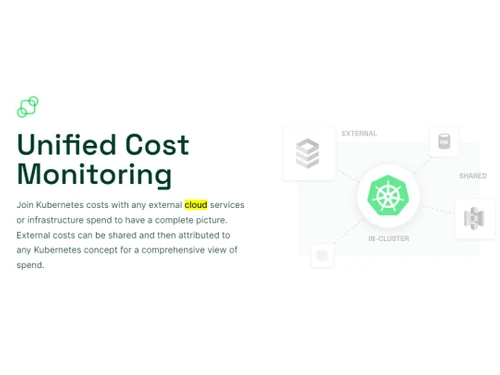
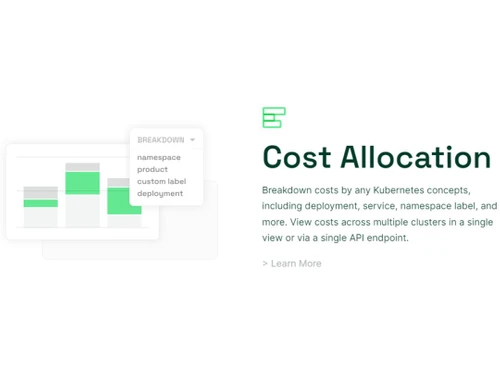
It enables the users to get real-time cost visibility and insights to continuously reduce the cost of cloud expenditure. The software also helps in breaking down costs by deployments, services, and namespaces to gain a comprehensive financial understanding. The platform offers an intuitive dashboard to view costs across multiple clusters through a single view or API endpoint. By joining Kubernetes costs with external cloud services or infrastructure spending, users get a complete picture of expenses.

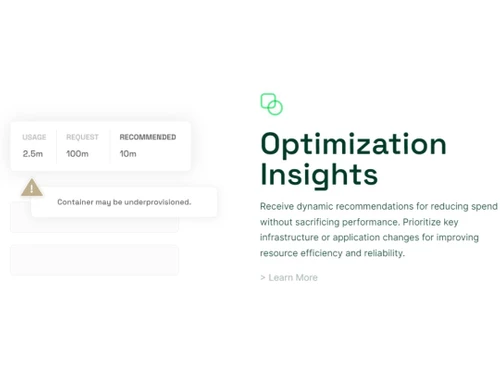
Kubecost reduces expenditure without compromising performance. This software prioritizes infrastructure and application changes for better resource efficiency and reliability. Real-time notifications help detect cost overruns and infrastructure risks before they escalate. Users can seamlessly integrate Kubecost with tools like PagerDuty and Slack to preserve engineering workflows and collaboration. Buy now and experience the power of Kubecost in achieving optimal financial efficiency and improved cloud management for Kubernetes deployments.

Why Choose Kubecost Software?

  • Cost Allocation: Customize cost breakdown for showbacks and chargebacks to namespaces, deployments, and more for clear financial insights.
  • Unified Cost Monitoring: Get a view of Kubernetes and out-of-cluster spending, combining in-cluster and cloud infrastructure costs for visibility.
  • Optimization Insights: Automatically generated personalized cost-saving insights help optimize infrastructure spend by 30-50% or more.
  • Alerts & Governance: Enhance application performance and reliability with customizable alerts and real-time updates for infrastructure management.
  • Complete Cost Visibility: Gain full visibility into allocated spend across Kubernetes concepts, multiple clusters, and cloud providers in one place.
  • Resource Allocation: Efficiently distribute shared costs, allocating expenses across teams, departments, or applications for accurate budgeting.
  • Optimization Without Privacy Concerns: Access cost-saving insights without data sharing to ensure confidentiality while achieving financial optimization.
  • Drilling Down and Optimization: Perform in-depth analysis and achieve efficient resource utilization by drilling down to node and pod levels.

Benefits of Kubecost Cloud Cost Management Software

  • Transparent costs with custom allocation.
  • Unified monitoring for complete visibility.
  • Personalized insights for optimized spending.
  • Proactive alerts for better management.
  • Efficient budgeting across teams.
  • Ensures data privacy during analysis.
  • Streamlined showbacks and chargebacks.
  • Simplified Kubernetes cost optimization.

Kubecost Pricing

Kubecost cloud cost monitoring platform pricing is available on request at techjockey.com.

The pricing model is based on different parameters, including extra features, deployment type, and total users. For further queries related to the product, you can contact our product team and learn more about the pricing and offers.

Read more

Stackwatch Company Details

Founded Year:  2019

Kubecost provides real-time cost visibility and insights for teams using Kubernetes.

Director/Founders Ajay Tripathy, Webb Brown
Company Size 1-100 Employees

Kubecost Pricing & Plans

Pro
Key Features
  • 30-day metric retention
  • Cost reconciliation with cloud bill
  • 100 nodes monitored
Starting at $8
    • Monthly

      Monthly
      Monthly

Key Features

  • 30-day metric retention

  • Cost reconciliation with cloud bill

  • 100 nodes monitored

Kubecost Features

  • icon_check Dashboards
    Get an intuitive Kubecost interface for effortless cost management and insightful data visualization.
  • icon_check Roles & Permissions
    Customize the access control for different professionals and secure collaboration and role-based management.
  • icon_check Data Import/Export
    Seamlessly transfer data across different teams to enhance cost analysis and integrate resources effortlessly.
  • icon_check Data Visualizations
    Clear and insightful visual representation of cost data for a better understanding of integrated Kubernetes resources.
  • icon_check Unified Cost Monitoring
    Consolidated view of Kubernetes and cloud spending for comprehensive cost insights to enhance business operations.
  • icon_check Cost allocation
    Breakdown costs by namespace, deployment, and more for transparent financial insights.
  • icon_check Cost Reduction Optimization
    Personalized recommendations to save 30-50% on infrastructure spend and achieve cost optimization.
  • icon_check Alerts & Governance
    Proactive alerts and customizable governance improve application performance and financial control.
  • icon_check Reporting & Analytics
    Detailed reports and analytics help in informed financial decision-making and better cost management.
Kubecost Demo Video play icon

Get Kubecost Demo

Watch the demo video to explore key features, real workflows, and how the software fits your business needs.

Understand
Key Features
Personal
Demo Insights
Interactive
Demo Support

Kubecost Specifications

Supported Platforms
Ubuntu Ubuntu Windows Windows MacOS MacOS Linux Linux
Devices
Desktop Desktop Mobile Mobile
Deployment
Cloud-Based Cloud-Based
Suitable For
All Industries
Business Specific
All Businesses
Business Size
Small Business Startups Medium Business Enterprises SMBs SMEs MSMBs MSMEs
Customer Support
Email Live Chat Communities
Language
English
Integration
API Integration
Training Resources
Documentation Videos

Explore the Best Alternative Solutions Similar to Your Business Size and Needs

Kubecost Review

4.6

Out of 5

img

Overall Rating

Based on
4 Verified Ratings

Rating Breakdown

  • Features 4.2
  • Value for Money 4.7
  • Ease of Use 4.7
  • Customer Support 4.7

87% Recommend this Product

Add Review

Be the First to Review

This product has no reviews yet. Be the first to leave your feedback.

Add Review

Compare Kubecost With other Cloud Cost Management Tools

Products
Ratings
Pricing
Device Supported
Deployment
Supported Platforms
  • img

    Kubecost

  • 4.6

  • Price On Request

  • Desktop

    Mobile

  • Web based

    On Premises

  • Windows

    Mac OS

  • img

    Finout

  • 4.5

  • Price On Request

  • Desktop

    Mobile

  • Web based

    On Premises

  • Windows

    Mac OS

  • img

    CloudYali

  • 4.1

  • Price On Request

  • Desktop

    Mobile

  • Web based

    On Premises

  • Windows

    Mac OS

  • img

    ProsperOps

  • 4.6

  • Price On Request

  • Desktop

    Mobile

  • Web based

    On Premises

  • Windows

    Mac OS

  • img

    Costimizer

  • 4.2

  • Price On Request

  • Desktop

    Mobile

  • Web based

    On Premises

  • Windows

    Mac OS

  • img

    Cast AI

  • 4.4

  • Price On Request

  • Desktop

    Mobile

  • Web based

    On Premises

  • Windows

    Mac OS

  • img

    Virtana

  • 4.6

  • Price On Request

  • Desktop

    Mobile

  • Web based

    On Premises

  • Windows

    Mac OS

  • img

    CloudKeeper

  • 4.3

  • Price On Request

  • Desktop

    Mobile

  • Web based

    On Premises

  • Windows

    Mac OS

  • img

    Zesty

  • 4.3

  • Price On Request

  • Desktop

    Mobile

  • Web based

    On Premises

  • Windows

    Mac OS

  • img

    CloudCheckr

  • 4.3

  • Price On Request

  • Desktop

    Mobile

  • Web based

    On Premises

  • Windows

    Mac OS

  • img

    nOps

  • 4.3

  • Price On Request

  • Desktop

    Mobile

  • Web based

    On Premises

  • Windows

    Mac OS

(0) Product(s) selected

Kubecost Alternatives

See All Kubecost Alternatives

Available

Price on Request

Starting Price:

$5 /Monthly

Available

Price on Request

Available

Price on Request

Available

Price on Request

Which operating system does the Kubecost Software Support?

Kubecost software is compatible with Windows and macOS operating systems.

Is there any Kubecost App?

The Kubecost app is not available on Android and iOS devices.

What is the deployment type of the Kubecost Software?

The Kubecost system supports web-based deployment.

How much does Kubecost Software cost?

Kubecost pricing is available on request at techjockey.com.

Who are the potential users of the Kubecost?

Kubecost Software can be used by businesses of all sizes and individuals who need strong Cloud Cost Management software.

Is there any free trial or demo for Kubecost?

The Kubecost demo is available for free with techjockey.com.

Is the Kubecost software free?

Kubecost Tool does not offer a free trial.

How can you download the Kubecost software?

Kubecost is a web-based platform. So, you need not download any software or app to use it.

How does Kubecost work?

Kubecost is a cloud management tool designed for Kubernetes users. It offers real-time cost monitoring and analysis, enabling teams to gain visibility into their cloud expenses and make informed decisions to optimize and lower their overall cloud costs.

20,000+ Software Listed

Best Price Guranteed

Free Expert Consultation

2M+ Happy Customers

Terms and Condtions

close

Users with registered businesses can purchase goods from merchants on the platform to satisfy their business needs. Users are not permitted to utilize any products acquired through the platform for resale, advertising, business, or further distribution.

For each purchase made, users will receive a Tax Invoice (or 'GST invoice') that includes specific details such as:

  • the GSTIN of the user associated with their registered business, and

  • the specified Entity Name for their business.

It should be noted that not all products are eligible for GST Invoice. Only the products displayed by participating sellers with the 'GST-based Invoice Available' callout on the product description page would qualify.

Certain goods and services are not eligible to get a GST Invoice, including items with VAS, i.e., Value Added Services (e.g., Total Mobile Protection/Assured Buyback) and those involving an exchange offer at the time of purchase.

Users must ensure the accuracy of the GSTIN, and business entity name provided for the GST Invoice. Requests for corrections into GST Invoice would not be accommodated by Techjockey.com or any Seller, and any issues arising from user-provided information are the sole responsibility of users.

Techjockey.com is not liable for the GST Invoice or any associated input tax credit. To efficiently claim an input tax credit, users should select the registered place of business address as per the GST authority's data and follow the provisions of the GST Act and rules.

To claim an input tax credit, the delivery and billing addresses must match. Furthermore, input tax credits will not be granted if the delivery address and GSTIN on the invoice are from different states. In case of incorrect GST details provided during the order placement, the order will be canceled automatically.