linkedin
Lavender AI logo
play Lavender - AI Cold Email Assistant
lavender ai coach
lavender ai email

Lavender AI

Brand: Lavender

  • 4.3

  • 5 Ratings

Streamline your inbox with intelligent automation and effortless organization, enhancing productivity and peace of mind.

See More

Have you used Lavender AI before?

Share your insights for better experience

Add a Review
Starting Price
$29

View plans

100% Genuine
Products
Best Price
Guaranteed
Safe & Secure
Payment
  • Description

  • Pricing

  • Features

  • Specification

  • Review

  • Compare

  • Alternatives

  • FAQ

Starting at $29

Lavender AISoftware Overview

What is Lavender AI?

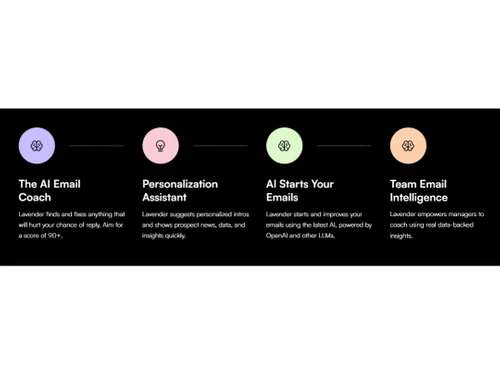
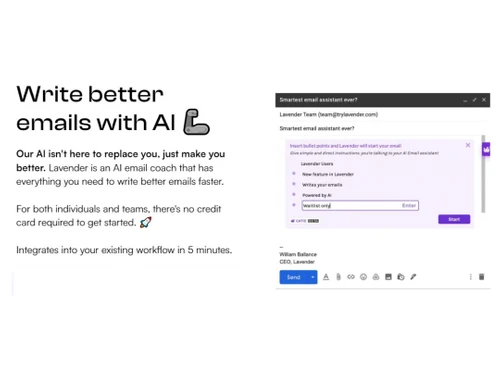
Lavender AI is an innovative AI-powered writing assistant designed to help individuals and businesses create effortlessly high-quality, engaging, personalized content. With its advanced natural language processing capabilities, Lavender AI helps users write better emails, reports, articles, and other written content, saving time and improving productivity. Whether you're a professional seeking to enhance your business communication, a student looking to improve your writing skills, or a content creator seeking inspiration, Lavender AI is the perfect tool to elevate your writing.

Harnessing the power of artificial intelligence, Lavender AI analyzes your writing style, tone, and preferences to generate personalized suggestions and recommendations. It helps you craft clear, concise, impactful messages that resonate with your audience. Lavender AI's user-friendly interface and intuitive design make it easy for anyone to use, regardless of their writing experience or technical expertise.

Why Choose Lavender AI Software?

  • Enhance Your Writing: Improve your writing skills and produce compelling content that engages your audience and achieves your desired outcomes.
  • Save Time and Effort: Automate repetitive writing tasks and generate high-quality content quickly, freeing up your time for more strategic activities.
  • Personalize Your Communication: Craft personalized messages that resonate with your recipients, building stronger relationships and driving better results.
  • Improve Team Collaboration: Foster effective team communication by providing real-time feedback and suggestions, ensuring everyone is on the same page.
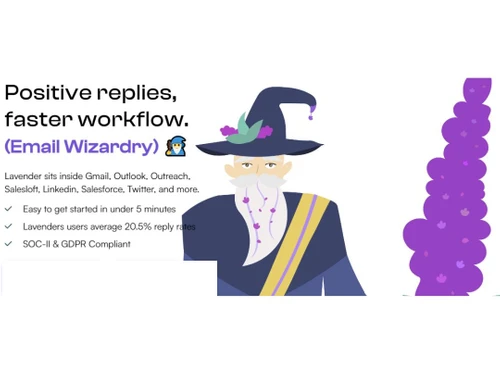
  • Stay Compliant and Secure: Trust in Lavender AI's SOC-II & GDPR compliance, ensuring the security and privacy of your data.

Benefits of Lavender AI Platform

  • Write with Confidence: Gain the confidence to write effectively and persuasively, knowing that Lavender AI is your trusted writing companion.
  • Boost Your Productivity: Save time and increase your productivity by generating high-quality content quickly and efficiently.
  • Elevate Your Communication: Enhance your communication skills by crafting clear, concise, and impactful messages that leave a lasting impression.
  • Drive Better Results: Achieve your desired outcomes by creating content that resonates with your audience and drives engagement and conversions.
  • Gain Valuable Insights: Track your performance and ROI to see how Lavender AI is helping you improve your writing and achieve your goals.

Pricing of Lavender AI

Lavender AI pricing starts from $29 at techjockey.com.

The price may vary based on customization, additional features required, the number of users, and the deployment type. Contact Lavender AI for subscription-related details and to avail of offers on premium packages.

Read more

Lavender Company Details

Founded Year:  2020

Lavender is your AI Email Coach.

Director/Founders Casey Corvino, Will Allred, William Ballance
Company Size 1-100 Employees

Lavender AI Pricing & Plans

Starter
Starting at $29
    • Licenses

      Licenses
      Licenses
    • Monthly

      Monthly
      Monthly

Key Features

  • Unlimited emails

  • Unlimited personalization

  • Unlimited AI recommendations

  • Mobile optimization

  • Multi-inbox support

Individual Pro
Starting at $49
    • Licenses

      Licenses
      Licenses
    • Monthly

      Monthly
      Monthly

Key Features

  • Everything in Starter

  • Unlimited everything

  • Integrations

  • Priority support

Team Plan
Starting at $99
    • Seat

      Seat
      Seat
    • Monthly

      Monthly
      Monthly

Key Features

  • Starter, Growth, & Enterprise Plans available

  • Aggregated Email Analytics

  • Accelerated Dynamic Scoring

  • Proactive Customer Success

  • Proactive Customer Success

Lavender AI Features

Core Writing & Editing Tools

  • icon_check Grammar & Punctuation Check
    Corrects grammar and punctuation errors for clarity.
  • icon_check Readability Score
    Rates content readability for accessibility.
  • icon_check Spelling & Proofing
    Detects and corrects spelling errors and inconsistencies.
  • icon_check Paraphrasing
    Rephrase sentences to enhance clarity and style.
  • icon_check Content Formatting
    Customizes text formatting for documents and social media.
  • icon_check File Upload Management
    Allows document uploads for analysis and content enhancement.
  • icon_check Version History
    Tracks changes, allowing easy reversion to past versions.
  • icon_check Tone & Style Adjustment
    Adjusts tone to fit formal, casual, or persuasive needs.
  • icon_check Content Scoring
    Scores content for engagement potential and SEO.
  • icon_check Vocabulary Enhancement
    Suggests synonyms and word choices to enrich vocabulary and style.

Content Generation

  • icon_check Audience Targeting
    Adapts tone and style for different audience profiles.
  • icon_check Blog Post Creation
    Generates complete, structured blog posts from prompts.
  • icon_check Social Media Posts
    Creates optimized posts for various social media platforms.
  • icon_check Marketing Copy
    Writes engaging promotional content for ads and landing pages.
  • icon_check Headlines & Taglines
    Suggests catchy headlines and taglines for branding.
  • icon_check SEO-Optimized Content
    Integrates keywords for better search engine ranking.
  • icon_check Content Ideas
    Provides topic ideas for articles and blog posts.
  • icon_check Topic Clustering
    Organizes related topics to aid in content strategy.
  • icon_check Custom Templates
    Offers pre-made templates for various content types.
  • icon_check Automated Outlining
    Generates structured outlines for long-form content.
  • icon_check Video Script Generation
    Creates structured, engaging scripts tailored for video content.

Collaboration

  • icon_check Team Collaboration
    Allows multiple users to edit and comment in real-time.
  • icon_check API Access
    Enables access to core features via API for flexibility.
  • icon_check Export & Sharing Options
    Easily exports and shares content in various formats.

Security and Compliance

  • icon_check Data Encryption
    Protects data with advanced encryption both at rest and in transit to prevent unauthorized access.
  • icon_check GDPR Compliant
    Adheres to EU data privacy regulations, safeguarding user rights and personal information.
  • icon_check SOC 2 Compliance
    Ensures secure, reliable, and confidential handling of customer data per industry standards.
  • icon_check User Access Management
    Manages user permissions and access levels.
  • icon_check AI Act Compliance
    Aligns with EU AI regulations to ensure ethical and risk-appropriate AI deployment.
  • icon_check Bias Mitigation
    Detects and reduces biases in AI-generated content, promoting fairness and inclusivity.
  • icon_check Audit Logs
    Tracks user activity and system changes for transparent monitoring and compliance checks.

Integrations

  • icon_check Third Party Integration
    Easily connects with external tools for enhanced functionality
  • icon_check Browser Extension
    Provides AI assistance directly in the browser.
  • icon_check API Integration
    Connects with third-party tools for extended functionality.
  • icon_check Google Workspace Integration
    Syncs with Google Docs, Sheets, and Drive.
  • icon_check Microsoft Office Integration
    Integrates with Word and other Office apps.
  • icon_check Learning Management System (LMS) Integration
    Connects with educational platforms.
  • icon_check CMS Integration
    Direct publishing to content management systems.

Language Support

  • icon_check Multilingual Writing
    Enables content creation in multiple languages.
  • icon_check Translation Assistance
    Translates content while retaining tone and context.
  • icon_check Localization Suggestions
    Adapts content for cultural relevance in translations.

Analytics & Reporting

  • icon_check Performance Analytics
    Tracks content metrics to measure effectiveness.
  • icon_check Content Optimization Suggestions
    Provides actionable insights for improvement.
  • icon_check Predictive Analysis
    Uses data insights to forecast trends and improve content strategy

AI Capabilities

  • icon_check Plagiarism Detection
    Scans text for originality, ensuring unique content.
  • icon_check Multi-Model Support
    Switch between different language models for varied output.
  • icon_check Citation Generation
    Automatically generates citations for references.
  • icon_check AI Detection
    Identifies AI-generated content for transparency.
  • icon_check Summarisation
    Condenses long text into clear, concise summaries.
  • icon_check Custom Prompts
    Allows personalized prompts for generating tailored content outputs.
  • icon_check Citation Suggestions
    Provides source suggestions for accurate citations.
  • icon_check AI Content Generation
    Creates detailed, engaging content with minimal input using AI-driven models.

Administrative Features

  • icon_check API Access
    Enables access to core features via API for flexibility.
  • icon_check Role-Based Access Control (RBAC)
    Sets access based on user roles.
  • icon_check User Access Management
    Manages user permissions and access levels.
  • icon_check Team Management
    Tracks team activity and assigns roles.
  • icon_check Data Loss Prevention
    Protects sensitive data from unauthorized access.
Lavender AI Demo Video play icon

Get Lavender AI Demo

Watch the demo video to explore key features, real workflows, and how the software fits your business needs.

Understand
Key Features
Personal
Demo Insights
Interactive
Demo Support

Lavender AI Specification

Supported Platforms
Ubuntu Ubuntu Windows Windows MacOS MacOS Linux Linux
Devices
Desktop Desktop
Deployment
Web-Based Web-Based
Suitable For
All Industries
Business Specific
All Businesses
Business Size
Small Business Startups Medium Business Enterprises
Customer Support
Email Live Chat Communities
Language
English
Training Resources
Videos
AI Features
AI Integrated

Explore the Best Alternative Solutions Similar to Your Business Size and Needs

Lavender AI Review

4.3

Out of 5

img

Overall Rating

Based on
5 Verified Ratings

Rating Breakdown

  • Features 4.2
  • Value for Money 4.3
  • Ease of Use 4.5
  • Customer Support 4.4

92% Recommend this Product

Add Review

Techjockey Trusted Reviews from Verified Users

No reviews are currently available for Lavender AI. Discover similar AI Writing Assistants reviews

  • WordAi

    4.8

    Whats great - I've been using WordAi for the last 2 months. Being a professional blogger and running my own business, I've seen the need fo... read more

  • Hushl

    4.6

    Whats great - Sandbox feedback loop—community suggestions elevate content read more

  • LongShot

    4.4

    Whats great - Compared to many AI writing tools with fewer features, LongShot gives great value. SEO tools, fact checking, niche templates ... read more

Compare Lavender AI With other AI Writing Assistants

Products
Ratings
Pricing
Device Supported
Deployment
Supported Platforms
  • img

    Lavender AI

  • 4.3

  • Price On Request

  • Desktop

    Mobile

  • Web based

    On Premises

  • Windows

    Mac OS

  • img

    Rayo

  • 4.5

  • Price On Request

  • Desktop

    Mobile

  • Web based

    On Premises

  • Windows

    Mac OS

  • img

    Paperpal

  • 4.2

  • Price On Request

  • Desktop

    Mobile

  • Web based

    On Premises

  • Windows

    Mac OS

  • img

    Type Pulse

  • 4.3

  • Price On Request

  • Desktop

    Mobile

  • Web based

    On Premises

  • Windows

    Mac OS

  • img

    Quillbot AI

  • 4.6

  • Price On Request

  • Desktop

    Mobile

  • Web based

    On Premises

  • Windows

    Mac OS

  • img

    Junia AI

  • 4.3

  • Price On Request

  • Desktop

    Mobile

  • Web based

    On Premises

  • Windows

    Mac OS

  • img

    HIX AI Writer

  • 4.2

  • ₹ 1081

  • Desktop

    Mobile

  • Web based

    On Premises

  • Windows

    Mac OS

  • img

    Text Cortex

  • 4.4

  • Price On Request

  • Desktop

    Mobile

  • Web based

    On Premises

  • Windows

    Mac OS

  • img

    Shopia

  • 4.3

  • Price On Request

  • Desktop

    Mobile

  • Web based

    On Premises

  • Windows

    Mac OS

  • img

    SEO AI

  • 4.3

  • Price On Request

  • Desktop

    Mobile

  • Web based

    On Premises

  • Windows

    Mac OS

  • img

    Yarnit

  • 4.5

  • Price On Request

  • Desktop

    Mobile

  • Web based

    On Premises

  • Windows

    Mac OS

(0) Product(s) selected

Lavender AI Alternatives

See All Lavender AI Alternatives

Starting Price:

₹2,596 /Month

Starting Price:

$34 /Month

Starting Price:

$49 /Month

Starting Price:

$49 /month

Starting Price:

$29 /Month

Starting Price:

$25 /Month

Starting Price:

$13 /Month

Starting Price:

£2 /Month

Articles for Lavender AI

See All Related Articles

Which operating systems support Lavender AI?

Lavender AI supports Windows, macOS, and Linux operating systems.

Is there a Lavender AI app?

Lavender AI is not available for iOS and Android devices.

What is the deployment type of Lavender AI?

Lavender AI is a web-based application.

Who are the potential users of Lavender AI?

Lavender AI is designed for businesses like media houses, news and marketing firms, content-based websites, and ecommerce portals. It helps them improve their email communication by generating better emails, checking for plagiarism, and providing personalized recommendations.

Is there any free trial or demo for Lavender AI?

Yes, a free demo of Lavender AI is available at techjockey.com.

Is Lavender AI free?

Lavender AI is not available for free. You can connect with our experts to learn more about the pricing plans.

How can you download Lavender AI?

There is no need for software installation since Lavender AI supports web-based deployment. So, just open the setup wizard and get started.

How does Lavender AI work?

Lavender AI helps businesses improve their email communication. It uses artificial intelligence to generate better emails, check for plagiarism, and provide personalized recommendations.

20,000+ Software Listed

Best Price Guranteed

Free Expert Consultation

2M+ Happy Customers

Terms and Condtions

close

Users with registered businesses can purchase goods from merchants on the platform to satisfy their business needs. Users are not permitted to utilize any products acquired through the platform for resale, advertising, business, or further distribution.

For each purchase made, users will receive a Tax Invoice (or 'GST invoice') that includes specific details such as:

  • the GSTIN of the user associated with their registered business, and

  • the specified Entity Name for their business.

It should be noted that not all products are eligible for GST Invoice. Only the products displayed by participating sellers with the 'GST-based Invoice Available' callout on the product description page would qualify.

Certain goods and services are not eligible to get a GST Invoice, including items with VAS, i.e., Value Added Services (e.g., Total Mobile Protection/Assured Buyback) and those involving an exchange offer at the time of purchase.

Users must ensure the accuracy of the GSTIN, and business entity name provided for the GST Invoice. Requests for corrections into GST Invoice would not be accommodated by Techjockey.com or any Seller, and any issues arising from user-provided information are the sole responsibility of users.

Techjockey.com is not liable for the GST Invoice or any associated input tax credit. To efficiently claim an input tax credit, users should select the registered place of business address as per the GST authority's data and follow the provisions of the GST Act and rules.

To claim an input tax credit, the delivery and billing addresses must match. Furthermore, input tax credits will not be granted if the delivery address and GSTIN on the invoice are from different states. In case of incorrect GST details provided during the order placement, the order will be canceled automatically.