 USA
USA UAE
UAESmall Business
Designed for startups and growing businesses


See More





Brand: Leonardo.ai
A complete AI image generator helps in creating immersive images, providing tools for image creation, motion capture and many more
See MoreHave you used Leonardo AI before?
Share your insights for better experience
Brand: Leonardo.ai
Founded Year: 2022
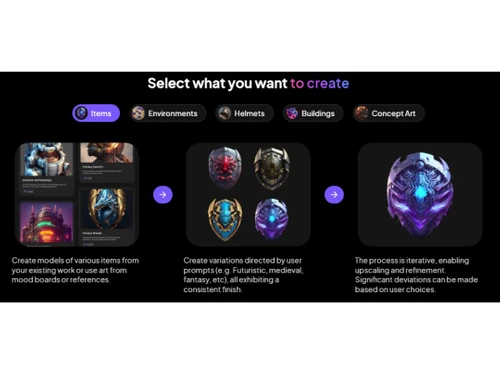
Leonardo AI is a generative AI platform for content creation, offering features like the Alchemy Refiner and an image generator app.
Image Generation and Processing
 Real-time Preview Text-to-Image Generation Image-to-Image Transformation Multi-Layer Image Processing High-Resolution Output Batch Generation Preset Styles Drag and Drop Real-Time Rendering
 Editing and Customization Tools
Style Transfer Background Removal AI Editor Adjustable Parameters Layer Control Realistic Object Generation Resolution Control Image Upscaling Object Removal Text Overlay Image Tiling Denoising Style Adaptation 3D Effects Content Filters Image Weights Prompt Control and Enhancements
Prompt Flexibility Prompt Editing Prompt Enhancer Prompt Matrix Negative Prompt Seed Real-Time Generation Prompt Sensitivity Model and AI Capabilities
Multi-Model Support Fine Tuning Model Merging Collaboration and Sharing
Prompt Libraries Custom Templates Collaboration Tools Image Sharing Branding and Commercial Use
Data Privacy Commercial Rights Brand Kit Integration Integration Supported
API Integration Cloud Storage and Collaboration Tools Integration 3D Modeling Software Integration Game Engines Integration Content Management Systems (CMS) Integration Design and Editing Software Integration E-Commerce Platforms Integration Video Editing Tools Integration Animation Tools Integration NFT Marketplaces Plugin & Extensions 

Watch the demo video to explore key features, real workflows, and how the software fits your business needs.
 Ubuntu
  Windows
  Android
  MacOS
MacOS  Linux
Linux  Desktop
  Mobile
  Tablet
  iPad
iPad  Web-Based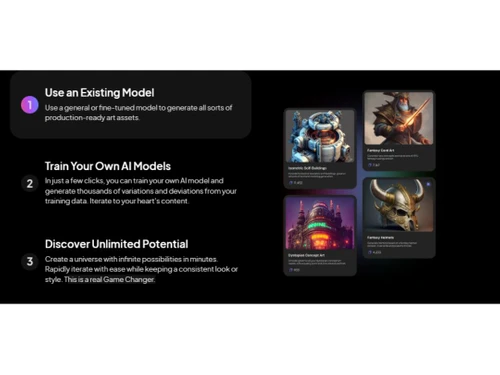
Small Business
Designed for startups and growing businesses
Medium Business
Built for business growth and flexibility
Enterprises
Designed for complex and large-scale business needs
3.8
Out of 5

Overall Rating
Based on
18 Verified Reviews
Rating Breakdown
82% Recommend this Product
Add ReviewUsers generally appreciate Leonardo AI for its ability to generate high-quality images and provide creative flexibility through features like HD output, style transfer, and text-to-image capabilities. Many find the platform user-friendly, catering to both beginners and experienced designers. However, common complaints include the time-consuming nature of generating high-resolution images and limited customization options for certain features. While the overall sentiment is positive, some users note a learning curve associated with exploring all available functionalities.
Pros
"I’ve been impressed with the HD Output feature of Leonardo AI. It allows me to generate high-resolution images."
"Leonardo provides the ability to make small adjustments after the image is generated. It allows you to tweak the generated images until they match your vision more closely."
"I’ve been using Leonardo AI’s Image Tiling feature, and it’s perfect for creating patterns for backgrounds and designs."
Cons
"One challenge is that it can take some time to explore all the features. "
"There aren’t many customization options when it comes to adjusting the details of the patterns. "
"Sometimes, the output can be a little off from what you had in mind. It may need to try different words or prompts to get closer to your vision."


Sep 3, 2024
Techjockey Verified
“Offers HD Output for my projects”
Now, I’ve been able to generate HD visuals for my presentations and print materials. I highly recommend this software.
Pros
I’ve been impressed with the HD Output feature of Leonardo AI. It allows me to generate high-resolution images.
Cons
Generating high-resolution images is a bit time consuming.
Reason to switch
I needed something that could generate high-resolution images for my professional use.
Sep 3, 2024
Techjockey Verified
“With Leonardo ai you can get the result you want”
I’ve used it to fix minor issues in my images, like color balance or composition.
Pros
Leonardo provides the ability to make small adjustments after the image is generated. It allows you to tweak the generated images until they match your vision more closely.
Cons
Loving the software and the ease, nothing to dislike.
Reason to switch
I needed more control over the fine details of my images, and Leonardo AI provided just that.
Jul 15, 2024
Techjockey Verified
“Style Transfer Adds on a beautiful Touch to Images”
With the Style Transfer feature, I’ve been able to make some unique images. It’s a great way to add artistic flair to simple images without doing too much work.
Pros
The Style Transfer feature on Leonardo AI is one of my favorites. It allows me to take a regular image and apply artistic styles to it, transforming something ordinary into something creative.
Cons
Some styles don’t apply as smoothly as I’d like.
Reason to switch
I wanted something with more options and the ability to apply styles to images without needing a separate app.

Leonardo AI
Price On Request
Desktop
Mobile
Web based
On Premises
Windows
Mac OS

Remaker AI
Price On Request
Desktop
Mobile
Web based
On Premises
Windows
Mac OS

Deepnude
Price On Request
Desktop
Mobile
Web based
On Premises
Windows
Mac OS

Adobe Firefly
Price On Request
Desktop
Mobile
Web based
On Premises
Windows
Mac OS

DeepSukebe
Price On Request
Desktop
Mobile
Web based
On Premises
Windows
Mac OS

Facet AI
Price On Request
Desktop
Mobile
Web based
On Premises
Windows
Mac OS

SUPERMACHINE
Price On Request
Desktop
Mobile
Web based
On Premises
Windows
Mac OS

GoEnhance AI
Price On Request
Desktop
Mobile
Web based
On Premises
Windows
Mac OS

DiffusionBee
Price On Request
Desktop
Mobile
Web based
On Premises
Windows
Mac OS

Getimg AI
₹ 850
Desktop
Mobile
Web based
On Premises
Windows
Mac OS

Character AI
Price On Request
Desktop
Mobile
Web based
On Premises
Windows
Mac OS
(0) Product(s) selected
Starting Price:
$30 /Month
Starting Price:
$19 /Month
Starting Price:
$10 /Month
Available
Price on Request

Available
Price on Request

Starting Price:
$9 /Month

Available
Price on Request

Starting Price:
$5
Starting Price:
$12 /Month

Available
Price on Request




Yes, Leonardo AI is completely free to use.
Yes, there is a Leonardo AI app available on Google Play Store.
You can use Leonardo AI without Discord.
Leonardo AI price in India starts at $12 at techjockey.com, please request a call back for subscription-related details and to avail of offers on premium packages.
Leonardo AI is typically used by video editors.
It does not cost any money. However, there are some limitations on the number of images you can generate per day. You get 250 image credits per day.
Leonardo AI offers a free trial. Please request a call back for subscription-related details and to avail yourself of offers on premium packages.
For Leonardo AI installation is not required, as it is web-based. Just open the Setup Wizard to get started.
Leonardo AI helps with building your dream game with ease. It also helps in creating stunning visuals that leave a lasting impression. With Leonardo AI, you can simplify your workflow with easy drag-and-drop functionality. So, get ready to step into a whole new world with immersive VR experiences.
Leonardo AI excels in creating unique artworks, creating prototypes, enhancing creativity, and personalizing pre-existing images.
Yes, Leonardo is a user-friendly software that doesn’t require any prior coding knowledge to generate images. Users can start using the software from point zero with ease.
Yes, users can delete their generated images. However, if a user has trained a well-liked public model, then the changes made are permanent and cannot be changed. In this case, users must train their models in private and make alterations within them as per their needs.
AlbedoBaseXL and AnimeXL are some of the superior choices for creating models for logos in Leonardo AI. As most logos are square, select a square ratio, set the size to either 768×768 or 1024×1024 when using XL models, and get the best result.
Leonardo AI usually allows the commercial use of the pictures it makes, but you need to make sure there aren’t any rules about how you use them or if you need to give credit. Look at their rules about using the images, especially if you plan to sell them or put them on products.
0 1
To make AI art in a certain style on Leonardo AI, you can train the platform using images that show that style. The platform lets you add reference images so the AI can learn how to make similar art in that style.
0 0
Make sure the Leonardo AI photos you use in an Amazon KDP book comply with the platform's copyright and quality standards. Usually, commercial use of Leonardo AI photos is permitted. However, ensure that the platform’s terms and conditions are met. During the KDP publishing process, simply download them and add them to your manuscript file.
4 4
Using specific prompts like 'portrait of a person,' you may use Leonardo AI to create a portrait. You can even define the lighting, angle and style of the image such as digital art or oil painting. You can modify the output by giving more precise inputs to alter the background, mood, or facial traits.
0 0
The first step in creating AI art of a girl in Leonardo AI is to describe the desired appearance, style, and attributes using text prompts. By adjusting basic factors such as the setting, the artist's emotion, or the style of the artwork, you can improve the final product. Based on your input, Leonardo's technology then creates versions, which you may subsequently modify.
0 0
20,000+ Software Listed
Best Price Guranteed
Free Expert Consultation
2M+ Happy Customers
Terms and Condtions

Users with registered businesses can purchase goods from merchants on the platform to satisfy their business needs. Users are not permitted to utilize any products acquired through the platform for resale, advertising, business, or further distribution.
For each purchase made, users will receive a Tax Invoice (or 'GST invoice') that includes specific details such as:
the GSTIN of the user associated with their registered business, and
the specified Entity Name for their business.
It should be noted that not all products are eligible for GST Invoice. Only the products displayed by participating sellers with the 'GST-based Invoice Available' callout on the product description page would qualify.
Certain goods and services are not eligible to get a GST Invoice, including items with VAS, i.e., Value Added Services (e.g., Total Mobile Protection/Assured Buyback) and those involving an exchange offer at the time of purchase.
Users must ensure the accuracy of the GSTIN, and business entity name provided for the GST Invoice. Requests for corrections into GST Invoice would not be accommodated by Techjockey.com or any Seller, and any issues arising from user-provided information are the sole responsibility of users.
Techjockey.com is not liable for the GST Invoice or any associated input tax credit. To efficiently claim an input tax credit, users should select the registered place of business address as per the GST authority's data and follow the provisions of the GST Act and rules.
To claim an input tax credit, the delivery and billing addresses must match. Furthermore, input tax credits will not be granted if the delivery address and GSTIN on the invoice are from different states. In case of incorrect GST details provided during the order placement, the order will be canceled automatically.



