linkedin
Linear logo
play Intro to Linear
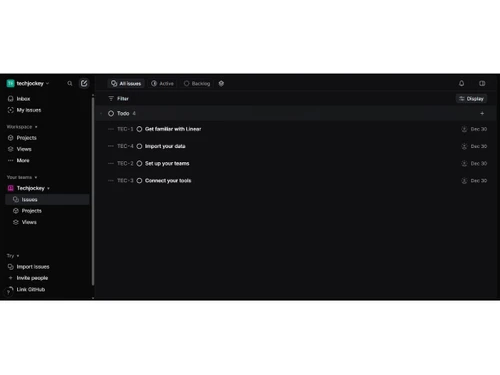
Linear-issues
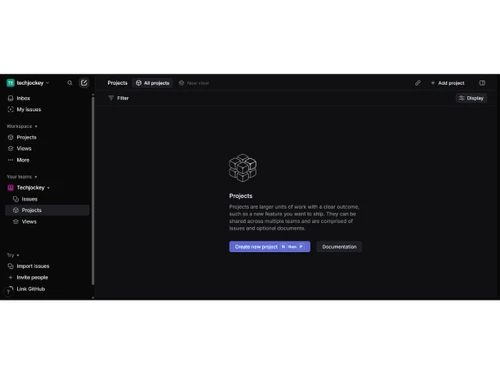
Linear-projects

Linear

Brand: Linear Orbit

  • 4.2

  • 4 Ratings

A fast and intuitive project management and issue-tracking tool for software teams.

See More

Have you used Linear before?

Share your insights for better experience

Add a Review
Starting Price
$12

View plans

100% Genuine
Products
Best Price
Guaranteed
Safe & Secure
Payment
  • Description

  • Pricing

  • Features

  • Specification

  • Review

  • FAQ

Starting at $12

Linear Software Overview

What is Linear?

Linear is a fast and modern project management software designed especially for software and product teams to plan, organize, and build work in one place.

It helps teams track bugs, feature requests, tasks, and sprints so everyone knows what to work on and when. Linear also supports roadmaps and project planning to align team goals and priorities easily.

Its clean interface and quick keyboard shortcuts make work faster and less cluttered. The platform integrates with tools like GitHub, Slack, and Figma so teams can work without switching apps.

Linear offers real-time updates and collaboration, helping everyone stay in sync. It's available on the web and mobile for work on the go.

Why Choose Linear Software?

  • Fast Performance: Linear is designed to be extremely fast, making task and issue management seamless.
  • Clean Interface: Its intuitive and minimalistic design reduces clutter and enhances usability.
  • Efficient Task Management: Easily create, assign, and prioritize tasks for smooth project workflows.
  • Powerful Issue Tracking: Track bugs and issues efficiently with clear visibility for teams.
  • Sprint Planning: Plan and manage agile sprints effectively with built-in sprint features.
  • Roadmap Visualization: Visualize product roadmaps to keep everyone aligned on project goals.
  • Real-Time Collaboration: Collaborate with team members in real time, reducing delays and miscommunication.
  • Seamless Integrations: Integrates with GitHub, Slack, Figma, and other popular tools.
  • Automated Workflows: Automate repetitive tasks to save time and improve productivity.
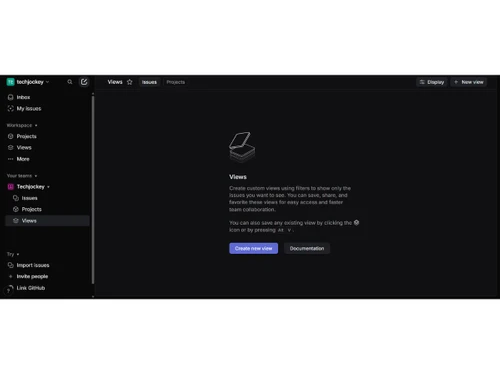
  • Custom Views: Organize tasks with customizable views like lists, boards, and timelines.
  • Team Transparency: Provides visibility across teams so everyone knows project status and priorities.

Benefits of Linear Software

  • Cross-Platform Access: Accessible via web, desktop, and mobile apps for flexibility.
  • Fast Issue Creation: Quickly create issues without interrupting workflow or focus.
  • Status Tracking: Track task progress with clear status indicators for better management.
  • High Productivity: Optimized for speed and efficiency, helping teams accomplish more.
  • Easy Prioritization: Prioritize tasks easily to focus on what matters most.
  • Notifications & Updates: Stay informed with real-time notifications and activity updates.
  • Collaboration Across Teams: Supports coordination between development, design, and management teams.
  • Scalable for Teams: Suitable for small startups to large enterprises with growing needs.
  • Reliable Support: Offers customer support and resources to assist teams when needed.

Linear Pricing

Linear price starts at USD 12 at techjockey.com. The pricing model is based on different parameters, including extra features, deployment type, and the total number of users. For further queries related to the product, you can contact our product team and learn more about the pricing and offers.

Read more

Linear Orbit Company Details

Founded Year:  2019

Linear is a purpose-built tool for tracking issues, managing sprints, and organizing project roadmaps in software development teams.

Director/Founders Jori Lallo, Karri Saarinen, Tuomas Artman
Company Size 1-100 Employees

Linear Pricing & Plans

Basic
Starting at $12
    • Users

      Users
      Users
    • Monthly

      Monthly
      Monthly

Key Features

  • 5 teams

  • Unlimited teams

  • Unlimited file uploads

  • Admin roles

Business
Starting at $18
    • Users

      Users
      Users
    • Monthly

      Monthly
      Monthly

Key Features

  • Unlimited teams

  • Private teams and guests

  • Triage Intelligence

  • Linear Insights

Linear Features

  • icon_check Issue Tracking Tools
    Create, assign, prioritize, and track bugs, tasks, and feature requests in a fast, unified workflow.
  • icon_check Project Management
    Organize work into structured projects with clear ownership, scope definition, and progress tracking.
  • icon_check Sprint Management
    Plan work using cycles (sprints) with automatic rollover of unfinished issues to future cycles.
  • icon_check Agile Roadmap Planning
    Visualize long-term product plans, milestones, and priorities with timeline-based roadmaps.
  • icon_check Workflow Automation
    Automate issue state changes, assignments, and transitions to reduce manual operational effort.
  • icon_check Team Management
    Manage multiple teams with separate workflows, backlogs, cycles, and access controls.
  • icon_check Custom Workflows
    Define custom issue states and workflows tailored to engineering and product team processes.
  • icon_check GitHub & GitLab Integration
    Automatically sync issues with commits, pull requests, and deployments from Git platforms.
  • icon_check Slack Integration
    Receive real-time notifications and create or update issues directly from Slack conversations.
  • icon_check Priority & Label Management
    Use priorities, labels, and filters to organize issues and focus on high-impact work.
  • icon_check Search and Filter
    Quickly find issues using powerful filters across status, assignee, labels, and timelines.
  • icon_check Reporting & Analytics
    Track team performance, cycle progress, lead time, and workflow efficiency with insights dashboards.
  • icon_check Access Control & Permissions
    Control user roles, team access, and visibility to maintain secure project collaboration.
  • icon_check Activity Logs & Audit Trail
    Maintain a complete history of issue updates, comments, and workflow changes.
Linear Demo Video play icon

Get Linear Demo

Watch the demo video to explore key features, real workflows, and how the software fits your business needs.

Understand
Key Features
Personal
Demo Insights
Interactive
Demo Support

Linear Specifications

Supported Platforms
Windows Windows iOS iOS Android Android MacOS MacOS
Devices
Desktop Desktop Mobile Mobile
Deployment
Cloud-Based Cloud-Based
Suitable For
All Industries
Business Specific
All Businesses
Business Size
Small Business Medium Business Enterprises
Customer Support
Email Communities
Language
English
Integration
API Integration
Training Resources
Videos

Linear Review

4.2

Out of 5

img

Overall Rating

Based on
4 Verified Ratings

Rating Breakdown

  • Features 4
  • Value for Money 4.1
  • Ease of Use 4.3
  • Customer Support 4.5

80% Recommend this Product

Add Review

Techjockey Trusted Reviews from Verified Users

No reviews are currently available for Linear. Discover similar Product Management Software reviews

  • Vabro

    4.8

    Whats great - Vabro.ai provides a number of benefits that simplify and improve project management. Its AI-driven features streamline workfl... read more

  • Jira

    4.5

    Whats great - Jira's emphasis on visuals when tracking performance and tickets is something I appreciate. Since our project is a support pr... read more

  • Monday.com

    4.0

    Whats great - monday.com’s design and functionality make it a perfect choice for managing projects. read more

Articles for Linear

See All Related Articles

How much does Linear cost?

Linear pricing starts at USD 12, as listed on techjockey.com.

Is there a mobile app available for Linear Software?

Yes, Linear has an Android and iOS mobile app available for users.

Which operating systems are compatible with Linear Software?

Linear works on web browsers and has apps compatible with major operating systems like Windows, macOS, iOS, and Android.

Does Linear Software offer a free trial?

Yes, Linear offers a free trial for new users.

How does Linear Software function?

Linear functions as a project management and issue-tracking tool to organize tasks, track progress, and streamline team workflows.

Who uses Linear Software?

Software development teams and project managers use Linear to plan and track work.

Is a free demo available for Linear Software?

Yes, Linear provides a free demo for interested users.

Is Linear Software available for free?

Linear offers a limited free plan, but full features require a paid subscription.

20,000+ Software Listed

Best Price Guranteed

Free Expert Consultation

2M+ Happy Customers

Terms and Condtions

close

Users with registered businesses can purchase goods from merchants on the platform to satisfy their business needs. Users are not permitted to utilize any products acquired through the platform for resale, advertising, business, or further distribution.

For each purchase made, users will receive a Tax Invoice (or 'GST invoice') that includes specific details such as:

  • the GSTIN of the user associated with their registered business, and

  • the specified Entity Name for their business.

It should be noted that not all products are eligible for GST Invoice. Only the products displayed by participating sellers with the 'GST-based Invoice Available' callout on the product description page would qualify.

Certain goods and services are not eligible to get a GST Invoice, including items with VAS, i.e., Value Added Services (e.g., Total Mobile Protection/Assured Buyback) and those involving an exchange offer at the time of purchase.

Users must ensure the accuracy of the GSTIN, and business entity name provided for the GST Invoice. Requests for corrections into GST Invoice would not be accommodated by Techjockey.com or any Seller, and any issues arising from user-provided information are the sole responsibility of users.

Techjockey.com is not liable for the GST Invoice or any associated input tax credit. To efficiently claim an input tax credit, users should select the registered place of business address as per the GST authority's data and follow the provisions of the GST Act and rules.

To claim an input tax credit, the delivery and billing addresses must match. Furthermore, input tax credits will not be granted if the delivery address and GSTIN on the invoice are from different states. In case of incorrect GST details provided during the order placement, the order will be canceled automatically.