linkedin
StoriesOnBoard logo
play StoriesOnBoard - Product Management Suite
storiesonboard-discovery
storiesonboard-product

StoriesOnBoard

Brand: StoriesOnBoard

  • 4.3

  • 4 Ratings

StoriesOnBoard helps teams plan and visualize product development by creating interactive user‑story maps and prioritizing features.

See More

Have you used StoriesOnBoard before?

Share your insights for better experience

Add a Review

Price Available on Request

Questions about pricing or customization? We’re here to help, just a click away.

100% Genuine
Products
Best Price
Guaranteed
Safe & Secure
Payment
  • Description

  • Pricing

  • Features

  • Specification

  • Review

  • FAQ

StoriesOnBoard Software Overview

What is StoriesOnBoard?

StoriesOnBoard is a product management software that helps teams visualize user journeys and plan software features effectively.

It allows product managers, designers, and developers to create interactive story maps, prioritize tasks, and align on project goals.

The platform facilitates clear communication, better backlog management, and streamlined product development, ensuring teams deliver value-driven software efficiently.

Why Choose StoriesOnBoard Software?

  • Visual Story Mapping: Create intuitive story maps to visualize user journeys and product features.
  • Improved Collaboration: Teams can collaborate in real-time, ensuring everyone is aligned.
  • Prioritize Features Easily: Assign priorities to stories and features to focus on what matters most.
  • Clear Product Roadmaps: Build and share interactive product roadmaps with stakeholders.
  • Enhanced Backlog Management: Organize, refine, and maintain a structured product backlog.
  • User-Centric Planning: Plan features and releases based on real user needs.
  • Drag-and-Drop Interface: Simple drag-and-drop functionality for easy story map creation.
  • Integration with Project Tools: Connect with Jira, Trello, GitHub, and other tools for seamless workflow.
  • Flexible Workflows: Adapt story maps to different team processes and project types.
  • Stakeholder Transparency: Share maps and roadmaps with stakeholders for better visibility.
  • Release Planning Support: Plan and manage releases effectively with clear timelines.
  • Insightful Analytics: Track progress and gain insights into team performance.

Benefits of StoriesOnBoard Software

  • Remote Team Friendly: Supports distributed teams with cloud-based access.
  • Easy Story Import/Export: Import stories from other tools or export maps for documentation.
  • Customizable Templates: Use pre-built templates or customize maps to suit your project.
  • Foster Team Alignment: Align product, design, and development teams around shared goals.
  • Encourage Agile Practices: Supports Agile and Scrum workflows for iterative development.
  • Reduce Miscommunication: Visual maps reduce misunderstandings about feature priorities and workflows.
  • Track Dependencies: Identify and manage dependencies between stories and features.
  • Boost Product Quality: Structured planning ensures features meet user expectations and business goals.

StoriesOnBoard Pricing

StoriesOnBoard price starts from USD 11 at techjockey.com.The pricing model is based on different parameters, including extra features, deployment type, and the total number of users. For further queries related to the product, you can contact our product team and learn more about the pricing and offers.

Read more

StoriesOnBoard Company Details

Founded Year:  2014

StoriesOnBoard is a product management tool built around story mapping.

Director/Founders StoriesOnBoard
Company Size 1-100 Employees

StoriesOnBoard Pricing & Plans

Looking for The Right Pricing?

Share your requirements and get a plan built around your business.

  • Define your business needs
  • Get customised pricing
  • Choose features that fit your workflow

Price Available on Request

Get personalised StoriesOnBoard pricing that fits your needs. Our team will connect with you.

StoriesOnBoard Features

  • icon_check User Story Mapping
    Visualize user journeys and organize product features effectively.
  • icon_check Custom Workflows
    Tailor workflows to match your team's processes.
  • icon_check Story Point Estimation
    Estimate effort required for tasks and prioritize accordingly.
  • icon_check Visual Card Customization
    Customize cards with colors, labels, and details for clarity.
  • icon_check Access Control
    Manage user permissions and control who can view or edit content.
  • icon_check Story Generation
    Create and manage stories directly within the platform.
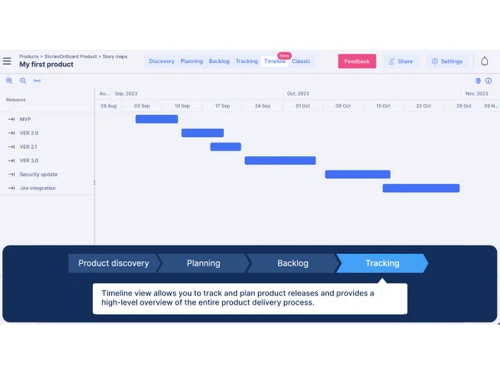
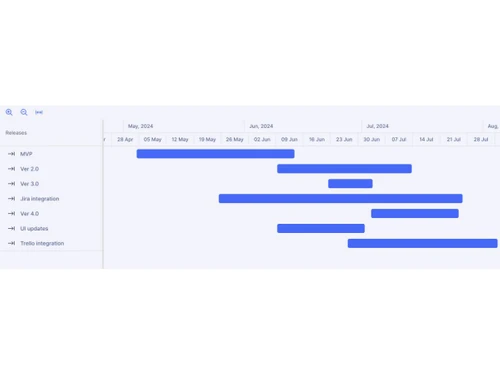
  • icon_check Release Planning
    Plan and schedule product releases with clear timelines.
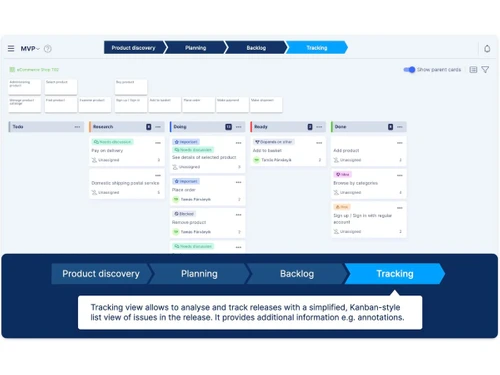
  • icon_check Progress Tracking
    Monitor project status and team performance in real-time.
  • icon_check Kanban Boards
    Use Kanban views to organize tasks and visualize workflow.
  • icon_check Templates
    Utilize pre-built templates to speed up story mapping and planning.
  • icon_check Feedback Management
    Collect, organize, and act on stakeholder or user feedback.
  • icon_check Compliance Management
    Ensure processes and documentation meet regulatory requirements.
  • icon_check Data Import/Export
    Easily import or export data for seamless integration with other tools.
StoriesOnBoard Demo Video play icon

Get StoriesOnBoard Demo

Watch the demo video to explore key features, real workflows, and how the software fits your business needs.

Understand
Key Features
Personal
Demo Insights
Interactive
Demo Support

StoriesOnBoard Specifications

Supported Platforms
Ubuntu Ubuntu Windows Windows MacOS MacOS Linux Linux
Devices
Desktop Desktop
Deployment
Cloud-Based Cloud-Based
Suitable For
All Industries
Business Specific
All Businesses
Business Size
Small Business Startups Medium Business Enterprises SMBs SMEs MSMBs MSMEs
Customer Support
Email Communities
Language
English
Training Resources
Videos
AI Features
AI Integrated

StoriesOnBoard Review

4.3

Out of 5

img

Overall Rating

Based on
4 Verified Ratings

Rating Breakdown

  • Features 4.5
  • Value for Money 3.8
  • Ease of Use 4.5
  • Customer Support 4.7

80% Recommend this Product

Add Review

Techjockey Trusted Reviews from Verified Users

No reviews are currently available for StoriesOnBoard. Discover similar Product Management Software reviews

  • Vabro

    4.8

    Whats great - Vabro.ai provides a number of benefits that simplify and improve project management. Its AI-driven features streamline workfl... read more

  • Jira

    4.5

    Whats great - Jira's emphasis on visuals when tracking performance and tickets is something I appreciate. Since our project is a support pr... read more

  • Monday.com

    4.0

    Whats great - monday.com’s design and functionality make it a perfect choice for managing projects. read more

Articles for StoriesOnBoard

See All Related Articles

How much does StoriesOnBoard software cost?

StoriesOnBoard pricing starts from USD 11 on techjockey.com.

Is there a mobile app available for StoriesOnBoard software?

StoriesOnBoard is web-based and does not have a dedicated mobile app.

Which operating systems are compatible with StoriesOnBoard software?

StoriesOnBoard works on Ubuntu, Windows, macOS, and Linux through any modern web browser.

Does StoriesOnBoard software offer a free trial?

Yes, StoriesOnBoard offers a 14-day free trial with no credit card required.

How does StoriesOnBoard software function?

StoriesOnBoard allows teams to create interactive story maps, visualize user journeys, prioritize features, and manage backlogs efficiently.

Who uses StoriesOnBoard software?

StoriesOnBoard is used by product managers, UX designers, business analysts, and development teams for agile product planning.

Is a free demo available for StoriesOnBoard software?

Yes, a live demo can be booked to explore the platform's features.

Is StoriesOnBoard software available for free?

No, StoriesOnBoard requires a paid subscription after the trial period.

20,000+ Software Listed

Best Price Guranteed

Free Expert Consultation

2M+ Happy Customers

Terms and Condtions

close

Users with registered businesses can purchase goods from merchants on the platform to satisfy their business needs. Users are not permitted to utilize any products acquired through the platform for resale, advertising, business, or further distribution.

For each purchase made, users will receive a Tax Invoice (or 'GST invoice') that includes specific details such as:

  • the GSTIN of the user associated with their registered business, and

  • the specified Entity Name for their business.

It should be noted that not all products are eligible for GST Invoice. Only the products displayed by participating sellers with the 'GST-based Invoice Available' callout on the product description page would qualify.

Certain goods and services are not eligible to get a GST Invoice, including items with VAS, i.e., Value Added Services (e.g., Total Mobile Protection/Assured Buyback) and those involving an exchange offer at the time of purchase.

Users must ensure the accuracy of the GSTIN, and business entity name provided for the GST Invoice. Requests for corrections into GST Invoice would not be accommodated by Techjockey.com or any Seller, and any issues arising from user-provided information are the sole responsibility of users.

Techjockey.com is not liable for the GST Invoice or any associated input tax credit. To efficiently claim an input tax credit, users should select the registered place of business address as per the GST authority's data and follow the provisions of the GST Act and rules.

To claim an input tax credit, the delivery and billing addresses must match. Furthermore, input tax credits will not be granted if the delivery address and GSTIN on the invoice are from different states. In case of incorrect GST details provided during the order placement, the order will be canceled automatically.