 USA
USA UAE
UAESmall Business
Designed for startups and growing businesses

See More




Brand: Livekeeping Technologies
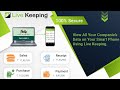
A mobile app that allows users to access Tally, a popular accounting software, on their smartphones and tablets.
See MoreHave you used Livekeeping before?
Share your insights for better experience
View plans
 Save upto 18%, Get GST Invoice on your business purchase T&C Buy Now & Pay Later, Check offer on payment page.
 Brand: Livekeeping Technologies
Founded Year: 2015
Livekeeping is the ultimate tally app for Android and iOS, bringing Tally ERP 9 and Tally Prime to your smartphone and the web. This free tally mobile app download gives you instant access to your financial data anywhere, anytime.
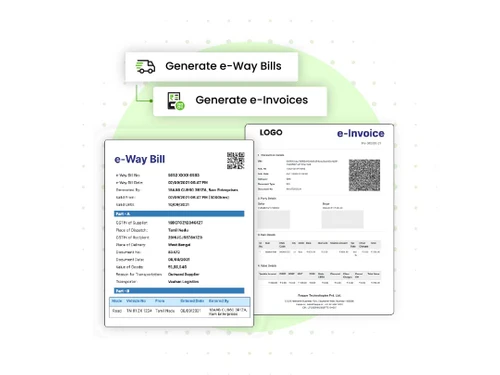
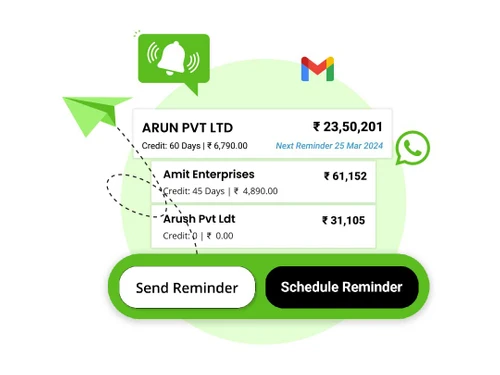
 Decision-Driven Dashboard GST-Compliant Invoicing Customer Outstanding Track Multi-Company Management Inventory Management E-Way Bill Generation Payment Reminders e-Invoices Customer Management Reports Balance Sheet Expense Tracking Backup & Restore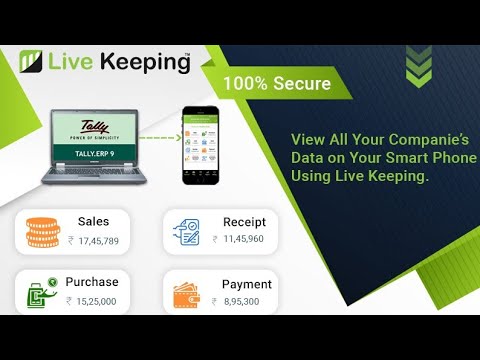

Watch the demo video to explore key features, real workflows, and how the software fits your business needs.
 Windows
  iOS
iOS  Android
  Desktop
  Mobile
  Cloud-Based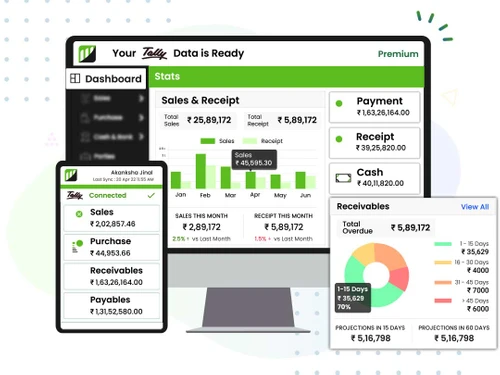
Small Business
Designed for startups and growing businesses
Medium Business
Built for business growth and flexibility
Enterprises
Designed for complex and large-scale business needs
4.3
Out of 5

Overall Rating
Based on
10 Verified Reviews
Rating Breakdown
87% Recommend this Product
Add ReviewUsers generally appreciate Livekeeping for its ease of use, affordability, and real-time syncing capabilities with Tally, which significantly streamline accounting tasks and enhance remote access. Many find it particularly beneficial for small to medium-sized businesses, as it simplifies client communication and reduces manual workload. However, some common limitations include the lack of offline mode, limited analytics features, and occasional performance issues such as slow customer support and unexpected logouts. Overall, the sentiment is positive, with users recommending it for its efficiency and convenience.
Pros
"Good pricing for small businesses. Real-time sync works perfectly."
"I can check my accounts from anywhere without being in the office."
"The ability to share Tally reports with clients instantly is very helpful."
Cons
"The mobile app could be a bit faster when loading large data."

May 15, 2025
Techjockey Verified
“The Easiest Way to Access Tally Remotely”
If you need to access Tally data when you’re away from the office, this app is the best. I can check reports, update entries, and share data anytime.
Pros
Works perfectly on mobile for remote access.
Cons
No offline mode, so it only works with internet.
Reason to switch
LeadMagic required extra setup and didn’t provide smooth remote features like Livekeeping.
Apr 3, 2025
Techjockey Verified
“Best for Small Business Owners Like Me”
I run a small retail store, and managing accounts was always a big problem. Livekeeping is simple and works well with Tally, which makes it perfect for my needs.
Pros
It connects easily with Tally and is very simple to use.
Cons
Limited analytics features compared to bigger software.
Reason to switch
Protomator didn’t fit well for Indian businesses using Tally, so Livekeeping was a better choice.
Aug 22, 2025
Techjockey Verified
“Affordable and Reliable Solution”
I needed a solution that was both affordable and efficient. Livekeeping gave me both. I get all Tally data on my phone without any extra headache.
Pros
Good pricing for small businesses. Real-time sync works perfectly.
Cons
No dark mode for the app yet.
Reason to switch
MaruTally charged more and had too many features I didn’t need. Livekeeping gave me only what I wanted at a better price.

Livekeeping
₹ 2500.00 excl. GST
Desktop
Mobile
Web based
On Premises
Windows
Mac OS

AlienSkin Eye Candy 7
₹ 10042
Desktop
Mobile
Web based
On Premises
Windows
Mac OS

FireCut
Price On Request
Desktop
Mobile
Web based
On Premises
Windows
Mac OS

Quite Imposing Plus
Price On Request
Desktop
Mobile
Web based
On Premises
Windows
Mac OS

Boris Continuum
Price On Request
Desktop
Mobile
Web based
On Premises
Windows
Mac OS

Kaspr
Price On Request
Desktop
Mobile
Web based
On Premises
Windows
Mac OS

Re Vision Effections
Price On Request
Desktop
Mobile
Web based
On Premises
Windows
Mac OS

iToosoft RailClone
Price On Request
Desktop
Mobile
Web based
On Premises
Windows
Mac OS

Tooltip Glossary Plugin
Price On Request
Desktop
Mobile
Web based
On Premises
Windows
Mac OS

MAPILab POP3 Connector
₹ 8625
Desktop
Mobile
Web based
On Premises
Windows
Mac OS

MyEra
₹ 8280
Desktop
Mobile
Web based
On Premises
Windows
Mac OS
(0) Product(s) selected
Starting Price:
$34 /Month
Starting Price:
$3,999 /Quantity
Available
Price on Request
Starting Price:
€59 /Monthly
Available
Price on Request

Starting Price:
$49

Starting Price:
$59 /Quantity

Available
Price on Request

Available
Price on Request

Available
Price on Request

Available
Price on Request
Livekeeping price in India starts at INR 2,500 at techjockey.com.
Yes, Livekeeping offers an iOS and Android mobile app.
Livekeeping Software is compatible with the Windows operating system.
Yes, Livekeeping Software offers a free trial for new users to explore its features.
Livekeeping Software works by allowing users to access and manage Tally accounting features directly from their mobile devices, providing real-time updates and secure data synchronization.
The potential users of Livekeeping Software include accountants, small business owners, finance professionals, and anyone needing mobile access to Tally accounting features.
Yes, Livekeeping Software often provides a free demo upon request at techjockey.com.
Livekeeping Software offers a free trial, but it is not completely free and requires a subscription for continued use.
Yes, Livekeeping supports multiple user access, allowing teams to collaborate effectively within the platform.
20,000+ Software Listed
Best Price Guranteed
Free Expert Consultation
2M+ Happy Customers
Terms and Condtions

Users with registered businesses can purchase goods from merchants on the platform to satisfy their business needs. Users are not permitted to utilize any products acquired through the platform for resale, advertising, business, or further distribution.
For each purchase made, users will receive a Tax Invoice (or 'GST invoice') that includes specific details such as:
the GSTIN of the user associated with their registered business, and
the specified Entity Name for their business.
It should be noted that not all products are eligible for GST Invoice. Only the products displayed by participating sellers with the 'GST-based Invoice Available' callout on the product description page would qualify.
Certain goods and services are not eligible to get a GST Invoice, including items with VAS, i.e., Value Added Services (e.g., Total Mobile Protection/Assured Buyback) and those involving an exchange offer at the time of purchase.
Users must ensure the accuracy of the GSTIN, and business entity name provided for the GST Invoice. Requests for corrections into GST Invoice would not be accommodated by Techjockey.com or any Seller, and any issues arising from user-provided information are the sole responsibility of users.
Techjockey.com is not liable for the GST Invoice or any associated input tax credit. To efficiently claim an input tax credit, users should select the registered place of business address as per the GST authority's data and follow the provisions of the GST Act and rules.
To claim an input tax credit, the delivery and billing addresses must match. Furthermore, input tax credits will not be granted if the delivery address and GSTIN on the invoice are from different states. In case of incorrect GST details provided during the order placement, the order will be canceled automatically.



