linkedin
LogicMonitor logo
play Who is LogicMonitor?
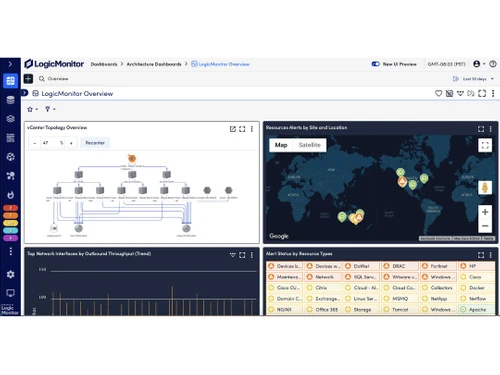
logicmonitor dashboard
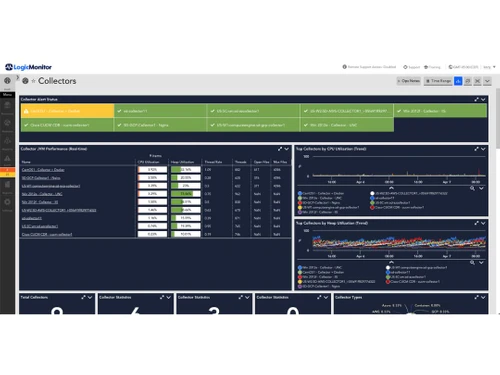
logicmonitor collectors

LogicMonitor

Brand: LogicMonitor

  • 4.2

  • 4 Ratings & 1 Review

LogicMonitor is a cloud-based observability and IT infrastructure monitoring solution that assists companies in monitoring the security, health, and performance of their networks, applications, servers, and cloud services.

See More

Have you used LogicMonitor before?

Share your insights for better experience

Add a Review
Starting Price
$3

View plans

100% Genuine
Products
Best Price
Guaranteed
Safe & Secure
Payment
  • Description

  • Pricing

  • Features

  • Specification

  • Review

  • Compare

  • Alternatives

  • FAQ

Starting at $3

LogicMonitor Software Overview

What is LogicMonitor?

LogicMonitor is a cloud-based platform and observability tool that provides automated monitoring and observability solutions for IT infrastructures, encompassing on-premises systems, cloud services, and hybrid environments. Offering comprehensive visibility and actionable insights enables organisations to proactively manage their IT operations, ensuring optimal performance and reliability.

Features of LogicMonitor

  • Automated Device Discovery: LogicMonitor will automatically discover and set up devices found in your infrastructure to ensure that there is no supervision when monitoring devices.
  • Dynamic Alert Thresholds: The platform modifies logs intelligently by using performance history to adjust alert thresholds, ensuring that the real issues are not masked by false positives.
  • Role-Based Access Control (RBAC): Administrators using LogicMonitor can grant system functionalities to users by tailoring it to their roles, which effectively enhances security.
  • Forecasting and Prediction: LogicMonitor enables proactive issue resolution and capacity planning by rendering predictive analysis in conjunction with historical data to anticipate performance trends.

Why Businesses Use LogicMonitor Software?

  • Proactive Issue Resolution: LogicMonitor offers IT systems monitoring which tracks, measures and reports on possible issues before they impact operations.
  • Unified Monitoring Across Environments: Through vendor neutral monitoring, the platform integrates various systems such as cloud services, applications, servers, and even networks to provide centralized full stack visibility.
  • Enhanced Operational Efficiency: Integrating monitoring tools into existing workflows and LogicMonitor’s automization of manual monitoring processes allows IT teams to concentrate their efforts where it matters.
  • Scalability and Flexibility: Businesses, no matter how small or big, can benefit from LogicMonitor’s cloud-based solution as it caters effortlessly to scaling infrastructure.
  • Data-Driven Decision Making: Taking big data analytics one step further, the platform provides comprehensive reporting capabilities which enables organizations to drive business success.

LogicMonitor Pricing

LogicMonitor pricing depends on the type of coverage you are choosing. Below is the pricing list for LogicMonitor:

Hybrid Coverage:

  • Infrastructure Monitoring: $22USD/Resource/Month
  • Cloud IaaS Monitoring: $22USD/Resource/Month
  • Wireless Access Point: $4USD/Resource/Month
  • Cloud PaaS & Container Monitoring: $3USD/Resource/Month

Layered AI:

  • Log Intelligence: $2.50USD/GB/Month for 7-days Retention, $4USD/GB/Month for 30-days Retention, $5.50USD/GB/Month for 90-days Retention, $7USD/GB/Month for 1 Year Retention
  • Edwin AI: Custom Pricing
Read more

LogicMonitor Company Details

Founded Year:  2007

LogicMonitor

Director/Founders Jie Song, Steve Francis
Company Size 1000+ Employees

LogicMonitor Pricing & Plans

Cloud PaaS & container monitoring
Starting at $3
    • Resource

      Resource
      Resource
    • Monthly

      Monthly
      Monthly

Key Features

  • AWS

  • Azure

  • GCP

  • Kubernetes

  • MongoDB Atlas Databases

Wireless Access Points
Starting at $4
    • Resource

      Resource
      Resource
    • Monthly

      Monthly
      Monthly

Key Features

  • Juniper Mist

  • Cisco Meraki

  • Cisco Catalyst Center

  • Cisco Meraki Smart Cameras (Meraki MV Series)

  • Cisco Meraki Environmental Sensors (MT Series)

LogicMonitor Features

  • icon_check Network topology mapping
    Helps in managing networks and troubleshooting by visually automating the interconnection of devices.
  • icon_check Root Cause Analysis
    Reduces the time wasted for trouble shooting by identifying the root indicator and resolving the problem quickly.
  • icon_check Log based anomaly detection
    Pertains to log analysis and assists in scanning for abnormal behavior in uncategorized and unidentified data.
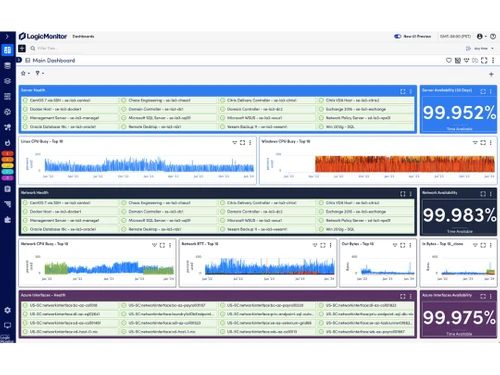
  • icon_check Custom dashboards
    Provides a unique view of the data relevant to the system and allows users to visualize it as per their requirements.
  • icon_check VMware server monitoring
    Keeps track of the performance of VMware servers, ensuring that the available resources are put to good use.
  • icon_check Container Monitoring
    Ensure the performance of an infrastructure by tracking the health and performance of containerized applications.
  • icon_check Website Monitoring
    Regularly checks the performance of a website in relation to its availability to guarantee that users are receiving quality
  • icon_check Auto tags and summarization
    System allocates computer resources without the need of user intervention and provides simple computing resource and user
  • icon_check Adaptive correlation
    Analyzes identified new patterns for a set of events to suggest a common rationale behind sophisticated data, resulting in
  • icon_check AI powered event correlation
    Filters out low value alerts and places emphasis on issues that matter, linking relevant events through events
LogicMonitor Demo Video play icon

Get LogicMonitor Demo

Watch the demo video to explore key features, real workflows, and how the software fits your business needs.

Understand
Key Features
Personal
Demo Insights
Interactive
Demo Support

LogicMonitor Specifications

Supported Platforms
Windows Windows iOS iOS Android Android MacOS MacOS
Devices
Desktop Desktop Mobile Mobile Tablet Tablet iPad iPad
Deployment
Cloud-Based Cloud-Based
Suitable For
ITES
Business Specific
All Businesses
Business Size
Small Business Startups Medium Business Enterprises
Customer Support
Email Communities
Language
English
Training Resources
Webinars Documentation Videos
AI Features
AI Integrated

Explore the Best Alternative Solutions Similar to Your Business Size and Needs

LogicMonitor Review

4.2

Out of 5

img

Overall Rating

Based on
1 Verified Review

Rating Breakdown

  • Features 4.2
  • Value for Money 4.5
  • Ease of Use 3.8
  • Customer Support 4.2

92% Recommend this Product

Add Review

LogicMonitor Video Review

youtubeVideoId

4.1

“LogicMonitor Honest Review In 2026”

Review by: Tutorials By David

Compare LogicMonitor With other Observability Tools

Products
Ratings
Pricing
Device Supported
Deployment
Supported Platforms
  • img

    LogicMonitor

  • 4.2

  • Price On Request

  • Desktop

    Mobile

  • Web based

    On Premises

  • Windows

    Mac OS

  • img

    Evidently AI

  • 4.3

  • Price On Request

  • Desktop

    Mobile

  • Web based

    On Premises

  • Windows

    Mac OS

  • img

    Metaplane

  • 4.3

  • Price On Request

  • Desktop

    Mobile

  • Web based

    On Premises

  • Windows

    Mac OS

  • img

    observIQ

  • 4.4

  • Price On Request

  • Desktop

    Mobile

  • Web based

    On Premises

  • Windows

    Mac OS

  • img

    Sifflet

  • 4.2

  • Price On Request

  • Desktop

    Mobile

  • Web based

    On Premises

  • Windows

    Mac OS

  • img

    Fiddler AI

  • 4.1

  • Price On Request

  • Desktop

    Mobile

  • Web based

    On Premises

  • Windows

    Mac OS

  • img

    Edge Delta

  • 4.4

  • Price On Request

  • Desktop

    Mobile

  • Web based

    On Premises

  • Windows

    Mac OS

  • img

    Chronosphere

  • 4.2

  • Price On Request

  • Desktop

    Mobile

  • Web based

    On Premises

  • Windows

    Mac OS

  • img

    Giggso

  • 4.2

  • Price On Request

  • Desktop

    Mobile

  • Web based

    On Premises

  • Windows

    Mac OS

  • img

    Honeycomb

  • 4.1

  • Price On Request

  • Desktop

    Mobile

  • Web based

    On Premises

  • Windows

    Mac OS

  • img

    Robusta

  • 4.3

  • Price On Request

  • Desktop

    Mobile

  • Web based

    On Premises

  • Windows

    Mac OS

(2) Product(s) selected

LogicMonitor Alternatives

See All LogicMonitor Alternatives

Available

Price on Request

Available

Price on Request

Available

Price on Request

Available

Price on Request
Available

Price on Request

Available

Price on Request

Starting Price:

$99 /Month

Available

Price on Request

Available

Price on Request

Available

Price on Request

Articles for LogicMonitor

See All Related Articles

How much does LogicMonitor cost?

The starting price of LogicMonitor is $2.50USD/GB/Month for 7-days Retention. You can contact Techjockey.com for information on other plans.

How does LogicMonitor work?

LogicMonitor uses a light, agentless collector that auto-discovers and monitors devices in your IT environment. It gathers performance data via standard protocols and sends it to a cloud-based platform for analysis.

Is LogicMonitor available for free?

No, LogicMonitor is not available for free. However, you can try a free trial of 14 days before using.

Is a free demo available in LogicMonitor?

No, there is no demo available in LogicMonitor.

Who can use LogicMonitor?

The key users of LogicMonitor include small businesses, medium enterprises, and big corporations, in order to effectively monitor and manage their IT infrastructure.

Is there any mobile app for LogicMonitor?

Yes, LogicMonitor does provide a mobile app on Play Store.

20,000+ Software Listed

Best Price Guranteed

Free Expert Consultation

2M+ Happy Customers

Terms and Condtions

close

Users with registered businesses can purchase goods from merchants on the platform to satisfy their business needs. Users are not permitted to utilize any products acquired through the platform for resale, advertising, business, or further distribution.

For each purchase made, users will receive a Tax Invoice (or 'GST invoice') that includes specific details such as:

  • the GSTIN of the user associated with their registered business, and

  • the specified Entity Name for their business.

It should be noted that not all products are eligible for GST Invoice. Only the products displayed by participating sellers with the 'GST-based Invoice Available' callout on the product description page would qualify.

Certain goods and services are not eligible to get a GST Invoice, including items with VAS, i.e., Value Added Services (e.g., Total Mobile Protection/Assured Buyback) and those involving an exchange offer at the time of purchase.

Users must ensure the accuracy of the GSTIN, and business entity name provided for the GST Invoice. Requests for corrections into GST Invoice would not be accommodated by Techjockey.com or any Seller, and any issues arising from user-provided information are the sole responsibility of users.

Techjockey.com is not liable for the GST Invoice or any associated input tax credit. To efficiently claim an input tax credit, users should select the registered place of business address as per the GST authority's data and follow the provisions of the GST Act and rules.

To claim an input tax credit, the delivery and billing addresses must match. Furthermore, input tax credits will not be granted if the delivery address and GSTIN on the invoice are from different states. In case of incorrect GST details provided during the order placement, the order will be canceled automatically.