 USA
USA UAE
UAESmall Business
Designed for startups and growing businesses

See More





Brand: Lookback
Lookback is a comprehensive usability testing platform that empowers businesses to conduct remote user research seamlessly, enabling in-depth insights through live sessions, screen sharing, and video recording.
See MoreHave you used Lookback before?
Share your insights for better experience
Brand: Lookback
Founded Year: 2013
Lookback is a platform for easy-to-use software testing solutions.
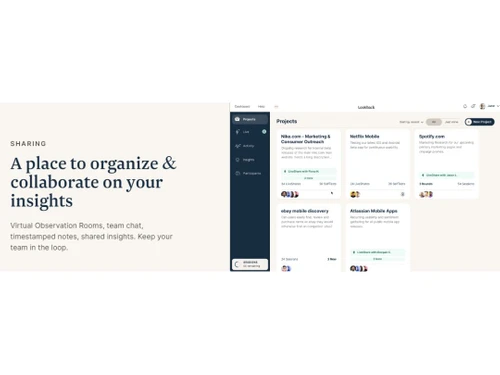
 Screen Activity Recording Collaboration Customization Usability Testing Unmoderated Testing Reporting & Analytics Sharing Surveys & Feedback

Watch the demo video to explore key features, real workflows, and how the software fits your business needs.
 Ubuntu
  Windows
  MacOS
MacOS  Linux
Linux  Desktop
  Mobile
  Tablet
  iPad
iPad  Cloud-Based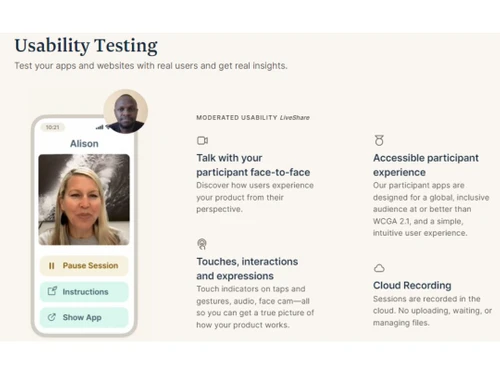

Small Business
Designed for startups and growing businesses
Medium Business
Built for business growth and flexibility
Enterprises
Designed for complex and large-scale business needs
4.5
Out of 5

Overall Rating
Based on
10 Verified Reviews
Rating Breakdown
88% Recommend this Product
Add ReviewOverall, users appreciate Lookback for its valuable insights into user behavior and effective collaboration features, particularly during live sessions and note-taking. Many find it user-friendly and beneficial for remote testing. However, common complaints include technical glitches, especially with mobile testing on iOS devices, which can disrupt sessions. Additionally, some users noted a lack of robust reporting tools and slower customer support response times as areas for improvement. Despite these limitations, the platform remains a popular choice among various roles in small to medium-sized companies.
Pros
"Lookback's session recording and playback features have been instrumental in our user research, allowing for detailed post-session analysis."
"The ability for multiple team members to observe sessions and take notes in real-time has improved our collaborative efforts."
"Lookback offers a suite of features that cater to various user research needs, from live sessions to note-taking and session recordings."
Cons
"We've encountered occasional technical glitches, such as audio or video not recording properly, which can compromise the quality of our research data."
"Mobile testing, particularly on iOS devices, has presented challenges, with participants facing connectivity issues."
"New users may find the platform's interface and functionalities overwhelming initially."

Apr 15, 2025
Techjockey Verified
“Valuable Tool with Some Technical Glitches”
The platform has provided us with valuable insights into user behavior. The ability to revisit sessions and analyze user interactions has been beneficial. However, the technical issues we've faced have sometimes hindered our research outcomes.
Pros
Lookback's session recording and playback features have been instrumental in our user research, allowing for detailed post-session analysis.
Cons
We've encountered occasional technical glitches, such as audio or video not recording properly, which can compromise the quality of our research data.
Reason to switch
We sought a more stable platform to ensure the reliability of our session recordings.
Apr 6, 2025
Techjockey Verified
“Effective for Team Collaboration, but Mobile Testing Needs Work”
Lookback has streamlined our collaborative research processes. The live observation and note-sharing features have been beneficial. However, the mobile testing limitations have occasionally disrupted our sessions, necessitating alternative solutions.
Pros
The ability for multiple team members to observe sessions and take notes in real-time has improved our collaborative efforts.
Cons
Mobile testing, particularly on iOS devices, has presented challenges, with participants facing connectivity issues.
Reason to switch
We needed a platform with more robust mobile testing capabilities to ensure consistent user experiences across devices.
Apr 2, 2025
Techjockey Verified
“Comprehensive Features with a Learning Curve”
The platform has been a valuable asset in our user research toolkit. While it took some time to familiarize ourselves with all the features, once mastered, it significantly enhanced our research capabilities.
Pros
Lookback offers a suite of features that cater to various user research needs, from live sessions to note-taking and session recordings.
Cons
New users may find the platform's interface and functionalities overwhelming initially.
Reason to switch
We sought a platform with a more intuitive interface to reduce the onboarding time for new team members.

Lookback
Price On Request
Desktop
Mobile
Web based
On Premises
Windows
Mac OS

Trymata
Price On Request
Desktop
Mobile
Web based
On Premises
Windows
Mac OS

Centercode
Price On Request
Desktop
Mobile
Web based
On Premises
Windows
Mac OS

UserTesting
Price On Request
Desktop
Mobile
Web based
On Premises
Windows
Mac OS

Useberry
Price On Request
Desktop
Mobile
Web based
On Premises
Windows
Mac OS

PlaybookUX
Price On Request
Desktop
Mobile
Web based
On Premises
Windows
Mac OS

Maze
Price On Request
Desktop
Mobile
Web based
On Premises
Windows
Mac OS

UXArmy
Price On Request
Desktop
Mobile
Web based
On Premises
Windows
Mac OS

UXtweak
Price On Request
Desktop
Mobile
Web based
On Premises
Windows
Mac OS

Userlytics
Price On Request
Desktop
Mobile
Web based
On Premises
Windows
Mac OS

UsabilityHub
Price On Request
Desktop
Mobile
Web based
On Premises
Windows
Mac OS
(0) Product(s) selected
Lookback software compatible with Windows and macOS operating systems.
Lookback app is unavailable for Android and iOS devices.
Lookback system supports web-based deployment.
Lookback software pricing starts from $149 at techjockey.com.
Lookback can be used by Students, App Developers, Web Developers, and businesses who need usability testing software.
Lookback solution demo is available for free with techjockey.com.
Lookback software does not offer a free trial.
Lookback Software is a web-based platform. So, you need not download any software or app to use it.
Lookback simplifies usability testing through user interviews, capturing comprehensive details and nuances. It offers features like transcriptions and highlight reels to analyze user interactions, making it an ideal tool for conducting effective usability tests.
20,000+ Software Listed
Best Price Guranteed
Free Expert Consultation
2M+ Happy Customers
Terms and Condtions

Users with registered businesses can purchase goods from merchants on the platform to satisfy their business needs. Users are not permitted to utilize any products acquired through the platform for resale, advertising, business, or further distribution.
For each purchase made, users will receive a Tax Invoice (or 'GST invoice') that includes specific details such as:
the GSTIN of the user associated with their registered business, and
the specified Entity Name for their business.
It should be noted that not all products are eligible for GST Invoice. Only the products displayed by participating sellers with the 'GST-based Invoice Available' callout on the product description page would qualify.
Certain goods and services are not eligible to get a GST Invoice, including items with VAS, i.e., Value Added Services (e.g., Total Mobile Protection/Assured Buyback) and those involving an exchange offer at the time of purchase.
Users must ensure the accuracy of the GSTIN, and business entity name provided for the GST Invoice. Requests for corrections into GST Invoice would not be accommodated by Techjockey.com or any Seller, and any issues arising from user-provided information are the sole responsibility of users.
Techjockey.com is not liable for the GST Invoice or any associated input tax credit. To efficiently claim an input tax credit, users should select the registered place of business address as per the GST authority's data and follow the provisions of the GST Act and rules.
To claim an input tax credit, the delivery and billing addresses must match. Furthermore, input tax credits will not be granted if the delivery address and GSTIN on the invoice are from different states. In case of incorrect GST details provided during the order placement, the order will be canceled automatically.




