linkedin
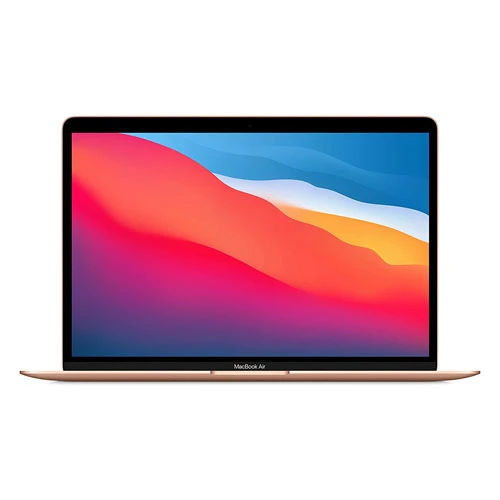
MacBook Air logo
play Introducing the new MacBook Air — Apple
macbook-air
macbook-air-usb

MacBook Air

Brand: Apple Inc

  • 4.6

  • 16 Ratings & 16 Reviews

The MacBook Air Laptop offers exceptional portability with its lightweight design, while delivering powerful performance and stunning visuals for productivity and entertainment on the go.

See More

Have you used MacBook Air before?

Share your insights for better experience

Add a Review
Starting Price 53% OFF
₹54,000 ₹114,900

View plans

100% Genuine
Products
Best Price
Guaranteed
Safe & Secure
Payment
  • Specification

  • Pricing

  • Features

  • Description

  • Review

  • Compare

  • Alternatives

  • FAQ

  • Questions

Starting at ₹54,000

MacBook Air Specifications

Supported Platforms
iOS iOS
Suitable For
All Industries
Business Specific
All Businesses

MacBook Air Pricing & Plans

MacBook Air 13
Starting at ₹54000 ₹114900 SAVE UPTO 53%
    • Quantity

      Quantity
      Quantity

Key Features

  • Mac + iPhone

  • iCloud

  • Migration Assistant

  • Powerful apps built in

MacBook Air 15
Starting at ₹99990 ₹134900 SAVE UPTO 26%
    • Quantity

      Quantity
      Quantity

Key Features

  • Mac + iPhone

  • iCloud

  • Migration Assistant

  • Powerful apps built in

MacBook Air Features

  • icon_check CPU
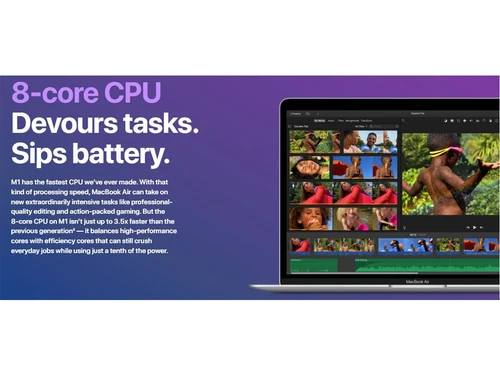
    Enables smooth multitasking and efficient handling of demanding tasks with advanced CPUs that deliver exceptional performance.
  • icon_check GPU
    Provides an enhanced visual experience for gaming, video editing, and graphics-intensive applications.
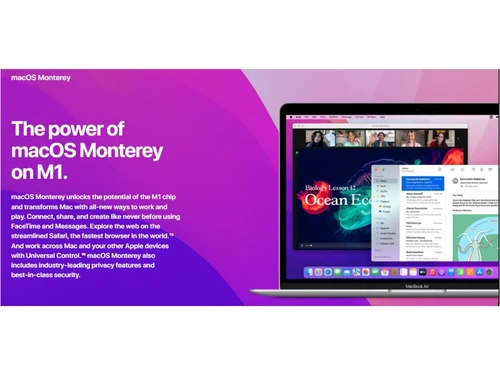
  • icon_check macOS Monterey
    Runs on the latest macOS Monterey operating system that offers an intuitive user experience with new features.
  • icon_check Speed and Responsiveness
    Allows users to launch apps quickly, navigate effortlessly, and experience smooth performance in everyday tasks.
  • icon_check Biggest Collection of Apps Ever
    Users can choose from an extensive collection of apps, ranging from productivity tools to creative software.
  • icon_check Unified Memory
    Provides high bandwidth and improved performance for multitasking, app usage, and overall system responsiveness.
  • icon_check SSD Storage
    Offers ample space to store files, documents, photos, and videos, ensuring quick access and efficient data management.
  • icon_check Security
    Incorporates advanced security features, including secure boot, encryption, and enclave.

MacBook Air Overview

What is MacBook Air?

The MacBook Air is a flagship laptop model created by Apple Inc., renowned for its exceptional blend of power, performance, and portability. Featuring a stunning Retina display, the laptop delivers vivid and true-to-life visuals to enhance the viewing experience for tasks such as graphic design, video editing, and content creation. The display is complemented by a precision-engineered keyboard that provides a comfortable and responsive typing experience.

Underneath its elegant exterior, the flagship laptop is powered by advanced processors that deliver impressive speed and efficiency. Whether it's handling demanding software applications, multitasking between various tasks, or enjoying seamless web browsing, it ensures uninterrupted productivity throughout the day. With its long-lasting battery life, the MacBook Air allows users to work, create, and collaborate without frequent charging.

Additionally, it comes equipped with fast and reliable solid-state storage that provides ample space for storing files, documents, photos, and videos. It also excels in connectivity options with Thunderbolt ports for fast data transfer and versatile connectivity to various devices. It supports wireless connectivity standards such as Wi-Fi and Bluetooth to support seamless integration with other devices and networks.

Why Choose MacBook Air Laptop?

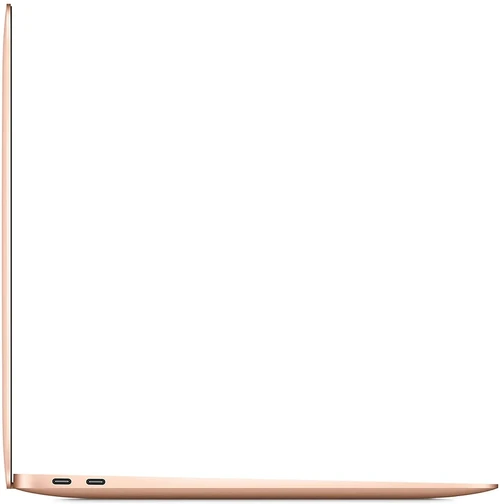
  • Thunderbolt/USB 4 Connectivity: The laptop has Thunderbolt/USB 4 ports that enable fast data transfer, versatile connectivity, and support for external displays and devices.
  • Retina Display: It offers vibrant colours, sharp details, and excellent viewing angles to enhance the visual experience for tasks like photo editing and content consumption.
  • Touch ID: Users can easily unlock their MacBook Air, make secure purchases, and authenticate with a simple finger touch.
  • FaceTime HD Camera: The laptop has a high-definition FaceTime camera that allows users to engage in crystal-clear video calls and conferences.
  • Stereo Speakers: It boasts high-fidelity stereo speakers that deliver immersive audio to enhance the entertainment experience for music, movies, and video content.
  • Backlit Keyboard: The flagship laptop features a backlit keyboard that ensures comfortable typing even in low-light environments.
  • Force Touch Trackpad: The Force Touch trackpad offers precise control and supports multi-touch gestures.

Benefits of MacBook Air Laptop

  • The MacBook Air is designed to provide an impressive battery life that allows users to work, browse, and enjoy media for extended periods.
  • It is powered by the Apple M1 chip to deliver exceptional performance, energy efficiency, and enhanced machine learning capabilities.
  • The laptop supports the latest Wi-Fi 6 technology to provide faster and more stable wireless connectivity for browsing, streaming, and online collaboration.
  • Its True Tone technology dynamically adjusts the display's colour temperature based on ambient lighting.
  • The laptop offers a range of accessibility features, including Voiceover, Zoom, and Siri, to ensure that users of all abilities can comfortably use the device.
  • The Multi-Touch Retina display enables precise and intuitive interaction with the screen and supports gestures like pinch-to-zoom and swiping.

MacBook Air Price

MacBook Air system pricing is available on request at techjockey.com.

The overall pricing model is based on different factors such as personalization, extra features required, total users, and the deployment type. Please feel free to request a call from our product experts if you want to learn more about our subscription plans or premium package deals.

Read more

Apple Inc Company Details

Founded Year:  1976

Apple is a multinational corporation that designs, manufactures, and markets consumer electronics, personal computers, and software.

Director/Founders Ron Wayne, Steve Jobs, Steve Wozniak
Company Size 1000+ Employees
MacBook Air Demo Video play icon

Get MacBook Air Demo

Watch the demo video to explore key features, real workflows, and how the software fits your business needs.

Understand
Key Features
Personal
Demo Insights
Interactive
Demo Support

MacBook Air Reviews

4.6

Out of 5

img

Overall Rating

Based on
16 Verified Reviews

Rating Breakdown

  • Features 4.8
  • Value for Money 4.6
  • Ease of Use 4.6
  • Customer Support 4.5

96% Recommend this Product

Add Review

MacBook Air Video Reviews

youtubeVideoId

4.9

“Here the Thing about the M3 Macbook Air”

Review by: Marques Brownlee

youtubeVideoId

4.6

“M3 MacBook Air Review: Should You Upgrade”

Review by: CNET

youtubeVideoId

4.3

“MacBook Air M3 review Unsurprisingly excellent”

Review by: Engadget

Rahul Agarwal

Owner

Industry: Hospitality User since: 6-12 months

5

Reviewed on: May 22, 2021

Techjockey Verified

“A powerful laptop to handle a variety of tasks”

Pros

The MacBook Air is a wonder of technology and innovation. With a sleek design, it's ultra-light and powerful. I purchased the MacBook Air, which is not just a laptop but an entire technology experience. Its touchscreen, fast processor, long battery life, and powerful graphics make it a great choice for anyone.

Cons

It is a bit costly compared to other brands available on market.

Switched from Dell Latitude 3420

Reason to switch

There are many shortcomings in Dell Latitude 3420, as it was offering a very basic OS, there were no VGA or HDMI ports, and an avg. screen resolution.

Nitin jain

Owner

Industry: Healthcare User since: 1-2 years

5

Reviewed on: Oct 30, 2021

Techjockey Verified

“The MacBook Air has everything”

Pros

My MacBook Air is fast, light, and well-built. The backlit keyboard is amazing, and the battery lasts for a really long time. I can't believe how much I get done with this computer.

Cons

The storage capacity is not sufficient even when it's expensive.

Switched from Microsoft Surface Book 2

Reason to switch

The speakers are very loud and lack the bass, SSD is very slow, and there is no slot for an SD card.

jitender jaiswal

Owner

Industry: Travel & Tourism User since: 1-2 years

5

Reviewed on: Jan 15, 2022

Techjockey Verified

“A solid machine to help you get your work done.”

Pros

I am a graphic designer and photographer and constantly working on the go. I needed a lightweight laptop that can handle all of my processing needs, and this MacBook Air is perfect for me. I have been working on it for more than a year now and it has not failed me once!

Cons

Highly expensive within the range of products

Reason to switch

It was very heavy to use, and its touchpad is also not very stable.

See All MacBook Air Reviews

Compare MacBook Air With other Laptops & PCs

Products
Ratings
Pricing
Device Supported
Deployment
Supported Platforms
  • img

    MacBook Air

  • 4.6

  • ₹ 54000.00 excl. GST

  • Desktop

    Mobile

  • Web based

    On Premises

  • Windows

    Mac OS

  • img

    MacBook Pro

  • 4.5

  • Price On Request

  • Desktop

    Mobile

  • Web based

    On Premises

  • Windows

    Mac OS

  • img

    Mac Mini

  • 4.4

  • Price On Request

  • Desktop

    Mobile

  • Web based

    On Premises

  • Windows

    Mac OS

  • img

    MacBook Neo

  • Price On Request

  • Desktop

    Mobile

  • Web based

    On Premises

  • Windows

    Mac OS

  • img

    Dell Latitude 3410

  • 4.7

  • Price On Request

  • Desktop

    Mobile

  • Web based

    On Premises

  • Windows

    Mac OS

(0) Product(s) selected

MacBook Air Alternatives

See All MacBook Air Alternatives

Starting Price:

₹59,900

Starting Price:

₹70,254 ₹90,890

SAVE UPTO 23%
SAVE UPTO 31%

Articles for MacBook Air

See All Related Articles

Which operating system does MacBook Air Support?

MacBook Air supports macOS operating system.

How much does MacBook Air Cost?

The pricing for the MacBook Air laptop is available on request at techjockey.com.

Who are the potential users of MacBook Air?

The potential users of MacBook Air include the employees, startups, and students.

Does MacBook Air have a touch screen?

No, MacBook Air does not have a touch screen facility.

Is MacBook Air suitable for the working class?

MacBook Air is the ideal choice for the working class as it will help the users to work on documents, coding, and light photo and video editing.

How can MacBook Air help students?

MacBook Air is equipped with a powerful M1 chip, allowing it to handle demanding tasks efficiently and consume less energy. This impressive capability makes it an ideal choice for students who require multitasking with numerous tabs open while simultaneously working on research papers or completing online assignments.

MacBook Air Questions

Q:

How to change file date modified in MacBook?

Syed firoz Ahmed Apr 17, 2024
A:

To change file date modified in MacBook, follow the steps given below:

  • Open the Terminal in Mac and type ‘touch -t YYYMMDDhhmm’
  • Replace YYYMMDDhhmm with the time format of your choice
  • Press the Spacebar
  • Hold the file whose date you want to alter
  • Pess the Return button once you are done.
Anil Shah Apr 17, 2024
Q:

How to connect Wacom pen to MacBook Air?

agriya leena Apr 7, 2024
A:

You can connect Wacom pen and tab to MacBook Air either via Bluetooth or a USB cable. Here is how you can connect your Wacom pen via Bluetooth:

  • Make sure that your Wacom tab is fully charged
  • Long press the Bluetooth button until the blue light starts flashing
  • Turn ON the Bluetooth in Mac and search for your Pen’s Tablet under the device section
  • Simply start using your pen on your tab and the cursor starts moving on your screen.
Mahender Kumar Apr 7, 2024
Q:

How to get image URL from camera roll on MacBook Air?

Md Mushfique Alam Apr 6, 2024
A:

To get image URL from camera roll on MacBook Air, follow the steps given below:

  • Right click on the image
  • Choose Copy Image URL
  • The URL gets copied on your clipboard and then send it to respective people.
Rupesh kumar Singh Apr 6, 2024
Q:

How to family share iBooks on MacBook Air?

Richard PolashRozario Mar 28, 2024
A:

You may set up Family Sharing on one device and then add additional devices that are signed in with the same Apple ID to share Apple Books with family members. Family members can download any book from your Apple Books collection to any Apple device.

Amar nath sah Mar 28, 2024
Q:

How many GBs do I have in my MacBook Air?

Rahul Mar 17, 2024
A:

To check How much memory you have in your MacBook Air, follow the steps given below:

  • Go to Apple Menu
  • Open System Settings
  • Select General from the sidebar and then select Stroage.
Nilankur Das Mar 17, 2024
See All MacBook Air Questions

20,000+ Software Listed

Best Price Guranteed

Free Expert Consultation

2M+ Happy Customers

Terms and Condtions

close

Users with registered businesses can purchase goods from merchants on the platform to satisfy their business needs. Users are not permitted to utilize any products acquired through the platform for resale, advertising, business, or further distribution.

For each purchase made, users will receive a Tax Invoice (or 'GST invoice') that includes specific details such as:

  • the GSTIN of the user associated with their registered business, and

  • the specified Entity Name for their business.

It should be noted that not all products are eligible for GST Invoice. Only the products displayed by participating sellers with the 'GST-based Invoice Available' callout on the product description page would qualify.

Certain goods and services are not eligible to get a GST Invoice, including items with VAS, i.e., Value Added Services (e.g., Total Mobile Protection/Assured Buyback) and those involving an exchange offer at the time of purchase.

Users must ensure the accuracy of the GSTIN, and business entity name provided for the GST Invoice. Requests for corrections into GST Invoice would not be accommodated by Techjockey.com or any Seller, and any issues arising from user-provided information are the sole responsibility of users.

Techjockey.com is not liable for the GST Invoice or any associated input tax credit. To efficiently claim an input tax credit, users should select the registered place of business address as per the GST authority's data and follow the provisions of the GST Act and rules.

To claim an input tax credit, the delivery and billing addresses must match. Furthermore, input tax credits will not be granted if the delivery address and GSTIN on the invoice are from different states. In case of incorrect GST details provided during the order placement, the order will be canceled automatically.