USA
USA UAE
UAESmall Business
Designed for startups and growing businesses

See More





Brand: MAJESTIC
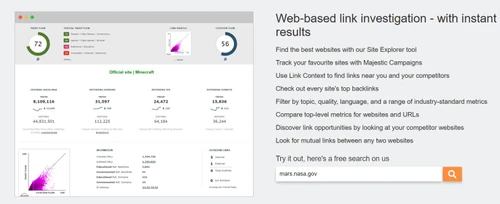
Majestic is a comprehensive Link Intelligence platform built for SEO professionals and agencies to analyze backlink profiles and uncover competitive link-building opportunities.
See MoreHave you used Majestic before?
Share your insights for better experience
Brand: MAJESTIC
Founded Year: 2008
Majestic Agency is the largest developer of custom social campaigns and applications in Canada, focused on delivering innovative digital and mobile marketing programs
Keyword Analysis
 Keyword Gap Analysis Keyword Research Keyword Difficulty Checker
 Keyword Rank Tracker
Location Based Tracking Keyword Position Tracking Device Based Tracking Backlink Analysis
Backlink Audit Bulk Analysis Link Building Oppurtunities Broken Link Checker Backlink History Checker Backlinks Monitoring Competitor Analysis
Keyword Gap Analysis Content Gap Analysis Keyword Position Tracking Backlink Audit Bulk Analysis Traffic Insights Content Analysis
Content Gap Analysis Duplicate Content Check Plagiarism Check Reporting and Insights
Custom Reports & Dashboards White Label Scheduled Reporting Integrations Supported
Google Search Console Google Analytics Page Speed Insights Google Data Studio API Integration Third Party Integration Alerts & Notifications
Keyword Ranking Changes Backlink Alerts Algorithm Updates Monitoring Site Health Issues Brand Mentions Traffic Insights Competitor Monitoring Others
Site Explorer Campaigns Data Export API 

Watch the demo video to explore key features, real workflows, and how the software fits your business needs.
 Ubuntu
  Windows
  MacOS
MacOS  Linux
Linux  Desktop
  Mobile
  Tablet
  iPad
iPad  Cloud-Based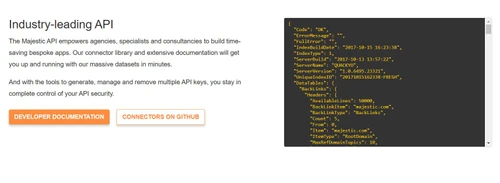
Small Business
Designed for startups and growing businesses
Medium Business
Built for business growth and flexibility
Enterprises
Designed for complex and large-scale business needs
4.4
Out of 5

Overall Rating
Based on
17 Verified Reviews
Rating Breakdown
90% Recommend this Product
Add ReviewUsers generally appreciate Majestic for its robust backlink analysis capabilities, particularly valuing the Trust Flow and Citation Flow metrics that aid in assessing link quality and website authority. Many find it effective for discovering new link-building opportunities and analyzing competitors' backlinks. However, a common concern is the steep learning curve and outdated interface, which can make it challenging for beginners. Additionally, some users have noted slower data updates compared to competitors and the lack of other SEO tools like rank tracking and site audits.
Pros
"Trust Flow and Citation Flow give me unique insights into link quality."
"In-depth backlink analysis, Trust Flow, and Citation Flow scores."
"In-depth backlink analysis, Trust Flow, and Citation Flow scores."
Cons
"Sometimes, the data updates are slower compared to other tools."
"Doesn’t have other SEO tools like keyword tracking or site audits."
"The interface is a bit outdated, and it took me some time to understand all the features."

Mar 11, 2025
Techjockey Verified
“Best Tool for Finding New Link-Building Opportunities”
Majestic has helped me improve my link-building strategy by finding high-quality sites to get backlinks from. It’s a great tool, but it took me a while to understand all the metrics.
Pros
Helps me discover high-quality backlink opportunities.
Cons
It can be hard to interpret the data at first.
Reason to switch
Ubersuggest didn’t have detailed backlink data, so I switched to Majestic for better insights.
Mar 4, 2025
Techjockey Verified
“Deep Backlink Analysis with Trust Metrics”
I use Majestic to check if backlinks are trustworthy or spammy. It’s useful, but sometimes I feel the updates could be faster.
Pros
Trust Flow and Citation Flow give me unique insights into link quality.
Cons
Some backlink data updates slower than competitors.
Reason to switch
Semrush had good backlink data, but I needed more detailed trust metrics.
Mar 9, 2025
Techjockey Verified
“A Must-Have for Link-Building Professionals”
I manage link-building campaigns, and Majestic is perfect for tracking backlinks. However, I still need another tool for things like keyword rankings and site audits.
Pros
One of the best tools for serious link builders.
Cons
Doesn’t include rank tracking or site audits.
Reason to switch
Ahrefs was too expensive, and I only needed backlink analysis, which Majestic does well.

Majestic
Price On Request
Desktop
Mobile
Web based
On Premises
Windows
Mac OS
SISTRIX
Price On Request
Desktop
Mobile
Web based
On Premises
Windows
Mac OS

Click Insights
Price On Request
Desktop
Mobile
Web based
On Premises
Windows
Mac OS

KWT Spider
Price On Request
Desktop
Mobile
Web based
On Premises
Windows
Mac OS

Search Atlas
Price On Request
Desktop
Mobile
Web based
On Premises
Windows
Mac OS
Respona
Price On Request
Desktop
Mobile
Web based
On Premises
Windows
Mac OS

Surfer
Price On Request
Desktop
Mobile
Web based
On Premises
Windows
Mac OS
SmallSEOTools
Price On Request
Desktop
Mobile
Web based
On Premises
Windows
Mac OS

Semrush
Price On Request
Desktop
Mobile
Web based
On Premises
Windows
Mac OS

BrandWell
Price On Request
Desktop
Mobile
Web based
On Premises
Windows
Mac OS

Ubersuggest
Price On Request
Desktop
Mobile
Web based
On Premises
Windows
Mac OS
(0) Product(s) selected
Starting Price:
€119 /Month
Starting Price:
$99 /Month
Starting Price:
$100 /Month
Starting Price:
$119 /Month
Starting Price:
$249 /Month

Available
Price on Request
Starting Price:
€43 /Month
Starting Price:
$49 /Month

Available
Price on Request

Starting Price:
$30 /License
Majestic is compatible with Windows operating systems.
Majestic app is not available.
Majestic supports Web-Based.
Majestic is typically used in All Industries.
Majestic demo is available for free with Techjockey.com
Majestic offers a free trial. However, the premium plan with advanced features available at Techjockey.
For Majestic installation, insert the given CD/USB flash storage in your system and open the Setup Wizard to get started.
Majestic helps with Site Explorer,Keyword Explorer,Campaigns and Keyword Checker. It's a complete solution for Data Export,Custom Reports,Email Alert and Rank Tracking.
Majestic is a dedicated SEO and Link Intelligence tool that maps the web to provide a massive database of competitor backlink analysis. It helps digital marketers analyze link profiles and understand the authority of various websites.
The core features of Majestic include Site Explorer for domain metrics, the interactive Link Graph to visualize connections, and the Clique Hunter tool for identifying competitor link opportunities. It also offers bulk backlink checkers and Topical Trust Flow assessments.
Majestic pricing starts at 40 Pounds at techjockey.com.
While Majestic does not offer a traditional free trial, users can register for a free account to perform limited complimentary searches. The Lite and Pro plans also come with a seven-day money-back guarantee for new customers.
Trust Flow measures the quality and reliability of a web page's backlinks by analyzing proximity to trustworthy seed websites, while Citation Flow measures the raw quantity of links pointing to a site. The balance between these two metrics helps identify natural link profiles.
Topical Trust Flow is a proprietary metric that categorizes a website's backlink profile into over 800 niche topics to show its topical relevance. This helps SEO professionals see if their links are coming from relevant industries.
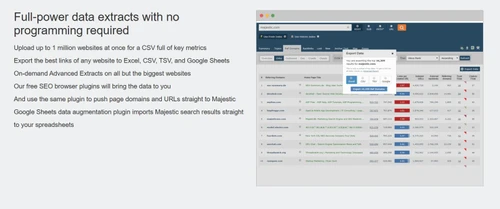
Yes, users on the Pro and API plans can export raw backlink data and generate custom reports for in-depth offline analysis. This feature is particularly useful for SEO agencies managing large datasets.
Majestic is designed for digital marketing agencies, SEO professionals, domain traders, and webmasters who need advanced backlink intelligence. It is also highly useful for developers wanting to retrieve link data programmatically.
The Lite plan is limited to the Fresh Index and basic search depths, whereas the Pro plan adds access to the Historic Index, Clique Hunter, and raw data exports. The Pro plan also offers higher analysis units per month.
20,000+ Software Listed
Best Price Guranteed
Free Expert Consultation
2M+ Happy Customers
Terms and Condtions

Users with registered businesses can purchase goods from merchants on the platform to satisfy their business needs. Users are not permitted to utilize any products acquired through the platform for resale, advertising, business, or further distribution.
For each purchase made, users will receive a Tax Invoice (or 'GST invoice') that includes specific details such as:
the GSTIN of the user associated with their registered business, and
the specified Entity Name for their business.
It should be noted that not all products are eligible for GST Invoice. Only the products displayed by participating sellers with the 'GST-based Invoice Available' callout on the product description page would qualify.
Certain goods and services are not eligible to get a GST Invoice, including items with VAS, i.e., Value Added Services (e.g., Total Mobile Protection/Assured Buyback) and those involving an exchange offer at the time of purchase.
Users must ensure the accuracy of the GSTIN, and business entity name provided for the GST Invoice. Requests for corrections into GST Invoice would not be accommodated by Techjockey.com or any Seller, and any issues arising from user-provided information are the sole responsibility of users.
Techjockey.com is not liable for the GST Invoice or any associated input tax credit. To efficiently claim an input tax credit, users should select the registered place of business address as per the GST authority's data and follow the provisions of the GST Act and rules.
To claim an input tax credit, the delivery and billing addresses must match. Furthermore, input tax credits will not be granted if the delivery address and GSTIN on the invoice are from different states. In case of incorrect GST details provided during the order placement, the order will be canceled automatically.