 USA
USA UAE
UAESmall Business
Designed for startups and growing businesses


See More


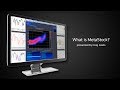


Brand: MetaStock
Boost your trading game with this user-friendly stock market software offering powerful charting & analysis tools for smart decisions!
See MoreHave you used MetaStock before?
Share your insights for better experience
Brand: MetaStock
Founded Year: 1985
MetaStock is the brand in the charting and technical analysis arena for the self-directed trader.
Looking for The Right Pricing?
Share your requirements and get a plan built around your business.
Price Available on Request
Get personalised MetaStock pricing that fits your needs. Our team will connect with you.
Core Features
 Portfolio Management Market Data Watchlist Charting Tools Order Execution Stock Screener Order Control
 Order Execution
Limit Order Stop (Loss) Order Stop Limit Orders Market Order Trailing Stop Order Research and Analysis
Advanced Order Flow Analysis Multi-Timeframe Analysis Analyst Ratings Sentiment Analysis Technical Analysis
Smart drawing tools Trendlines Technical Indicators Custom Indicators Automated Technical Patterns Detection Fundamental Analysis
Industry Analysis Financial Ratios Earnings Forecasts Income Statement Balance Sheet Cash Flow Statements Company Valuation Models Backtesting and Optimization
Strategy Tester Strategy Optimization Historical Data Simulation Paper Trading Monte Carlo Simulation Risk Management
Performance Analytics Position Sizing Calculator Stop-Loss Automation Maximum Drawdown Analysis Risk Calculator Diversification Analysis Trading Options
Swing Trading Intraday Trading Derivative Trading Options Trading Futures Trading Forex Trading Crypto Trading Automatic Trading Rotational Trading Spread Trading Paper Trading Algorithm Trading Reporting & Analytics
Dashboards Customizable Reports Risk Analytics Portfolio Tracking Trade Performance Attribution Account Management
User Access Management Customizable User Interface Multi-Factor Authentication (MFA) Account Summary Reports Audit Trail Integrations
API Integration Third Party Integration Market Data Integration Brokerage Integration Social Media Integration Multi-Language Support Cloud Data Integration Alerts & Notifications
Price Alert Volume Alerts Real-Time Market Updates News Alert Sentiment Alerts Push Notifications 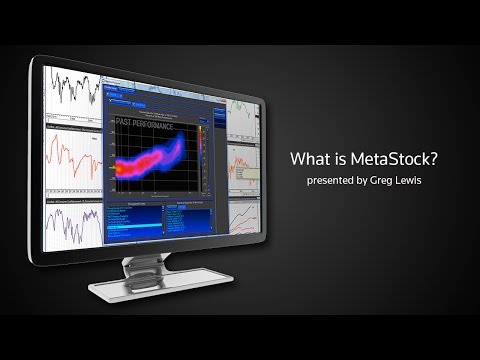

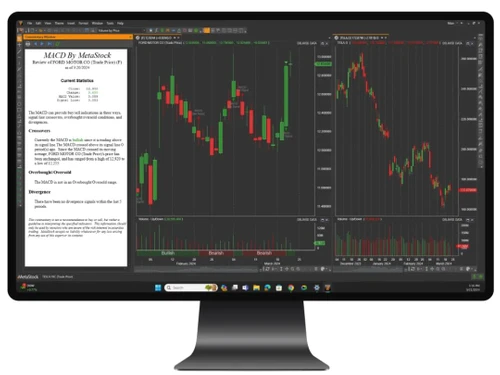
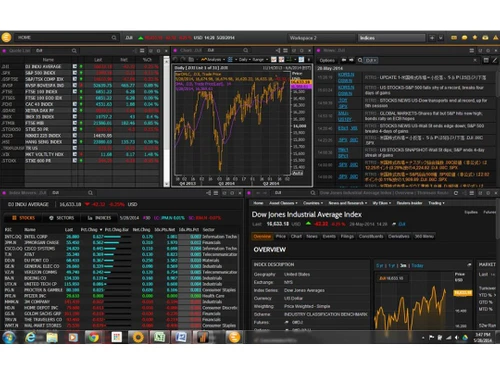
Watch the demo video to explore key features, real workflows, and how the software fits your business needs.
 Windows
  Desktop
  Cloud-Based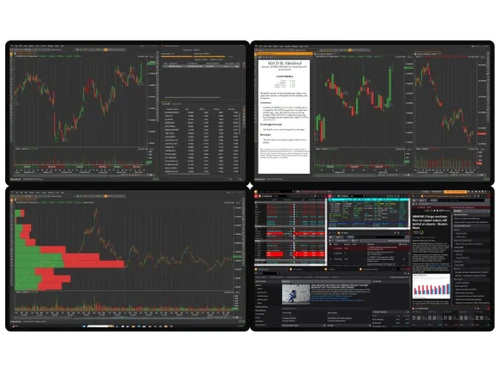
Small Business
Designed for startups and growing businesses
Medium Business
Built for business growth and flexibility
Enterprises
Designed for complex and large-scale business needs
4.0
Out of 5

Overall Rating
Based on
10 Verified Reviews
Rating Breakdown
84% Recommend this Product
Add ReviewCustomers generally appreciate MetaStock for its comprehensive technical analysis capabilities and real-time data updates, which enhance their trading confidence and decision-making. Users find the variety of indicators and customizable charts particularly beneficial for tracking market trends. However, many note a steep learning curve and express frustration with the outdated interface and additional costs for certain features. While the software is seen as valuable, its pricing and complexity may pose challenges for beginners and those on a budget.

Sep 26, 2024
Techjockey Verified
“MetaStock is My Go-To for Technical Analysis”
MetaStock has become an essential part of my trading routine. The technical analysis features are incredibly thorough, and I’ve gained more confidence in making trades based on what the software shows me. It took some time to fully understand how to navigate all the features, but now I feel much more prepared when I invest.
Pros
MetaStock stands out in its detailed technical analysis features. I love how it has so many different tools that I can use to evaluate stocks. The customizable charts allow me to view data the way I prefer, and the news updates help me stay informed.
Cons
The software is a little bit pricey, especially when you factor in the cost of some of the additional services. It can also be overwhelming to navigate all the tools at first, but over time I got the hang of it.
Reason to switch
I wanted something more advanced.
Sep 12, 2024
Techjockey Verified
“MetaStock Makes My Stock Analysis Easier”
MetaStock has changed the way I view trading. Their technical indicators are detailed but simple enough for me to understand, and I’ve used them to spot good buying opportunities. I’ve learned so much more about market analysis thanks to this software. Although the design feels a bit outdated, the value it brings makes up for that.
Pros
I appreciate how MetaStock makes stock analysis easy to understand, even for someone who isn’t a pro like me. I love using the technical indicators to make better decisions on trades. Plus, the access to real-time data gives me a sense of control when trading.
Cons
One thing that could be improved is the interface, as it feels a bit outdated compared to some newer platforms. It’s functional but could use a more modern feel. Also, some features are locked behind an additional paywall, which is a bit discouraging after the initial investment.
Reason to switch
I was looking for a platform that offered deeper charting tools, and MetaStock fit the bill better than ThinkorSwim.
Sep 18, 2024
Techjockey Verified
“MetaStock’s Charts Make Sense of Stock Movements”
MetaStock has been a game-changer for me in terms of technical analysis. I rely heavily on their indicators and charting tools. Though it took a little while to get used to the different features, I can now see trends much more clearly, which helps me decide when to make trades. Their customer support has also been helpful whenever I had questions.
Pros
The best part about MetaStock is how the charts make things easier for me to understand. I can quickly identify trends, and that has helped me become more confident in my trading. Their indicators are really on point and have improved my timing when buying or selling.
Cons
There is a learning curve, especially if you’re like me and don’t have much technical analysis experience. I also noticed that some features are locked behind extra fees, which is disappointing considering the initial price.
Reason to switch
I switched to MetaStock because I needed more robust charting options and deeper market insights than what TradingView was offering me.

MetaStock
Price On Request
Desktop
Mobile
Web based
On Premises
Windows
Mac OS

TradingView
₹ 1295
Desktop
Mobile
Web based
On Premises
Windows
Mac OS

Falcon7
₹ 10339
Desktop
Mobile
Web based
On Premises
Windows
Mac OS

MultiCharts
Price On Request
Desktop
Mobile
Web based
On Premises
Windows
Mac OS

TrendSpider
Price On Request
Desktop
Mobile
Web based
On Premises
Windows
Mac OS

M2 Trading System
₹ 18500
Desktop
Mobile
Web based
On Premises
Windows
Mac OS

ProRealTime
Price On Request
Desktop
Mobile
Web based
On Premises
Windows
Mac OS

GoCharting
₹ 599
Desktop
Mobile
Web based
On Premises
Windows
Mac OS
Tickertape
Price On Request
Desktop
Mobile
Web based
On Premises
Windows
Mac OS

OptionX
₹ 999
Desktop
Mobile
Web based
On Premises
Windows
Mac OS

Tradetron
₹ 300
Desktop
Mobile
Web based
On Premises
Windows
Mac OS
(2) Product(s) selected








MetaStock Stock Market Software is compatible with Windows operating systems.
MetaStock Stock Market Software app is not available.
MetaStock Stock Market Software supports Web-Based.
MetaStock Stock Market Software is typically used in All Industries.
MetaStock demo is available for free with Techjockey.com. Please request a call back.
MetaStock Stock Market Software offers a free trial. However, the premium plan with advanced features available at Techjockey.com.
For MetaStock installation, insert the given CD/USB flash storage in your system and open the Setup Wizard to get started. The web-based version can be accessed directly through MetaStock portal.
MetaStock Stock Market Software helps with Charting,Data Analysis,Technical Analysis and Distribution & Trading. It's a complete solution for Financial Analysis and Reports.
MetaStock regular updates are available free of cost. There are no hidden software update charges.
MetaStock Stock Market Software used for Charting,Data Analysis,Technical Analysis and Distribution & Trading.
You can directly visit MetaStock portal and get in touch with MetaStock customer support for any software-related query.
Please contact our product experts to get MetaStock lifetime deal with exclusive offers.
Yes, backtesting is available in MetaStock, allowing you to test your strategies and improve your trading strategies.
Although, it is rare to experience lag in MetaStock, but if you do, you need to close other applications if any. Also, make sure to check if you have a stable internet connection.
0 0
The formula language of MetaStock benefits in many ways:
0 0
MetaStock gives you tools to spot important price patterns in stocks, like ‘hammers’ and ‘shooting stars’, which help you predict when prices might change direction. It also lets you make your own indicators to fit your own trading plans.
0 0
Yes, you can save your chart setting for future sessions. You can easily save chart layouts, indicators, watchlists, and other things, enabling you to access the preferred setting in the future.
0 0
You can easily share your MetaStock analysis with others by exporting the analysis in image or PDF format. This helps you to share your analysis insights with clients, colleagues, and others.
0 0
20,000+ Software Listed
Best Price Guranteed
Free Expert Consultation
2M+ Happy Customers
Terms and Condtions

Users with registered businesses can purchase goods from merchants on the platform to satisfy their business needs. Users are not permitted to utilize any products acquired through the platform for resale, advertising, business, or further distribution.
For each purchase made, users will receive a Tax Invoice (or 'GST invoice') that includes specific details such as:
the GSTIN of the user associated with their registered business, and
the specified Entity Name for their business.
It should be noted that not all products are eligible for GST Invoice. Only the products displayed by participating sellers with the 'GST-based Invoice Available' callout on the product description page would qualify.
Certain goods and services are not eligible to get a GST Invoice, including items with VAS, i.e., Value Added Services (e.g., Total Mobile Protection/Assured Buyback) and those involving an exchange offer at the time of purchase.
Users must ensure the accuracy of the GSTIN, and business entity name provided for the GST Invoice. Requests for corrections into GST Invoice would not be accommodated by Techjockey.com or any Seller, and any issues arising from user-provided information are the sole responsibility of users.
Techjockey.com is not liable for the GST Invoice or any associated input tax credit. To efficiently claim an input tax credit, users should select the registered place of business address as per the GST authority's data and follow the provisions of the GST Act and rules.
To claim an input tax credit, the delivery and billing addresses must match. Furthermore, input tax credits will not be granted if the delivery address and GSTIN on the invoice are from different states. In case of incorrect GST details provided during the order placement, the order will be canceled automatically.





