 USA
USA UAE
UAE




Brand: Anchorage Technologies
A stock market software designed to help investors research, analyze, and track stocks, mutual funds, ETFs, and market indices, primarily in the Indian market.
See MoreHave you used Tickertape before?
Share your insights for better experience
Brand: Anchorage Technologies
Founded Year: 2021
Tickertape provides data, information & content for Indian stocks, Mutual Funds, ETFs & indices
Core Features
 Portfolio Management Market Data Watchlist Charting Tools Order Control Order Execution Stock Screener
 Order Execution
Limit Order Market Order Stop (Loss) Order Stop Limit Orders Trailing Stop Order Research and Analysis
Sentiment Analysis Analyst Ratings Multi-Timeframe Analysis Advanced Order Flow Analysis Technical Analysis
Smart drawing tools Trendlines Technical Indicators Automated Technical Patterns Detection Custom Indicators Fundamental Analysis
Balance Sheet Income Statement Industry Analysis Financial Ratios Cash Flow Statements Earnings Forecasts Company Valuation Models Backtesting and Optimization
Historical Data Simulation Strategy Tester Paper Trading Strategy Optimization Monte Carlo Simulation Risk Management
Performance Analytics Diversification Analysis Risk Calculator Position Sizing Calculator Stop-Loss Automation Maximum Drawdown Analysis Trading Options
Swing Trading Intraday Trading Derivative Trading Options Trading Futures Trading Paper Trading Algorithm Trading Forex Trading Crypto Trading Automatic Trading Rotational Trading Spread Trading Reporting & Analytics
Dashboards Portfolio Tracking Risk Analytics Customizable Reports Trade Performance Attribution Account Management
Multi-Factor Authentication (MFA) Account Summary Reports Customizable User Interface User Access Management Audit Trail Integrations
API Integration Third Party Integration Market Data Integration Brokerage Integration Cloud Data Integration Social Media Integration Multi-Language Support Alerts & Notifications
Price Alert Push Notifications Volume Alerts Real-Time Market Updates News Alert Sentiment Alerts 

Watch the demo video to explore key features, real workflows, and how the software fits your business needs.
 Windows
  iOS
iOS  Android MacOS
  Desktop
  Mobile
  Cloud-Based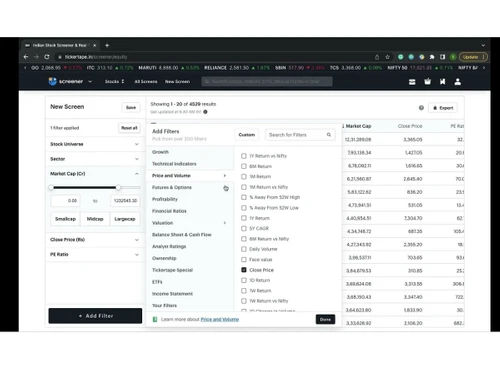
4.4
Out of 5

Overall Rating
Based on
1 Verified Review
Rating Breakdown
80% Recommend this Product
Add Review







Tickertape pricing starts at USD 299 at techjockey.com. Pricing is customised based on specific business needs.
Tickertape is a web-based platform accessible through modern browsers on Windows, macOS, and Linux. It also offers mobile apps for Android and iOS devices.
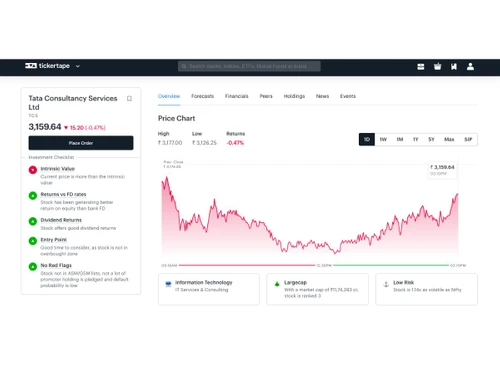
Tickertape aggregates financial data, market insights, and analytics to help users research investments, screen securities, and track portfolios.
Tickertape is primarily designed for individual investors and financial enthusiasts, but small business owners can also use it to manage and analyze their investment portfolios effectively.
Tickertape offers a free version with essential features and also provides premium plans with advanced analytics and tools. Users can explore many features before upgrading.
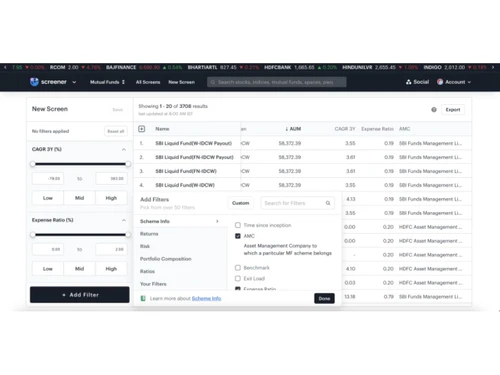
Key features include stock and mutual fund screening, portfolio tracking, financial ratios, technical indicators, proprietary scores, watchlists, market insights, and brokerage integration.
Yes, Tickertape provides mobile applications for both Android and iOS, allowing users to research markets and track investments on the go.
Potential users include retail investors, traders, financial advisors, market researchers, and anyone interested in analyzing and managing investments.
Tickertape uses secure authentication, encrypted connections, and trusted integrations with brokerage partners to protect user data and financial information.
Tickertape is used for researching investment opportunities, analyzing stocks and funds, tracking portfolios, and making informed financial decisions based on data-driven insights.
20,000+ Software Listed
Best Price Guranteed
Free Expert Consultation
2M+ Happy Customers
Terms and Condtions

Users with registered businesses can purchase goods from merchants on the platform to satisfy their business needs. Users are not permitted to utilize any products acquired through the platform for resale, advertising, business, or further distribution.
For each purchase made, users will receive a Tax Invoice (or 'GST invoice') that includes specific details such as:
the GSTIN of the user associated with their registered business, and
the specified Entity Name for their business.
It should be noted that not all products are eligible for GST Invoice. Only the products displayed by participating sellers with the 'GST-based Invoice Available' callout on the product description page would qualify.
Certain goods and services are not eligible to get a GST Invoice, including items with VAS, i.e., Value Added Services (e.g., Total Mobile Protection/Assured Buyback) and those involving an exchange offer at the time of purchase.
Users must ensure the accuracy of the GSTIN, and business entity name provided for the GST Invoice. Requests for corrections into GST Invoice would not be accommodated by Techjockey.com or any Seller, and any issues arising from user-provided information are the sole responsibility of users.
Techjockey.com is not liable for the GST Invoice or any associated input tax credit. To efficiently claim an input tax credit, users should select the registered place of business address as per the GST authority's data and follow the provisions of the GST Act and rules.
To claim an input tax credit, the delivery and billing addresses must match. Furthermore, input tax credits will not be granted if the delivery address and GSTIN on the invoice are from different states. In case of incorrect GST details provided during the order placement, the order will be canceled automatically.

