
linkedin
MindMap AI logo
play Unlock the Full Power of MindMap AI: Comprehensive Feature Demo
MindMap AI-visual magic
MindMap AI-copilot

MindMap AI

Brand: 3axislabs

  • 3.9

  • 5 Ratings

A mind mapping software that instantly turns your ideas, notes, and files into clear, structured visual mind maps to help you organize, and visualize information.

See More

Have you used MindMap AI before?

Share your insights for better experience

Add a Review
Starting Price
$7

View plans

100% Genuine
Products
Best Price
Guaranteed
Safe & Secure
Payment
  • Description

  • Pricing

  • Features

  • Specification

  • Review

  • FAQ

Starting at $7

MindMap AI Software Overview

What is MindMap AI?

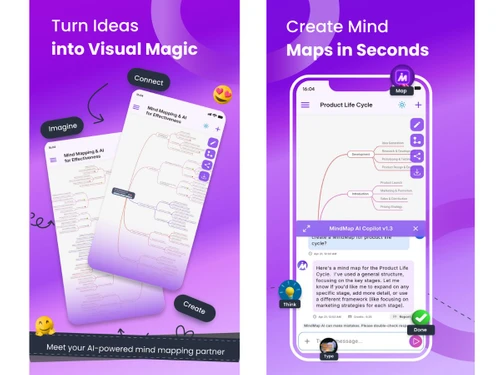
MindMap AI is an AI-powered mind mapping software that transforms your ideas, notes, and documents including PDFs, text, images, audio, video, and CSV files into clear visual mind maps.

It includes an AI Copilot to help brainstorm, expand, summarize, and organize content, while still allowing manual edits.

The platform offers various chart views, customization options, and export features, making it ideal for planning, studying, and organizing projects.

Why Choose MindMap AI Software?

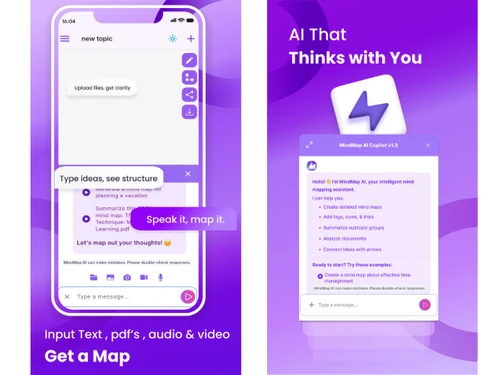
  • Multi-Format Input Support: You can upload content in various formats like text, PDFs, images, audio, and video, and MindMap AI instantly transforms it into organized mind maps.
  • AI Copilot Chat: The built-in AI assistant interacts with you, helping brainstorm, refine, and expand ideas, making your mind mapping process smoother and smarter.
  • AI Expand Feature: Automatically grow your mind map by adding relevant subtopics and branches suggested by AI, keeping your ideas comprehensive.
  • AI Summarizer: Converts lengthy documents or notes into concise summaries, allowing you to focus on key points without losing essential information.
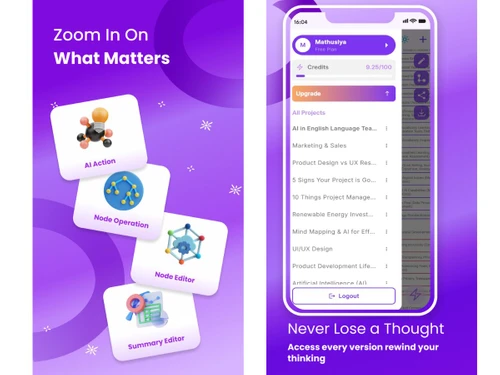
  • Flexible Editing: Easily add, remove, or rearrange nodes on your mind map, giving you full control over the structure and content of your maps.
  • Custom Themes & Styles: Personalize your mind maps with different colors, fonts, and layouts, making them visually engaging and easy to understand.
  • Export & Sharing Options: Export your mind maps in formats like PNG, SVG, PDF, CSV, or Markdown, and share them with colleagues or friends effortlessly.

Benefits of MindMap AI Software

  • Version History: Keep track of changes and revert to earlier versions of your mind maps whenever needed, ensuring nothing is ever lost.
  • Unlimited Projects: Create as many mind maps as you want without restrictions, allowing for unlimited brainstorming and planning opportunities.
  • Real-Time Brainstorming: Collaborate with the AI in real time to generate new ideas, expand topics, and refine your concepts efficiently.
  • Second-Order Connections: The AI identifies hidden connections and relationships between ideas, helping you discover insights that might be missed manually.
  • Improves Clarity: Visual diagrams break down complex information into simple, understandable structures, making it easier to analyze and learn.
  • Custom Widgets & Tags: Add priorities, flags, due dates, and other markers to nodes to organize your tasks and ideas effectively.

MindMap AI Pricing

MindMap AI price starts at USD 7 at techjockey.com.

The pricing model is based on different parameters, including extra features, deployment type, and the total number of users. For further queries related to the product, you can contact our product team and learn more about the pricing and offers.

Read more

3axislabs Company Details

Founded Year:  2020

3axislabs is a software development company that offers mobile and web applications, UI/UX design, and technology consulting services.

Director/Founders Prasanth Subendran
Company Size 1-100 Employees

MindMap AI Pricing & Plans

Basic
Starting at $7
    • Licenses

      Licenses
      Licenses
    • Monthly

      Monthly
      Monthly

Key Features

  • 2,000 monthly AI credits

  • Buy 2,000 add-on credits for $4.99

  • Adaptive version history

  • Text to mind maps (up to 5MB)

  • PDF to mind maps (up to 30MB)

Pro
Starting at $15
    • Licenses

      Licenses
      Licenses
    • Monthly

      Monthly
      Monthly

Key Features

  • Everything in Basic, plus

  • Buy 5,000 add-on credits for $4.99

  • PDF to mind maps (up to 50MB)

  • Audio to summaries (up to 100MB)

  • Video to summaries (up to 150MB)

MindMap AI Features

  • icon_check AI Mind Map Generator
    Automatically creates structured mind maps from text, files, or prompts using advanced natural language models.
  • icon_check Multi-Format Input Support
    Accepts text, PDF, DOCX, CSV, image, audio, video, and HTML formats for instant conversion into visual maps.
  • icon_check AI Copilot Chat
    Interactive AI assistant helps expand ideas, refine map nodes, and generate new concepts during brainstorming.
  • icon_check Real Time Editing
    Easily modify node text, rearrange branches, or restructure the map with smooth drag-and-drop functionality.
  • icon_check Smart Topic Extraction
    AI identifies and organizes main ideas and subtopics automatically for faster and more logical map creation.
  • icon_check File Export Options
    Export mind maps as PDF, PNG, SVG, CSV, or Markdown formats for sharing or integration with other tools.
  • icon_check Multi-Device Support
    Use MindMap AI seamlessly on web, iOS, Android, or Chrome/Edge extensions for consistent productivity.
  • icon_check Collaboration Tools
    Invite others to view, edit, or comment on maps in real time for effective teamwork and shared ideation.
  • icon_check Auto-Save and Versioning
    All changes are automatically saved, with previous map versions available for tracking and restoration.
  • icon_check Credit-Based Usage System
    AI usage is managed by a fair credit system based on word count, allowing scalable access for all users.
  • icon_check Custom Theme Styling
    Personalize your mind maps with color themes, shapes, and layouts to improve clarity and visual appeal.
  • icon_check Content Summarization
    AI summarizes lengthy text or documents, generating concise, visual outlines for quick comprehension.
  • icon_check Secure Data Handling
    All uploaded data remains private and encrypted, ensuring user confidentiality and content protection.
  • icon_check Search and Filter
    Quickly locate nodes, keywords, or topics within large maps using advanced search and filtering features.
  • icon_check Cloud Storage Integration
    Store maps securely in the cloud with instant sync across all logged-in devices and collaboration sessions.
MindMap AI Demo Video play icon

Get MindMap AI Demo

Watch the demo video to explore key features, real workflows, and how the software fits your business needs.

Understand
Key Features
Personal
Demo Insights
Interactive
Demo Support

MindMap AI Specifications

Supported Platforms
Windows Windows iOS iOS Android Android MacOS MacOS
Devices
Desktop Desktop Mobile Mobile Tablet Tablet iPad iPad
Deployment
Cloud-Based Cloud-Based
Suitable For
All Industries
Business Specific
All Businesses
Business Size
Small Business Medium Business Enterprises
Customer Support
Email Communities
Language
English
Training Resources
Videos
AI Features
AI Integrated

MindMap AI Review

3.9

Out of 5

img

Overall Rating

Based on
5 Verified Ratings

Rating Breakdown

  • Features 4.1
  • Value for Money 3.9
  • Ease of Use 3.9
  • Customer Support 3.8

80% Recommend this Product

Add Review

Be the First to Review

This product has no reviews yet. Be the first to leave your feedback.

Add Review

Articles for MindMap AI

See All Related Articles

How much does MindMap AI cost?

MindMap AI is available starting at USD 7, as listed on techjockey.com.

Is there a mobile app available for MindMap AI Software?

Yes, MindMap AI has mobile apps for both iOS and Android devices.

Which operating systems are compatible with MindMap AI Software?

MindMap AI is compatible with Windows, macOS, iOS, Android, and web browsers.

Does MindMap AI Software offer a free trial?

Yes, MindMap offers a free plan to try basic features before upgrading.

How does MindMap AI Software function?

MindMap uses AI to convert notes, text, PDFs, images, audio, and video into visual mind maps automatically.

Who uses MindMap AI Software?

Students, professionals, educators, and teams use MindMap AI for brainstorming, planning, and organizing ideas.

Is a free demo available for MindMap AI Software?

Yes, users can access a free demo.

Is MindMap AI Software available for free?

Yes, MindMap AI offers a free plan with basic mind mapping features.

20,000+ Software Listed

Best Price Guranteed

Free Expert Consultation

2M+ Happy Customers

Terms and Condtions

close

Users with registered businesses can purchase goods from merchants on the platform to satisfy their business needs. Users are not permitted to utilize any products acquired through the platform for resale, advertising, business, or further distribution.

For each purchase made, users will receive a Tax Invoice (or 'GST invoice') that includes specific details such as:

  • the GSTIN of the user associated with their registered business, and

  • the specified Entity Name for their business.

It should be noted that not all products are eligible for GST Invoice. Only the products displayed by participating sellers with the 'GST-based Invoice Available' callout on the product description page would qualify.

Certain goods and services are not eligible to get a GST Invoice, including items with VAS, i.e., Value Added Services (e.g., Total Mobile Protection/Assured Buyback) and those involving an exchange offer at the time of purchase.

Users must ensure the accuracy of the GSTIN, and business entity name provided for the GST Invoice. Requests for corrections into GST Invoice would not be accommodated by Techjockey.com or any Seller, and any issues arising from user-provided information are the sole responsibility of users.

Techjockey.com is not liable for the GST Invoice or any associated input tax credit. To efficiently claim an input tax credit, users should select the registered place of business address as per the GST authority's data and follow the provisions of the GST Act and rules.

To claim an input tax credit, the delivery and billing addresses must match. Furthermore, input tax credits will not be granted if the delivery address and GSTIN on the invoice are from different states. In case of incorrect GST details provided during the order placement, the order will be canceled automatically.