 USA
USA UAE
UAE


Microsoft Enterprise Mobility Security
Whats great - With the development of Microsoft's Enterprise Mobility Suite, I don't have to worry about the accessibility of work producti... read more





Brand: Netsparker
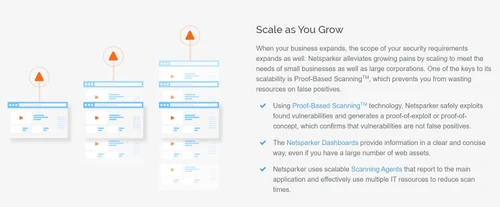
Netsparker is a web application security solution. Users get to combat cybersecurity skill gaps by automating their web security processes and can scan the vulnerabilities within their systems. Netsparker uses Proof-Based Scanning Technology to prevent its users from wasting their resources on false threats. Most importantly, users get to integrate their team with CD/CI along with DevOps and SDLC...
See MoreHave you used Netsparker (Invicti) before?
Share your insights for better experience
Brand: Netsparker
Founded Year: 2018
Invicti is transforming the way web applications are secured.
Looking for The Right Pricing?
Share your requirements and get a plan built around your business.
Price Available on Request
Get personalised Netsparker (Invicti) pricing that fits your needs. Our team will connect with you.
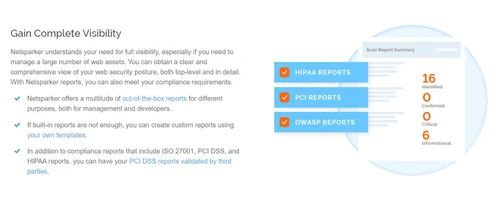
 Advanced Threat Protection Application Scan Data Theft Protection Device Protection Endpoint Protection Security Automatic Detection Accurate Scalable Application Automated Workflow Optimization Integration Reports

Watch the demo video to explore key features, real workflows, and how the software fits your business needs.
 Ubuntu
  Windows
  MacOS
MacOS  Linux
Linux  Desktop
  Cloud-Based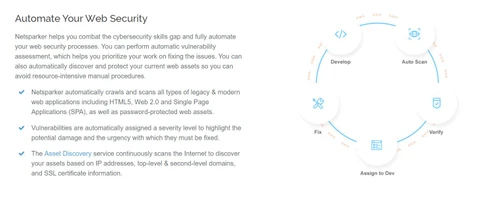
3.9
Out of 5

Overall Rating
Based on
3 Verified Ratings
Rating Breakdown
90% Recommend this Product
Add ReviewTechjockey Trusted Reviews from Verified Users
No reviews are currently available for Netsparker (Invicti). Discover similar Website Security Software reviews
Microsoft Enterprise Mobility Security
Whats great - With the development of Microsoft's Enterprise Mobility Suite, I don't have to worry about the accessibility of work producti... read more

SiteLock
Whats great - SiteLock has been a blessing for my business. With 360-degree protection and automatic removal of harmful threats. read more

Netumo
Whats great - With Netumo I could easily monitor my website for any issues which could arise and I was up to date with my SSL Certificate t... read more

Netsparker (Invicti)
Price On Request
Desktop
Mobile
Web based
On Premises
Windows
Mac OS
SiteLock
₹ 1700
Desktop
Mobile
Web based
On Premises
Windows
Mac OS

GoDaddy Website Security
₹ 329
Desktop
Mobile
Web based
On Premises
Windows
Mac OS
SafeLine WAF
Price On Request
Desktop
Mobile
Web based
On Premises
Windows
Mac OS
KillBot
Price On Request
Desktop
Mobile
Web based
On Premises
Windows
Mac OS

Jetpack
Price On Request
Desktop
Mobile
Web based
On Premises
Windows
Mac OS

Reblaze Web Application Firewall
Price On Request
Desktop
Mobile
Web based
On Premises
Windows
Mac OS

Visual Observer
Price On Request
Desktop
Mobile
Web based
On Premises
Windows
Mac OS

Site 24x7 Website Monitoring
Price On Request
Desktop
Mobile
Web based
On Premises
Windows
Mac OS

Forcepoint Web Security
Price On Request
Desktop
Mobile
Web based
On Premises
Windows
Mac OS
(0) Product(s) selected
Starting Price:
₹329 /Month
Starting Price:
$10 /Month
Starting Price:
$10 /Month
Starting Price:
₹585 /Month ₹1,172
Available
Price on Request
Starting Price:
₹903
Available
Price on Request
Available
Price on Request
Netsparker automatically scans all types of legacy and modern web applications such as Web 2.0, HTML5, web assets protected by passwords and single-page applications.
Netsparker can be integrated with third party issue trackers like Azure DevOps, Clubhouse, FogBugz, Bugzilla, Freshservice and more, enabling its users to manage their vulnerability issues in an efficient manner.
You can send a demo request for Netsparker. Techjockey product experts will get back to you as per your preferable date and time.
Your system need to have: RAM: 1GB RAM, Processor: 1.8GHz Dual-Core processor, Hard Disk: 200MB out of the total hard disk space.
Netsparker web application sec does not have a mobile app as of now.
20,000+ Software Listed
Best Price Guranteed
Free Expert Consultation
2M+ Happy Customers
Terms and Condtions

Users with registered businesses can purchase goods from merchants on the platform to satisfy their business needs. Users are not permitted to utilize any products acquired through the platform for resale, advertising, business, or further distribution.
For each purchase made, users will receive a Tax Invoice (or 'GST invoice') that includes specific details such as:
the GSTIN of the user associated with their registered business, and
the specified Entity Name for their business.
It should be noted that not all products are eligible for GST Invoice. Only the products displayed by participating sellers with the 'GST-based Invoice Available' callout on the product description page would qualify.
Certain goods and services are not eligible to get a GST Invoice, including items with VAS, i.e., Value Added Services (e.g., Total Mobile Protection/Assured Buyback) and those involving an exchange offer at the time of purchase.
Users must ensure the accuracy of the GSTIN, and business entity name provided for the GST Invoice. Requests for corrections into GST Invoice would not be accommodated by Techjockey.com or any Seller, and any issues arising from user-provided information are the sole responsibility of users.
Techjockey.com is not liable for the GST Invoice or any associated input tax credit. To efficiently claim an input tax credit, users should select the registered place of business address as per the GST authority's data and follow the provisions of the GST Act and rules.
To claim an input tax credit, the delivery and billing addresses must match. Furthermore, input tax credits will not be granted if the delivery address and GSTIN on the invoice are from different states. In case of incorrect GST details provided during the order placement, the order will be canceled automatically.