linkedin
NotMe logo
play NotMe Solutions 2-in-1 whistleblowing platform w/ integrated case management
notme-report
notme-issues

NotMe

Brand: NotMe Solutions

  • 4.5

  • 4 Ratings

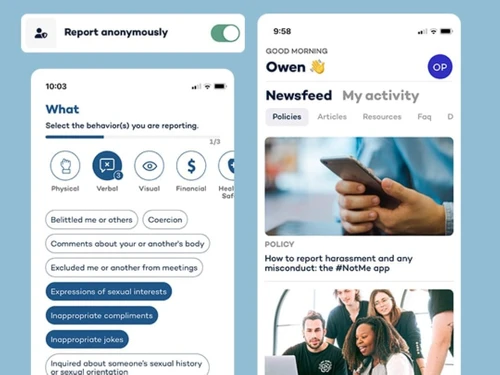
NotMe is designed to help employees anonymously report unethical behavior, misconduct, or violations within an organization. It provides a secure platform for maintaining transparency and accountability in the workplace.

See More

Have you used NotMe before?

Share your insights for better experience

Add a Review

Price Available on Request

Questions about pricing or customization? We’re here to help, just a click away.

100% Genuine
Products
Best Price
Guaranteed
Safe & Secure
Payment
  • Description

  • Pricing

  • Features

  • Specification

  • Review

  • Compare

  • Alternatives

  • FAQ

NotMe Software Overview

What is NotMe?

NotMe is a whistleblowing software designed to empower individuals to speak up about workplace misconduct, offering a secure and confidential way to report incidents without fear of retaliation. It provides employees with a safe space to document and share their experiences, promoting transparency and accountability within organizations.

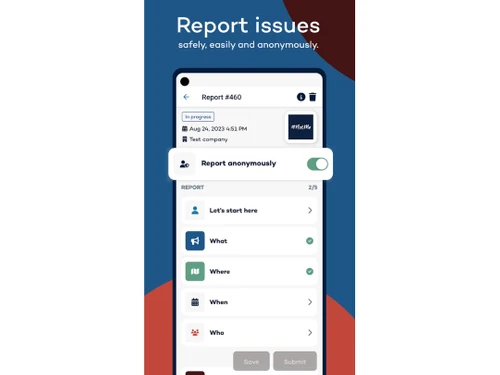
NotMe's system allows users to create detailed records of incidents, which can be used to support internal investigations or legal actions. The platform prioritizes privacy, ensuring that personal information is protected and shared only with authorized parties. NotMe aims to foster a culture of respect and integrity by giving employees a voice and holding organizations accountable for addressing misconduct. It serves as a valuable tool for creating safer and more equitable work environments.

Why Choose NotMe Software?

  • Safe Reporting: Provides a secure and confidential way for employees to report workplace misconduct without fear of retaliation.
  • Detailed Documentation: Allows users to create detailed records of incidents, aiding internal investigations or legal actions.
  • Privacy Protection: Ensures personal information is protected and shared only with authorized parties.
  • Promotes Transparency: Fosters a culture of transparency and accountability within organizations.
  • Empowers Employees: Gives employees a voice to speak up about misconduct and promotes respect and integrity.
  • Supports Investigations: Offers valuable support for internal investigations by providing structured incident reports.
  • Easy to Use: Designed to be user-friendly, ensuring that reporting incidents is straightforward and accessible for all employees.
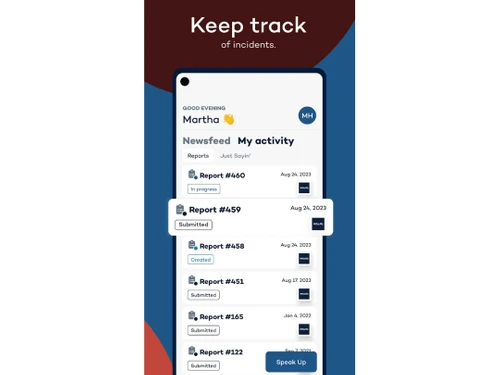
  • Centralized System: Serves as a centralized system for managing and tracking misconduct reports, enhancing organizational responsiveness.
  • Proactive Approach: Enables organizations to take a proactive approach to addressing misconduct and preventing future incidents.
  • Improves Workplace Culture: Helps create safer and more equitable work environments by holding organizations accountable for addressing misconduct.

Benefits of NotMe Software

  • Reduces Legal Risks: Helps organizations mitigate potential legal liabilities by addressing misconduct promptly and effectively.
  • Encourages Early Intervention: Facilitates early detection and intervention in cases of harassment or discrimination, preventing escalation.
  • Provides Evidence for Investigations: Offers well-documented evidence for internal investigations, ensuring thorough and fair inquiries.
  • Enhances Employee Trust: Builds trust and confidence among employees by demonstrating a commitment to addressing workplace issues.
  • Complies with Regulations: Aids organizations in complying with relevant workplace safety and anti-discrimination laws.
  • Customizable Reporting: Offers customizable reporting options to suit specific organizational needs and reporting requirements.
  • Increases Reporting Rates: Encourages employees to report incidents that may otherwise go unreported due to fear or uncertainty.
  • Improves Morale: Contributes to improved employee morale and job satisfaction by fostering a more supportive and respectful work environment.
  • Supports Whistleblower Protection: Aligns with whistleblower protection policies, ensuring individuals are safeguarded when reporting misconduct.
  • Facilitates Training: Offers training and educational resources to raise awareness and prevent misconduct from occurring.

NotMe Pricing

NotMe price details are available on request at techjockey.com.

The pricing model is based on different parameters, including extra features, deployment type, and the total number of users. For further queries related to the product, you can contact our product team and learn more about the pricing and offers.

Read more

NotMe Solutions Company Details

Founded Year:  2017

NotMe Solutions is the easiest whistleblowing platform to use, and the fastest to implement.

Director/Founders Ariel Weindling
Company Size 1-100 Employees

NotMe Pricing & Plans

Looking for The Right Pricing?

Share your requirements and get a plan built around your business.

  • Define your business needs
  • Get customised pricing
  • Choose features that fit your workflow

Price Available on Request

Get personalised NotMe pricing that fits your needs. Our team will connect with you.

NotMe Features

Case Management

  • icon_check Incident/Case Tracking
    Monitors case progress from initiation to resolution.
  • icon_check Centralized Case Dashboard
    Provides a unified view of all cases.
  • icon_check Case Prioritization
    Assigns urgency levels to cases for timely action.
  • icon_check Evidence Management
    Organizes and secures whistleblower evidence.
  • icon_check Unique Case ID Generation
    Automatically assign a unique identifier to each case for easy tracking.
  • icon_check Automated Case Assignment
    Route cases to the right personnel based on predefined criteria.
  • icon_check Manual Case Reassignment
    Reassign cases to other team members or departments as needed.
  • icon_check Document Management
    Store, retrieve, and manage case-related documents securely.
  • icon_check Cross-Department Collaboration
    Facilitate seamless collaboration between teams on cases.
  • icon_check Data Integrity Checks
    Ensure data accuracy and prevent unauthorized modifications.
  • icon_check Escalation Management
    Automatically escalate unresolved cases based on defined rules.
  • icon_check Duplicate Report Detection
    Identify and merge duplicate reports to avoid redundancy.
  • icon_check Customizable Workflows
    Tailor workflows to match your organizational processes.

Reporting Channels

  • icon_check Anonymous Reporting
    Allows users to report without revealing their identity.
  • icon_check Multilingual Reporting
    Supports reports in multiple languages.
  • icon_check Multi-Channel Reporting
    Allow reporting via web, hotline, email, and more.
  • icon_check Offline Reporting
    Support reporting even without an internet connection.
  • icon_check Voice-to-Text Reporting
    Convert spoken reports into text for easier documentation.

Security and Data Protection

  • icon_check Role-Based Access Control (RBAC)
    Restricts access based on user roles.
  • icon_check Secure Messaging Channels
    Provides encrypted communication channels.
  • icon_check Secure File-Sharing Support
    Ensures safe sharing of case files.
  • icon_check Two-Factor Authentication (2FA)
    Adds an extra layer of security during login.
  • icon_check GDPR-Compliant Data Storage
    Adheres to GDPR regulations for data storage.
  • icon_check End-to-End Data Encryption
    Encrypt data during transmission and storage for security.
  • icon_check ISO 27001-Certified Infrastructure
    Maintain robust security with ISO-certified systems.
  • icon_check IP Masking
    Hide IP addresses to ensure reporter anonymity.
  • icon_check Automated Data Backup
    Schedule regular backups to prevent data loss.
  • icon_check Metadata Removal
    Remove metadata from files to protect sensitive information.
  • icon_check Zero-Trust Security Architecture
    Adopt strict access control for enhanced security.

Compliance and Legal Standards

  • icon_check Compliance Management
    Oversees adherence to legal and regulatory requirements.
  • icon_check GDPR and SOX Support
    Complies with General Data Protection Regulation and Sarbanes-Oxley Act.
  • icon_check Third-Party Audit Readiness
    Prepared for external audits.
  • icon_check Audit Trail
    Maintains a record of all system activities.
  • icon_check EU Whistleblowing Directive Alignment
    Align with EU whistleblower protection standards.
  • icon_check Policy Integration Framework
    Integrate organizational policies with reporting workflows.
  • icon_check WCAG-Compliant Accessibility
    Ensure platform usability for people with disabilities.
  • icon_check Global Compliance Updates
    Stay updated on evolving compliance requirements.

Reporting and Analytics

  • icon_check Trend Analysis
    Identifies patterns in reported incidents.
  • icon_check Real-Time Analytics
    Provides immediate insights into data.
  • icon_check Export Reports
    Allows reports to be exported in various formats.
  • icon_check Customizable Analytics Dashboard
    Visualize and track data with tailored dashboards.
  • icon_check KPI Tracking and Monitoring
    Measure performance using key metrics.
  • icon_check Predictive Analytics
    Forecast trends and outcomes based on historical data.
  • icon_check Sentiment Analysis
    Gauge emotional tone from reports to assess urgency.
  • icon_check Automated Report Scheduling
    Schedule recurring report generation automatically.
  • icon_check Root Cause Analysis
    Identify the underlying cause of reported incidents.
  • icon_check Anomaly Detection
    Spot unusual patterns in reporting data.

Integrations

  • icon_check Workflow Automation
    Automates repetitive tasks within workflows.
  • icon_check Third Party Integration
    Connect with external platforms like HR or compliance tools.
  • icon_check API Access
    Enable seamless integration with custom systems.
  • icon_check HR Platform Integration
    Sync whistleblowing data with HR platforms for better tracking.
  • icon_check Tor Network Integration
    Support anonymous reporting via the Tor network.
  • icon_check Email and Hotline Integration
    Integrate email and hotline channels into the platform.
  • icon_check Feedback Survey Integration
    Gather feedback for continuous improvement.
  • icon_check Forensic Tool Integration
    Connect with forensic tools for advanced investigation.

Whistleblowing Program Tools

  • icon_check Risk Assessment
    Evaluates potential risks associated with reports.
  • icon_check Evidence Management
    Organizes and secures whistleblower evidence.
  • icon_check Whistleblower Protection
    Safeguard whistleblowers from retaliation.
  • icon_check Policy Acknowledgment Tracker
    Track employee acknowledgment of policies.
  • icon_check Risk Scoring Models
    Assess and rank risks using scoring systems.

Alerts & Notifications

  • icon_check Real-Time Notifications
    Sends immediate alerts for new reports or updates.
  • icon_check SLA-Based Reminders
    Send reminders based on service level agreements.
  • icon_check Automated Follow-Up Reminders
    Ensure timely follow-ups with automated alerts.
  • icon_check High-Severity Case Alerts
    Prioritize alerts for critical cases requiring immediate attention.

Others

  • icon_check Two way communication
    Secure dialogue between whistleblowers and investigators.
  • icon_check UK FCA compliant
    Meets UK Financial Conduct Authority standards.
  • icon_check FIPPA compliant
    Follows Canadian public sector privacy laws.
  • icon_check Australian Privacy Act compliant
    Complies with Australian data protection laws.
  • icon_check Loi Sapin II compliant
    Aligns with French anti-corruption laws.
  • icon_check CCPA compliant
    Meets California Consumer Privacy Act requirements.
NotMe Demo Video play icon

Get NotMe Demo

Watch the demo video to explore key features, real workflows, and how the software fits your business needs.

Understand
Key Features
Personal
Demo Insights
Interactive
Demo Support

NotMe Specifications

Supported Platforms
Ubuntu Ubuntu Windows Windows iOS iOS Android Android MacOS MacOS Linux Linux
Devices
Desktop Desktop Mobile Mobile
Deployment
Cloud-Based Cloud-Based
Suitable For
All Industries
Business Specific
All Businesses
Business Size
Small Business Startups Medium Business Enterprises
Customer Support
Phone Email Live Chat Communities
Language
English
Training Resources
Videos

Explore the Best Alternative Solutions Similar to Your Business Size and Needs

Medium Business

Built for business growth and flexibility

Trusty

4.2

Gendas

4

Kenjo

4.1

See More

NotMe Review

4.5

Out of 5

img

Overall Rating

Based on
4 Verified Ratings

Rating Breakdown

  • Features 4.1
  • Value for Money 4.5
  • Ease of Use 4.7
  • Customer Support 4.6

100% Recommend this Product

Add Review

Be the First to Review

This product has no reviews yet. Be the first to leave your feedback.

Add Review

Compare NotMe With other Whistleblowing Software

Products
Ratings
Pricing
Device Supported
Deployment
Supported Platforms
  • img

    NotMe

  • 4.5

  • Price On Request

  • Desktop

    Mobile

  • Web based

    On Premises

  • Windows

    Mac OS

  • img

    Trusty

  • 4.2

  • Price On Request

  • Desktop

    Mobile

  • Web based

    On Premises

  • Windows

    Mac OS

  • img

    AllVoices

  • 4.3

  • Price On Request

  • Desktop

    Mobile

  • Web based

    On Premises

  • Windows

    Mac OS

  • img

    tell it

  • 4.5

  • Price On Request

  • Desktop

    Mobile

  • Web based

    On Premises

  • Windows

    Mac OS

  • img

    Grapevine

  • 4.1

  • Price On Request

  • Desktop

    Mobile

  • Web based

    On Premises

  • Windows

    Mac OS

  • img

    SpeakUp

  • 4.1

  • Price On Request

  • Desktop

    Mobile

  • Web based

    On Premises

  • Windows

    Mac OS

  • img

    Gendas

  • 4

  • Price On Request

  • Desktop

    Mobile

  • Web based

    On Premises

  • Windows

    Mac OS

  • img

    Hintbox

  • 4.3

  • Price On Request

  • Desktop

    Mobile

  • Web based

    On Premises

  • Windows

    Mac OS

  • img

    Kenjo

  • 4.1

  • Price On Request

  • Desktop

    Mobile

  • Web based

    On Premises

  • Windows

    Mac OS

(2) Product(s) selected

NotMe Alternatives

See All NotMe Alternatives

Available

Price on Request

Available

Price on Request

Starting Price:

€588 /Year

Available

Price on Request

Available

Price on Request

Available

Price on Request

Available

Price on Request

How much does NotMe Software cost?

NotMe price details are available on request at techjockey.

Is there a mobile app available for NotMe Software?

Yes, NotMe is available as a mobile app for both Android and iOS users.

Which operating systems are compatible with NotMe Software?

NotMe Software is compatible with Ubuntu, Linux, Windows, macOS, Android, and iOS platforms.

Does NotMe Software offer a free trial?

Yes, NotMe offers a free trial so users can explore its features.

How does NotMe Software function?

NotMe allows users to anonymously report issues, which are then managed securely through a case management system.

Who uses NotMe Software?

Organizations of all sizes, HR teams, and employees benefit from using NotMe to promote a safe work environment.

Is a free demo available for NotMe Software?

Yes, NotMe provides a free demo upon request.

Is NotMe Software available for free?

NotMe Software is not free, but it offers flexible pricing plans and trial options.

Is reporting on NotMe truly anonymous?

Yes, users can report anonymously and choose whether to reveal their identity at any point.

Can HR teams communicate with anonymous reporters?

Yes, NotMe allows two-way anonymous communication between reporters and HR teams.

Does NotMe support multilingual reporting?

Yes, NotMe supports multiple languages to accommodate diverse teams globally.

20,000+ Software Listed

Best Price Guranteed

Free Expert Consultation

2M+ Happy Customers

Terms and Condtions

close

Users with registered businesses can purchase goods from merchants on the platform to satisfy their business needs. Users are not permitted to utilize any products acquired through the platform for resale, advertising, business, or further distribution.

For each purchase made, users will receive a Tax Invoice (or 'GST invoice') that includes specific details such as:

  • the GSTIN of the user associated with their registered business, and

  • the specified Entity Name for their business.

It should be noted that not all products are eligible for GST Invoice. Only the products displayed by participating sellers with the 'GST-based Invoice Available' callout on the product description page would qualify.

Certain goods and services are not eligible to get a GST Invoice, including items with VAS, i.e., Value Added Services (e.g., Total Mobile Protection/Assured Buyback) and those involving an exchange offer at the time of purchase.

Users must ensure the accuracy of the GSTIN, and business entity name provided for the GST Invoice. Requests for corrections into GST Invoice would not be accommodated by Techjockey.com or any Seller, and any issues arising from user-provided information are the sole responsibility of users.

Techjockey.com is not liable for the GST Invoice or any associated input tax credit. To efficiently claim an input tax credit, users should select the registered place of business address as per the GST authority's data and follow the provisions of the GST Act and rules.

To claim an input tax credit, the delivery and billing addresses must match. Furthermore, input tax credits will not be granted if the delivery address and GSTIN on the invoice are from different states. In case of incorrect GST details provided during the order placement, the order will be canceled automatically.