linkedin
NTuf Label Tag Maker Software logo
play NTUF Demo
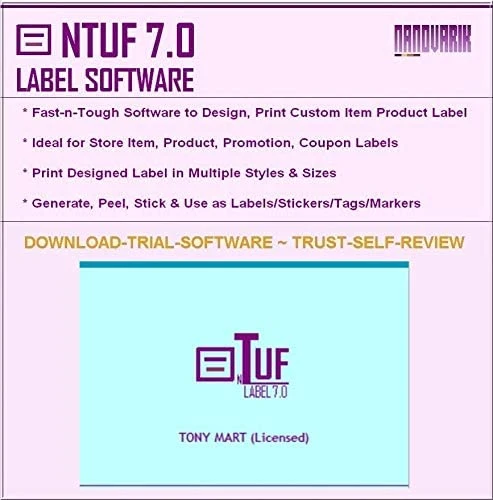
NTUF Label Sticker Printing trial
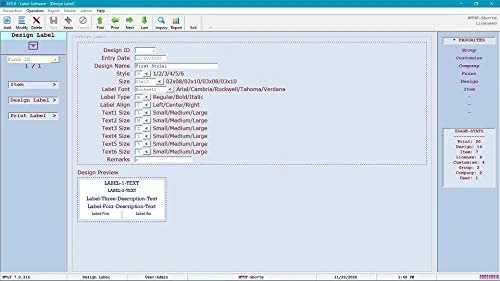
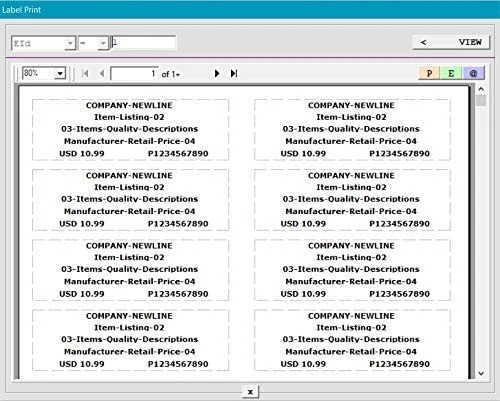
NTUF Label Sticker Printing design

NTuf Label Tag Maker Software

Brand: Nandvarik Systems

  • 4.2

  • 3 Ratings

An easy-to-use program that helps small businesses create and print custom labels, tags, and stickers quickly and efficiently.

See More

Have you used NTuf Label Tag Maker Software before?

Share your insights for better experience

Add a Review
Starting Price
$50

View plans

100% Genuine
Products
Best Price
Guaranteed
Safe & Secure
Payment
  • Description

  • Pricing

  • Features

  • Specification

  • Review

  • Compare

  • Alternatives

  • FAQ

Starting at $50

NTuf Label Tag Maker Software Overview

What is Tuf Label Tag Maker Software?

Tuf Label Tag Maker Software by andvarik is a simple and effective tool designed for creating and printing custom labels, tags, and stickers, particularly for small businesses. It allows users to design labels quickly, offering various styles and sizes to fit different needs. ,

,

This rack labels software is easy to install and can be set up in just a few minutes on Windows PCs. Key features include the ability to print, save, or email labels without requiring barcode fonts, making it user-friendly for those who may not be tech-savvy. Tuf supports most types of label paper, enabling users to produce peel-and-stick labels efficiently.

Why Choose Tuf Label Tag Maker oftware?

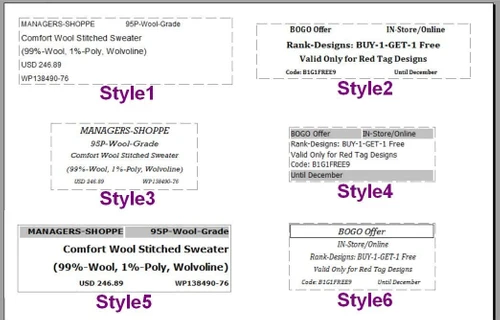
  • Customizable Label Formats: Supports various label sizes and styles, allowing for tailored labeling solutions to meet specific retail needs.
  • User-Friendly Interface: Easy to navigate, making label design and printing quick and efficient, even for non-technical users.
  • Improved Inventory Management: Helps organize products on shelves with clear, accurate labels, enhancing stock visibility and control.
  • Cost and Time Efficiency: Automates the label creation process, reducing manual efforts, and errors saving time.
  • Versatility: Suitable for a wide range of retail environments, from small stores to large chains, offering scalable label solutions.

Benefits of Tuf Label Tag Maker Software

  • Barcode Integration: The software allows seamless integration of barcodes into labels, enhancing product tracking and checkout efficiency.
  • Batch Printing: Enables the printing of multiple labels at once, which is ideal for bulk inventory updates or new stock arrivals.
  • Enhanced Branding: Allows customization of labels with logos, fonts, and colors to align with a retailer’s branding.
  • Multi-Language Support: Supports label creation in different languages, catering to diverse retail environments.
  • Data Import: Facilitates easy import of product information from various databases, reducing manual data entry for label creation.

Pricing of Tuf Label Tag Maker Software

Tuf Label Tag Maker Software price in India starts at $50 at techjockey.com.

The pricing model is based on different parameters, including extra features, deployment type, and the total number of users. For further queries related to the product, you can contact our product team and learn more about the pricing and offers.

Read more

Nandvarik Systems Company Details

Founded Year:  1997

Nandvarik Systems is a POS Software Store; Offers Inventory POS, Sale POS, Restaurant POS, Service Billing, Invoice Billing, Rental Billing, Schedule Planner, Label Maker, Giftcard Creator & Email Marketing software since 1997.

Director/Founders Ramesh N
Company Size 1-100 Employees

NTuf Label Tag Maker Software Pricing & Plans

NTUF
Key Features
  • Point of Sale (POS)
  • Promotions
  • Label Printing
  • Custom label Design
  • Design tools
  • COUPONS
Starting at $4000
    • Users (One time cost)

      Users (One time cost)
      Users (One time cost)

Key Features

  • Point of Sale (POS)

  • Promotions

  • Label Printing

  • Custom label Design

  • Design tools

  • COUPONS

NTuf Label Tag Maker Software Features

  • icon_check Point of Sale (POS)
    Integrates with POS systems to ensure accurate pricing and product information on labels, streamlining the checkout process.
  • icon_check Offers & Coupons
    Allows the creation of labels that highlight discounts, special offers, or coupons directly on products.
  • icon_check Promotions
    Supports designing labels for promotional campaigns, helping attract customer attention to featured products.
  • icon_check Label Printing
    Enables easy and fast printing of high-quality labels in various sizes and formats, suitable for different product types.
  • icon_check Custom Label Design
    Provides tools to customize labels with brand logos, fonts, and layouts tailored to your store’s needs.
  • icon_check Design Tools
    Offers a set of intuitive design tools for creating professional, visually appealing labels that enhance product presentation.
NTuf Label Tag Maker Software Demo Video play icon

Get NTuf Label Tag Maker Software Demo

Watch the demo video to explore key features, real workflows, and how the software fits your business needs.

Understand
Key Features
Personal
Demo Insights
Interactive
Demo Support

NTuf Label Tag Maker Software Specifications

Supported Platforms
Ubuntu Ubuntu Windows Windows MacOS MacOS Linux Linux
Devices
Desktop Desktop
Deployment
Perpetual Perpetual
Suitable For
All Industries
Business Specific
All Businesses
Business Size
Small Business Startups Medium Business SMBs
Customer Support
Email
Language
English
Training Resources
Videos

NTuf Label Tag Maker Software Review

4.2

Out of 5

img

Overall Rating

Based on
3 Verified Ratings

Rating Breakdown

  • Features 4
  • Value for Money 4.5
  • Ease of Use 4.3
  • Customer Support 4.3

90% Recommend this Product

Add Review

Techjockey Trusted Reviews from Verified Users

No reviews are currently available for NTuf Label Tag Maker Software. Discover similar Rack Labels Solutions reviews

  • Sharpmark Labelling System

    2.4

    Whats great - Quick delivery and great quality read more

  • NiceLabel Designer

    4.5

    Whats great - NiceLabel Designer makes automated digit calculation checks to make sure that the most accurate barcode has been generated. A... read more
  • Seagull BarTender

    5.0

    Whats great - What a fantastic service 10/10 I've since signed up with them. read more

Compare NTuf Label Tag Maker Software With other Rack Labels Solutions

Products
Ratings
Pricing
Device Supported
Deployment
Supported Platforms
  • img

    NTuf Label Tag Maker Software

  • 4.2

  • Price On Request

  • Desktop

    Mobile

  • Web based

    On Premises

  • Windows

    Mac OS

  • img

    LabelSuite

  • 4.2

  • Price On Request

  • Desktop

    Mobile

  • Web based

    On Premises

  • Windows

    Mac OS

  • img

    Markin

  • 4.1

  • Price On Request

  • Desktop

    Mobile

  • Web based

    On Premises

  • Windows

    Mac OS

  • img

    Loftware

  • 4.2

  • Price On Request

  • Desktop

    Mobile

  • Web based

    On Premises

  • Windows

    Mac OS

(2) Product(s) selected

NTuf Label Tag Maker Software Alternatives

See All NTuf Label Tag Maker Software Alternatives

Available

Price on Request

Available

Price on Request

Available

Price on Request

What is the cost of Tuf Label Tag Maker Software?

The price of Tuf Label Tag Maker Software in India starts at $50 on techjockey.com.

Is there a mobile app available for Tuf Label Tag Maker Software?

o, Tuf does not offer a mobile app.

Which operating systems are compatible with Tuf Label Tag Maker Software?

Tuf is compatible with Ubuntu, Windows, Linux, and MacOS operating systems.

Does Tuf Label Tag Maker Software offer a free trial?

Yes, Tuf's free trial is available for users to explore its features.

How does Tuf Label Tag Maker Software function?

Tuf Label Tag Maker Software functions by allowing users to quickly design and print custom labels, tags, and stickers using a straightforward interface, supporting various styles and sizes while enabling printing on most label papers without the need for barcode fonts.

Who are the target users of Tuf Label Tag Maker Software?

Retailers, inventory managers, and businesses needing organized labeling solutions are the primary users of Tuf Label Tag Maker.

Is there a free demo available for Tuf Label Tag Maker Software?

Yes, the Tuf Label Tag Maker free demo is offered to showcase the software's capabilities.

Is Tuf Label Tag Maker Software offered for free?

o, Tuf Label Tag Maker Software is not free, but it provides a free trial.

What types of labels can be created with Tuf Label Tag Maker Software?

Users can create various labels, including product labels, price tags, barcode labels, and promotional stickers using Tuf Label Tag Maker.

Can Tuf Label Tag Maker Software integrate with existing inventory management systems?

Yes, Tuf Label Tag Maker can integrate with popular inventory management systems for seamless data synchronization.

Is customer support available for Tuf Label Tag Maker Software?

Yes, Tuf offers customer support via email and phone to assist users with any issues.

20,000+ Software Listed

Best Price Guranteed

Free Expert Consultation

2M+ Happy Customers

Terms and Condtions

close

Users with registered businesses can purchase goods from merchants on the platform to satisfy their business needs. Users are not permitted to utilize any products acquired through the platform for resale, advertising, business, or further distribution.

For each purchase made, users will receive a Tax Invoice (or 'GST invoice') that includes specific details such as:

  • the GSTIN of the user associated with their registered business, and

  • the specified Entity Name for their business.

It should be noted that not all products are eligible for GST Invoice. Only the products displayed by participating sellers with the 'GST-based Invoice Available' callout on the product description page would qualify.

Certain goods and services are not eligible to get a GST Invoice, including items with VAS, i.e., Value Added Services (e.g., Total Mobile Protection/Assured Buyback) and those involving an exchange offer at the time of purchase.

Users must ensure the accuracy of the GSTIN, and business entity name provided for the GST Invoice. Requests for corrections into GST Invoice would not be accommodated by Techjockey.com or any Seller, and any issues arising from user-provided information are the sole responsibility of users.

Techjockey.com is not liable for the GST Invoice or any associated input tax credit. To efficiently claim an input tax credit, users should select the registered place of business address as per the GST authority's data and follow the provisions of the GST Act and rules.

To claim an input tax credit, the delivery and billing addresses must match. Furthermore, input tax credits will not be granted if the delivery address and GSTIN on the invoice are from different states. In case of incorrect GST details provided during the order placement, the order will be canceled automatically.