linkedin
Octoparse logo
play Scrape Product Details Page
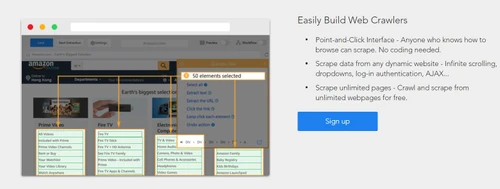
octoparse build web crawlers
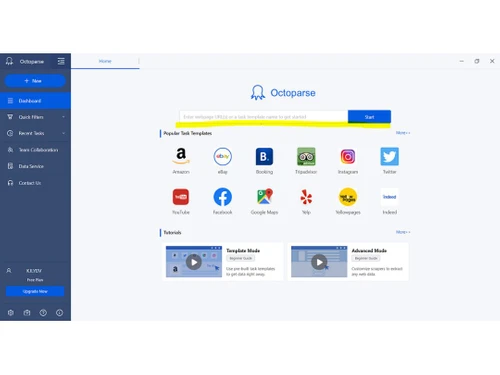
Octoparse Dashboard

Octoparse

Brand: Octopus Data

  • 4.4

  • 5 Ratings

Octoparse helps users extract data from websites easily and efficiently. It is commonly used in web development and data analysis to gather large-scale web content without programming skills.

See More

Have you used Octoparse before?

Share your insights for better experience

Add a Review
Starting Price
$119

View plans

100% Genuine
Products
Best Price
Guaranteed
Safe & Secure
Payment
  • Description

  • Pricing

  • Features

  • Specification

  • Review

  • Compare

  • Alternatives

  • FAQ

Starting at $119

Octoparse Software Overview

What is Octoparse?

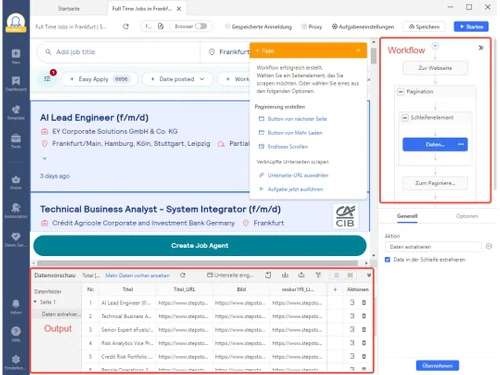
Octoparse is a user-friendly web scraping tool designed to extract data from websites without requiring any coding knowledge. It offers both a visual interface and powerful features, allowing users to capture large amounts of data from various types of websites, including dynamic ones.

Octoparse supports both simple and advanced scraping techniques, enabling users to scrape data such as text, images, links, and tables. The tool also provides automation capabilities for scheduling scraping tasks and exporting data to multiple formats like Excel, CSV, or databases. With its point-and-click interface, Octoparse makes web scraping accessible for beginners while still offering advanced options for experienced users. It's widely used for data analysis, lead generation, and competitive research.

Why Choose Octoparse Software?

  • Ease of Use: Its visual interface allows users to scrape data without any coding knowledge, making it ideal for beginners.
  • Advanced Features: It offers powerful features like handling dynamic websites, pagination, and JavaScript rendering.
  • Data Automation: You can automate scraping tasks and schedule them to run at specific times, saving time and effort.
  • Customization: Octoparse supports complex data extraction, enabling users to tailor the scraping process to specific needs.
  • Multiple Export Options: It allows you to export data in various formats such as Excel, CSV, or directly to databases.
  • Cloud Services: With its cloud platform, users can perform scraping tasks on remote servers, freeing up local resources.
  • Customer Support: Octoparse provides excellent customer support, including tutorials and guides, to help users at every stage.

Benefits of Octoparse Software

  • Scalability: Octoparse can handle both small-scale and large-scale scraping projects, making it suitable for businesses of all sizes.
  • Data Quality: The tool provides precise and accurate data extraction, ensuring high-quality datasets without errors or duplicates.
  • Customizable Workflows: Users can design custom workflows tailored to their scraping needs, including the ability to handle complex data structures.
  • Real-Time Data Extraction: It allows for real-time data extraction, ensuring that you always get the most up-to-date information.
  • Flexible Integration: Octoparse integrates easily with other tools and software, allowing seamless data transfer to CRMs, analytics platforms, and databases.
  • Security: Octoparse ensures that the data scraping process complies with privacy and security standards, offering a safe environment for users.
  • Free Trial: It offers a free trial, allowing users to test out its features and determine if it meets their needs before committing to a subscription.

Octoparse Pricing

Octoparse price in India starts at $119 at techjockey.com.

The pricing model is based on different parameters, including extra features, deployment type, and the total number of users. For further queries related to the product, you can contact our product team and learn more about the pricing and offers.

Read more

Octoparse Pricing & Plans

Standard Plan
Key Features
  • Number of tasks-100
  • Preset templates
  • Concurrent runs-Unlimited
  • Concurrent boost runs-2
  • Data rows per export-Unlimited
  • Concurrent scheduled runs-1
  • Local run history-Last 10 runs
  • Max number of cloud servers-6
  • Cloud live logs
  • Cloud run history-Last 10 runs
  • Scheduled runs
Starting at $119
    • Licenses

      Licenses
      Licenses
    • Monthly

      Monthly
      Monthly

Key Features

  • Number of tasks-100

  • Preset templates

  • Concurrent runs-Unlimited

  • Concurrent boost runs-2

  • Data rows per export-Unlimited

  • Concurrent scheduled runs-1

  • Local run history-Last 10 runs

  • Max number of cloud servers-6

  • Cloud live logs

  • Cloud run history-Last 10 runs

  • Scheduled runs

Octoparse Features

  • icon_check Easy to Use
    Intuitive point-and-click interface for hassle-free data extraction without coding skills.
  • icon_check Website
    Extract data from a variety of websites, including dynamic and complex ones.
  • icon_check Download Results
    Export scraped data in various formats like Excel, CSV, or databases.
  • icon_check Cloud Services
    Perform web scraping on Octoparse’s cloud platform, freeing up local resources and enabling remote execution.
  • icon_check Scheduling Scraping
    Automate the scraping process by scheduling tasks to run at specified times.
  • icon_check IP Rotation
    Use multiple IP addresses to avoid detection and blocking during large-scale scraping.
  • icon_check Crawler
    A built-in web crawler that automatically navigates websites to collect data from multiple pages.
  • icon_check Creation of publishing task templates
    Create reusable templates for recurring scraping tasks, saving time.
  • icon_check Email Support
    Access responsive customer support via email to resolve any issues or queries.
  • icon_check API
    Integrate Octoparse with other applications and automate scraping workflows using its API.
  • icon_check Data Import/Export
    Easily import data from other sources and export scraped data to your preferred format.
Octoparse Demo Video play icon

Get Octoparse Demo

Watch the demo video to explore key features, real workflows, and how the software fits your business needs.

Understand
Key Features
Personal
Demo Insights
Interactive
Demo Support

Octoparse Specifications

Supported Platforms
Ubuntu Ubuntu Windows Windows MacOS MacOS Linux Linux
Devices
Desktop Desktop
Deployment
Cloud-Based Cloud-Based
Suitable For
All Industries
Business Specific
All Businesses
Business Size
Small Business Medium Business SMEs MSMBs MSMEs
Customer Support
Phone Email Forums
Language
English Deutsche Italiano Español
Integration
API Integration

Explore the Best Alternative Solutions Similar to Your Business Size and Needs

Octoparse Review

4.4

Out of 5

img

Overall Rating

Based on
5 Verified Ratings

Rating Breakdown

  • Features 4.4
  • Value for Money 4.4
  • Ease of Use 4.5
  • Customer Support 4.6

92% Recommend this Product

Add Review

Be the First to Review

This product has no reviews yet. Be the first to leave your feedback.

Add Review

Compare Octoparse With other Web Scraping Tools

Products
Ratings
Pricing
Device Supported
Deployment
Supported Platforms
  • img

    Octoparse

  • 4.4

  • Price On Request

  • Desktop

    Mobile

  • Web based

    On Premises

  • Windows

    Mac OS

  • img

    Apify

  • 4.4

  • Price On Request

  • Desktop

    Mobile

  • Web based

    On Premises

  • Windows

    Mac OS

  • img

    SerpApi

  • 4.2

  • Price On Request

  • Desktop

    Mobile

  • Web based

    On Premises

  • Windows

    Mac OS

  • img

    Firecrawl

  • 4.2

  • ₹ 1700

  • Desktop

    Mobile

  • Web based

    On Premises

  • Windows

    Mac OS

  • img

    Nstproxy

  • 4.3

  • Price On Request

  • Desktop

    Mobile

  • Web based

    On Premises

  • Windows

    Mac OS

  • img

    Bardeen

  • 4.3

  • Price On Request

  • Desktop

    Mobile

  • Web based

    On Premises

  • Windows

    Mac OS

  • img

    Oxylabs

  • 4.2

  • Price On Request

  • Desktop

    Mobile

  • Web based

    On Premises

  • Windows

    Mac OS

  • img

    Bright Data

  • 4.4

  • Price On Request

  • Desktop

    Mobile

  • Web based

    On Premises

  • Windows

    Mac OS

  • img

    Browse AI

  • 4.5

  • Price On Request

  • Desktop

    Mobile

  • Web based

    On Premises

  • Windows

    Mac OS

  • img

    Browser Cash

  • 4.0

  • Price On Request

  • Desktop

    Mobile

  • Web based

    On Premises

  • Windows

    Mac OS

  • img

    PhantomBuster

  • 4.5

  • Price On Request

  • Desktop

    Mobile

  • Web based

    On Premises

  • Windows

    Mac OS

(0) Product(s) selected

Octoparse Alternatives

See All Octoparse Alternatives

Starting Price:

$39 /Month

Starting Price:

$25 /Month

Starting Price:

$49 /Month

Available

Price on Request

Available

Price on Request

How much does Octoparse Software cost?

The price of Octoparse in India starts at $119 on techjockey.com.

Is there a mobile app available for Octoparse Software?

No, Octoparse does not have a mobile app; it is available as a desktop application.

Which operating systems are compatible with Octoparse Software?

Octoparse is compatible with Ubuntu, Linux, Windows and MacOS operating systems.

Does Octoparse Software offer a free trial?

Yes, Octoparse offers a free trial version with limited features.

How does Octoparse Software function?

Octoparse uses a point-and-click interface to allow users to scrape data from websites easily.

Who uses Octoparse Software?

Businesses, data analysts, marketers, and anyone needing to extract web data can benefit from Octoparse.

Is a free demo available for Octoparse Software?

Yes, Octoparse provides a free demo version for users to explore its features.

Is Octoparse Software available for free?

Octoparse offers a free version with limited features for basic scraping needs.

Can Octoparse handle dynamic websites?

Yes, Octoparse can scrape data from dynamic websites, including those with AJAX, JavaScript, and other interactive elements.

Is there a limit to the number of pages I can scrape?

There is no hard limit on the number of pages you can scrape, but this depends on the plan and resources you use.

20,000+ Software Listed

Best Price Guranteed

Free Expert Consultation

2M+ Happy Customers

Terms and Condtions

close

Users with registered businesses can purchase goods from merchants on the platform to satisfy their business needs. Users are not permitted to utilize any products acquired through the platform for resale, advertising, business, or further distribution.

For each purchase made, users will receive a Tax Invoice (or 'GST invoice') that includes specific details such as:

  • the GSTIN of the user associated with their registered business, and

  • the specified Entity Name for their business.

It should be noted that not all products are eligible for GST Invoice. Only the products displayed by participating sellers with the 'GST-based Invoice Available' callout on the product description page would qualify.

Certain goods and services are not eligible to get a GST Invoice, including items with VAS, i.e., Value Added Services (e.g., Total Mobile Protection/Assured Buyback) and those involving an exchange offer at the time of purchase.

Users must ensure the accuracy of the GSTIN, and business entity name provided for the GST Invoice. Requests for corrections into GST Invoice would not be accommodated by Techjockey.com or any Seller, and any issues arising from user-provided information are the sole responsibility of users.

Techjockey.com is not liable for the GST Invoice or any associated input tax credit. To efficiently claim an input tax credit, users should select the registered place of business address as per the GST authority's data and follow the provisions of the GST Act and rules.

To claim an input tax credit, the delivery and billing addresses must match. Furthermore, input tax credits will not be granted if the delivery address and GSTIN on the invoice are from different states. In case of incorrect GST details provided during the order placement, the order will be canceled automatically.