linkedin
Openfiler logo
play How To Install and Configure OpenFiler iSCSI Storage for use with VMWARE ESXI 7.0
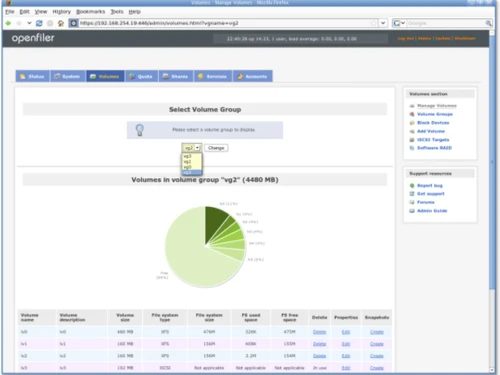
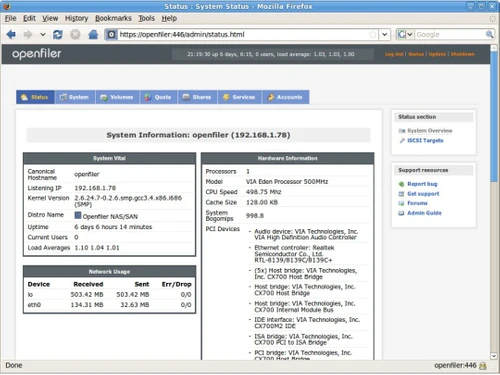
Openfiler Dashboard
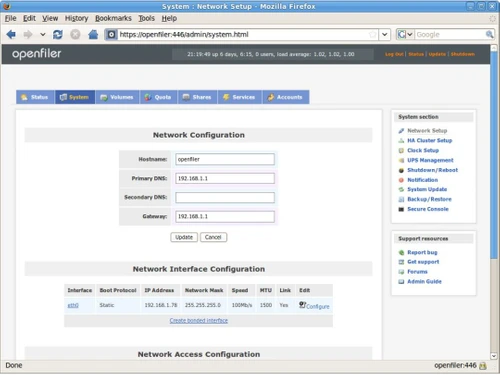
Openfiler Configuration

Openfiler

Brand: Openfiler

  • 4.2

  • 5 Ratings

Openfiler NAS Software offers robust data storage and management, with advanced data protection and seamless scalability for your network storage needs.

See More

Have you used Openfiler before?

Share your insights for better experience

Add a Review

Price Available on Request

Questions about pricing or customization? We’re here to help, just a click away.

100% Genuine
Products
Best Price
Guaranteed
Safe & Secure
Payment
  • Description

  • Pricing

  • Features

  • Specification

  • Review

  • Compare

  • Alternatives

  • FAQ

Openfiler Software Overview

What is Openfiler Software?

Openfiler is a robust and Linux-powered browser-based network storage management utility designed to streamline storage management for organizations. The platform offers support for both file-based Network Attached Storage (NAS) and block-based Storage Area Network (SAN) functionalities within a single framework. Its broad protocol support includes CIFS, NFS, HTTP/DAV, FTP, and iSCSI, ensuring compatibility with diverse network environments.

This storage management operating system, based on rPath Linux, harnesses the power of the Linux kernel and open-source applications like Apache, Samba, Linux Volume Management, ext3, Linux NFS, and iSCSI enterprise target. Its strength lies in its ability to seamlessly integrate these technologies into a user-friendly package accessible through a web-based management interface.

The platform simplifies the process of creating a Network Attached Storage (NAS) or Storage Area Network (SAN) appliance by transforming standard x86_64 architecture systems into powerful storage gateways. It offers a quick installation process, enabling users to have a fully functional storage solution up and running in less than 10 minutes. The software allows storage administrators to efficiently allocate and manage storage resources while optimizing system performance and storage capacity utilization.

Additionally, it provides essential features like iSCSI target support for virtualization, Fibre Channel target capabilities, block-level replication, and High Availability, making it an indispensable tool for businesses with critical storage needs.

Why Choose Openfiler?

Openfiler offers snapshot management to facilitate point-in-time data copies for backup and recovery. Administrators can set user quotas to manage and control storage consumption. The NAS software supports ACLs to define and enforce fine-grained access permissions. It offers thin provisioning to optimize storage allocation and utilization. It includes data deduplication capabilities to reduce storage redundancy and save space.

The NAS tool supports data compression to minimize storage requirements while maintaining data integrity. It supports multipath I/O for enhanced data path redundancy and reliability. The platform allows users to assign data to different storage classes based on performance and cost. The software offers a storage management API for programmatic control and automation. It includes resource monitoring tools to track system performance and usage. Administrators can use custom scripts to extend functionality and automate tasks.

Benefits of Openfiler NAS Software

  • The NAS software ensures high availability by supporting failover clustering to minimize downtime.
  • It provides iSCSI target support to enable efficient storage provisioning for virtualization environments.
  • The platform supports Fibre Channel, making it suitable for enterprises with Fibre Channel SAN infrastructures.
  • It allows block-level replication to ensure data redundancy and disaster recovery.
  • The NAS software offers storage virtualization to allow the pooling of multiple storage devices into a single, easily managed resource.

Openfiler Pricing

Openfiler pricing is available on request at techjockey.com.

The pricing model is based on different parameters, including extra features, deployment type, and total users. For further queries related to the product, you can contact our product team and learn more about the pricing and offers.

Read more

Openfiler Company Details

Founded Year:  2003

Leader in Opensource Unified Storage.

Director/Founders Rafiu Fakunle, Shweta Pala
Company Size 1-100 Employees

Openfiler Pricing & Plans

Looking for The Right Pricing?

Share your requirements and get a plan built around your business.

  • Define your business needs
  • Get customised pricing
  • Choose features that fit your workflow

Price Available on Request

Get personalised Openfiler pricing that fits your needs. Our team will connect with you.

Openfiler Features

  • icon_check Dashboards
    Provides an intuitive dashboard for easy monitoring and management of storage resources and services.
  • icon_check Accounts Management
    Allows administrators to create and manage user accounts with various access levels and permissions.
  • icon_check Storage Services
    Offers a range of storage services, including file-based NAS and block-based SAN.
  • icon_check Reporting
    Generates comprehensive reports on storage usage and performance for informed decision-making.
  • icon_check Extensive Share Management
    Facilitates the creation and administration of shared folders TO enhance collaboration.
  • icon_check Synchronous
    Supports synchronous data replication for real-time mirroring of data across multiple storage systems.
  • icon_check Asynchronous
    Allows data to be copied at scheduled intervals to a remote location for disaster recovery.
  • icon_check File Sharing
    Allows seamless data exchange and collaboration among users.
Openfiler Demo Video play icon

Get Openfiler Demo

Watch the demo video to explore key features, real workflows, and how the software fits your business needs.

Understand
Key Features
Personal
Demo Insights
Interactive
Demo Support

Openfiler Specification

Supported Platforms
Ubuntu Ubuntu Windows Windows MacOS MacOS Linux Linux
Devices
Desktop Desktop Mobile Mobile
Deployment
Web-Based Web-Based Perpetual Perpetual
Suitable For
All Industries
Business Specific
All Businesses
Business Size
Small Business Medium Business Enterprises
Customer Support
Phone Email Live Chat
Language
English
Training Resources
Documentation Videos

Explore the Best Alternative Solutions Similar to Your Business Size and Needs

Openfiler Review

4.2

Out of 5

img

Overall Rating

Based on
5 Verified Ratings

Rating Breakdown

  • Features 4.3
  • Value for Money 4.2
  • Ease of Use 4.6
  • Customer Support 3.9

92% Recommend this Product

Add Review

Be the First to Review

This product has no reviews yet. Be the first to leave your feedback.

Add Review

Compare Openfiler With other NAS Software

Products
Ratings
Pricing
Device Supported
Deployment
Supported Platforms
  • img

    Openfiler

  • 4.2

  • Price On Request

  • Desktop

    Mobile

  • Web based

    On Premises

  • Windows

    Mac OS

  • img

    TrueNAS

  • 4.2

  • Price On Request

  • Desktop

    Mobile

  • Web based

    On Premises

  • Windows

    Mac OS

  • img

    OpenMediaVault

  • 3.9

  • Price On Request

  • Desktop

    Mobile

  • Web based

    On Premises

  • Windows

    Mac OS

  • img

    Rockstor

  • 4.1

  • Price On Request

  • Desktop

    Mobile

  • Web based

    On Premises

  • Windows

    Mac OS

  • img

    XigmaNAS

  • 4.3

  • Price On Request

  • Desktop

    Mobile

  • Web based

    On Premises

  • Windows

    Mac OS

  • img

    PetaSAN

  • 4.2

  • Price On Request

  • Desktop

    Mobile

  • Web based

    On Premises

  • Windows

    Mac OS

  • img

    Amahi

  • 4.1

  • Price On Request

  • Desktop

    Mobile

  • Web based

    On Premises

  • Windows

    Mac OS

  • img

    MayaNAS

  • 4.1

  • Price On Request

  • Desktop

    Mobile

  • Web based

    On Premises

  • Windows

    Mac OS

  • img

    SoftNAS

  • 4.5

  • Price On Request

  • Desktop

    Mobile

  • Web based

    On Premises

  • Windows

    Mac OS

(0) Product(s) selected

Openfiler Alternatives

See All Openfiler Alternatives

Available

Price on Request

Starting Price:

$8 /hour

Which operating system does the Openfiler support?

Openfiler is compatible with Windows and macOS device systems.

Is there any Openfiler app?

The Openfiler app is not available on Android and iOS devices.

What is the deployment type of the Openfiler ?

Openfiler supports on-premises deployment.

How much does the Openfiler cost?

Openfiler pricing is available on request at techjockey.com.

Who are the potential users of the Openfiler?

Openfiler can be used by entrepreneurs, web developers, web owners, AWS users, large enterprises and anyone who operates their business in the cloud and is looking for a storage system.

Is there any free trial or demo for the Openfiler?

The Openfiler demo is available for free with techjockey.com.

Is the Openfiler free?

Openfiler does not offer a free trial.

How can you download the Openfiler?

For Openflier installation, you can go directly to Techjockey’s official website and buy this solution. Once purchased, you will receive a key to download the same via email.

How does Openfiler work?

Openfiler is an OS designed for network-attached storage (NAS) and storage area network (SAN) solutions. It enables users to manage and share files across a network while also offering block-level storage capabilities for data-intensive applications.

20,000+ Software Listed

Best Price Guranteed

Free Expert Consultation

2M+ Happy Customers

Terms and Condtions

close

Users with registered businesses can purchase goods from merchants on the platform to satisfy their business needs. Users are not permitted to utilize any products acquired through the platform for resale, advertising, business, or further distribution.

For each purchase made, users will receive a Tax Invoice (or 'GST invoice') that includes specific details such as:

  • the GSTIN of the user associated with their registered business, and

  • the specified Entity Name for their business.

It should be noted that not all products are eligible for GST Invoice. Only the products displayed by participating sellers with the 'GST-based Invoice Available' callout on the product description page would qualify.

Certain goods and services are not eligible to get a GST Invoice, including items with VAS, i.e., Value Added Services (e.g., Total Mobile Protection/Assured Buyback) and those involving an exchange offer at the time of purchase.

Users must ensure the accuracy of the GSTIN, and business entity name provided for the GST Invoice. Requests for corrections into GST Invoice would not be accommodated by Techjockey.com or any Seller, and any issues arising from user-provided information are the sole responsibility of users.

Techjockey.com is not liable for the GST Invoice or any associated input tax credit. To efficiently claim an input tax credit, users should select the registered place of business address as per the GST authority's data and follow the provisions of the GST Act and rules.

To claim an input tax credit, the delivery and billing addresses must match. Furthermore, input tax credits will not be granted if the delivery address and GSTIN on the invoice are from different states. In case of incorrect GST details provided during the order placement, the order will be canceled automatically.