 USA
USA UAE
UAESmall Business
Designed for startups and growing businesses


See More





Brand: OpKey
OpKey Functional Testing Software streamlines software testing with its intuitive automation capabilities, ensuring efficient test case design, execution, and reporting.
See MoreHave you used OpKey before?
Share your insights for better experience
Brand: OpKey
Founded Year: 2015
Opkey's codeless continuous test automation platform is easy to use and built for change. By automating process intelligence and testing, we empower the world's largest enterprises to keep pace with release schedules, reduce risks, and ensure business continuity.
Looking for The Right Pricing?
Share your requirements and get a plan built around your business.
Price Available on Request
Get personalised OpKey pricing that fits your needs. Our team will connect with you.
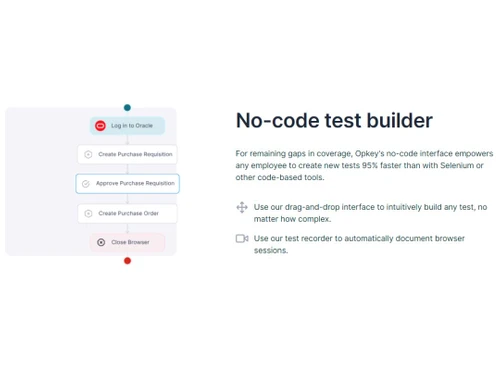
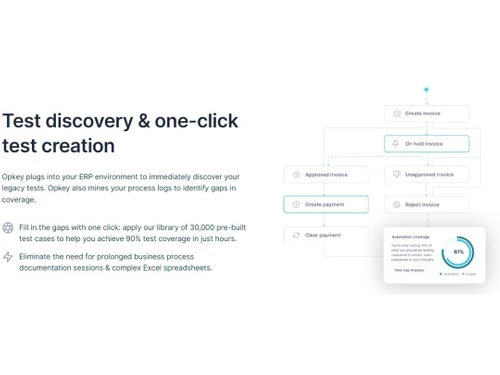
 End-to-end Test Automation No-code test builder Self-healing scripts Collaborate & report Impact analysis Pre-Built Integrations Document browser sessions Drag-and-drop interface Mines your process logs Single-app & cross-app tests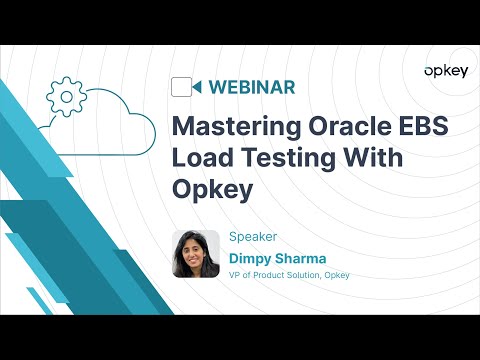

Watch the demo video to explore key features, real workflows, and how the software fits your business needs.
 Ubuntu
  Windows
  MacOS
MacOS  Linux
Linux  Desktop
  Mobile
  Tablet
  iPad
iPad  Cloud-Based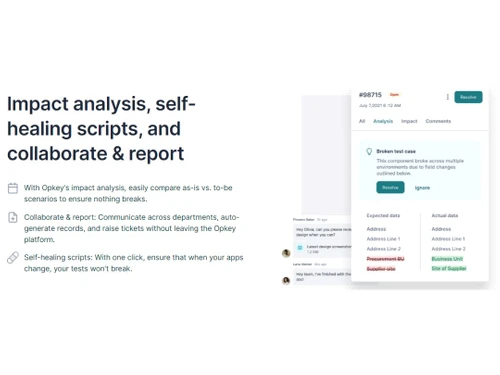
Small Business
Designed for startups and growing businesses
Medium Business
Built for business growth and flexibility
Enterprises
Designed for complex and large-scale business needs
4.7
Out of 5

Overall Rating
Based on
3 Verified Reviews
Rating Breakdown
94% Recommend this Product
Add ReviewUsers consistently praise OpKey for its ability to enhance workflow and improve the organization of patient records, with many noting its positive impact on workplace culture. The software's reliability and the proactive support from the team are frequently highlighted as major benefits. While there are no significant complaints, some users suggest that further process improvements could enhance the overall experience. Overall, customer sentiment is highly positive, reflecting strong satisfaction with the product and its support.

Jais Charli 
UX Designer & UI Developer
Aug 14, 2024
Techjockey Verified
“I really like working with Opkey”
Great software, perfect for patient records.
Pros
This system has enhanced our workflow. It has significantly simplified the organization of patient records, retrieval of crucial doctor information, and the generation of billing reports.
Cons
No cons
Rehana Singh
Chief Executive Officer
Aug 12, 2024
Techjockey Verified
“better environment for everyone”
Brings a positive attitude and energy to the workplace, making it a better environment for everyone
Pros
Brings a positive attitude and energy to the workplace, making it a better environment for everyone
Cons
With some process improvements, it could be even better
Aug 9, 2024
Techjockey Verified
“Very responsive product”
Pros
opkey's team is knowledgeable, responsive, and proactive. Their technology is reliable, and I appreciate the regular updates and improvements.
Cons
I appreciate the regular updates and improvements.

OpKey
Price On Request
Desktop
Mobile
Web based
On Premises
Windows
Mac OS

Testcomplete
Price On Request
Desktop
Mobile
Web based
On Premises
Windows
Mac OS

UFT One
Price On Request
Desktop
Mobile
Web based
On Premises
Windows
Mac OS

Kobiton
Price On Request
Desktop
Mobile
Web based
On Premises
Windows
Mac OS

Applause
Price On Request
Desktop
Mobile
Web based
On Premises
Windows
Mac OS

Rapise
Price On Request
Desktop
Mobile
Web based
On Premises
Windows
Mac OS

Katalon Studio
Price On Request
Desktop
Mobile
Web based
On Premises
Windows
Mac OS

Rainforest QA
Price On Request
Desktop
Mobile
Web based
On Premises
Windows
Mac OS

Selenium
Price On Request
Desktop
Mobile
Web based
On Premises
Windows
Mac OS

Tuskr
Price On Request
Desktop
Mobile
Web based
On Premises
Windows
Mac OS

Cypress
Price On Request
Desktop
Mobile
Web based
On Premises
Windows
Mac OS
(0) Product(s) selected
Starting Price:
$1,940 /quantity
Starting Price:
$83
Available
Price on Request
Starting Price:
$300 /month
Available
Price on Request
Available
Price on Request

Available
Price on Request

Starting Price:
$175 /month

Available
Price on Request
OpKey software is compatible with Windows and macOS operating systems.
OpKey Functional Testing app is unavailable on Android and iOS devices.
The OpKey Software supports web-based deployment.
OpKey Functional Testing software pricing is available on request at techjockey.com.
OpKey, a cutting-edge functional testing software, caters to diverse potential users. It proves invaluable to quality assurance teams, software developers, and businesses seeking efficient and reliable testing solutions.
OpKey functional testing Software demo is available for free with techjockey.com.
OpKey Functional Testing Tool does not offer a free trial.
OpKey is a web-based platform. So, you need not download any software or app to use it.
OpKey is a powerful testing software designed for enterprises. It streamlines the testing process by eliminating the need for manual coding. This platform facilitates continuous testing, helping businesses release software faster, reduce expenses, and minimize risks. It's a codeless solution that enhances release cycles, cost-efficiency, and software reliability.
20,000+ Software Listed
Best Price Guranteed
Free Expert Consultation
2M+ Happy Customers
Terms and Condtions

Users with registered businesses can purchase goods from merchants on the platform to satisfy their business needs. Users are not permitted to utilize any products acquired through the platform for resale, advertising, business, or further distribution.
For each purchase made, users will receive a Tax Invoice (or 'GST invoice') that includes specific details such as:
the GSTIN of the user associated with their registered business, and
the specified Entity Name for their business.
It should be noted that not all products are eligible for GST Invoice. Only the products displayed by participating sellers with the 'GST-based Invoice Available' callout on the product description page would qualify.
Certain goods and services are not eligible to get a GST Invoice, including items with VAS, i.e., Value Added Services (e.g., Total Mobile Protection/Assured Buyback) and those involving an exchange offer at the time of purchase.
Users must ensure the accuracy of the GSTIN, and business entity name provided for the GST Invoice. Requests for corrections into GST Invoice would not be accommodated by Techjockey.com or any Seller, and any issues arising from user-provided information are the sole responsibility of users.
Techjockey.com is not liable for the GST Invoice or any associated input tax credit. To efficiently claim an input tax credit, users should select the registered place of business address as per the GST authority's data and follow the provisions of the GST Act and rules.
To claim an input tax credit, the delivery and billing addresses must match. Furthermore, input tax credits will not be granted if the delivery address and GSTIN on the invoice are from different states. In case of incorrect GST details provided during the order placement, the order will be canceled automatically.



