
linkedin
Opticdigit logo
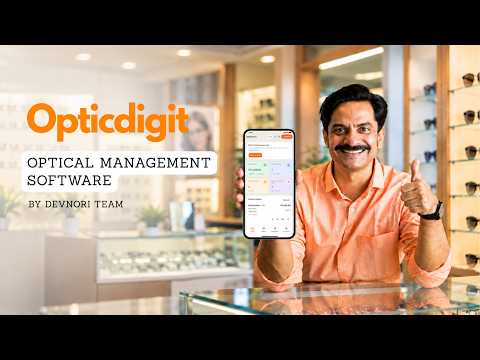
play Optical Shop Software in Marathi | Billing, Stock, Barcode & 2-in-1 Printer | Opticdigit
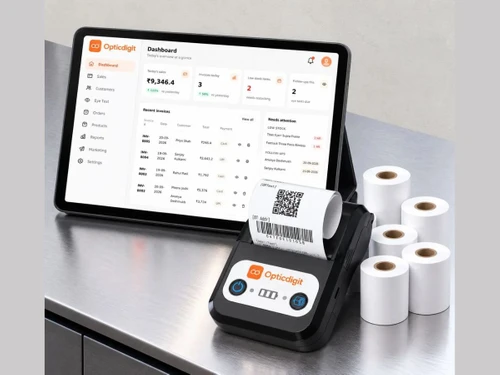
Opticdigit dashboard
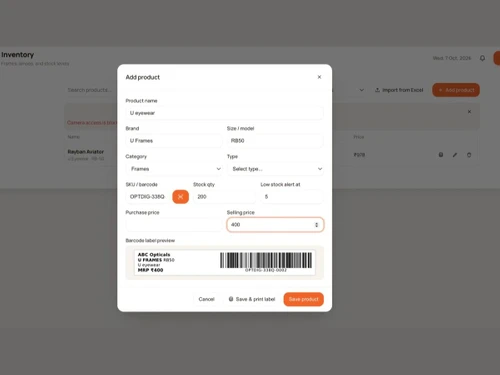
Opticdigit products

Opticdigit

Brand: Opticdigit

  • No Ratings & Reviews

Have you used Opticdigit before?

Share your insights for better experience

Add a Review
Starting Price
₹2,500 excl.GST
₹ 2,950 incl. GST

View plans

100% Genuine
Products
Best Price
Guaranteed
Safe & Secure
Payment
  • Description

  • Pricing

  • Features

  • Specification

  • Review

Starting at ₹2,500

Opticdigit Software Overview

Opticdigit Company Details

Founded Year:  2026

Opticdigit is optical shop software built for opticians across India, from single-counter stores to multi-branch optical chains. Running an optical shop means juggling billing, prescriptions, frames and lenses stock, and repeat customers. Opticdigit puts all of it on one screen:

Director/Founders Devnori
Company Size 101-500 Employees

Opticdigit Pricing & Plans

Basic

Calculated Price

₹ 2500 Exclusive of all taxes
    • Quantity

      Quantity
      Quantity
    • Yearly

      Yearly
      Yearly

Key Features

  • Shops on one account-1

  • SMS credits per year-1,000

  • PDF invoice templates-2

  • Unlimited GST billing & invoices

  • Barcode labels & scan to bill

  • Sales, stock & GST reports

Premium

Calculated Price

₹ 4000 Exclusive of all taxes
    • Quantity

      Quantity
      Quantity
    • Yearly

      Yearly
      Yearly

Key Features

  • Shops on one account-1

  • SMS credits per year-5,000

  • PDF invoice templates -10+

  • Everything in Basic, plus

  • Lens & lab order tracking (workshop prints, fitter

  • GST filing support & bank reconciliation

Pro

Calculated Price

₹ 8000 Exclusive of all taxes
    • Quantity

      Quantity
      Quantity
    • Yearly

      Yearly
      Yearly

Key Features

  • Shops on one account-1

  • SMS credits per year-5,000

  • PDF invoice templates -10+

  • Everything in Premium, plus

  • Bluetooth bill + barcode printer

  • 4 bill rolls + 2 barcode sticker rolls

Ultra

Calculated Price

₹ 20000 Exclusive of all taxes
    • Quantity

      Quantity
      Quantity
    • Yearly

      Yearly
      Yearly

Key Features

  • Shops on one account -Up to 6

  • SMS credits per year-15,000

  • PDF invoice templates -10+

  • Everything in Pro, plus

  • Stock across shops & combined reports

  • Branch-wise salesman ranking

Opticdigit Features

  • icon_check Billing & Invoicing
    Generate GST invoices for frames, lenses and other optical products.
  • icon_check Prescription Management
    Record SPH, CYL, AXIS and PD values in customer invoices and history.
  • icon_check Customer Management
    Maintain customer profiles, purchase records and prescription history.
  • icon_check Inventory Management
    Manage frame, lens and optical accessory stock with automatic updates.
  • icon_check Barcode Management
    Generate unique barcodes for products and scan them during billing.
  • icon_check Barcode Label Printing
    Print product labels containing shop name, brand, model and MRP.
  • icon_check Low Stock Alerts
    Receive alerts when product quantities fall below the set stock level.
  • icon_check Loyalty Program
    Credit cashback to customers for redemption on their next purchase.
  • icon_check Automated Reminder
    Send eye-test, anniversary and contact lens reorder reminders.
  • icon_check Offers & Campaign Management
    Create promotional campaigns, festival offers and customer messages.
  • icon_check Payment Management
    Record cash, UPI and card payments, including advances and outstanding balances.
  • icon_check Sales Reports
    Track daily sales, invoices and salesperson performance.
  • icon_check Staff Management
    Create staff logins with role-based access permissions.
  • icon_check Multi-Store Management
    Manage multiple optical shop branches from one account.
  • icon_check GST Report
    Access GST summaries and sales information for tax filing.
Opticdigit Demo Video play icon

Get Opticdigit Demo

Watch the demo video to explore key features, real workflows, and how the software fits your business needs.

Understand
Key Features
Personal
Demo Insights
Interactive
Demo Support

Opticdigit Specifications

Supported Platforms
Ubuntu Ubuntu Windows Windows iOS iOS Android Android MacOS MacOS Windows(Phone) Windows(Phone) Linux Linux
Devices
Desktop Desktop Mobile Mobile Tablet Tablet iPad iPad
Deployment
Cloud-Based Cloud-Based Perpetual Perpetual
Suitable For
Optical
Business Specific
Optical
Business Size
Small Business Startups Medium Business Enterprises SMBs SMEs MSMBs MSMEs
Customer Support
Phone Email
Language
English
Training Resources
Documentation

Opticdigit Review

Be the First to Review

This product has no reviews yet. Be the first to leave your feedback.

Add Review

20,000+ Software Listed

Best Price Guranteed

Free Expert Consultation

2M+ Happy Customers

Terms and Condtions

close

Users with registered businesses can purchase goods from merchants on the platform to satisfy their business needs. Users are not permitted to utilize any products acquired through the platform for resale, advertising, business, or further distribution.

For each purchase made, users will receive a Tax Invoice (or 'GST invoice') that includes specific details such as:

  • the GSTIN of the user associated with their registered business, and

  • the specified Entity Name for their business.

It should be noted that not all products are eligible for GST Invoice. Only the products displayed by participating sellers with the 'GST-based Invoice Available' callout on the product description page would qualify.

Certain goods and services are not eligible to get a GST Invoice, including items with VAS, i.e., Value Added Services (e.g., Total Mobile Protection/Assured Buyback) and those involving an exchange offer at the time of purchase.

Users must ensure the accuracy of the GSTIN, and business entity name provided for the GST Invoice. Requests for corrections into GST Invoice would not be accommodated by Techjockey.com or any Seller, and any issues arising from user-provided information are the sole responsibility of users.

Techjockey.com is not liable for the GST Invoice or any associated input tax credit. To efficiently claim an input tax credit, users should select the registered place of business address as per the GST authority's data and follow the provisions of the GST Act and rules.

To claim an input tax credit, the delivery and billing addresses must match. Furthermore, input tax credits will not be granted if the delivery address and GSTIN on the invoice are from different states. In case of incorrect GST details provided during the order placement, the order will be canceled automatically.