linkedin
OptiSigns logo
play OptiSigns: Engaging your audience with digital signage. We make it happen.
OptiSigns Templates
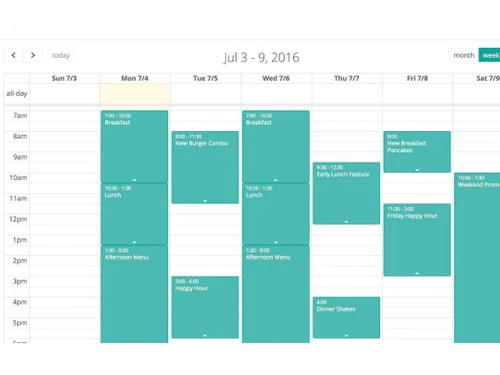
OptiSigns Schedule Content

OptiSigns

Brand: OptiSigns

  • 4.5

  • 3 Ratings

OptiSigns is a cloud-based digital signage software that allows you to easily create and manage dynamic content for your business on any screen or device.

See More

Have you used OptiSigns before?

Share your insights for better experience

Add a Review
Starting Price
$10

View plans

100% Genuine
Products
Best Price
Guaranteed
Safe & Secure
Payment
  • Description

  • Pricing

  • Features

  • Specification

  • Review

  • Compare

  • Alternatives

  • FAQ

Starting at $10

OptiSignsSoftware Overview

What is OptiSigns?

OptiSigns is an intuitive digital signage software designed to effortlessly transform any television into a dynamic digital display. Boasting over 100 integrated apps, including Weather, Instagram, Facebook, YouTube, Google Slides, and more, it ensures a versatile and engaging display experience.

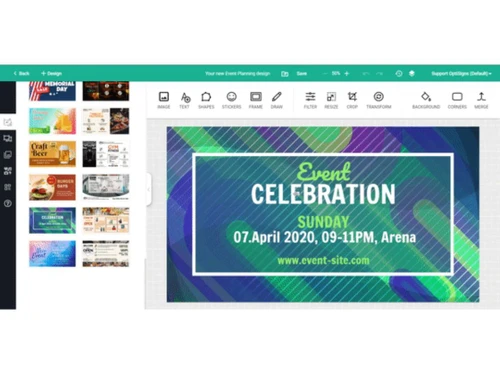
For users seeking convenience in design, it offers an extensive template library covering diverse categories such as Digital Menu, Holiday & Event, Food & Beverage, Health & Medical, Retail, Gyms & Fitness, and more.

The online editor allows easy customization and lets users pick and personalize a template within minutes. Simplifying large deployments, it offers pre configured devices ready for use upon arrival. These devices come preconfigured and provisioned for your account, requiring only power and an HDMI connection to the TV.

Why Choose OptiSigns Software?

  • The digital signage software allows you to create dynamic playlists by combining images, videos, and apps for a customized and engaging display experience.
  • It controls your digital signage displays and allows you to schedule content for specific times, weeks, or events.
  • The platform supports landscape and portrait modes, enabling users to display content in their preferred direction for optimal visual impact.
  • It allows you to download content to devices to ensure uninterrupted playback, even in areas with a poor internet connection.
  • The digital signage system allows you to schedule daily auto-restarts to maintain screen stability and ensure consistent performance.

Benefits of OptiSigns Platform

  • The digital signage software enables processing, filtering, and action on events with data sent back for analytics.
  • It allows you to collaborate efficiently with team members by assigning different roles and approval workflows for managing and updating screens.
  • The platform enhances engagement by incorporating full touchscreens or interactive elements into your digital signage for an immersive experience.
  • It allows you to connect sensors and utilize AI to adapt content based on real-time demographics and IoT sensor data.
  • The digital signage system allows you to build interactive kiosk experiences through a user-friendly drag-and-drop interface.

Pricing of OptiSigns Digital Signage Software

OptiSigns price in India starts at $10 on techjockey.com. It comes with multiple pricing plans and caters to a diverse customer base.

For subscription-related details and offers on premium packages, please request a call back from our product experts.

Read more

OptiSigns Company Details

Founded Year:  2016

OptiSigns provides a simple digital signage solution.

Director/Founders Henry Le
Company Size 1-100 Employees

OptiSigns Pricing & Plans

Standard
Key Features
  • Upload Images, Videos, Documents
  • 160+ Apps & Integrations
  • Thousands of Free Templates
  • Design Tool
  • Playlists, Schedule
  • Work Offline
Starting at $10
    • Monthly

      Monthly
      Monthly

Key Features

  • Upload Images, Videos, Documents

  • 160+ Apps & Integrations

  • Thousands of Free Templates

  • Design Tool

  • Playlists, Schedule

  • Work Offline

OptiSigns Features

  • icon_check Automatic Player Updates
    Keep your digital signage software up-to-date with automatic, effortless upgrades.
  • icon_check Content Scheduling
    Plan your displays with flexible scheduling for different messages and timings.
  • icon_check Media Library
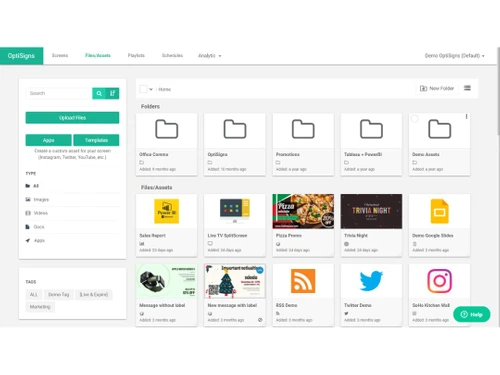
    Organize and access all your images, videos, and other content in one central location.
  • icon_check Multi-Screen Support
    Manage and synchronize content across multiple displays, even video walls.
  • icon_check Remote Display Management
    Control your displays from anywhere with internet access for troubleshooting and updates.
  • icon_check Visual Editor
    Use drag-and-drop tools to create engaging content visually, without coding knowledge.
  • icon_check Secure Browsing
    Ensure the safety of your displays with restricted access to websites and content sources.
  • icon_check POS Integration
    Connect your digital signage to your point-of-sale system for real-time pricing and promotions.
  • icon_check Templates
    Start your content creation with pre-designed templates for various purposes and occasions.
OptiSigns Demo Video play icon

Get OptiSigns Demo

Watch the demo video to explore key features, real workflows, and how the software fits your business needs.

Understand
Key Features
Personal
Demo Insights
Interactive
Demo Support

OptiSigns Specification

Supported Platforms
Ubuntu Ubuntu Windows Windows iOS iOS Android Android MacOS MacOS Linux Linux
Devices
Desktop Desktop Mobile Mobile Tablet Tablet iPad iPad
Deployment
Web-Based Web-Based
Suitable For
All Industries
Business Specific
All Businesses
Business Size
Small Business Medium Business Enterprises
Customer Support
Email Communities
Language
English
Training Resources
Videos

Explore the Best Alternative Solutions Similar to Your Business Size and Needs

OptiSigns Review

4.5

Out of 5

img

Overall Rating

Based on
3 Verified Ratings

Rating Breakdown

  • Features 4
  • Value for Money 4.6
  • Ease of Use 4.5
  • Customer Support 5

86% Recommend this Product

Add Review

Be the First to Review

This product has no reviews yet. Be the first to leave your feedback.

Add Review

Compare OptiSigns With other Digital Signage Software

Products
Ratings
Pricing
Device Supported
Deployment
Supported Platforms
  • img

    OptiSigns

  • 4.5

  • Price On Request

  • Desktop

    Mobile

  • Web based

    On Premises

  • Windows

    Mac OS

  • img

    FlexiSign

  • 4.0

  • Price On Request

  • Desktop

    Mobile

  • Web based

    On Premises

  • Windows

    Mac OS

  • img

    Lira Screen

  • 4.5

  • Price On Request

  • Desktop

    Mobile

  • Web based

    On Premises

  • Windows

    Mac OS

  • img

    PosterBooking

  • 4.6

  • Price On Request

  • Desktop

    Mobile

  • Web based

    On Premises

  • Windows

    Mac OS

  • img

    DISPL

  • 4.5

  • Price On Request

  • Desktop

    Mobile

  • Web based

    On Premises

  • Windows

    Mac OS

  • img

    Screencloud

  • 4.7

  • Price On Request

  • Desktop

    Mobile

  • Web based

    On Premises

  • Windows

    Mac OS

  • img

    Korbyt

  • 4.3

  • Price On Request

  • Desktop

    Mobile

  • Web based

    On Premises

  • Windows

    Mac OS

  • img

    Intuiface

  • 4.2

  • Price On Request

  • Desktop

    Mobile

  • Web based

    On Premises

  • Windows

    Mac OS

  • img

    piSignage

  • 4.5

  • Price On Request

  • Desktop

    Mobile

  • Web based

    On Premises

  • Windows

    Mac OS

(0) Product(s) selected

OptiSigns Alternatives

See All OptiSigns Alternatives

Starting Price:

$206

Available

Price on Request

Starting Price:

$1,020

Starting Price:

$50

Available

Price on Request

Starting Price:

€15

Starting Price:

$9

Which operating system does OptiSigns support?

OptiSigns is compatible with Ubuntu, Windows, Linux, and MacOS operating systems.

Is there any OptiSigns app?

OptiSigns is unavailable for Android and iOS app users.

What is the deployment type of OptiSigns software?

OptiSigns supports web-based deployment.

How much do OptiSigns cost?

OptiSigns price starts at $10 on techjockey.com.

Who are the potential users of OptiSigns?

OptiSigns can help businesses across various sectors to create engaging digital signage displays that inform their audience.

Is there any free trial or demo for OptiSigns?

Yes, OptiSigns offers a free demo for users at techjockey.com.

Is OptiSigns free?

OptiSigns software is not available for free at techjockey.com. You can connect with our experts to learn more about the product details.

Does OptiSigns offer a free trial?

Yes, OptiSigns software offers users a free trial.

How can you download OptiSigns software?

OptiSigns software is a web-based platform. So, installation is not required. Just open the Setup Wizard to get started.

How do OptiSigns work?

OptiSigns is a cloud-based digital signage software that helps businesses manage digital displays for advertising and promotional content.

20,000+ Software Listed

Best Price Guranteed

Free Expert Consultation

2M+ Happy Customers

Terms and Condtions

close

Users with registered businesses can purchase goods from merchants on the platform to satisfy their business needs. Users are not permitted to utilize any products acquired through the platform for resale, advertising, business, or further distribution.

For each purchase made, users will receive a Tax Invoice (or 'GST invoice') that includes specific details such as:

  • the GSTIN of the user associated with their registered business, and

  • the specified Entity Name for their business.

It should be noted that not all products are eligible for GST Invoice. Only the products displayed by participating sellers with the 'GST-based Invoice Available' callout on the product description page would qualify.

Certain goods and services are not eligible to get a GST Invoice, including items with VAS, i.e., Value Added Services (e.g., Total Mobile Protection/Assured Buyback) and those involving an exchange offer at the time of purchase.

Users must ensure the accuracy of the GSTIN, and business entity name provided for the GST Invoice. Requests for corrections into GST Invoice would not be accommodated by Techjockey.com or any Seller, and any issues arising from user-provided information are the sole responsibility of users.

Techjockey.com is not liable for the GST Invoice or any associated input tax credit. To efficiently claim an input tax credit, users should select the registered place of business address as per the GST authority's data and follow the provisions of the GST Act and rules.

To claim an input tax credit, the delivery and billing addresses must match. Furthermore, input tax credits will not be granted if the delivery address and GSTIN on the invoice are from different states. In case of incorrect GST details provided during the order placement, the order will be canceled automatically.