linkedin
Panoptic Scans logo
play How to Run Vulnerability Scans with Panoptic Scans
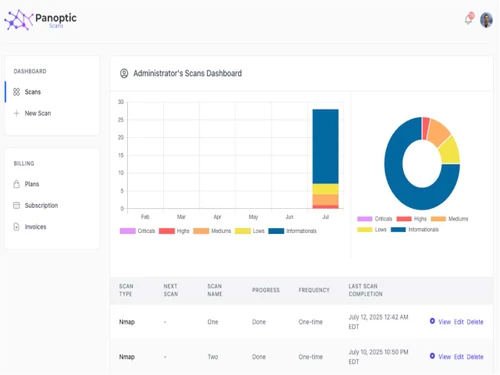
Panoptic Scans Dashboard
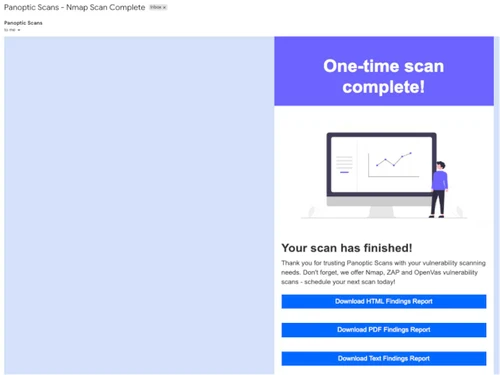
Panoptic-Scans-complete

Panoptic Scans

Brand: Panoptic Scans, LLC

  • 4.3

  • 4 Ratings

A cloud-based vulnerability scanning platform designed to help organizations identify and remediate security weaknesses in their networks and applications.

See More

Have you used Panoptic Scans before?

Share your insights for better experience

Add a Review
Starting Price
$25

View plans

100% Genuine
Products
Best Price
Guaranteed
Safe & Secure
Payment
  • Description

  • Pricing

  • Features

  • Specification

  • Review

  • Compare

  • Alternatives

  • FAQ

Starting at $25

Panoptic Scans Software Overview

What are Panoptic Scans?

Panoptic Scans is a cybersecurity software and a vulnerability assessment tool that helps organizations detect, analyze, and remediate security weaknesses in their networks and applications.

It uses automated scanning with tools like OpenVAS, OWASP ZAP, and Nmap to provide comprehensive security reports, risk ratings, and compliance guidance.

Why Choose Panoptic Scans?

  • Comprehensive Vulnerability Detection: Scans networks, applications, and systems to identify security weaknesses effectively.
  • Automated Assessments: Schedules scans automatically, saving time and ensuring consistent security checks.
  • Regulatory Compliance Support: Helps meet standards like SOC 2, HIPAA, ISO 27001, and GDPR with detailed reports.
  • AI-Powered Analysis: Uses AI-generated attack narratives to simplify vulnerability understanding and remediation.
  • Integration Capabilities: Easily integrates with tools like Vanta for streamlined compliance and security workflows.
  • White-Labeled Reporting: Provides customizable reports suitable for internal teams, clients, and stakeholders.
  • Scalable and Cost-Effective: Offers flexible pricing plans, making it suitable for startups, SMBs, and large enterprises.
  • Proactive Security Management: Helps organizations identify risks before they are exploited, enhancing overall security posture.

Benefits of Panoptic Scans

  • Early Threat Detection: Identifies vulnerabilities before they are exploited, reducing security risks.
  • Time-Saving Automation: Automates scans and reporting, freeing IT teams for other critical tasks.
  • Improved Risk Management: Provides risk ratings and insights to prioritize remediation efforts effectively.
  • Detailed Compliance Reports: Generates reports to demonstrate adherence to regulatory requirements.
  • Actionable Remediation Guidance: Offers clear instructions for fixing detected vulnerabilities.
  • Customizable Scan Schedules: Allows businesses to run scans according to their specific timelines and needs.
  • Supports Multiple Platforms: Scans web apps, APIs, networks, and cloud environments for comprehensive coverage.
  • Enhanced Security Posture: Enables organizations to maintain strong defenses and reduce potential breaches.
  • User-Friendly Interface: Simplifies security management for both technical and non-technical users.
  • Scalable for All Business Sizes: Suitable for startups, SMEs, and large enterprises with flexible pricing options.

Panoptic Scans Pricing

Panoptic Scans pricing starts at $ 25 at Techjockey.com. The pricing model is based on different parameters, including the amount of bandwidth you need, the number of servers you need, and the features you need. For further queries related to the product, you can contact our product team and learn more about the pricing and offers.

Read more

Panoptic Scans Pricing & Plans

Basic
Starting at $25
    • Licenses

      Licenses
      Licenses
    • Monthly

      Monthly
      Monthly

Key Features

  • Up to 75 Targets

  • OpenVas Nmap and ZAP Scanning

  • Automate Scanning on a Schedule

  • Reports Sent Via Email

Premium
Starting at $75
    • Licenses

      Licenses
      Licenses
    • Monthly

      Monthly
      Monthly

Key Features

  • Up to 300 Targets

  • OpenVas Nmap and ZAP Scanning

  • Automate Scanning on a Schedule

  • Reports Sent Via Email

  • White Label Report Logo

  • AI Attack Narrative

Pro
Starting at $200
    • Licenses

      Licenses
      Licenses
    • Monthly

      Monthly
      Monthly

Key Features

  • Up to 7500 Targets

  • OpenVas Nmap and ZAP Scanning

  • Automate Scanning on a Schedule

  • Reports Sent Via Email

  • White Label Report Logo

  • AI Attack Narrative

Panoptic Scans Features

  • icon_check Application Vulnerability Scanning
    Scans web applications and APIs to identify security weaknesses and risks.
  • icon_check Network Vulnerability Scanning
    Detects security gaps in networks, servers, and connected devices.
  • icon_check Attack Narratives
    Offers AI-powered explanations of potential attack scenarios for better understanding.
  • icon_check Scheduled Scans
    Automates regular scanning at defined intervals to ensure continuous security checks.
  • icon_check Vulnerability Management
    Provides tools to track, prioritize, and remediate identified vulnerabilities efficiently.
  • icon_check Simple Dashboard Interface
    Provides an intuitive interface to monitor scans, results, and security status at a glance.
  • icon_check Email Notifications
    Sends alerts and scan reports directly to relevant stakeholders for timely action.
  • icon_check Reporting
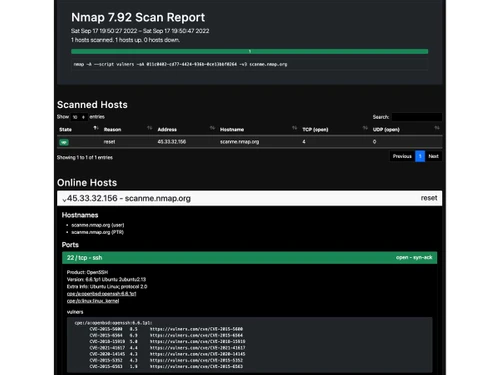
    Generates detailed and customizable reports for compliance and internal review.
Panoptic Scans Demo Video play icon

Get Panoptic Scans Demo

Watch the demo video to explore key features, real workflows, and how the software fits your business needs.

Understand
Key Features
Personal
Demo Insights
Interactive
Demo Support

Panoptic Scans Specifications

Supported Platforms
Ubuntu Ubuntu Windows Windows iOS iOS Android Android MacOS MacOS Windows(Phone) Windows(Phone) Linux Linux
Devices
Desktop Desktop Mobile Mobile Tablet Tablet iPad iPad
Deployment
Cloud-Based Cloud-Based
Suitable For
All Industries
Business Specific
All Businesses
Business Size
Small Business Startups Medium Business Enterprises SMBs SMEs MSMBs MSMEs
Customer Support
Email
Language
English
Training Resources
Live Online

Explore the Best Alternative Solutions Similar to Your Business Size and Needs

Panoptic Scans Review

4.3

Out of 5

img

Overall Rating

Based on
4 Verified Ratings

Rating Breakdown

  • Features 4.1
  • Value for Money 4
  • Ease of Use 4.2
  • Customer Support 4.8

80% Recommend this Product

Add Review

Be the First to Review

This product has no reviews yet. Be the first to leave your feedback.

Add Review

Compare Panoptic Scans With other Vulnerability Assessment Tools

Products
Ratings
Pricing
Device Supported
Deployment
Supported Platforms
  • img

    Panoptic Scans

  • 4.3

  • Price On Request

  • Desktop

    Mobile

  • Web based

    On Premises

  • Windows

    Mac OS

  • img

    Astra Pentest

  • 4.5

  • Price On Request

  • Desktop

    Mobile

  • Web based

    On Premises

  • Windows

    Mac OS

  • img

    InsightVM

  • 4.1

  • Price On Request

  • Desktop

    Mobile

  • Web based

    On Premises

  • Windows

    Mac OS

  • img

    OpenVAS

  • 4.1

  • Price On Request

  • Desktop

    Mobile

  • Web based

    On Premises

  • Windows

    Mac OS

  • img

    Tripwire Ip360

  • 4.2

  • Price On Request

  • Desktop

    Mobile

  • Web based

    On Premises

  • Windows

    Mac OS

  • img

    Qualys

  • 3.9

  • Price On Request

  • Desktop

    Mobile

  • Web based

    On Premises

  • Windows

    Mac OS

  • img

    KnowBe4

  • 4.0

  • Price On Request

  • Desktop

    Mobile

  • Web based

    On Premises

  • Windows

    Mac OS

(0) Product(s) selected

Panoptic Scans Alternatives

See All Panoptic Scans Alternatives

Available

Price on Request

Available

Price on Request

How much does Panoptic Scans cost?

Panoptic Scans pricing starts at $ 25 at Techjockey.com. Pricing is customised based on specific business needs.

Which operating system does Panoptic Scans support?

Panoptic Scans is cloud-based and works on Windows, macOS, Linux, and mobile browsers.

How does Panoptic Scans work?

It uses automated scanning tools like OpenVAS, OWASP ZAP, and Nmap to detect vulnerabilities, generate reports, and suggest remediation.

Is Panoptic Scans suitable for small businesses?

Yes, it offers scalable pricing and automated features, making it ideal for startups, SMBs, and large enterprises.

Does Panoptic Scans offer a free trial or a demo?

Yes, Panoptic Scans provides demos and trial options for businesses to explore its capabilities before purchasing.

What features does Panoptic Scans offer?

Features include application & network vulnerability scanning, scheduled scans, reporting, attack narratives, dashboard interface, and email notifications.

Is there a Panoptic Scans App?

Panoptic Scans is primarily cloud-based; it does not require a separate mobile or desktop app.

Who are the potential users of Panoptic Scans?

SaaS companies, IT security teams, and organizations need proactive vulnerability management and compliance support.

How secure is Panoptic Scans?

It uses industry-standard security protocols, encrypted data transmission, and compliance with standards like SOC 2, HIPAA, and GDPR.

20,000+ Software Listed

Best Price Guranteed

Free Expert Consultation

2M+ Happy Customers

Terms and Condtions

close

Users with registered businesses can purchase goods from merchants on the platform to satisfy their business needs. Users are not permitted to utilize any products acquired through the platform for resale, advertising, business, or further distribution.

For each purchase made, users will receive a Tax Invoice (or 'GST invoice') that includes specific details such as:

  • the GSTIN of the user associated with their registered business, and

  • the specified Entity Name for their business.

It should be noted that not all products are eligible for GST Invoice. Only the products displayed by participating sellers with the 'GST-based Invoice Available' callout on the product description page would qualify.

Certain goods and services are not eligible to get a GST Invoice, including items with VAS, i.e., Value Added Services (e.g., Total Mobile Protection/Assured Buyback) and those involving an exchange offer at the time of purchase.

Users must ensure the accuracy of the GSTIN, and business entity name provided for the GST Invoice. Requests for corrections into GST Invoice would not be accommodated by Techjockey.com or any Seller, and any issues arising from user-provided information are the sole responsibility of users.

Techjockey.com is not liable for the GST Invoice or any associated input tax credit. To efficiently claim an input tax credit, users should select the registered place of business address as per the GST authority's data and follow the provisions of the GST Act and rules.

To claim an input tax credit, the delivery and billing addresses must match. Furthermore, input tax credits will not be granted if the delivery address and GSTIN on the invoice are from different states. In case of incorrect GST details provided during the order placement, the order will be canceled automatically.