linkedin
Payfunnels logo
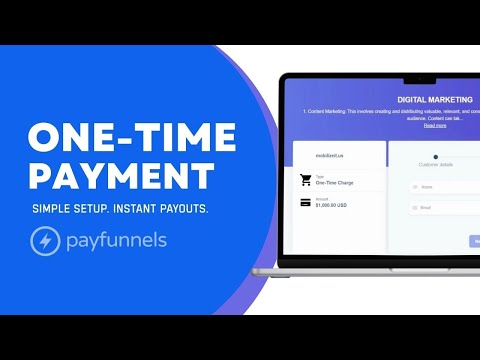
play Create Payment Plan Invoice - Payfunnels
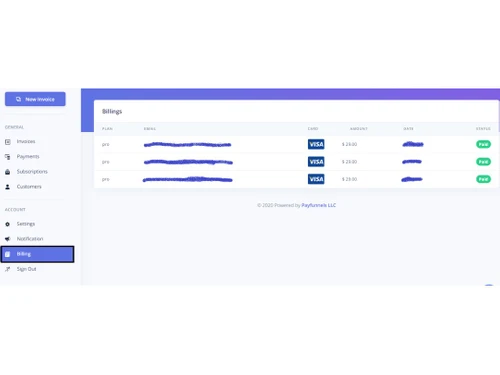
payfunnels-billing
payfunnels-paymentlink

Payfunnels

Brand: Payfunnels

  • 4.4

  • 5 Ratings

Payfunnels is a robust payment management software. This software facilitates safe and secure payment through platforms. People in business can incorporate it into their APIs and collect payment for their services. Payfunnels take very little time to install, and it's exceptionally easy to use interface makes it favourable among traders. Payfunnels payment gateway India supports international c...

See More

Have you used Payfunnels before?

Share your insights for better experience

Add a Review
Starting Price
$29

View plans

100% Genuine
Products
Best Price
Guaranteed
Safe & Secure
Payment
  • Description

  • Pricing

  • Features

  • Specification

  • Review

  • Compare

  • Alternatives

  • FAQ

Starting at $29

Payfunnels Software Overview

What is Payfunnels? 

Payfunnels is a robust payment management software. This software facilitates safe and secure payment through platforms. People in business can incorporate it into their APIs and collect payment for their services. Payfunnels take very little time to install, and it's exceptionally easy to use interface makes it favourable among traders. 

Payfunnels payment gateway India supports international currency across 25 countries. The software facilitates businesses to go global. Payfunnels enable a flexible payment system as it caters to a one-time payment, recurring payments, and periodic payment plans. The periodic payment plan sends an automated reminder for instalment collection. 
Payfunnels is available for a 14-days trial that you can avail and check for yourself! 

Who are the targeted customers for Payfunnels?

Businesses predominantly use Payfunnels for invoicing and schedule payment. The payment management software is also used by freelancers and E-commerce companies, as it allows secure payments. 

What are the system requirements for Payfunnels? 

Payfunnels is a web-based payment management software that requires a web browser to access. Hence, there are no mandatory software or hardware requirement for the Payfunnels investment manager. Payfunnels investment software is also available for Android and iPhone platforms. 

What features does Payfunnels offer? 

Payfunnels payment management software offers numerous features that benefit businesses in simplifying payment collections. Here are a few listed below for better acquaintance with the investment management software

  1. Integration with communication and social media networks such as Facebook, Gmail, Slack, Facebook Messenger, WordPress, Skype, etc. 
  2. Scheduled Payments 
  3. Gateway Attachments such as debit cards, credit cards, etc. 
  4. Bank Level SSL Encryption 
  5. 1-Step Checkout 
  6. Desktop and Mobile Accessibility 
  7. Process Payments with Stripe
  8. International Currency 
  9. API Integration with your current system

What is the price of Payfunnels? 

Payfunnels payment management software starts from Rs. 1914 per month. The price can vary based on the size of operations required. For further inquiries, please request a call and our sales team will get in touch with you as soon as possible.

Read more

Payfunnels Company Details

Founded Year:  2015

PayFunnels makes receiving payments online simple and fast.

Director/Founders Dave Rogenmoser, John Philip Morgan
Company Size 1-100 Employees

Payfunnels Pricing & Plans

Unlimited
Key Features
  • Unlimited Monthly Volume
  • Unlimited Invoices
  • No contracts, cancel anytime
Starting at $29
    • Licenses

      Licenses
      Licenses
    • Monthly

      Monthly
      Monthly

Key Features

  • Unlimited Monthly Volume

  • Unlimited Invoices

  • No contracts, cancel anytime

Payfunnels Features

  • icon_check Recurring Payments
    Automate recurring billing for subscriptions and scheduled payments to improve collection and cash flow.
  • icon_check Subscription Management
    Allow customers to pause, resume, cancel, or update subscriptions and their associated payment methods.
  • icon_check Multi-Currency Support
    Accept payments globally with support for multiple currencies and international payment methods.
  • icon_check Coupon Management
    Create and manage discount coupons to encourage purchases, increase conversions, and support promotional campaigns.
  • icon_check Customer Portal
    Provide customers with a secure portal to view payments, invoices, subscriptions, account details, and tasks.
  • icon_check Online Fraud Prevention
    Protect transactions with security controls, fraud detection capabilities, encryption, and PCI compliance.
  • icon_check Custom Domain
    Use a branded custom domain for payment pages to provide a consistent and professional customer experience.
  • icon_check Payment Tracking
    Track payments, sales, revenue, customer activity, and transaction status through centralized dashboards.
  • icon_check Slack Integration
    Receive real-time payment and invoice notifications in Slack to keep teams informed about transaction activity.
  • icon_check Upsells & Add-Ons
    Offer additional products, services, or upgrades during checkout to increase order value and revenue opportunities.
  • icon_check Refund Management
    Process complete or partial refunds while maintaining transaction records and customer payment information.
  • icon_check Invoice Management
    Manage invoices and track invoice activity, including when invoices are sent, opened, and viewed.
Payfunnels Demo Video play icon

Get Payfunnels Demo

Watch the demo video to explore key features, real workflows, and how the software fits your business needs.

Understand
Key Features
Personal
Demo Insights
Interactive
Demo Support

Payfunnels Specifications

Supported Platforms
Ubuntu Ubuntu Windows Windows MacOS MacOS Linux Linux
Devices
Desktop Desktop
Deployment
Cloud-Based Cloud-Based
Suitable For
All Industries
Business Specific
All Businesses
Business Size
Small Business Startups Medium Business Enterprises
Customer Support
Email Communities
Language
English
Training Resources
Videos

Explore the Best Alternative Solutions Similar to Your Business Size and Needs

Small Business

Designed for startups and growing businesses

Payoneer

4.2

Rapyd

4.4

Melio

4.0

See More

Payfunnels Review

4.4

Out of 5

img

Overall Rating

Based on
5 Verified Ratings

Rating Breakdown

  • Features 4.2
  • Value for Money 4.6
  • Ease of Use 4.3
  • Customer Support 4.8

84% Recommend this Product

Add Review

Be the First to Review

This product has no reviews yet. Be the first to leave your feedback.

Add Review

Compare Payfunnels With other Payment Processing Software

Products
Ratings
Pricing
Device Supported
Deployment
Supported Platforms
  • img

    Payfunnels

  • 4.4

  • Price On Request

  • Desktop

    Mobile

  • Web based

    On Premises

  • Windows

    Mac OS

  • img

    Rapyd

  • 4.4

  • Price On Request

  • Desktop

    Mobile

  • Web based

    On Premises

  • Windows

    Mac OS

  • img

    Hyperswitch

  • 4.1

  • Price On Request

  • Desktop

    Mobile

  • Web based

    On Premises

  • Windows

    Mac OS

  • img

    Melio

  • 4.0

  • Price On Request

  • Desktop

    Mobile

  • Web based

    On Premises

  • Windows

    Mac OS

  • img

    Noda

  • 4.3

  • Price On Request

  • Desktop

    Mobile

  • Web based

    On Premises

  • Windows

    Mac OS

  • img

    Airwallex

  • 4.2

  • Price On Request

  • Desktop

    Mobile

  • Web based

    On Premises

  • Windows

    Mac OS

  • img

    Zoho Checkout

  • 4.3

  • ₹ 1800

  • Desktop

    Mobile

  • Web based

    On Premises

  • Windows

    Mac OS

  • img

    CCBill

  • 4.3

  • Price On Request

  • Desktop

    Mobile

  • Web based

    On Premises

  • Windows

    Mac OS

  • img

    Veem

  • 4.1

  • Price On Request

  • Desktop

    Mobile

  • Web based

    On Premises

  • Windows

    Mac OS

(0) Product(s) selected

Payfunnels Alternatives

See All Payfunnels Alternatives

Noda

4.3

Available

Price on Request

Available

Price on Request

Available

Price on Request

Veem

4.1

Available

Price on Request

TSYS

4.2

Available

Price on Request

Available

Price on Request

Available

Price on Request

Available

Price on Request

Available

Price on Request

Articles for Payfunnels

See All Related Articles

How do I change default currency?

You can change the default currency in your stripe account that is embedded in Payfunnels. The default currency is based on your location. You can access the “Advanced option” and edit the default currency.

How to delete an invoice?

Please log in to Payfunnels. Click invoices then the invoice you want to delete and go at the bottom of the page. Note: Please make sure no subscription exists in Payfunnels. To check, please go to Subscriptions.

What are the charges for Stripe integration?

Stripe charges have to be paid on every card transaction. It costs 20 rupees on every card transaction.

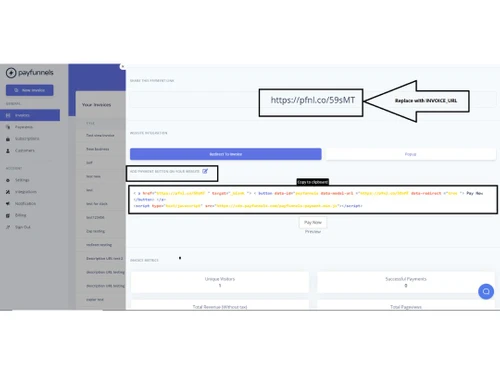
How to add personal links to the payment page?

Copy following script in your HTML page. Replace the INVOICE_URL with the link from the invoice and change it with the following:

Does Payfunnels require coding for installation?

No, Payfunnels does not require any knowledge for coding. It does not even require coding for API integration.

20,000+ Software Listed

Best Price Guranteed

Free Expert Consultation

2M+ Happy Customers

Terms and Condtions

close

Users with registered businesses can purchase goods from merchants on the platform to satisfy their business needs. Users are not permitted to utilize any products acquired through the platform for resale, advertising, business, or further distribution.

For each purchase made, users will receive a Tax Invoice (or 'GST invoice') that includes specific details such as:

  • the GSTIN of the user associated with their registered business, and

  • the specified Entity Name for their business.

It should be noted that not all products are eligible for GST Invoice. Only the products displayed by participating sellers with the 'GST-based Invoice Available' callout on the product description page would qualify.

Certain goods and services are not eligible to get a GST Invoice, including items with VAS, i.e., Value Added Services (e.g., Total Mobile Protection/Assured Buyback) and those involving an exchange offer at the time of purchase.

Users must ensure the accuracy of the GSTIN, and business entity name provided for the GST Invoice. Requests for corrections into GST Invoice would not be accommodated by Techjockey.com or any Seller, and any issues arising from user-provided information are the sole responsibility of users.

Techjockey.com is not liable for the GST Invoice or any associated input tax credit. To efficiently claim an input tax credit, users should select the registered place of business address as per the GST authority's data and follow the provisions of the GST Act and rules.

To claim an input tax credit, the delivery and billing addresses must match. Furthermore, input tax credits will not be granted if the delivery address and GSTIN on the invoice are from different states. In case of incorrect GST details provided during the order placement, the order will be canceled automatically.