linkedin
Prospero logo
play How To Create a Business Proposal Using Prospero
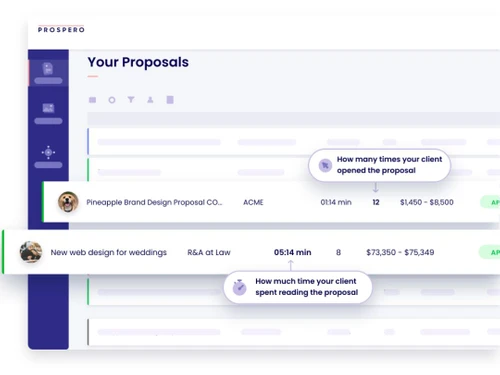
Prospero Tracking
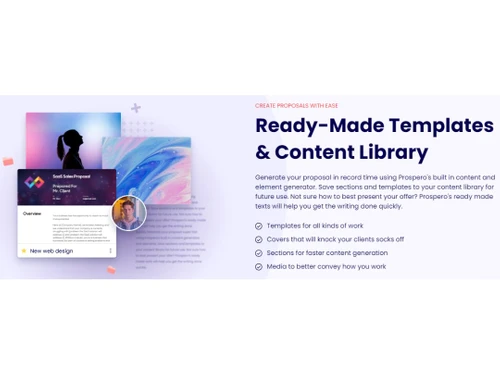
Prospero Templates

Prospero

Brand: GOProspero

  • 4.5

  • 5 Ratings

Craft captivating proposals effortlessly with Prospero.

See More

Have you used Prospero before?

Share your insights for better experience

Add a Review
Starting Price
$10

View plans

100% Genuine
Products
Best Price
Guaranteed
Safe & Secure
Payment
  • Description

  • Pricing

  • Features

  • Specification

  • Review

  • Compare

  • Alternatives

  • FAQ

Starting at $10

Prospero Software Overview

What is Prospero?

Prospero software redefines the art of proposal creation by providing a user-friendly platform that allows you to craft stunning proposals effortlessly. Prospero helps you impress clients with personalised touches such as logos, images, videos, and tables, ensuring a memorable and professional presentation every time. This software stands out for its seamless integrations, rich content library, customisable templates, and secure e-signatures, making it the ultimate solution for effective proposal management.

By leveraging Prospero's features, you can elevate your business proposals, streamline workflows, and ultimately increase your chances of winning more and more fresh and substantial projects. Whether creating a compelling pitch or collaborating with team members, Prospero empowers users to create proposals that leave a lasting impression on clients, helping them achieve their business goals as efficiently as ever!

Why Choose Prospero Software?

  • Streamlined Workflow: Enjoy a streamlined workflow that simplifies the process of creating, managing, and tracking proposals, saving a lot of your valuable time and effort.
  • Client Satisfaction: Deliver highly impressive and viable proposals that meet client expectations quickly, leading to higher client satisfaction and improved business relationships.
  • Data Security: Ensure the security of all your sensitive proposal data with robust encryption and secure storage features within the platform.
  • Automated Updates: Receive automatic updates and notifications to stay well informed about proposal status changes and updates.
  • User-Friendly Interface: Benefit from a user-friendly interface that makes proposal creation and management intuitive and accessible for all users alike, regardless of their technical knowledge.

Benefits of Prospero Platform

  • Efficiency Boost: Experience a significant boost in efficiency with streamlined proposal creation and management processes, allowing you to focus more on core (and more important) business activities.
  • Enhanced Professionalism: You can now easily impress your clients with professional-looking proposals that reflect your brand identity and attention to detail, enhancing your professional image and credibility.
  • Centralised Collaboration: Collaborate seamlessly with team members and clients by centralising all proposal-related communication and feedback within the Prospero platform.
  • Improved Communication: Facilitate better communication with clients and team members through integrated features such as comments, notifications, and real-time updates on proposal progress.
  • Customisation Flexibility: Enjoy the flexibility to customise proposals according to specific client needs and preferences, ensuring personalised and tailored solutions for each proposal.
  • Time Savings: Save substantial amounts of your valuable time with automated processes, pre-built templates, and intuitive tools that streamline proposal creation and reduce manual tasks.

Pricing of Prospero Quoting Software

Prospero pricing starts at $10 at techjockey.com.

The pricing model is based on different parameters, including extra features, deployment type, and the total number of users. For further queries related to the product, you can contact our product team and learn more about the pricing and offers.

Read more

GOProspero Company Details

Founded Year:  2017

Business Proposal Software. Close More Deals. 3x Faster.

Director/Founders Gal Dubinski, Tomer Aharon
Company Size 1-100 Employees

Prospero Pricing & Plans

Starter
Key Features
  • Unlimited proposals
  • Proposal analytics
  • Integrations
  • Content Library
  • Templates
  • Live chat support
Starting at $10
    • Monthly

      Monthly
      Monthly

Key Features

  • Unlimited proposals

  • Proposal analytics

  • Integrations

  • Content Library

  • Templates

  • Live chat support

Prospero Features

  • icon_check Proposal Management
    Efficiently handle proposals for streamlined workflow management.
  • icon_check Integrations
    Integrate conveniently with other systems for enhanced functionality and compatibility.
  • icon_check Content Library
    Access a centralised content repository for easy reference and utilisation.
  • icon_check Templates
    Utilise pre-designed formats for quick and professional proposal creation.
  • icon_check Quote Management
    Manage and track quotes efficiently for streamlined quoting processes.
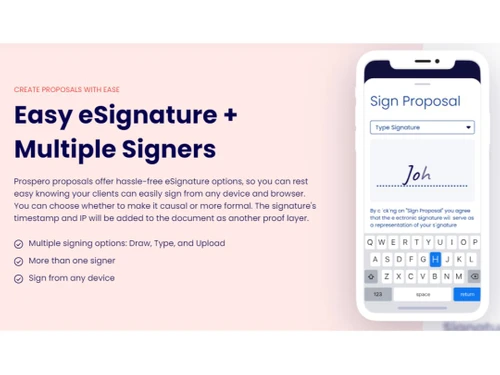
  • icon_check E-Signatures
    Enable secure and legally binding electronic signatures for document authentication.
  • icon_check Collaboration
    Facilitate teamwork and communication among team members for efficient proposal creation.
Prospero Demo Video play icon

Get Prospero Demo

Watch the demo video to explore key features, real workflows, and how the software fits your business needs.

Understand
Key Features
Personal
Demo Insights
Interactive
Demo Support

Prospero Specifications

Supported Platforms
Ubuntu Ubuntu Windows Windows MacOS MacOS Linux Linux
Devices
Desktop Desktop Mobile Mobile Tablet Tablet iPad iPad
Deployment
Cloud-Based Cloud-Based
Suitable For
All Industries
Business Specific
All Businesses
Business Size
Small Business Medium Business Enterprises
Customer Support
Email Communities
Language
English
Training Resources
Videos

Explore the Best Alternative Solutions Similar to Your Business Size and Needs

Prospero Review

4.5

Out of 5

img

Overall Rating

Based on
5 Verified Ratings

Rating Breakdown

  • Features 4.2
  • Value for Money 4.6
  • Ease of Use 4.4
  • Customer Support 4.8

88% Recommend this Product

Add Review

Be the First to Review

This product has no reviews yet. Be the first to leave your feedback.

Add Review

Compare Prospero With other Quoting Software

Products
Ratings
Pricing
Device Supported
Deployment
Supported Platforms
  • img

    Prospero

  • 4.5

  • Price On Request

  • Desktop

    Mobile

  • Web based

    On Premises

  • Windows

    Mac OS

  • img

    Proposify

  • 4.4

  • Price On Request

  • Desktop

    Mobile

  • Web based

    On Premises

  • Windows

    Mac OS

  • img

    Estimo

  • 4.7

  • Price On Request

  • Desktop

    Mobile

  • Web based

    On Premises

  • Windows

    Mac OS

  • img

    Quotient

  • 4.4

  • Price On Request

  • Desktop

    Mobile

  • Web based

    On Premises

  • Windows

    Mac OS

  • img

    Better Proposals

  • 4.5

  • Price On Request

  • Desktop

    Mobile

  • Web based

    On Premises

  • Windows

    Mac OS

  • img

    Quoter

  • 4.2

  • Price On Request

  • Desktop

    Mobile

  • Web based

    On Premises

  • Windows

    Mac OS

  • img

    GleanQuote

  • 4.5

  • Price On Request

  • Desktop

    Mobile

  • Web based

    On Premises

  • Windows

    Mac OS

  • img

    Bidsketch

  • 4.5

  • Price On Request

  • Desktop

    Mobile

  • Web based

    On Premises

  • Windows

    Mac OS

  • img

    Nusii

  • 4.4

  • Price On Request

  • Desktop

    Mobile

  • Web based

    On Premises

  • Windows

    Mac OS

  • img

    Paperless Parts

  • 4.0

  • Price On Request

  • Desktop

    Mobile

  • Web based

    On Premises

  • Windows

    Mac OS

  • img

    QuoteWerks

  • 4.4

  • Price On Request

  • Desktop

    Mobile

  • Web based

    On Premises

  • Windows

    Mac OS

(0) Product(s) selected

Prospero Alternatives

See All Prospero Alternatives

Starting Price:

$15 /Month

Starting Price:

$35

Articles for Prospero

See All Related Articles

Which operating system does Prospero Software Support?

Prospero software is compatible with Ubuntu, Windows, MacOS, and Linux systems.

Is there any Prospero App?

Prospero is not available for mobile devices.

What is the deployment type of Prospero System?

Prospero system supports web-based deployment.

How much does Prospero Software Cost?

Prospero pricing starts at $10 at techjockey.com.

Who are the potential users of Prospero?

Prospero Software is typically used in all businesses and industries.

Is there any free trial or demo for Prospero Solution?

Yes, Prospero solution free demo is available at techjockey.com.

Is Prospero Software Free?

Prospero Software generally offers a free 14-day trial. However, the premium plan with advanced features and exciting deals is available at techjockey.com.

How can you download Prospero?

Prospero software installation is not required, as it is web-based. Just open the Setup Wizard to get started.

How does Prospero Work?

Craft captivating proposals effortlessly with Prospero. Impress clients and win more projects with ease! Boost your chances of success today!

20,000+ Software Listed

Best Price Guranteed

Free Expert Consultation

2M+ Happy Customers

Terms and Condtions

close

Users with registered businesses can purchase goods from merchants on the platform to satisfy their business needs. Users are not permitted to utilize any products acquired through the platform for resale, advertising, business, or further distribution.

For each purchase made, users will receive a Tax Invoice (or 'GST invoice') that includes specific details such as:

  • the GSTIN of the user associated with their registered business, and

  • the specified Entity Name for their business.

It should be noted that not all products are eligible for GST Invoice. Only the products displayed by participating sellers with the 'GST-based Invoice Available' callout on the product description page would qualify.

Certain goods and services are not eligible to get a GST Invoice, including items with VAS, i.e., Value Added Services (e.g., Total Mobile Protection/Assured Buyback) and those involving an exchange offer at the time of purchase.

Users must ensure the accuracy of the GSTIN, and business entity name provided for the GST Invoice. Requests for corrections into GST Invoice would not be accommodated by Techjockey.com or any Seller, and any issues arising from user-provided information are the sole responsibility of users.

Techjockey.com is not liable for the GST Invoice or any associated input tax credit. To efficiently claim an input tax credit, users should select the registered place of business address as per the GST authority's data and follow the provisions of the GST Act and rules.

To claim an input tax credit, the delivery and billing addresses must match. Furthermore, input tax credits will not be granted if the delivery address and GSTIN on the invoice are from different states. In case of incorrect GST details provided during the order placement, the order will be canceled automatically.