linkedin
Proxmox VE logo
proxmox-ve
proxmox-ve-community
proxmox-ve-lvm

Proxmox VE

Brand: PROXMOX

  • 4.1

  • 5 Ratings

An open-source virtual server for running and managing virtual machines and containers on a server with an easy web interface.

See More

Have you used Proxmox VE before?

Share your insights for better experience

Add a Review
Starting Price
€355

View plans

100% Genuine
Products
Best Price
Guaranteed
Safe & Secure
Payment
  • Description

  • Pricing

  • Features

  • Specification

  • Review

  • Compare

  • Alternatives

  • FAQ

Starting at €355

Proxmox VE Software Overview

What is Proxmox VE?

Proxmox Virtual Environment (Proxmox VE) is an open-source virtual server that helps you run and manage virtual machines and containers on a single server.

It's built on Debian Linux and uses KVM for full virtualization and LXC for lightweight containers. With an easy-to-use web interface, you can create, control, and monitor virtual environments for Linux or Windows.

It supports advanced features like high-availability clustering, backups, and software-defined storage.

Proxmox VE is great for businesses or individuals wanting to optimize server resources without high costs. You can install it on bare-metal hardware or a Debian system.

Why Choose Proxmox VE Software?

  • Dual Virtualization (KVM + LXC): Supports full VMs for Windows/Linux and lightweight LXC containers on a single platform.
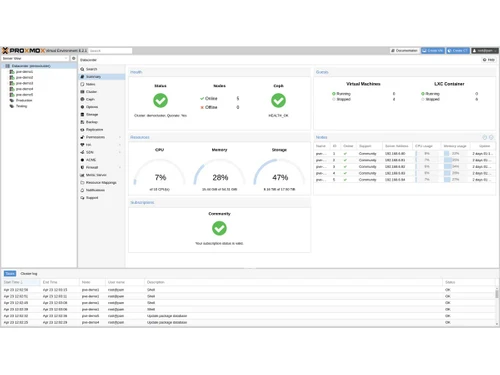
  • Intuitive Web Interface: A central, browser-based GUI (plus mobile app) gives full control over VMs, containers, storage, HA, and backups.
  • REST API & CLI: Automate via JSON-defined REST API, CLI, SSH, or tools like Ansible, Terraform, and more .
  • Integrated Clustering & HA: Create clusters with shared config (pmxcfs) and built-in High Availability to autorestart VMs on failure.
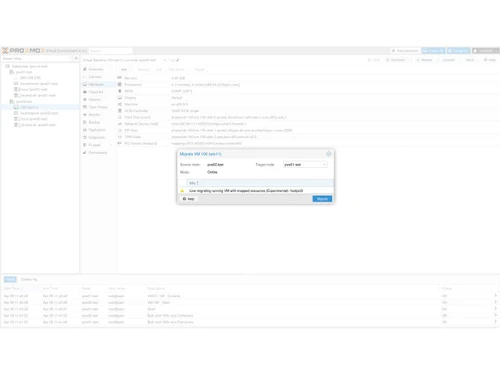
  • Live Migration: Move running VMs between nodes with zero downtime: great for balancing loads or maintenance.
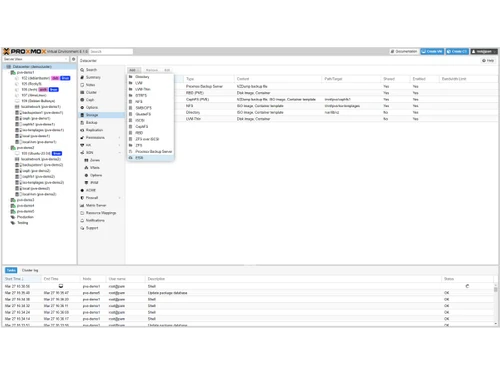
  • Flexible Storage Options: Supports local disks, ZFS, LVM, XFS, as well as NFS, iSCSI, Ceph, GlusterFS: fully managed via GUI.
  • Builtin Backup & Snapshots: Comprehensive vzdump backup, incremental backups, snapshots, and integration with Proxmox Backup Server (PBS) for dedupe and faster restores.
  • Advanced Networking / SDN: VLANs, bridges, virtual switches, VXLAN, BGP/EVPN supports enterprise-level software-defined networks.

Benefits of Proxmox VE Software

  • Security & Access Controls: 2factor auth, RBAC, LDAP/AD/OpenID integration, SSL/TLS, and per-host/VM firewalls.
  • Enterprise Performance & Scalability: Efficient resource usage, excellent I/O op performance (often outperforming alternatives), clusters scale from tiny to large data centers.
  • Minimal Downtime Upgrades: Smooth upgrade process, even across major versions; praised for easy and safe maintenance.
  • Strong Community & Support: Large active forums, frequent updates, robust documentation, optional paid support.
  • Private & Hybrid Cloud Ready: Supports private/hybrid cloud setups with multi-tenant clusters, Ceph, SDN, and automated infra-as-code .
  • Ideal for Labs to Production: Suitable for single nodes or full clusters great for homelabs, dev/test environments, enterprise deployments, disaster recovery, and even as VMware alternatives

Proxmox VE Pricing

Proxmox VE pricing starts from 355 Euros per year, as listed on Techjockey.com. The pricing model is based on different parameters, including extra features, deployment type, and the total number of users. For further queries related to the product, you can contact our product team and learn more about the pricing and offers.

Read more

Proxmox VE Pricing & Plans

Basic
Starting at €355
    • Yearly

      Yearly
      Yearly

Key Features

  • Access to Enterprise repository

  • Complete feature-set

  • 3 support tickets/year

  • Support via Customer Portal

Standard
Starting at €530
    • Yearly

      Yearly
      Yearly

Key Features

  • All Features of Basic Plan

  • Remote support (via SSH)

  • 10 support tickets/year

  • Support via Customer Portal

Premium
Starting at €1060
    • Yearly

      Yearly
      Yearly

Key Features

  • All Features of Standard Plan

  • Remote support (via SSH)

  • Unlimited support tickets

  • Support via Customer Portal

Proxmox VE Features

  • icon_check Dual Virtualization Support
    Runs both KVM virtual machines and LXC containers on one platform.
  • icon_check Integrated Web Interface
    Manage your entire infrastructure via a centralized, browser-based GUI.
  • icon_check Software-Defined Networking (SDN)
    Advanced networking features like VLANs, VXLAN, and virtual switching.
  • icon_check Live Migration
    Move running VMs or containers between nodes with zero downtime.
  • icon_check Role-Based Access Control (RBAC)
    Fine-grained user permissions using roles and access groups.
  • icon_check Built-in Firewall
    Per-VM/container and host-level firewalls for enhanced security.
  • icon_check Comprehensive Documentation
    Extensive official guides and manuals for users and developers.

Proxmox VE Specifications

Supported Platforms
Linux Linux
Devices
Desktop Desktop
Deployment
Cloud-Based Cloud-Based
Suitable For
All Industries
Business Specific
All Businesses
Business Size
Medium Business Enterprises MSMEs
Customer Support
Email
Language
English
Training Resources
Live Online

Proxmox VE Review

4.1

Out of 5

img

Overall Rating

Based on
5 Verified Ratings

Rating Breakdown

  • Features 4.3
  • Value for Money 4
  • Ease of Use 4.1
  • Customer Support 4.3

94% Recommend this Product

Add Review

Be the First to Review

This product has no reviews yet. Be the first to leave your feedback.

Add Review

Compare Proxmox VE With other Virtual Server

Products
Ratings
Pricing
Device Supported
Deployment
Supported Platforms
  • img

    Proxmox VE

  • 4.1

  • Price On Request

  • Desktop

    Mobile

  • Web based

    On Premises

  • Windows

    Mac OS

  • img

    VMmanager

  • 4.2

  • Price On Request

  • Desktop

    Mobile

  • Web based

    On Premises

  • Windows

    Mac OS

  • img

    NGINX Web Server

  • 4

  • Price On Request

  • Desktop

    Mobile

  • Web based

    On Premises

  • Windows

    Mac OS

(0) Product(s) selected

Proxmox VE Alternatives

See All Proxmox VE Alternatives

Available

Price on Request

Is there any free trial or demo for Proxmox Ve ?

Proxmox Ve Virtual Server demo is available for free at Techjockey.

Is Proxmox Ve free?

Proxmox Ve Virtual Server offers a free trial. However, the premium plan with advanced features available at Techjockey.

How can you download Proxmox Ve?

For Proxmox Ve Virtual Server installation, insert the given CD/USB flash storage in your system and open the Setup Wizard to get started.

How much does Proxmox VE cost?

Proxmox VE pricing starts from Euro355 per year, as listed on techjockey.com.

Is there a mobile app available for Proxmox VE Software?

No, Proxmox VE is not available as an iOS and Android mobile app.

Which operating systems are compatible with Proxmox VE Software?

Proxmox VE is compatible with Linux only.

Does Proxmox VE Software offer a free trial?

No, Proxmox VE does not offer a free trial.

How does Proxmox VE Software work?

Proxmox VE installs as a Debian-based bare-metal OS combining KVM and LXC virtualization, managed via a web GUI and CLI.

Who uses Proxmox VE Software?

Proxmox VE is used by individuals, small to large enterprises, educational bodies, healthcare providers, and NGOs.

Is a free demo available for Proxmox VE Software?

No official demo environment is offered, users install locally to evaluate the system.

Is Proxmox VE Software available for free?

Yes the core software is released under AGPLv3 and free to use, with optional paid subscriptions for support and stable updates.

How much does Proxmox VE cost?

Proxmox VE pricing starts from Euro355 per year, as listed on techjockey.com.

Is there a mobile app available for Proxmox VE Software?

No, Proxmox VE is not available as an iOS and Android mobile app.

Which operating systems are compatible with Proxmox VE Software?

Proxmox VE is compatible with Linux only.

Does Proxmox VE Software offer a free trial?

No, Proxmox VE does not offer a free trial.

How does Proxmox VE Software work?

Proxmox VE installs as a Debian-based bare-metal OS combining KVM and LXC virtualization, managed via a web GUI and CLI.

Who uses Proxmox VE Software?

Proxmox VE is used by individuals, small to large enterprises, educational bodies, healthcare providers, and NGOs.

Is a free demo available for Proxmox VE Software?

No official demo environment is offered, users install locally to evaluate the system.

Is Proxmox VE Software available for free?

Yes the core software is released under AGPLv3 and free to use, with optional paid subscriptions for support and stable updates.

20,000+ Software Listed

Best Price Guranteed

Free Expert Consultation

2M+ Happy Customers

Terms and Condtions

close

Users with registered businesses can purchase goods from merchants on the platform to satisfy their business needs. Users are not permitted to utilize any products acquired through the platform for resale, advertising, business, or further distribution.

For each purchase made, users will receive a Tax Invoice (or 'GST invoice') that includes specific details such as:

  • the GSTIN of the user associated with their registered business, and

  • the specified Entity Name for their business.

It should be noted that not all products are eligible for GST Invoice. Only the products displayed by participating sellers with the 'GST-based Invoice Available' callout on the product description page would qualify.

Certain goods and services are not eligible to get a GST Invoice, including items with VAS, i.e., Value Added Services (e.g., Total Mobile Protection/Assured Buyback) and those involving an exchange offer at the time of purchase.

Users must ensure the accuracy of the GSTIN, and business entity name provided for the GST Invoice. Requests for corrections into GST Invoice would not be accommodated by Techjockey.com or any Seller, and any issues arising from user-provided information are the sole responsibility of users.

Techjockey.com is not liable for the GST Invoice or any associated input tax credit. To efficiently claim an input tax credit, users should select the registered place of business address as per the GST authority's data and follow the provisions of the GST Act and rules.

To claim an input tax credit, the delivery and billing addresses must match. Furthermore, input tax credits will not be granted if the delivery address and GSTIN on the invoice are from different states. In case of incorrect GST details provided during the order placement, the order will be canceled automatically.