 USA
USA UAE
UAE


Available
Price on Request


Brand: ISPSystem
VMmanager helps businesses centrally manage virtual infrastructure, automate VPS provisioning, and build fault-tolerant clusters with a scalable virtualization platform.
See MoreHave you used VMmanager before?
Share your insights for better experience
Brand: ISPSystem
Founded Year: 2004
ISPsystem is a software development company specializing in web technologies and business automation.
Looking for The Right Pricing?
Share your requirements and get a plan built around your business.
Price Available on Request
Get personalised VMmanager pricing that fits your needs. Our team will connect with you.
 Virtual Machine Monitoring Virtualization VPS Service Provisioning Servers Administration Cluster Deployment Analytics & Reporting Integration Stability Live Migration Software Defined Networking Snapshots and Backups Templates and ISO Images
  Windows
  Cloud-Based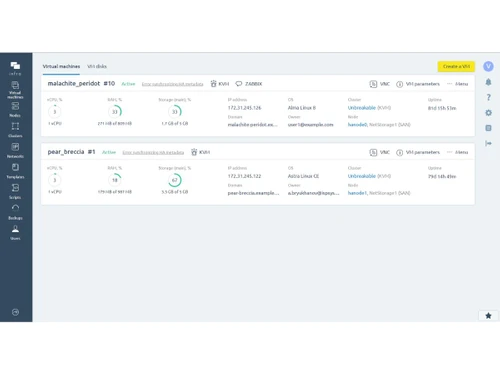
4.2
Out of 5

Overall Rating
Based on
3 Verified Ratings
Rating Breakdown
90% Recommend this Product
Add ReviewThis product has no reviews yet. Be the first to leave your feedback.
Add Review
VMmanager
Price On Request
Desktop
Mobile
Web based
On Premises
Windows
Mac OS
NGINX Web Server
Price On Request
Desktop
Mobile
Web based
On Premises
Windows
Mac OS

Proxmox VE
Price On Request
Desktop
Mobile
Web based
On Premises
Windows
Mac OS

Ethosdata Data Room
Price On Request
Desktop
Mobile
Web based
On Premises
Windows
Mac OS

Rackspace Server Virtualization Service
Price On Request
Desktop
Mobile
Web based
On Premises
Windows
Mac OS

Microsoft Commerce Server
Price On Request
Desktop
Mobile
Web based
On Premises
Windows
Mac OS
(0) Product(s) selected
Available
Price on Request
Starting Price:
€355 /Year
Starting Price:
$199
Available
Price on Request
Available
Price on Request
QEMU is open source software that allows to virtualize a guest platform by using full or partial emulation of hardware environment. The system uses two emulation levels: user (imitation of specific CPU tasks) and system (full imitation of CPU and other systems). QEMU supports emulation of peripheral devices for PC (keyboard, mouse, audio card, etc.) and for other systems, such as emulation of the basic board ??? Versatile. QEMU supports the most popular architectures (x86, x86_64, PowerPC, ARM, SPARC, MIPS, SH-4, m68k) and is able to transmit the binary code of one architecture to the other.
KVM is a hardware-level hypervisor based on AMD and Intel VT-x that allows to create virtual servers. KVM itself doesn’t support emulation feature, however together with QEMU app it allows using OS disks images by virtual machines. As result every VM has its own virtual equipment including network card, video card, etc. One of the major differences from OVZ is that KVM servers are isolated from each other and have a strict limits of its resources. Besides, every virtual server has its own OS core and it’s possible to modify it according with any specific needs and install any OS from distributive. VMmanager was designed to increase the convenience of working with virtual machines.
OpenVZ is software for container virtualization. OpenVZ is used for creating multiple VPS on one physical server, so that each VPS would live separately, have its own networks, files, etc. However, the owner of a physical server is capable of mass management, as it can overview and manage all VPS, which is not possible in other virtualization systems. One of the cons is that OpenVZ can only launch Linux operating systems (CentOS, Debian, Ubuntu). It is not possible to use other distributives since the main system uses Linux
Hypervisor is a hardware framework of creating and managing virtual machines within a single dedicated server or host-computer. Hypervisor allows to run several independent operating systems at the same time. There are 3 types of hypervisors: native/bare-metal, hosted and hybrid. Native hypervisors work without installed OS and give direct access to hardware. Hosted hypervisors run on a conventional operating system and while guest OS runs as a process on the conventional one. Hybrid hypervisors also allow to work directly with hardware, but also has a service OS that provides guest systems with an access to hardwareWhat is hypervisor Hypervisor is a hardware framework of creating and managing virtual machines within a single dedicated server or host-computer. Hypervisor allows to run several independent operating systems at the same time. There are 3 types of hypervisors: native/bare-metal, hosted and hybrid. Native hypervisors work without installed OS and give direct access to hardware. Hosted hypervisors run on a conventional operating system and while guest OS runs as a process on the conventional one. Hybrid hypervisors also allow to work directly with hardware, but also has a service OS that provides guest systems with an access to hardware
VMmanager is a scalable virtualization management platform designed to automate virtual infrastructure leasing for hosting providers and to create fault-tolerant private cloud environments for IT infrastructure.
VMmanager offers a 30-day free trial for evaluation purposes, but it isn't a free software.
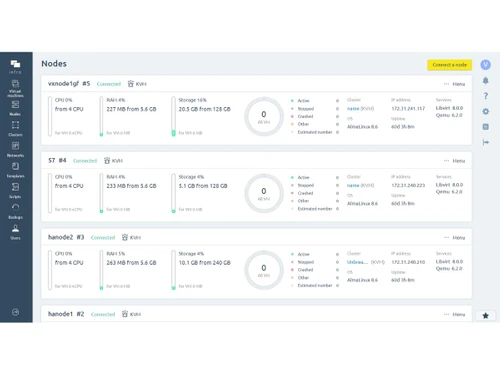
VMmanager is designed for easy installation and administration, featuring a fully automated host connection process that allows for the rapid deployment of large virtualization clusters.
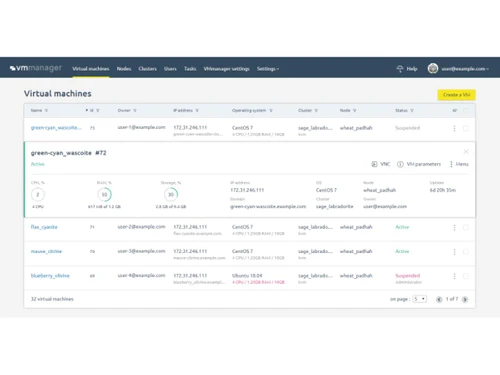
VMmanager automates the provisioning of virtual machines and cloud services, centralizes the management of physical servers and storage into high-availability clusters, and provides a user dashboard for self-service operations.
The platform is highly scalable, with a single installation designed to manage over 22,000 virtual machines, 50 clusters, and 350 physical servers across a geographically distributed infrastructure.
VMmanager achieves high availability through features like failover clusters, which automatically migrate virtual machines in case of a node failure, along with built-in backup tools and a stable microservice architecture.
The platform supports combining physical servers and network storage into a single virtualization cluster, with specific support for both SAN and Ceph storage solutions.
Yes, VMmanager integrates with popular billing platforms like BILLmanager and WHMCS to fully automate the provisioning and billing of VPS services for hosting clients.
VMmanager is based on proven open-source technologies, primarily using QEMU-KVM for hardware virtualization and also supporting container-based virtualization systems.
VMmanager pricing details are available on request on techjockey.com.
VMmanager is ideal for hosting providers, cloud service providers, IT teams, and enterprises that need to manage virtual infrastructure, automate VPS provisioning, and build private or public cloud environments.
20,000+ Software Listed
Best Price Guranteed
Free Expert Consultation
2M+ Happy Customers
Terms and Condtions

Users with registered businesses can purchase goods from merchants on the platform to satisfy their business needs. Users are not permitted to utilize any products acquired through the platform for resale, advertising, business, or further distribution.
For each purchase made, users will receive a Tax Invoice (or 'GST invoice') that includes specific details such as:
the GSTIN of the user associated with their registered business, and
the specified Entity Name for their business.
It should be noted that not all products are eligible for GST Invoice. Only the products displayed by participating sellers with the 'GST-based Invoice Available' callout on the product description page would qualify.
Certain goods and services are not eligible to get a GST Invoice, including items with VAS, i.e., Value Added Services (e.g., Total Mobile Protection/Assured Buyback) and those involving an exchange offer at the time of purchase.
Users must ensure the accuracy of the GSTIN, and business entity name provided for the GST Invoice. Requests for corrections into GST Invoice would not be accommodated by Techjockey.com or any Seller, and any issues arising from user-provided information are the sole responsibility of users.
Techjockey.com is not liable for the GST Invoice or any associated input tax credit. To efficiently claim an input tax credit, users should select the registered place of business address as per the GST authority's data and follow the provisions of the GST Act and rules.
To claim an input tax credit, the delivery and billing addresses must match. Furthermore, input tax credits will not be granted if the delivery address and GSTIN on the invoice are from different states. In case of incorrect GST details provided during the order placement, the order will be canceled automatically.