linkedin
Q360 PSA logo
play Solutions360 Product Video
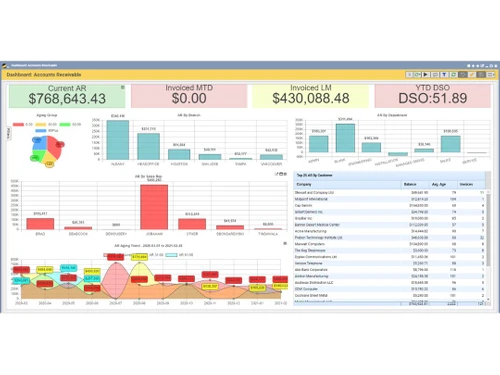
Q360 PSA Accounts Receivable
Q360 PSA Dashboard

Q360 PSA

Brand: Solutions360

  • 4.4

  • 5 Ratings

Q360 PSA is designed to streamline and optimize business operations in service-oriented industries, encompassing project management, resource allocation, time tracking, and invoicing functionalities.

See More

Have you used Q360 PSA before?

Share your insights for better experience

Add a Review

Price Available on Request

Questions about pricing or customization? We’re here to help, just a click away.

100% Genuine
Products
Best Price
Guaranteed
Safe & Secure
Payment
  • Description

  • Pricing

  • Features

  • Specification

  • Review

  • Compare

  • Alternatives

  • FAQ

Q360 PSA Software Overview

What is Q360 PSA?

Q360 PSA is a professional services automation software tailored for service-oriented industries. It encompasses project management, resource allocation, time tracking, invoicing, and client relationship management functionalities. Q360 streamlines business operations, improves efficiency and enhances client satisfaction by centralizing key functions into one platform.

It facilitates project planning, resource optimization, and financial management, ensuring projects are delivered on time and within budget. Additionally, Q360 offers insights into project statuses, resource availability, and financial metrics, empowering businesses to make data-driven decisions and drive profitability.

Why Choose Q360 PSA Software?

  • All-in-One Solution: It provides various tools to manage professional services, like handling projects, assigning resources, tracking time, sending invoices, and managing client relationships, making work more organized and efficient.
  • Boosted Efficiency: By putting everything in one place, it helps companies use resources better, streamline work, and reduce time spent on administrative tasks, letting teams focus on providing top-notch services.
  • Stronger Client Connections: With tools for managing clients and communication, it helps businesses understand client needs, offer proactive help, and build stronger, longer-lasting relationships.
  • Clear Project Oversight: It gives instant updates on project progress, resource availability, and financial details, empowering companies to make smart decisions and ensure projects stay on track.
  • Adaptable to Growth: Whether a small firm or a big corporation, it grows with the business, accommodating changes and new needs without losing performance or features.
  • Easy Integration: It works smoothly with other important business tools, like accounting software or CRM systems, ensuring data flows well and creating a more connected and efficient work environment.
  • Tailored to Your Needs: It can be customized to fit how the company works, making sure it fits specific needs and preferences perfectly.

Benefits of Q360 PSA Platform

  • Centralized Data Management: It consolidates all project-related data and client information into a single platform, eliminating data silos and providing a unified view of operations, leading to better decision-making and improved collaboration.
  • Streamlined Invoicing and Billing: With automated invoicing and billing processes, it reduce the time and effort required to generate invoices, track payments, and manage billing cycles, resulting in faster payments and improved cash flow.
  • Real-time Reporting and Analytics: It offers robust reporting and analytics capabilities, allowing businesses to gain insights into project performance, resource utilization, and financial metrics in real-time, enabling proactive management and strategic decision-making.
  • Enhanced Project Profitability: By providing visibility into project costs, revenues, and margins, it helps businesses identify areas for cost optimization, pricing adjustments, and revenue growth, ultimately improving project profitability and business outcomes.
  • Compliance Management: It helps businesses ensure compliance with industry regulations and standards by providing audit trails, document management features, and built-in compliance checks, reducing the risk of non-compliance and associated penalties.

Pricing of Q360 PSA Solution

Q360 PSA price details are available on request at techjockey.com.

The pricing model is based on different parameters, including extra features, deployment type, and the total number of users. For further queries related to the product, you can contact our product team and learn more about the pricing and offers.

Read more

Solutions360 Company Details

Founded Year:  1988

Solutions360 is a software provider that creates One View of the Business for customers.

Director/Founders Brad Dempsey
Company Size 1-100 Employees

Q360 PSA Pricing & Plans

Looking for The Right Pricing?

Share your requirements and get a plan built around your business.

  • Define your business needs
  • Get customised pricing
  • Choose features that fit your workflow

Price Available on Request

Get personalised Q360 PSA pricing that fits your needs. Our team will connect with you.

Q360 PSA Features

Project Management

  • icon_check Quote Management
    Generate and manage detailed project estimates, seamlessly transitioning to active projects.
  • icon_check Task Management
    Create, assign, and track tasks to ensure timely and efficient completion of project activities.
  • icon_check Project Planning and Scheduling
    Plan projects, set schedules, and allocate resources efficiently to meet deadlines.
  • icon_check Cost Management
    Track and control project costs to ensure budgets are adhered to and financial goals are met.
  • icon_check Collaboration Tools
    Enable team communication and file sharing to enhance project collaboration and productivity.
  • icon_check Portfolio Management
    Oversee and prioritize multiple projects to align with strategic business goals.
  • icon_check Milestone Tracking
    Define and monitor key milestones to ensure projects stay on track and meet deadlines.
  • icon_check Risk Management
    Identify, assess, and mitigate potential risks that could impact project success.

Resource Management

  • icon_check Resource Allocation
    Assign resources based on availability, skills, and project requirements for optimal efficiency.
  • icon_check Utilization Tracking
    Monitor billable and non-billable time to improve resource productivity and profitability.
  • icon_check Capacity Planning
    Forecast and manage resource demand to prevent overloading or underutilization.
  • icon_check Skill Management
    Maintain a database of skills to match resources effectively to project needs.

Financial Management

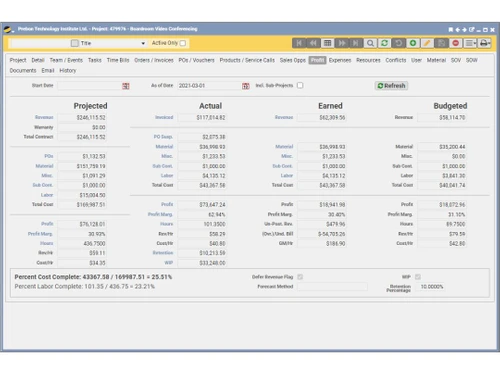
  • icon_check Profitability Analysis
    Assess profit margins across projects, clients, and services.
  • icon_check Expense Management
    Track and control expenses to ensure alignment with project budgets.
  • icon_check Budgeting And Forecasting
    Set and manage budgets while predicting financial outcomes based on current trends.

Billing and Contract Management

  • icon_check Billing & Invoicing
    Automate invoicing processes to ensure accurate and timely client billing.
  • icon_check Multi-Currency Support
    Handle international transactions with dynamic exchange rates and currency settings.
  • icon_check Contract Tracking
    Manage the lifecycle of contracts, including creation, approval, and renewal.

Time Tracking

  • icon_check Real Time Tracking
    Track time as tasks are performed for better accuracy and resource planning.
  • icon_check Approval Workflows
    Streamline timesheet and expense approvals with customizable workflows.
  • icon_check Timesheet Management
    Log and track employee work hours with ease, ensuring accurate payroll and billing.

Customer Relationship Management (CRM)

  • icon_check Client Management
    Centralize client information for easy access and efficient relationship management.
  • icon_check Lead and Opportunity Management
    Track sales leads and opportunities to convert prospects into clients.
  • icon_check Customer Feedback Management
    Collect and analyze feedback to improve service delivery and client satisfaction.
  • icon_check Client Communication
    Manage communication history for consistent and informed interactions with clients.
  • icon_check Sales Pipeline Tracking
    Visualize and manage the sales process to close deals faster.
  • icon_check Proposal Management
    Create and manage detailed proposals to win new business effectively.

Workflow Automation and Management

  • icon_check Workflow Automation
    Automate repetitive tasks to save time and improve efficiency.
  • icon_check Task Automation
    Simplify task assignments and updates with automated processes.
  • icon_check Customizable Workflows
    Design workflows to match specific business needs and processes.
  • icon_check Service Delivery Automation
    Streamline service operations and ensure consistent delivery.
  • icon_check Business Process Modeling
    Visualize and optimize business processes for better efficiency.
  • icon_check SLA Monitoring and Automation
    Track and automate service-level agreement compliance and reporting.

Integrations

  • icon_check API Integration
    Enable custom integrations and expand software capabilities.
  • icon_check Third Party Integrations
    Connect seamlessly with tools like Slack, QuickBooks, or Salesforce.
  • icon_check E-Signature Integration
    Incorporate electronic signature tools for faster contract approvals.
  • icon_check CRM Integration
    Sync with external CRM tools to centralize client and project data.

Security and Compliance

  • icon_check Role-Based Access Control (RBAC)
    Restrict access to sensitive data based on user roles and permissions.
  • icon_check Compliance Management
    Ensure adherence to regulatory standards like GDPR, SOC 2, or ISO.
  • icon_check Remote Access
    Securely access the system from any location or device.
  • icon_check Data Encryption
    Protect sensitive information with encryption both in transit and at rest.
  • icon_check Audit Logs
    Maintain records of system activities for accountability and compliance.
  • icon_check Data Backup and Recovery
    Safeguard data with regular backups and robust disaster recovery plans.

AI Capabilities

  • icon_check Resource Forecasting
    Predict future resource needs using historical data for efficient capacity planning.
  • icon_check Automated Invoicing
    Streamline billing with AI that verifies details and sends reminders for overdue payments.
  • icon_check Project Risk Assessment
    Identify potential risks proactively using AI insights to ensure successful project delivery.
  • icon_check Optimal Resource Allocation
    Assign resources intelligently based on skills, availability, and project requirements.
  • icon_check Intelligent Ticket Prioritization
    Prioritize service tickets using AI to address critical issues promptly.

Alerts & Notifications

  • icon_check Custom Workflow Alerts
    Get notified of important workflow events tailored to your preferences.
  • icon_check System Notifications
    Receive alerts for errors, updates, or critical system activities.
  • icon_check Customer Interaction Alerts
    Stay updated on client interactions and engagement.
  • icon_check Workflow Trigger Alerts
    Get real-time updates when specific workflows are initiated or completed.

Analytics and Reporting

  • icon_check Performance Metrics
    Evaluate team and project performance to optimize productivity.
  • icon_check Profitability Analysis
    Assess profit margins across projects, clients, and services.
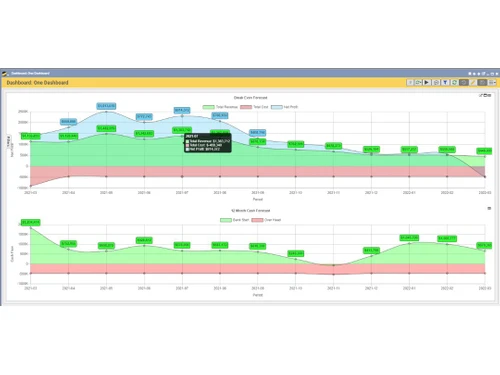
  • icon_check Dashboards
    Access real-time visual insights into key metrics and project progress.
  • icon_check Customizable Reports
    Generate tailored reports to analyze performance and identify trends.
  • icon_check Workflow Insights
    Gain actionable insights into workflow efficiencies and bottlenecks.
  • icon_check KPI Tracking
    Monitor key performance indicators to measure success and areas for improvement.
  • icon_check Predictive Analytics
    Forecast future trends and outcomes using historical data.

Others

  • icon_check Inventory and Procurement
  • icon_check Issue Management
  • icon_check Document Management
  • icon_check Bank Reconciliation
  • icon_check Tax district management
  • icon_check Collection Management
  • icon_check Financial ratio reporting
  • icon_check Accounts Payable
  • icon_check RMA management
  • icon_check Certification tracking
  • icon_check Labor burden rate management
  • icon_check Web publishing automation
Q360 PSA Demo Video play icon

Get Q360 PSA Demo

Watch the demo video to explore key features, real workflows, and how the software fits your business needs.

Understand
Key Features
Personal
Demo Insights
Interactive
Demo Support

Q360 PSA Specifications

Supported Platforms
Ubuntu Ubuntu Windows Windows MacOS MacOS Linux Linux
Devices
Desktop Desktop
Deployment
Cloud-Based Cloud-Based
Suitable For
All Industries
Business Specific
All Businesses
Business Size
Small Business Startups Medium Business Enterprises
Customer Support
Email Communities
Language
English
Training Resources
Videos

Explore the Best Alternative Solutions Similar to Your Business Size and Needs

Q360 PSA Review

4.4

Out of 5

img

Overall Rating

Based on
5 Verified Ratings

Rating Breakdown

  • Features 4.1
  • Value for Money 4.1
  • Ease of Use 4.7
  • Customer Support 4.8

88% Recommend this Product

Add Review

Be the First to Review

This product has no reviews yet. Be the first to leave your feedback.

Add Review

Compare Q360 PSA With other Professional Services Automation Software

Products
Ratings
Pricing
Device Supported
Deployment
Supported Platforms
  • img

    Q360 PSA

  • 4.4

  • Price On Request

  • Desktop

    Mobile

  • Web based

    On Premises

  • Windows

    Mac OS

  • img

    Birdview PSA

  • 4.6

  • Price On Request

  • Desktop

    Mobile

  • Web based

    On Premises

  • Windows

    Mac OS

  • img

    ConnectWise PSA

  • 4.3

  • Price On Request

  • Desktop

    Mobile

  • Web based

    On Premises

  • Windows

    Mac OS

  • img

    BigTime

  • 4.4

  • Price On Request

  • Desktop

    Mobile

  • Web based

    On Premises

  • Windows

    Mac OS

  • img

    Polaris PSA

  • 4.5

  • Price On Request

  • Desktop

    Mobile

  • Web based

    On Premises

  • Windows

    Mac OS

  • img

    Ruddr

  • 4.5

  • Price On Request

  • Desktop

    Mobile

  • Web based

    On Premises

  • Windows

    Mac OS

  • img

    Kantata

  • 4.3

  • Price On Request

  • Desktop

    Mobile

  • Web based

    On Premises

  • Windows

    Mac OS

  • img

    Klient

  • 4.4

  • Price On Request

  • Desktop

    Mobile

  • Web based

    On Premises

  • Windows

    Mac OS

  • img

    NetSuite OpenAir

  • 4.4

  • Price On Request

  • Desktop

    Mobile

  • Web based

    On Premises

  • Windows

    Mac OS

  • img

    Certinia PSA

  • 4.1

  • Price On Request

  • Desktop

    Mobile

  • Web based

    On Premises

  • Windows

    Mac OS

  • img

    Upland PSA

  • 4.2

  • Price On Request

  • Desktop

    Mobile

  • Web based

    On Premises

  • Windows

    Mac OS

(0) Product(s) selected

Q360 PSA Alternatives

See All Q360 PSA Alternatives

Available

Price on Request

Available

Price on Request

Starting Price:

$25 /Month

Articles for Q360 PSA

See All Related Articles

Which operating system does Q360 PSA Software Support?

Q360 PSA Software is compatible with Ubuntu, Windows, Linux, and MacOS.

Is there any Q360 PSA Software App?

Q360 PSA Software is not available for Android and iOS app users.

What is the deployment type of Q360 PSA Software?

It supports cloud-based deployment.

How much does Q360 PSA Software Cost?

Q360 PSA price details are available on request at techjockey.com.

Who are the potential users of Q360 PSA Software?

Q360 PSA Software is typically used by all industries to streamline and optimize business operations in service-oriented industries

Is there any free demo for Q360 PSA Software?

Yes, a demo of Q360 PSA is available at techjockey.com.

Is Q360 PSA Software Free?

Q360 PSA Software is not available for free. You can connect with our product experts to learn more about the pricing plans.

Does Q360 PSA Offer a free trial?

Q360 PSA software does not offer a free trial.

How can you download Q360 PSA Software?

Q360 PSA Software installation is not required, as it is cloud-based. Just open the Setup Wizard to get started.

How does Q360 PSA Software Work?

Q360 PSA Software integrates various project management functions into a unified platform, streamlining operations and enhancing collaboration for professional service organizations.

20,000+ Software Listed

Best Price Guranteed

Free Expert Consultation

2M+ Happy Customers

Terms and Condtions

close

Users with registered businesses can purchase goods from merchants on the platform to satisfy their business needs. Users are not permitted to utilize any products acquired through the platform for resale, advertising, business, or further distribution.

For each purchase made, users will receive a Tax Invoice (or 'GST invoice') that includes specific details such as:

  • the GSTIN of the user associated with their registered business, and

  • the specified Entity Name for their business.

It should be noted that not all products are eligible for GST Invoice. Only the products displayed by participating sellers with the 'GST-based Invoice Available' callout on the product description page would qualify.

Certain goods and services are not eligible to get a GST Invoice, including items with VAS, i.e., Value Added Services (e.g., Total Mobile Protection/Assured Buyback) and those involving an exchange offer at the time of purchase.

Users must ensure the accuracy of the GSTIN, and business entity name provided for the GST Invoice. Requests for corrections into GST Invoice would not be accommodated by Techjockey.com or any Seller, and any issues arising from user-provided information are the sole responsibility of users.

Techjockey.com is not liable for the GST Invoice or any associated input tax credit. To efficiently claim an input tax credit, users should select the registered place of business address as per the GST authority's data and follow the provisions of the GST Act and rules.

To claim an input tax credit, the delivery and billing addresses must match. Furthermore, input tax credits will not be granted if the delivery address and GSTIN on the invoice are from different states. In case of incorrect GST details provided during the order placement, the order will be canceled automatically.