linkedin
Quickwork logo
play Quickwork | Tutorial: Add Google Sheets Rows When New Instagram Media Is Posted To Your Account
Quickwork journey
Quickwork learning

Quickwork

Brand: Quickwork

  • 4

  • 3 Ratings

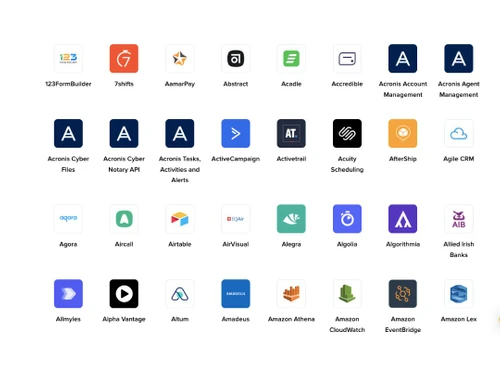
Quickwork enables businesses to automate workflows, publish APIs, and manage conversations across 1,500+ pre-integrated applications.

See More

Have you used Quickwork before?

Share your insights for better experience

Add a Review

Price Available on Request

Questions about pricing or customization? We’re here to help, just a click away.

100% Genuine
Products
Best Price
Guaranteed
Safe & Secure
Payment
  • Description

  • Pricing

  • Features

  • Specification

  • Review

  • Compare

  • Alternatives

  • FAQ

Quickwork Software Overview

What is Quickwork?

Quickwork is a no-code, real-time enterprise integration platform as a Service (iPaaS) that enables businesses to automate workflows, publish APIs, and manage conversations across various applications.

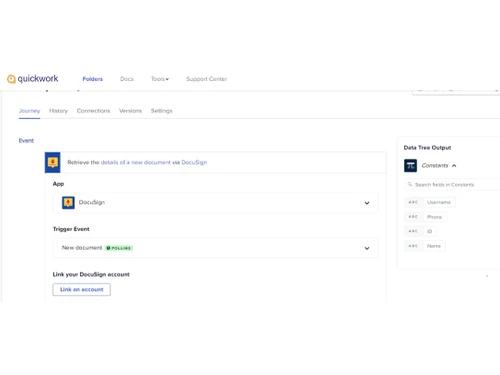
With over 1,500 pre-integrated apps, this workflow management software allows users to build complex workflows through a user-friendly drag-and-drop interface without writing any code.

Quickwork supports real-time event handling, API management, and multi-channel conversational workflows, making it suitable for enterprises seeking scalable automation solutions.

Why Choose Quickwork Workflow Management Software?

  • Drag-and-Drop Interface: Build complex workflows effortlessly without writing any code.
  • Pre-Built Templates: Access a library of ready-made templates to accelerate your automation projects.
  • Custom Connectors: Develop and deploy your own connectors using the Connector SDK.
  • Formula Engine: Utilize built-in functions or Node.js for advanced data transformations.
  • Version Control: Maintain workflow versions to manage changes and updates efficiently.
  • Error Monitoring: Implement error handling mechanisms to ensure smooth operations.
  • Conditional Logic: Incorporate if-else conditions to tailor workflows to specific needs.
  • Looping: Repeat tasks within workflows to handle multiple items or conditions.
  • Scheduling: Automate tasks to run at specified times or intervals.
  • Manual Triggers: Initiate workflows manually when needed.
  • 1,500+ Pre-Integrated Apps: Connect with a vast array of business, consumer, AI, analytics, messaging, and IoT applications.
  • Real-Time Data Sync: Ensure immediate data updates across integrated applications.
  • Cross-Platform Compatibility: Integrate seamlessly with both on-premise and cloud-based systems.
  • Legacy System Support: Bridge connections between modern applications and legacy systems.
  • Multi-Step Workflows: Design workflows that span multiple applications and processes.

Benefits of Quickwork Workflow Management Software

  • Webhook Support: Trigger workflows based on external events using webhooks.
  • Batch Processing: Handle large volumes of data efficiently with batch processing capabilities.
  • Data Mapping: Map data fields between different applications to ensure consistency.
  • API Integration: Easily integrate with external APIs to extend functionality.
  • Role-Based Access Control: Manage user permissions to ensure secure access to workflows.
  • ISO 27001 Certified: Adhere to international standards for information security management.
  • GDPR Compliant: Ensure data protection and privacy in line with European regulations.
  • SOC 2 Type 2 Certified: Demonstrate commitment to security, availability, and confidentiality.
  • VAPT Reports: Regular vulnerability assessments and penetration testing to identify and mitigate risks.
  • SSO & LDAP Support: Integrate with existing authentication systems for streamlined user access.
  • IP Whitelisting: Restrict access to workflows from trusted IP addresses.
  • Rate Limiting: Control the number of requests to prevent abuse and ensure fair usage.
  • OAuth Support: Implement secure authorization protocols for third-party integrations.
  • CORS Support: Manage cross-origin resource sharing to enhance security in web applications.
  • Elastic Scalability: Automatically scale resources to meet the demands of your workflows.

Quickwork Pricing

Quickwork price details are available on request at techjockey.com.

The pricing model is based on different parameters, including extra features, deployment type, and the total number of users. For further queries related to the product, you can contact our product team and learn more about the pricing and offers.

Read more

Quickwork Pricing & Plans

Looking for The Right Pricing?

Share your requirements and get a plan built around your business.

  • Define your business needs
  • Get customised pricing
  • Choose features that fit your workflow

Price Available on Request

Get personalised Quickwork pricing that fits your needs. Our team will connect with you.

Quickwork Features

  • icon_check Data Transformation
    Modify and format data within workflows easily.
  • icon_check No-Code Workflow Automation
    Automate workflows without coding skills.
  • icon_check Multi Channel
    Manage workflows across multiple communication platforms.
  • icon_check Integration
    Connect and sync with 1,500+ apps seamlessly.
  • icon_check Audit Trail
    Maintain detailed logs for transparency and compliance.
  • icon_check Version Control
    Track changes and revert workflows as needed.
  • icon_check API Management
    Create, publish, and manage APIs securely.
  • icon_check Region Specific Deployment
    Deploy workflows in specific regions for compliance.
Quickwork Demo Video play icon

Get Quickwork Demo

Watch the demo video to explore key features, real workflows, and how the software fits your business needs.

Understand
Key Features
Personal
Demo Insights
Interactive
Demo Support

Quickwork Specifications

Supported Platforms
Ubuntu Ubuntu Windows Windows MacOS MacOS Linux Linux
Devices
Desktop Desktop
Deployment
Cloud-Based Cloud-Based
Suitable For
All Industries
Business Specific
All Businesses
Business Size
Small Business Medium Business SMEs MSMBs
Language
English 日本人
Integration
API Integration
AI Features
AI Integrated

Explore the Best Alternative Solutions Similar to Your Business Size and Needs

Quickwork Review

4

Out of 5

img

Overall Rating

Based on
3 Verified Ratings

Rating Breakdown

  • Features 4.1
  • Value for Money 4
  • Ease of Use 3.6
  • Customer Support 4.1

93% Recommend this Product

Add Review

Techjockey Trusted Reviews from Verified Users

No reviews are currently available for Quickwork. Discover similar Workflow Automation Software reviews

  • Pipefy

    4.3

    Whats great - Great company! Excellent customer service and just generally smooth sailing. Would highly recommend. read more

  • Monday.com

    4.0

    Whats great - monday.com’s design and functionality make it a perfect choice for managing projects. read more

  • Wrike

    4.0

    Whats great - ssions and manage user rights, ensuring that sensitive information is only available to the right people. Further, the two-fa... read more

Compare Quickwork With other Workflow Automation Software

Products
Ratings
Pricing
Device Supported
Deployment
Supported Platforms
  • img

    Quickwork

  • 4

  • Price On Request

  • Desktop

    Mobile

  • Web based

    On Premises

  • Windows

    Mac OS

  • img

    Qntrl

  • 4.2

  • ₹ 1200

  • Desktop

    Mobile

  • Web based

    On Premises

  • Windows

    Mac OS

  • img

    Zoho Flow

  • 4.1

  • ₹ 1740

  • Desktop

    Mobile

  • Web based

    On Premises

  • Windows

    Mac OS

  • img

    n8n

  • 4.2

  • Price On Request

  • Desktop

    Mobile

  • Web based

    On Premises

  • Windows

    Mac OS

  • img

    Pipedream

  • 4.2

  • Price On Request

  • Desktop

    Mobile

  • Web based

    On Premises

  • Windows

    Mac OS

  • img

    Zapier

  • 4.4

  • Price On Request

  • Desktop

    Mobile

  • Web based

    On Premises

  • Windows

    Mac OS

  • img

    Pipefy

  • 4.3

  • Price On Request

  • Desktop

    Mobile

  • Web based

    On Premises

  • Windows

    Mac OS

  • img

    Levity

  • 4.5

  • Price On Request

  • Desktop

    Mobile

  • Web based

    On Premises

  • Windows

    Mac OS

  • img

    Integrately

  • 4.1

  • Price On Request

  • Desktop

    Mobile

  • Web based

    On Premises

  • Windows

    Mac OS

  • img

    Cflow

  • 4.1

  • Price On Request

  • Desktop

    Mobile

  • Web based

    On Premises

  • Windows

    Mac OS

  • img

    Relay App

  • 4.1

  • Price On Request

  • Desktop

    Mobile

  • Web based

    On Premises

  • Windows

    Mac OS

(0) Product(s) selected

Quickwork Alternatives

See All Quickwork Alternatives

n8n

4.2

Starting Price:

€20 /Month

Starting Price:

$30 /Month

Starting Price:

$49

Starting Price:

$11 /Month

Starting Price:

$20 /Month

Starting Price:

$108

Available

Price on Request

Available

Price on Request

How much does Quickwork Software cost?

Quickwork pricing details can be requested from techjockey.com.

Is there a mobile app available for Quickwork Workflow Management Software?

No dedicated mobile app is currently available for Quickwork.

Which operating systems are compatible with Quickwork Software?

Quickwork Workflow Management Software is web-based and compatible with Ubuntu, Windows, MacOS and Linux operating systems via a browser.

Does Quickwork Workflow Management Software offer a free trial?

Yes, Quickwork provides a free trial to explore its features.

How does Quickwork Software function?

Quickwork is a no-code, real-time integration platform that allows users to build automated workflows by connecting over 1,500 pre-integrated applications.

Who uses Quickwork Workflow Management Software?

Quickwork is utilized by enterprises across various industries, including fintech, e-commerce, banking, and education, to automate and integrate their business processes.

Is a free demo available for Quickwork Software?

Yes, Quickwork Workflow Management Software offers free demos on request.

Is Quickwork Software available for free?

Quickwork provides a free plan that includes 10,000 transactions per month and five active workflows, suitable for small-scale automation needs.

Can Quickwork integrate with custom or in-house applications?

Yes, Quickwork supports custom connectors to integrate proprietary apps.

Is technical support available for Quickwork users?

Yes, Quickwork Workflow Management Software provides customer support through various channels.

20,000+ Software Listed

Best Price Guranteed

Free Expert Consultation

2M+ Happy Customers

Terms and Condtions

close

Users with registered businesses can purchase goods from merchants on the platform to satisfy their business needs. Users are not permitted to utilize any products acquired through the platform for resale, advertising, business, or further distribution.

For each purchase made, users will receive a Tax Invoice (or 'GST invoice') that includes specific details such as:

  • the GSTIN of the user associated with their registered business, and

  • the specified Entity Name for their business.

It should be noted that not all products are eligible for GST Invoice. Only the products displayed by participating sellers with the 'GST-based Invoice Available' callout on the product description page would qualify.

Certain goods and services are not eligible to get a GST Invoice, including items with VAS, i.e., Value Added Services (e.g., Total Mobile Protection/Assured Buyback) and those involving an exchange offer at the time of purchase.

Users must ensure the accuracy of the GSTIN, and business entity name provided for the GST Invoice. Requests for corrections into GST Invoice would not be accommodated by Techjockey.com or any Seller, and any issues arising from user-provided information are the sole responsibility of users.

Techjockey.com is not liable for the GST Invoice or any associated input tax credit. To efficiently claim an input tax credit, users should select the registered place of business address as per the GST authority's data and follow the provisions of the GST Act and rules.

To claim an input tax credit, the delivery and billing addresses must match. Furthermore, input tax credits will not be granted if the delivery address and GSTIN on the invoice are from different states. In case of incorrect GST details provided during the order placement, the order will be canceled automatically.