linkedin
RadiAnt DICOM Viewer logo
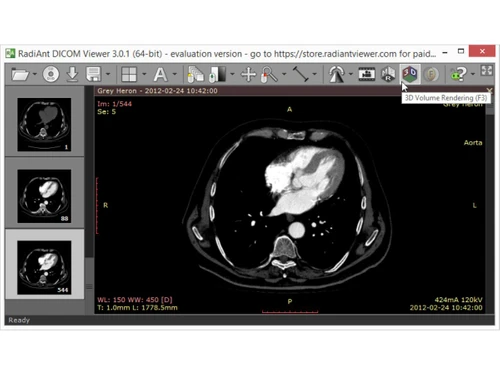
RadiAnt DICOM Viewer-rendering
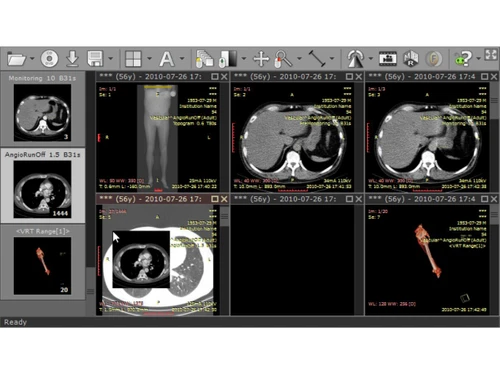
RadiAnt DICOM Viewer-monitoring
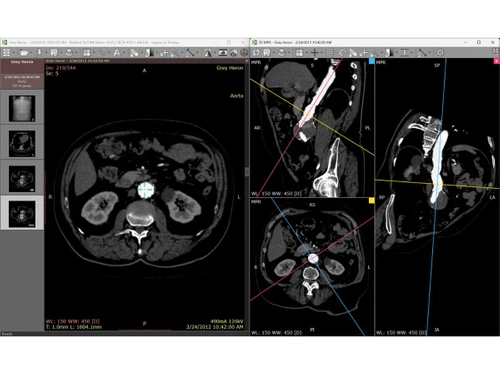
RadiAnt DICOM Viewer-MPR

RadiAnt DICOM Viewer

Brand: Medixant

  • No Ratings & Reviews

RadiAnt DICOM Viewer is used to view and analyze DICOM medical scan images like X-rays, CT scans, and MRIs easily and quickly.

See More

Have you used RadiAnt DICOM Viewer before?

Share your insights for better experience

Add a Review
Starting Price
₹556

View plans

100% Genuine
Products
Best Price
Guaranteed
Safe & Secure
Payment
  • Description

  • Pricing

  • Features

  • Specification

  • Review

  • Compare

  • Alternatives

  • FAQ

Starting at ₹556

RadiAnt DICOM Viewer Software Overview

What is RadiAnt DICOM Viewer?

RadiAnt DICOM Viewer is a medical imaging software that helps doctors and healthcare professionals view medical scan images such as X-rays, CT scans, MRI scans, PET scans, and ultrasound reports. It works with DICOM files, which are the standard format used in hospitals and diagnostic centers for storing medical images. The software is popular because of its fast speed, simple design, and easy-to-use interface.

Users can quickly open, zoom, rotate, and adjust medical images for better analysis and diagnosis. RadiAnt also supports advanced imaging features like 3D visualization, MPR, MIP, and volume rendering, making it useful for detailed medical examinations. It can load images from CDs, DVDs, USB drives, local storage, and PACS servers. The software is lightweight, runs smoothly on Windows computers, and is widely used by radiologists, doctors, clinics, hospitals, and medical students for medical imaging and learning purposes.

Why Choose RadiAnt DICOM Viewer Software?

  • Fast Performance: Loads medical images quickly without delays.
  • Simple Interface: Easy for doctors and medical staff to use.
  • DICOM Support: Fully supports standard DICOM medical files.
  • CT Scan Viewing: Smoothly opens and analyzes CT scan images.
  • MRI Compatibility: Supports high-quality MRI image viewing.
  • X-ray Support: Easily displays digital X-ray images.
  • PET Scan Viewing: Compatible with PET medical imaging files.
  • Zoom Feature: Allows detailed zooming of medical images.
  • Image Rotation: Helps rotate scans for better examination.
  • Brightness Control: Adjusts image brightness and contrast easily.
  • 3D Rendering: Creates advanced 3D medical image views.
  • MPR Technology: Supports multiplanar reconstruction viewing.
  • MIP Visualization: Provides maximum intensity projection tools.
  • Lightweight Software: Uses less system resources while running.
  • Windows Compatible: Optimized for Windows operating systems.
  • Large File Handling: Opens large imaging files efficiently.

Benefits of RadiAnt DICOM Viewer Software

  • Side-by-Side Comparison: Compares multiple scans together easily.
  • Easy Installation: Quick and simple software setup process.
  • Smooth Navigation: User-friendly controls for image browsing.
  • PACS Integration: Connects with PACS medical systems.
  • CD/DVD Support: Opens medical images directly from discs.
  • USB Importing: Reads imaging files from USB devices.
  • Measurement Tools: Provides tools for accurate image measurements.
  • Hospital Friendly: Suitable for hospitals and diagnostic centers.
  • Radiologist Support: Designed especially for radiologists and doctors.

RadiAnt DICOM Viewer Pricing

RadiAnt DICOM Viewer price starts at INR 556 on techjockey.com.

The pricing model is based on different parameters, including extra features, deployment type, and the total number of users. For further queries related to the product, you can contact our product team and learn more about the pricing and offers.

Read more

RadiAnt DICOM Viewer Pricing & Plans

Subscription Plan
Key Features
  • DICOM Image Viewing
  • Multi-Planar Reconstruction
  • 3D Volume Rendering
  • Measurement Tools
  • Window Level Adjustment
  • Image Fusion
Starting at ₹556
    • Quantity

      Quantity
      Quantity
    • Monthly

      Monthly
      Monthly

Key Features

  • DICOM Image Viewing

  • Multi-Planar Reconstruction

  • 3D Volume Rendering

  • Measurement Tools

  • Window Level Adjustment

  • Image Fusion

RadiAnt DICOM Viewer Features

  • icon_check Image Viewer
    Enables fast loading and viewing of DICOM medical images from CT, MRI, PET, ultrasound, and X-ray modalities.
  • icon_check Multi-Planar Reconstruction
    Allows visualization of imaging data in axial, sagittal, and coronal planes for detailed anatomical analysis.
  • icon_check 3D Volume Rendering
    Generates interactive 3D visualizations from imaging datasets to help clinicians examine complex structures clearly.
  • icon_check Measurement Tools
    Provides distance, angle, area, and density measurement tools for accurate diagnostic evaluation and reporting.
  • icon_check Window Level Adjustment
    Offers brightness and contrast controls to optimize image visualization based on tissue density variations.
  • icon_check Image Fusion
    Combines datasets from different imaging modalities to enhance diagnostic accuracy and comparative analysis.
  • icon_check PACS Integration
    Connects with PACS servers to retrieve, store, and manage imaging studies directly within the viewer interface.
  • icon_check Annotations
    Enables adding text labels, markers, and notes on images for documentation, communication, and reporting purposes.
  • icon_check Export & Sharing
    Allows exporting images and studies into common formats like JPEG, BMP, or video for presentations or collaboration.
  • icon_check Multi-Series Comparison
    Displays multiple studies or image series simultaneously to compare changes across time or modalities efficiently.
  • icon_check Touch & Gesture Support
    Supports multi-touch gestures for zooming, panning, and rotating images on compatible touchscreen devices.
  • icon_check GPU Acceleration
    Uses hardware acceleration to deliver smooth rendering performance and faster processing of large imaging datasets.
  • icon_check DICOM CD/DVD Import
    Imports imaging data directly from patient CDs or DVDs commonly provided by hospitals and imaging centers.
  • icon_check Customizable Interface
    Provides configurable layouts, shortcuts, and display settings to suit individual workflow preferences.
  • icon_check High-Resolution Output
    Ensures detailed image clarity with support for high-resolution monitors used in professional diagnostic environments.

RadiAnt DICOM Viewer Specifications

Supported Platforms
Windows Windows
Devices
Desktop Desktop
Deployment
Perpetual Perpetual
Suitable For
Healthcare
Business Specific
Hospitals
Business Size
Small Business Startups Medium Business Enterprises
Customer Support
Email Communities
Language
English
Training Resources
Videos

Explore the Best Alternative Solutions Similar to Your Business Size and Needs

RadiAnt DICOM Viewer Review

Be the First to Review

This product has no reviews yet. Be the first to leave your feedback.

Add Review
Compare RadiAnt DICOM Viewer With other Medical Imaging Software

Products
Ratings
Pricing
Device Supported
Deployment
Supported Platforms
  • img

    RadiAnt DICOM Viewer

  • Price On Request

  • Desktop

    Mobile

  • Web based

    On Premises

  • Windows

    Mac OS

  • img

    deepcOS

  • 4.3

  • Price On Request

  • Desktop

    Mobile

  • Web based

    On Premises

  • Windows

    Mac OS

  • img

    Qure AI

  • 4.4

  • Price On Request

  • Desktop

    Mobile

  • Web based

    On Premises

  • Windows

    Mac OS

  • img

    OsiriX MD

  • Price On Request

  • Desktop

    Mobile

  • Web based

    On Premises

  • Windows

    Mac OS

  • img

    Flywheel

  • Price On Request

  • Desktop

    Mobile

  • Web based

    On Premises

  • Windows

    Mac OS

  • img

    Everrtech

  • Price On Request

  • Desktop

    Mobile

  • Web based

    On Premises

  • Windows

    Mac OS

  • img

    Rad AI

  • Price On Request

  • Desktop

    Mobile

  • Web based

    On Premises

  • Windows

    Mac OS

  • img

    DeepHealth

  • Price On Request

  • Desktop

    Mobile

  • Web based

    On Premises

  • Windows

    Mac OS

  • img

    Rayscape

  • Price On Request

  • Desktop

    Mobile

  • Web based

    On Premises

  • Windows

    Mac OS

  • img

    Merge Imaging

  • Price On Request

  • Desktop

    Mobile

  • Web based

    On Premises

  • Windows

    Mac OS

  • img

    Gleamer

  • Price On Request

  • Desktop

    Mobile

  • Web based

    On Premises

  • Windows

    Mac OS

(0) Product(s) selected

RadiAnt DICOM Viewer Alternatives

See All RadiAnt DICOM Viewer Alternatives

Available

Price on Request

Available

Price on Request
Available

Price on Request

How much does RadiAnt DICOM Viewer Software cost?

RadiAnt DICOM Viewer price starts at INR 556 on techjockey.com.

Is there a mobile app available for RadiAnt DICOM Viewer Software?

No, RadiAnt DICOM Viewer mobile app is not available on iOS and Android.

Which operating systems are compatible with RadiAnt DICOM Viewer Software?

RadiAnt DICOM Viewer is compatible with Windows.

Does RadiAnt DICOM Viewer Software offer a free trial?

Yes, RadiAnt DICOM Viewer offers a free trial version for users.

How does RadiAnt DICOM Viewer Software function?

RadiAnt DICOM Viewer functions by opening, viewing, and analyzing DICOM medical images like X-rays, CT scans, and MRIs.

Who uses RadiAnt DICOM Viewer Software?

RadiAnt DICOM Viewer is used by radiologists, doctors, hospitals, clinics, and medical students.

Is a free demo available for RadiAnt DICOM Viewer Software?

Yes, a free demo is available on the official RadiAnt DICOM Viewer website.

Is RadiAnt DICOM Viewer Software available for free?

No, RadiAnt DICOM Viewer is not completely free, but it provides a free trial with limited usage.

20,000+ Software Listed

Best Price Guranteed

Free Expert Consultation

2M+ Happy Customers

Terms and Condtions

close

Users with registered businesses can purchase goods from merchants on the platform to satisfy their business needs. Users are not permitted to utilize any products acquired through the platform for resale, advertising, business, or further distribution.

For each purchase made, users will receive a Tax Invoice (or 'GST invoice') that includes specific details such as:

  • the GSTIN of the user associated with their registered business, and

  • the specified Entity Name for their business.

It should be noted that not all products are eligible for GST Invoice. Only the products displayed by participating sellers with the 'GST-based Invoice Available' callout on the product description page would qualify.

Certain goods and services are not eligible to get a GST Invoice, including items with VAS, i.e., Value Added Services (e.g., Total Mobile Protection/Assured Buyback) and those involving an exchange offer at the time of purchase.

Users must ensure the accuracy of the GSTIN, and business entity name provided for the GST Invoice. Requests for corrections into GST Invoice would not be accommodated by Techjockey.com or any Seller, and any issues arising from user-provided information are the sole responsibility of users.

Techjockey.com is not liable for the GST Invoice or any associated input tax credit. To efficiently claim an input tax credit, users should select the registered place of business address as per the GST authority's data and follow the provisions of the GST Act and rules.

To claim an input tax credit, the delivery and billing addresses must match. Furthermore, input tax credits will not be granted if the delivery address and GSTIN on the invoice are from different states. In case of incorrect GST details provided during the order placement, the order will be canceled automatically.