 USA
USA UAE
UAE
SysTools SQL Recovery
Whats great - I was looking for the SQL database recovery tool to get back my corrupted and lost data files. Among all the ineffective solu... read more


Brand: Remo Software
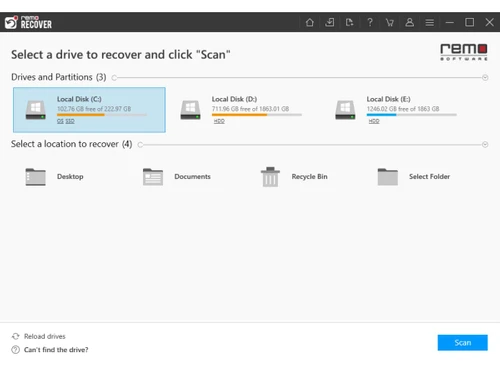
Remo Recover helps recover deleted, lost, formatted, or inaccessible files from Windows devices and storage media.
See MoreHave you used Remo Recover before?
Share your insights for better experience
Brand: Remo Software
Founded Year: 2011
Remo Software is a leading data recovery software company. Since 2011 the company introduced groundbreaking software, such as Remo Recover, a renowned data recovery software for Mac and Windows OS, video repair application and several repair tools catering to diverse file formats.
Core Data Recovery
 Partition Recovery Formatted Drive Recovery Accidental File Recovery Corrupted or Damaged File Recovery RAW Partition Data Recovery Deleted File Recovery Recovery from External Devices Cloud Data Recovery
 Backup & Restore Capabilities
Email Backup and Recovery Full System Backup and Restore Incremental Backup and Restore Mobile App Data Backup and Recovery Factory Recovery Partition Backup Cloud Native Backups Data Replication Security
Encrypted Data Recovery Ransomware Protection Secure Data Wiping Password Recovery Data Compliance and Governance Advanced Threat Detection Recovery for Different Devices and Platforms
Mobile Device Data Recovery Windows and macOS Compatibility Cross-Platform Data Recovery Rooting Error Recovery Virtual Machine Recovery File and Media Recovery
Media File Recovery Document and Email Recovery SD Card and USB Recovery Preview Files Before Recovery Automatic Device Detection Batch Recovery Multimedia File Repair Photo Recovery with Editing Tools Data Protection and Compliance
Comprehensive Backup and Protection Disaster Recovery Plans Legal and Compliance-Based Data Recovery Data Loss Prevention Data Migration Data Residency Enforcement Hierarchy & Access Management Advanced Features
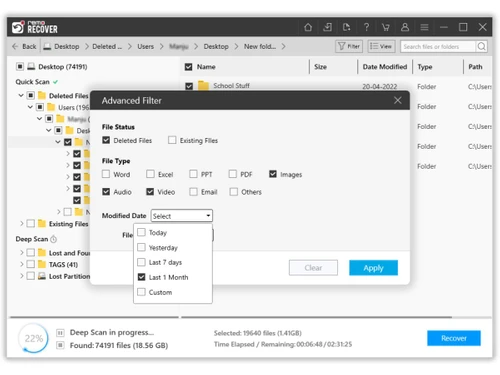
Smart Scanning Deep Scan Quick Scan Advanced Scan Algorithms Selective Recovery Filter by File Type Secure OST Converter  Windows
  MacOS
MacOS  Desktop
  Perpetual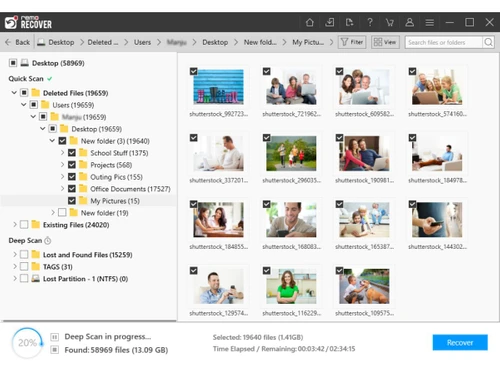
Techjockey Trusted Reviews from Verified Users
No reviews are currently available for Remo Recover. Discover similar Data Recovery Software reviews
SysTools SQL Recovery
Whats great - I was looking for the SQL database recovery tool to get back my corrupted and lost data files. Among all the ineffective solu... read more

Recoverit
Whats great - the product is anything but difficult to utilize, it doesn't threaten even the most essential clients, and it is include rich... read more

7 Data Recovery Software
Whats great - Best Software for use Data Recovery Software read more



Remo Recover price starts at USD 70 on techjockey.com.
No, Remo Recover does not offer a mobile application.
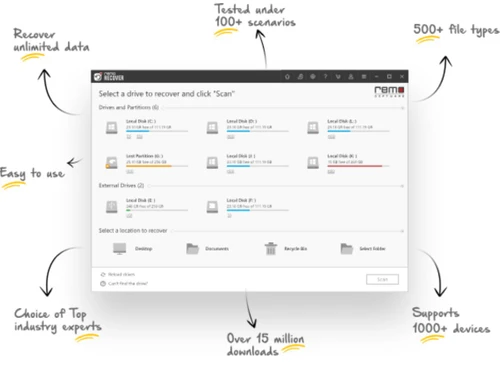
Remo Recover is compatible with Windows and MacOS operating systems.
Yes, Remo Recover offers a free trial version with scanning and preview features.
Remo Recover scans storage devices to detect and recover deleted, lost, formatted, or inaccessible files.
Individuals, businesses, IT professionals, and users needing data recovery use Remo Recover.
Yes, a free demo version is available to explore its features before purchase.
No, Remo Recover is not fully free, but Remo Recover offers a limited free trial version.
20,000+ Software Listed
Best Price Guranteed
Free Expert Consultation
2M+ Happy Customers
Terms and Condtions

Users with registered businesses can purchase goods from merchants on the platform to satisfy their business needs. Users are not permitted to utilize any products acquired through the platform for resale, advertising, business, or further distribution.
For each purchase made, users will receive a Tax Invoice (or 'GST invoice') that includes specific details such as:
the GSTIN of the user associated with their registered business, and
the specified Entity Name for their business.
It should be noted that not all products are eligible for GST Invoice. Only the products displayed by participating sellers with the 'GST-based Invoice Available' callout on the product description page would qualify.
Certain goods and services are not eligible to get a GST Invoice, including items with VAS, i.e., Value Added Services (e.g., Total Mobile Protection/Assured Buyback) and those involving an exchange offer at the time of purchase.
Users must ensure the accuracy of the GSTIN, and business entity name provided for the GST Invoice. Requests for corrections into GST Invoice would not be accommodated by Techjockey.com or any Seller, and any issues arising from user-provided information are the sole responsibility of users.
Techjockey.com is not liable for the GST Invoice or any associated input tax credit. To efficiently claim an input tax credit, users should select the registered place of business address as per the GST authority's data and follow the provisions of the GST Act and rules.
To claim an input tax credit, the delivery and billing addresses must match. Furthermore, input tax credits will not be granted if the delivery address and GSTIN on the invoice are from different states. In case of incorrect GST details provided during the order placement, the order will be canceled automatically.