linkedin
Sap Analytics Cloud logo
sap cloud
sap data
sap cloud

Sap Analytics Cloud

Brand: SAP

  • 4.3

  • 6 Ratings

Turn instant insights into action with Sap Analytics Cloud, the all-in-one solution for AI-powered analytics, collaborative planning, and predictive forecasts.

See More

Have you used Sap Analytics Cloud before?

Share your insights for better experience

Add a Review

Price Available on Request

Questions about pricing or customization? We’re here to help, just a click away.

100% Genuine
Products
Best Price
Guaranteed
Safe & Secure
Payment
  • Description

  • Pricing

  • Specification

  • Review

  • Compare

  • Alternatives

  • FAQ

Sap Analytics Cloud Software Overview

What is Sap Analytics Cloud?

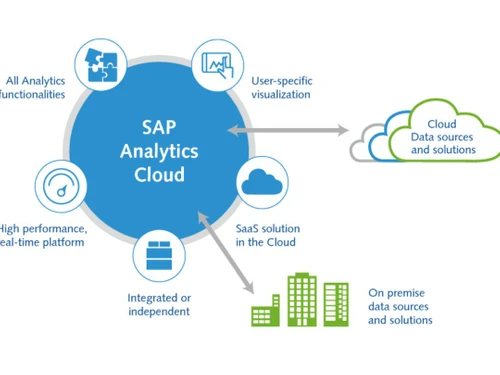
SAP Analytics Cloud (SAC) is a comprehensive, all-in-one cloud solution designed to consolidate analytics and planning functions into a single, integrated platform. Built on the high-performance SAP Cloud Platform, it offers a unified experience for business intelligence (BI), enterprise planning, and augmented analytics. The software empowers users across an organizationfrom the boardroom to the front linesto discover, analyze, plan, predict, and collaborate in real-time. By connecting to various data sources and embedding analytics directly into business processes, SAP Analytics Cloud transforms raw data into actionable insights, enabling quicker and more informed decision-making.

Why Choose Sap Analytics Cloud?

  • Make Faster Decisions with Trusted AI: SAC leverages its AI assistant, Joule, to automate routine tasks like reporting and data preparation. It can model complex scenarios and surface hidden insights, allowing teams to spend less time on manual data work and more time on strategic action.
  • Deliver Analytics with Full Business Context: The platform provides access to a rich library of prebuilt KPIs, data models, and content tailored to specific industries and business functions. This accelerates time-to-insight by delivering mission-critical analytics built on SAP's deep understanding of business processes.
  • Unify Financial and Operational Planning: By offering a single solution for financial, supply chain, and operational planning, SAC eliminates the fragmentation common in enterprise planning. It connects disparate teams and data sources on a governed foundation, fostering seamless cross-departmental collaboration.

Advanced Features of Sap Analytics Cloud

  1. Analytics and Planning with Joule: Users can interact with the platform using a conversational AI agent. Joule can analyze data, assess risks, generate scripts, and enrich data models through simple natural language commands.
  2. Natural Language Insights: This feature allows non-technical users to ask complex analytical questions in plain language and receive instant, accurate answers from governed business data, democratizing data access.
  3. Prebuilt Business Content: Accelerate deployment with a vast repository of prebuilt dashboards, models, and data flows for functions ranging from spend management to workforce capital, eliminating the need to build everything from scratch.
  4. Self-Service Analytics: The solution offers native connectivity to SAP Datasphere and SAP S/4HANA, enabling users to perform self-service analytics across the entire data landscape while preserving the business context and semantics of mission-critical data.
  5. Risk Scenario Simulation: The compass feature allows users to simulate best-case, worst-case, and expected outcomes based on key business drivers, helping organizations proactively prepare for potential disruptions.

Key Capabilities of Sap Analytics Cloud

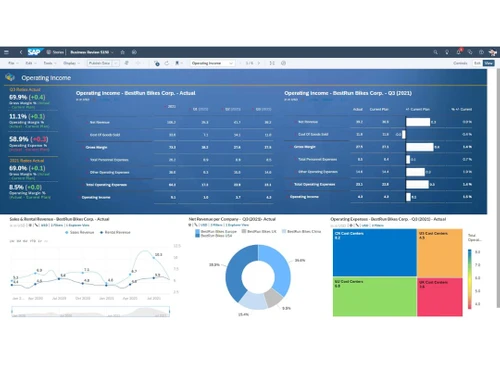
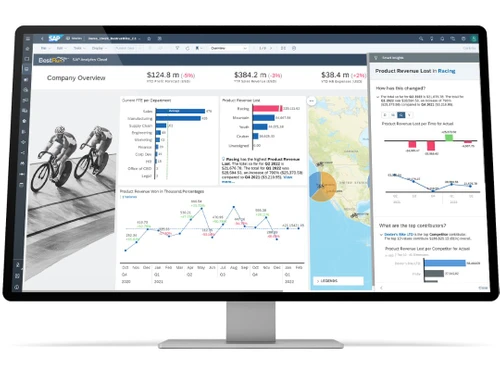
  • Business Intelligence (BI): Includes robust data visualization, reporting, and dashboarding tools. Users can create interactive stories to explore data, identify trends, and share insights across the organization.
  • Enterprise Planning: A comprehensive planning module that unifies financial planning and analysis (FP&A), operational planning, and supply chain planning. It supports collaborative workflows, version management, and scenario modeling.
  • Augmented Analytics: Leverages AI and machine learning to automate data discovery and provide predictive insights. Features like Smart Predict and Smart Insights automatically uncover key influencers in your data, forecast future outcomes, and generate narrative explanations for visualizations.

How to Use Sap Analytics Cloud?

  1. Connect to Data: Establish live or imported data connections to a wide array of sources, including SAP applications like S/4HANA and SAP Datasphere, as well as third-party cloud and on-premise systems.
  2. Model Your Data: Prepare and enrich your data by creating models. This step involves defining measures, dimensions, hierarchies, and calculations to ensure data is structured for analysis and planning.
  3. Create Stories and Visualizations: Use the intuitive, drag-and-drop interface to build interactive dashboards and reports (called Stories). Choose from a wide range of charts, tables, and maps to visualize your data.
  4. Leverage Augmented Analytics: Apply Smart Predict and Smart Insights features to automatically generate forecasts, identify key drivers, and simulate outcomes without needing data science expertise.
  5. Plan and Collaborate: Use the planning tools to create budgets and forecasts. Collaborate with team members by sharing stories, adding comments, and managing planning workflows directly within the platform.

Sap Analytics Cloud Price

SAP price is available on request at Techjockey. The pricing model is based on different parameters, including extra features, deployment type, and the total number of users. For further queries related to the product, you can contact our product expert and learn more about the pricing and offers.

Read more

SAP Company Details

Founded Year:  1972

SAP is a technology company that develops enterprise application software for companies and industries across diverse sectors.

Director/Founders Andreas Neumeier, Chen Lahav, Claus Wellenreuther, Dietmar Hopp, Hans-Werner Hector, Hasso Plattner,
Company Size 1000+ Employees

Sap Analytics Cloud Pricing & Plans

Looking for The Right Pricing?

Share your requirements and get a plan built around your business.

  • Define your business needs
  • Get customised pricing
  • Choose features that fit your workflow

Price Available on Request

Get personalised Sap Analytics Cloud pricing that fits your needs. Our team will connect with you.

Sap Analytics Cloud Specifications

Supported Platforms
Windows Windows
Devices
Desktop Desktop
Deployment
Cloud-Based Cloud-Based
Suitable For
All Industries
Business Specific
All Businesses
Business Size
Startups Medium Business SMBs
Customer Support
Phone Email Forums
Language
English

Sap Analytics Cloud Review

4.3

Out of 5

img

Overall Rating

Based on
6 Verified Ratings

Rating Breakdown

  • Features 4.2
  • Value for Money 4.2
  • Ease of Use 4.4
  • Customer Support 4.5

91% Recommend this Product

Add Review

Be the First to Review

This product has no reviews yet. Be the first to leave your feedback.

Add Review

Compare Sap Analytics Cloud With other Cloud Analytics Solutions

Products
Ratings
Pricing
Device Supported
Deployment
Supported Platforms
  • img

    Sap Analytics Cloud

  • 4.3

  • Price On Request

  • Desktop

    Mobile

  • Web based

    On Premises

  • Windows

    Mac OS

  • img

    Mammoth

  • 4.3

  • Price On Request

  • Desktop

    Mobile

  • Web based

    On Premises

  • Windows

    Mac OS

  • img

    AWS CloudSearch

  • 4.2

  • Price On Request

  • Desktop

    Mobile

  • Web based

    On Premises

  • Windows

    Mac OS

  • img

    Stratoscale

  • 4.2

  • Price On Request

  • Desktop

    Mobile

  • Web based

    On Premises

  • Windows

    Mac OS

  • img

    Apigee

  • 4.6

  • Price On Request

  • Desktop

    Mobile

  • Web based

    On Premises

  • Windows

    Mac OS

  • img

    Mcube

  • 4.4

  • Price On Request

  • Desktop

    Mobile

  • Web based

    On Premises

  • Windows

    Mac OS

  • img

    Rguroo

  • 4.4

  • Price On Request

  • Desktop

    Mobile

  • Web based

    On Premises

  • Windows

    Mac OS

(0) Product(s) selected

Sap Analytics Cloud Alternatives

See All Sap Analytics Cloud Alternatives

Starting Price:

$149 /Month

Starting Price:

$20

Available

Price on Request

Starting Price:

$20 /Yearly

Is there any free trial or demo for Sap Analytics Cloud ?

Sap Analytics Cloud Predictive Analytics Software demo is available for free at Techjockey.

Is Sap Analytics Cloud free?

Sap Analytics Cloud Predictive Analytics Software offers a free trial. However, the premium plan with advanced features available at Techjockey .

How can you download Sap Analytics Cloud ?

For Sap Analytics Cloud Predictive Analytics Software installation, insert the given CD/USB flash storage in your system and open the Setup Wizard to get started.

What is SAP Analytics Cloud used for?

SAP Analytics Cloud is used to unify business intelligence, enterprise planning, and predictive analytics, allowing users to analyze data, create plans, and generate AI-assisted insights in a single solution.

Is SAP Analytics Cloud an ETL tool?

SAP Analytics Cloud is not an ETL (Extract, Transform, Load) tool; it is a comprehensive analytics and planning solution that connects to various data sources to perform analysis, visualization, and reporting.

What is the difference between SAP Analytics Cloud and Power BI?

The primary difference is that SAP Analytics Cloud integrates analytics, enterprise planning, and predictive capabilities into a single solution with deep integration into SAP systems, whereas Power BI is predominantly a business intelligence and data visualization tool.

Is SAP Analytics Cloud replacing BOBJ?

While SAP Analytics Cloud is SAP's strategic cloud solution for analytics and planning, it is not a direct replacement for SAP BusinessObjects (BOBJ), which continues to be supported for specific on-premise enterprise reporting use cases.

How much does SAP Analytics Cloud cost?

SAP price is available on request at Techjockey.com.

What is the role of Joule in SAP Analytics Cloud?

Joule is a conversational AI assistant integrated into SAP Analytics Cloud that automates tasks like reporting and data modeling, and helps users uncover insights through a natural language experience.

How does SAP Analytics Cloud support enterprise planning?

SAP Analytics Cloud supports enterprise planning by unifying financial, supply chain, and operational planning into a single solution, allowing for cross-organizational collaboration and scenario modeling.

What is the prebuilt business content offered with SAP Analytics Cloud?

The prebuilt business content consists of ready-to-use KPIs, data models, and dashboards tailored for specific industries and lines of business, designed to accelerate time to insight.

What are the primary data sources for SAP Analytics Cloud?

SAP Analytics Cloud connects natively to SAP data sources like SAP Datasphere and SAP S/4HANA, while also providing connectivity to various third-party data to enable comprehensive self-service analytics.

20,000+ Software Listed

Best Price Guranteed

Free Expert Consultation

2M+ Happy Customers

Terms and Condtions

close

Users with registered businesses can purchase goods from merchants on the platform to satisfy their business needs. Users are not permitted to utilize any products acquired through the platform for resale, advertising, business, or further distribution.

For each purchase made, users will receive a Tax Invoice (or 'GST invoice') that includes specific details such as:

  • the GSTIN of the user associated with their registered business, and

  • the specified Entity Name for their business.

It should be noted that not all products are eligible for GST Invoice. Only the products displayed by participating sellers with the 'GST-based Invoice Available' callout on the product description page would qualify.

Certain goods and services are not eligible to get a GST Invoice, including items with VAS, i.e., Value Added Services (e.g., Total Mobile Protection/Assured Buyback) and those involving an exchange offer at the time of purchase.

Users must ensure the accuracy of the GSTIN, and business entity name provided for the GST Invoice. Requests for corrections into GST Invoice would not be accommodated by Techjockey.com or any Seller, and any issues arising from user-provided information are the sole responsibility of users.

Techjockey.com is not liable for the GST Invoice or any associated input tax credit. To efficiently claim an input tax credit, users should select the registered place of business address as per the GST authority's data and follow the provisions of the GST Act and rules.

To claim an input tax credit, the delivery and billing addresses must match. Furthermore, input tax credits will not be granted if the delivery address and GSTIN on the invoice are from different states. In case of incorrect GST details provided during the order placement, the order will be canceled automatically.