linkedin
SellerApp logo
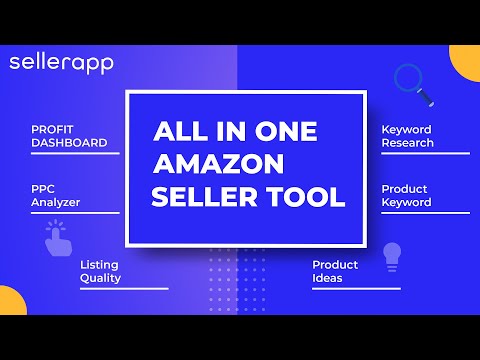
play SellerApp Features Introduction
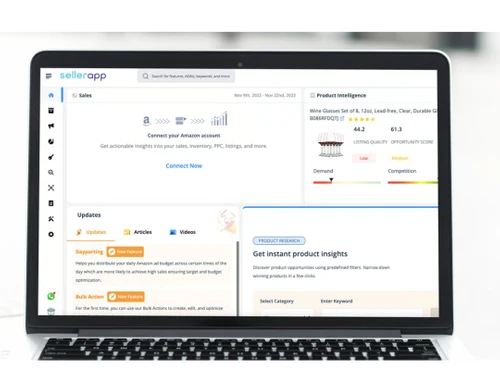
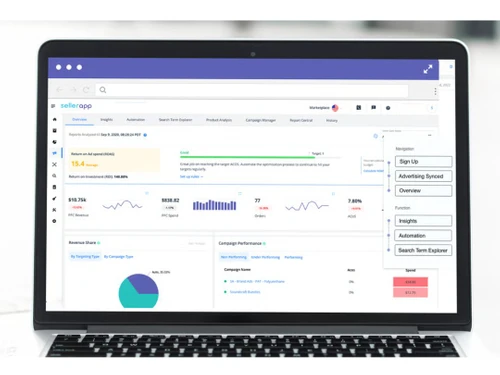
sellerapp dashboard
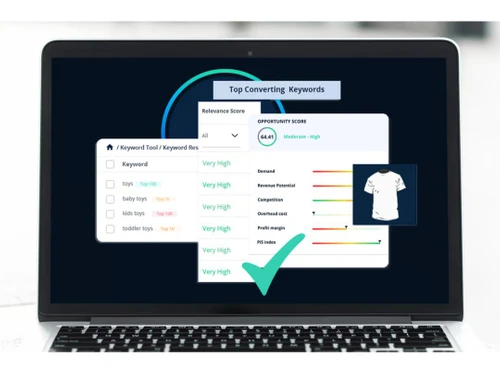
sellerapp keywords

SellerApp

Brand: Sellerapp

  • 4.3

  • 5 Ratings

SellerApp is an all-in-one Amazon seller tool designed to help e-commerce businesses optimize their listings, enhance profitability, and streamline operations.

See More

Have you used SellerApp before?

Share your insights for better experience

Add a Review
Starting Price
$99

View plans

100% Genuine
Products
Best Price
Guaranteed
Safe & Secure
Payment
  • Description

  • Pricing

  • Features

  • Specification

  • Review

  • Compare

  • Alternatives

  • FAQ

Starting at $99

SellerApp Software Overview

What is SellerApp?

SellerApp is a sales force automation software and sales intelligence software that assists e-commerce businesses in optimizing their product listings, enhancing profitability, and streamlining operations. It offers a suite of features, including advanced product research, keyword analysis, PPC campaign management, and real-time profit tracking.

Why Choose SellerApp

  • Comprehensive Analytics: Provides deep insights into product performance, competitor analysis, and keyword trends, helping you make data-driven decisions.
  • Advanced Product Research: Allows you to find high-demand, low-competition products using advanced filters and algorithms.
  • PPC Management: Optimizes Amazon PPC campaigns to increase sales and ROI by offering actionable recommendations and automated strategies.
  • Profit Tracking: Real-time profit tracking lets you monitor expenses, sales, and profit margins to ensure your business is profitable.
  • Listing Optimization: Improves product listings with keyword suggestions, SEO tips, and performance analysis to boost visibility on Amazon.
  • AI-Powered Tools: Utilizes artificial intelligence to provide predictive insights, helping you stay ahead of market trends and make smarter business decisions.

Benefits of SellerApp

  • Product Tracking: Continuously track your product’s performance and make adjustments based on real-time data to stay competitive and improve profitability.
  • Competitor Monitoring: SellerApp helps you monitor and analyze competitors' strategies, including pricing, sales rank, and customer reviews, giving you a competitive edge.
  • Market Intelligence: Gain insights into the Amazon market trends and consumer behavior, allowing you to adjust your strategies and product offerings to match demand.
  • Keyword Rank Tracking: Monitor the ranking of your chosen keywords, ensuring your listings are optimized for maximum visibility and success.
  • Sales Estimation: Accurate sales predictions help you make more informed decisions about inventory, pricing, and product launches.
  • Product Opportunity Finder: Helps identify profitable niches with less competition, guiding you towards lucrative products with high potential.
  • Amazon FBA & FBM Insights: Provides valuable insights into both FBA (Fulfillment by Amazon) and FBM (Fulfilled by Merchant) to help you manage fulfillment strategies efficiently.
  • User-Friendly Dashboard: The intuitive dashboard consolidates all your metrics in one place, making it easy to track progress, view reports, and analyze data.

SellerApp Pricing

SellerApp pricing starts at $99 at Techjockey.com.

The pricing model is based on different parameters, including the amount of bandwidth you need, the number of servers you need, and the features you need. For further queries related to the product, you can contact our product team and learn more about the pricing and offers.

Read more

Sellerapp Company Details

Founded Year:  2016

SellerApp’s all-inclusive e-Commerce Intelligence platform helps sellers and retailers maximize their potential on global marketplaces including Amazon.

Director/Founders Ashuvinder Ahuja, Brij Purohit, Dilip Vamanan, Gaurav Manchanda, Kunal Agarwal
Company Size 101-500 Employees

SellerApp Pricing & Plans

Seller-Pro Plan
Starting at $99
    • Licenses

      Licenses
      Licenses
    • Monthly

      Monthly
      Monthly

Key Features

  • Basic Plan Functionalities +

  • Insights

  • Keyword Tracking

  • Listing Quality

  • Lifetime data retention

Smart Plan with Automation
Starting at $149
    • Licenses

      Licenses
      Licenses
    • Monthly

      Monthly
      Monthly

Key Features

  • Professional Plan +

  • Ads Automation

  • Quarterly Business Review

  • Email + Chat Support

  • Email Support

SellerApp Features

  • icon_check PPC Management
    Optimize Amazon PPC campaigns with insights, automated bids, and strategies to boost ROI and sales.
  • icon_check Opportunity Score
    Prioritize high-potential products by analyzing demand, competition, and profit potential with a score.
  • icon_check Keyword Tracking
    Monitor real-time keyword rankings to assess SEO efforts and improve product visibility on Amazon.
  • icon_check Index Checker
    Ensure your products are indexed for the right keywords, improving discoverability and search results.
  • icon_check Listing Quality Analysis
    Optimize product listings based on keyword usage, descriptions, and images for better rankings.
  • icon_check Profit Dashboard
    Track real-time sales, expenses, and profits to monitor business performance and manage your finances.
  • icon_check Ad Automation Template
    Save time with pre-built PPC campaign templates to ensure consistent, automated optimization.
  • icon_check Analytics
    Access in-depth analytics on sales, traffic, and conversions to make data-driven decisions for growth.
  • icon_check Competitor Benchmarking
    Compare your performance with competitors in pricing, sales, and product offerings to stay competitive.
  • icon_check Seasonal Trends Prediction
    Predict demand shifts and market trends based on seasonal patterns, optimizing inventory and strategy.
  • icon_check Keyword Explorer & Optimization
    Discover high-intent keywords with search volume, conversion probability, difficulty, and CPC data for SEO.
  • icon_check Listing Quality Index
    Score and analyze product listings on critical factors like titles, bullets, images, and backend keywords.
  • icon_check API & Data Access
    RESTful Amazon Seller and ecommerce data APIs allow integration into custom apps and workflows.
  • icon_check Geo Support
    Support for global marketplaces (US, Canada, Mexico, Europe, India, and more) with region-specific insights.
  • icon_check Business Monitoring & Alerts
    Monitor sales velocity, keyword drops, Buy Box changes, hijackers, and unexpected performance issues.
SellerApp Demo Video play icon

Get SellerApp Demo

Watch the demo video to explore key features, real workflows, and how the software fits your business needs.

Understand
Key Features
Personal
Demo Insights
Interactive
Demo Support

SellerApp Specifications

Supported Platforms
Ubuntu Ubuntu Windows Windows MacOS MacOS Linux Linux
Devices
Desktop Desktop Mobile Mobile Tablet Tablet iPad iPad
Deployment
Cloud-Based Cloud-Based
Suitable For
E-Commerce
Business Specific
All Businesses
Business Size
Small Business Startups Medium Business Enterprises
Customer Support
Phone Email Communities
Language
English français Deutsche 日本人 普通话 Türkçe
Training Resources
Videos
AI Features
AI Integrated

Explore the Best Alternative Solutions Similar to Your Business Size and Needs

SellerApp Review

4.3

Out of 5

img

Overall Rating

Based on
5 Verified Ratings

Rating Breakdown

  • Features 4
  • Value for Money 4.5
  • Ease of Use 4.5
  • Customer Support 4.4

88% Recommend this Product

Add Review

Be the First to Review

This product has no reviews yet. Be the first to leave your feedback.

Add Review

Compare SellerApp With other Amazon Seller Tools

Products
Ratings
Pricing
Device Supported
Deployment
Supported Platforms
  • img

    SellerApp

  • 4.3

  • Price On Request

  • Desktop

    Mobile

  • Web based

    On Premises

  • Windows

    Mac OS

  • img

    Helium 10

  • 4.4

  • Price On Request

  • Desktop

    Mobile

  • Web based

    On Premises

  • Windows

    Mac OS

  • img

    Data Dive

  • 4.4

  • Price On Request

  • Desktop

    Mobile

  • Web based

    On Premises

  • Windows

    Mac OS

  • img

    Jungle Scout

  • 4.2

  • Price On Request

  • Desktop

    Mobile

  • Web based

    On Premises

  • Windows

    Mac OS

  • img

    SellerAmp

  • 4.3

  • Price On Request

  • Desktop

    Mobile

  • Web based

    On Premises

  • Windows

    Mac OS

  • img

    SmartScout

  • 4.6

  • Price On Request

  • Desktop

    Mobile

  • Web based

    On Premises

  • Windows

    Mac OS

  • img

    Teikametrics

  • 4.6

  • Price On Request

  • Desktop

    Mobile

  • Web based

    On Premises

  • Windows

    Mac OS

  • img

    AMZScout

  • 4.2

  • Price On Request

  • Desktop

    Mobile

  • Web based

    On Premises

  • Windows

    Mac OS

  • img

    sellerboard

  • 4.1

  • Price On Request

  • Desktop

    Mobile

  • Web based

    On Premises

  • Windows

    Mac OS

  • img

    Seller Labs

  • 4.3

  • Price On Request

  • Desktop

    Mobile

  • Web based

    On Premises

  • Windows

    Mac OS

  • img

    SellerSprite

  • 4.1

  • Price On Request

  • Desktop

    Mobile

  • Web based

    On Premises

  • Windows

    Mac OS

(0) Product(s) selected

SellerApp Alternatives

See All SellerApp Alternatives

Aura

4.2

Starting Price:

$47 /Month

How much does SellerApp cost?

SellerApp pricing starts at $99 at Techjockey.com. Pricing is customized based on specific business needs.

Which operating system does SellerApp support?

SellerApp is a cloud-based platform, so it works on any operating system with internet access, including Windows, macOS, and Linux. It can be accessed through modern web browsers on both desktop and mobile devices.

How does SellerApp work?

SellerApp collects and analyzes data from Amazon to offer insights on products, keywords, PPC performance, and competitor trends. Users can use this data to optimize listings, manage ads, and boost profitability on Amazon.

Is SellerApp suitable for small businesses?

Yes, SellerApp is ideal for small businesses. It simplifies complex Amazon operations and provides affordable tools for product research, ad optimization, and sales tracking, helping sellers grow faster.

Does SellerApp offer a free trial or a demo?

Yes, SellerApp offers a free trial along with demo options. This allows users to explore its features and understand how it can support their Amazon business before committing to a plan.

What features does SellerApp offer?

SellerApp offers PPC management, keyword tracking, listing optimization, profit dashboards, product research tools, competitor analysis, and more to help Amazon sellers scale efficiently.

Is there any SellerApp App?

Currently, SellerApp offers a web-based platform, which is mobile-responsive. While there is no dedicated mobile app, it can be accessed via browsers on smartphones and tablets.

Who are the potential users of SellerApp?

Amazon sellers of all sizes, including individuals, small businesses, marketing agencies, and large e-commerce brands, can benefit from using SellerApp for growth and optimization.

How secure is SellerApp?

SellerApp follows strong security protocols, including encrypted data transfer and secure account access. It ensures seller data and financial insights are protected from unauthorized access.

What is SellerApp used for?

SellerApp is used for Amazon product research, keyword tracking, PPC campaign management, competitor analysis, listing optimization, and sales performance tracking to boost revenue.

20,000+ Software Listed

Best Price Guranteed

Free Expert Consultation

2M+ Happy Customers

Terms and Condtions

close

Users with registered businesses can purchase goods from merchants on the platform to satisfy their business needs. Users are not permitted to utilize any products acquired through the platform for resale, advertising, business, or further distribution.

For each purchase made, users will receive a Tax Invoice (or 'GST invoice') that includes specific details such as:

  • the GSTIN of the user associated with their registered business, and

  • the specified Entity Name for their business.

It should be noted that not all products are eligible for GST Invoice. Only the products displayed by participating sellers with the 'GST-based Invoice Available' callout on the product description page would qualify.

Certain goods and services are not eligible to get a GST Invoice, including items with VAS, i.e., Value Added Services (e.g., Total Mobile Protection/Assured Buyback) and those involving an exchange offer at the time of purchase.

Users must ensure the accuracy of the GSTIN, and business entity name provided for the GST Invoice. Requests for corrections into GST Invoice would not be accommodated by Techjockey.com or any Seller, and any issues arising from user-provided information are the sole responsibility of users.

Techjockey.com is not liable for the GST Invoice or any associated input tax credit. To efficiently claim an input tax credit, users should select the registered place of business address as per the GST authority's data and follow the provisions of the GST Act and rules.

To claim an input tax credit, the delivery and billing addresses must match. Furthermore, input tax credits will not be granted if the delivery address and GSTIN on the invoice are from different states. In case of incorrect GST details provided during the order placement, the order will be canceled automatically.