linkedin
Sibro logo
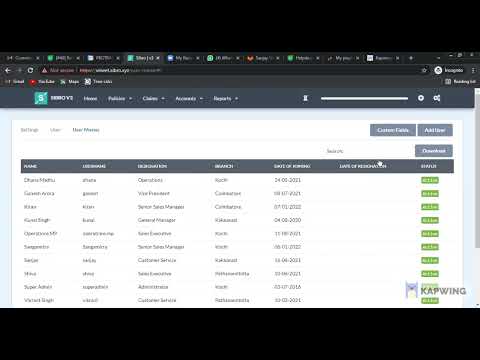
play sibro demo
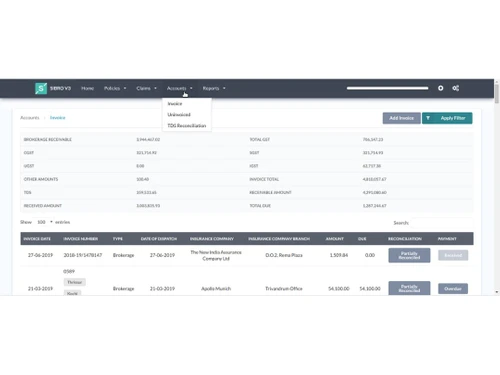
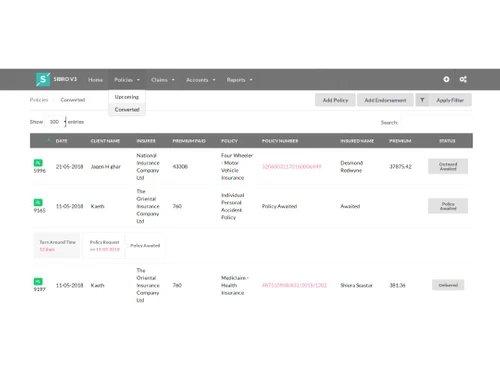
sibro accounts
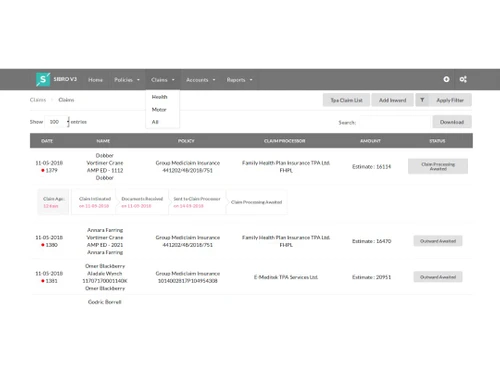
sibro claims

Sibro

Brand: Sibro

  • 4.4

  • 6 Ratings

SIBRO v3 is an end-to-end insurance broking software that simplifies operations, automates processes, and boosts productivity.

See More

Have you used Sibro before?

Share your insights for better experience

Add a Review

Price Available on Request

Questions about pricing or customization? We’re here to help, just a click away.

100% Genuine
Products
Best Price
Guaranteed
Safe & Secure
Payment
  • Description

  • Pricing

  • Features

  • Specification

  • Review

  • Compare

  • Alternatives

  • FAQ

Sibro Software Overview

What is Sibro?

SIBRO v3 is an end-to-end insurance broking software that helps to manage and automate insurance brokers' operations. Its purpose is to help insurance businesses manage prospects, policies, claims, and accounts efficiently. The software enables smooth communication with clients and insurers. It simplifies processes like RFQs, policy management, claims tracking, invoicing, and reconciliation. With a user-friendly interface, it integrates all these functions into a single platform, for smooth insurance and claim management.

SIBRO v3 provides policy management from creation to renewal, ensuring accurate tracking and updates. It helps in prospects management by tracking and organizing potential clients, improving lead conversion rates. It automates reminders for policy renewal and Follow-ups, and helps in RFQ preparation documents for efficient quoting. It allows for easy comparison of quotes from different insurers for decision making. The application manages payment collection of premiums and other payments. It also automates the delivery of policy documents to clients, and automates claims processes. It ensures adherence to regulatory requirements, and provides customizable features as per different brokers and agencies.

Why choose Sibro Insurance Management Software?

  • Policy Management: Manages the entire lifecycle of insurance policies, ensuring accurate tracking, updates, and renewals.
  • Prospects Management: Tracks and organizes potential clients, improving lead conversion rates and efficient client acquisition.
  • Renewal Follow-Ups: Automates reminders for policy renewals, enhancing customer retention and ensuring timely renewals.
  • RFQ Preparation: Facilitates the creation of Request for Quotation documents, aiding in accurate and efficient quoting.
  • Claims Management: Automates the claims process, improving efficiency, accuracy, and customer satisfaction.

Benefits of Sibro

  • Smooth Communication: Integrated SMS, email, and WhatsApp features enhance client and insurer interactions and follow-ups.
  • Reporting: Actionable, customizable reports provide key insights into business performance and client management efficiency.
  • Increased Efficiency: Automates policy management and claims processes, significantly boosting operational efficiency.
  • Improved Client Management: Enhances client tracking and lead conversion, improving customer acquisition and retention.
  • Accurate Quoting: Facilitates RFQ preparation and quote comparison, ensuring precise and competitive insurance quoting.
  • Timely Renewals: Automates renewal follow-ups, ensuring timely policy renewals and enhancing customer satisfaction.
  • Enhanced Compliance: Ensures adherence to regulatory requirements, maintaining compliance and reducing legal risks.

Pricing of Sibro

Sibro price details are available on request at techjockey.com.

Sibro price in India may vary based on factors like customization, additional features required, number of users, and the deployment type. Please request a call back for subscription-related details and to avail offers on premium packages.

Read more

Sibro Company Details

Founded Year:  2015

SIBRO is an extremely simple and user friendly insurance broking software.

Director/Founders Hemant Sikaria
Company Size 1-100 Employees

Sibro Pricing & Plans

Looking for The Right Pricing?

Share your requirements and get a plan built around your business.

  • Define your business needs
  • Get customised pricing
  • Choose features that fit your workflow

Price Available on Request

Get personalised Sibro pricing that fits your needs. Our team will connect with you.

Sibro Features

  • icon_check Policy Management
    Manages the entire lifecycle of insurance policies, ensuring accurate tracking, updates, and renewals.
  • icon_check Claim Management
    Automates the claims process, improving efficiency, accuracy, and customer satisfaction through streamlined handling.
  • icon_check Billing & Invoicing
    Streamlines billing and invoicing processes, ensuring timely and accurate premium collections and financial transactions.
  • icon_check Reporting & Analytics
    Provides detailed analytics and customizable reports, aiding in strategic decision-making and performance evaluation.
  • icon_check Claim Management
    Automates the claims process, improving efficiency, accuracy, and customer satisfaction through streamlined handling.
  • icon_check Risk and Compliance
    Ensures adherence to regulatory requirements, mitigating legal risks and maintaining compliance with industry standards.
Sibro Demo Video play icon

Get Sibro Demo

Watch the demo video to explore key features, real workflows, and how the software fits your business needs.

Understand
Key Features
Personal
Demo Insights
Interactive
Demo Support

Sibro Specifications

Supported Platforms
Ubuntu Ubuntu Windows Windows MacOS MacOS
Devices
Desktop Desktop
Deployment
Cloud-Based Cloud-Based
Suitable For
Insurance
Business Specific
All Businesses
Business Size
Small Business Startups Medium Business SMBs
Customer Support
Email Communities
Language
English
Training Resources
Documentation Videos

Explore the Best Alternative Solutions Similar to Your Business Size and Needs

Sibro Review

4.4

Out of 5

img

Overall Rating

Based on
6 Verified Ratings

Rating Breakdown

  • Features 4.4
  • Value for Money 4.5
  • Ease of Use 4.4
  • Customer Support 4.3

85% Recommend this Product

Add Review

Be the First to Review

This product has no reviews yet. Be the first to leave your feedback.

Add Review

Compare Sibro With other Insurance Management Software

Products
Ratings
Pricing
Device Supported
Deployment
Supported Platforms
  • img

    Sibro

  • 4.4

  • Price On Request

  • Desktop

    Mobile

  • Web based

    On Premises

  • Windows

    Mac OS

  • img

    Applied Epic

  • 4.0

  • Price On Request

  • Desktop

    Mobile

  • Web based

    On Premises

  • Windows

    Mac OS

  • img

    IMD.Mitra

  • 4.9

  • Price On Request

  • Desktop

    Mobile

  • Web based

    On Premises

  • Windows

    Mac OS

  • img

    BimaGrow

  • 4.2

  • ₹ 2999

  • Desktop

    Mobile

  • Web based

    On Premises

  • Windows

    Mac OS

  • img

    Turtlemint

  • 4.3

  • Price On Request

  • Desktop

    Mobile

  • Web based

    On Premises

  • Windows

    Mac OS

  • img

    A1 Tracker

  • 4.3

  • Price On Request

  • Desktop

    Mobile

  • Web based

    On Premises

  • Windows

    Mac OS

  • img

    Insurity

  • 3.9

  • Price On Request

  • Desktop

    Mobile

  • Web based

    On Premises

  • Windows

    Mac OS

  • img

    BriteCore

  • 4.1

  • Price On Request

  • Desktop

    Mobile

  • Web based

    On Premises

  • Windows

    Mac OS

  • img

    Bimabook

  • 4.4

  • ₹ 2999

  • Desktop

    Mobile

  • Web based

    On Premises

  • Windows

    Mac OS

  • img

    Smart Agent

  • 4.2

  • ₹ 999

  • Desktop

    Mobile

  • Web based

    On Premises

  • Windows

    Mac OS

(2) Product(s) selected

Sibro Alternatives

See All Sibro Alternatives

Available

Price on Request

Available

Price on Request

Available

Price on Request

Available

Price on Request

Starting Price:

₹10,000 /Year

Articles for Sibro

See All Related Articles

How does Sibro manage the lifecycle of insurance policies?

Sibro handles policy creation, updates, renewals, and tracking throughout the entire lifecycle.

Can Sibro automate claim processing?

Yes, Sibro automates the claims process, enhancing efficiency and accuracy in handling claims.

How does Sibro handle renewal follow-ups?

Sibro automates reminders for policy renewals, ensuring timely renewals and enhancing customer retention.

How does Sibro compare quotes from different insurers?

Sibro allows easy comparison of quotes from various insurers, helping brokers offer the best options to clients.

Is a demo available for SIBRO v3?

Yes, SIBRO v3 offers a live demo to showcase its features and functionalities.

On which operating systems can SIBRO v3 run?

SIBRO v3 is compatible with Windows, macOS, and Linux, accessible via browsers on any device.

Who are the potential users of SIBRO v3?

SIBRO v3 is designed for insurance brokers, agents, and firms looking to streamline operations.

Does SIBRO v3 support multi-currency transactions?

Yes, SIBRO v3 supports multi-currency for brokers dealing with international policies and clients.

Does SIBRO v3 offer cloud storage?

Yes, SIBRO v3 provides unlimited cloud storage for documents related to policies and claims.

How does SIBRO v3 handle user access control?

SIBRO v3 allows setting employee privileges with role-based access control for secure data management.

20,000+ Software Listed

Best Price Guranteed

Free Expert Consultation

2M+ Happy Customers

Terms and Condtions

close

Users with registered businesses can purchase goods from merchants on the platform to satisfy their business needs. Users are not permitted to utilize any products acquired through the platform for resale, advertising, business, or further distribution.

For each purchase made, users will receive a Tax Invoice (or 'GST invoice') that includes specific details such as:

  • the GSTIN of the user associated with their registered business, and

  • the specified Entity Name for their business.

It should be noted that not all products are eligible for GST Invoice. Only the products displayed by participating sellers with the 'GST-based Invoice Available' callout on the product description page would qualify.

Certain goods and services are not eligible to get a GST Invoice, including items with VAS, i.e., Value Added Services (e.g., Total Mobile Protection/Assured Buyback) and those involving an exchange offer at the time of purchase.

Users must ensure the accuracy of the GSTIN, and business entity name provided for the GST Invoice. Requests for corrections into GST Invoice would not be accommodated by Techjockey.com or any Seller, and any issues arising from user-provided information are the sole responsibility of users.

Techjockey.com is not liable for the GST Invoice or any associated input tax credit. To efficiently claim an input tax credit, users should select the registered place of business address as per the GST authority's data and follow the provisions of the GST Act and rules.

To claim an input tax credit, the delivery and billing addresses must match. Furthermore, input tax credits will not be granted if the delivery address and GSTIN on the invoice are from different states. In case of incorrect GST details provided during the order placement, the order will be canceled automatically.