linkedin
Sketchbox logo
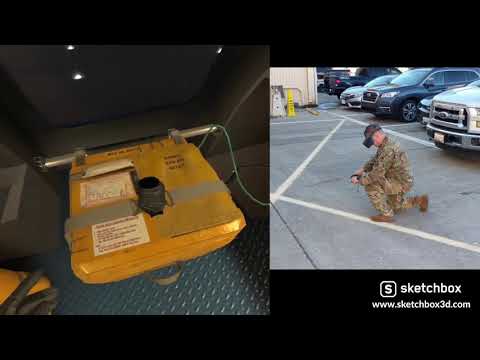
play How the Force saved $100K per student with VR training
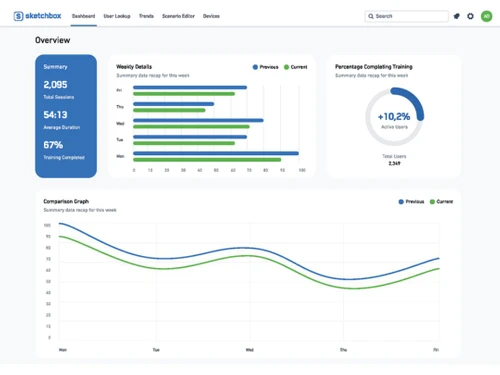
Sketchbox Dashboard
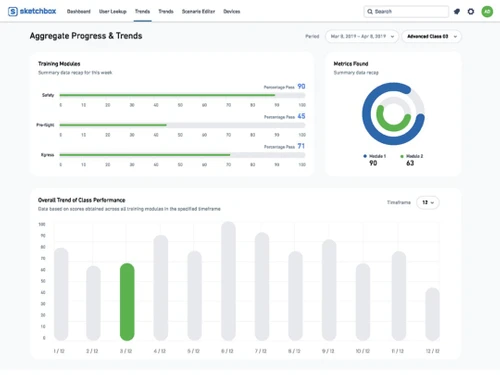
Sketchbox Aggregate Progress

Sketchbox

Brand: Sketchbox

  • 4.2

  • 6 Ratings

Sketchbox is a virtual reality (VR) software that allows users to manipulate models and meshes in a virtual space, scale in three built-in axes, and change model colors.

See More

Have you used Sketchbox before?

Share your insights for better experience

Add a Review

Price Available on Request

Questions about pricing or customization? We’re here to help, just a click away.

100% Genuine
Products
Best Price
Guaranteed
Safe & Secure
Payment
  • Description

  • Pricing

  • Features

  • Specification

  • Review

  • Compare

  • Alternatives

  • FAQ

Sketchbox Software Overview

What is Sketchbox

Sketchbox is a virtual reality training and assessment platform that seamlessly merges top-tier commercial technology with state-of-the-art software to address complex training needs. Featuring an intuitive drag-and-drop interface, it offers a customizable analytics dashboard that showcases the metrics of utmost importance to each instructor or class.

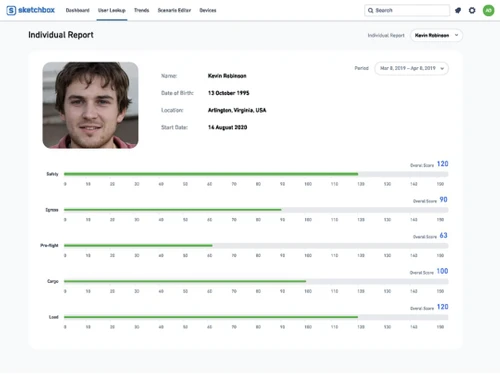
This innovative platform empowers instructors to swiftly identify students' areas of struggle across the entire class. This facilitates the timely adaptation of lesson plans for optimized learning outcomes. With access to comprehensive data insights, individuals gain a valuable understanding of their progress, including trends over time and even biometric data for a holistic assessment of their learning journey.

Why Choose Sketchbox Virtual Reality Software

  • The virtual reality software allows you to use a drag-and-drop interface to personalize metrics for instructors and classes.
  • It allows you to track class performance and adjust lesson plans accordingly.
  • The platform enables you to conduct VR training sessions with up to 25 participants remotely.
  • It enables you to pause, rewind, and playback VR training sessions for feedback and review.
  • The VR tool allows you to create immersive storylines with branching paths based on user choices.

Benefits of Sketchbox Software

  • The virtual reality software allows you to centrally control all VR headsets, including installation, uninstallation, and app management.
  • It allows you to incorporate 360° videos and images into your VR experiences for a more immersive feel.
  • The platform allows you to store and manage a library of 3D models, textures, and other assets for easy reuse in projects.
  • It enables you to design training scenarios where multiple users can interact and collaborate within the VR environment.
  • The VR tool allows you to interact with and manipulate objects within the VR experience.

Pricing of Sketchbox

Sketchbox details are available on request at techjockey.com.

Sketchbox price in India may vary based on factors like customization, additional features required, number of users, and the deployment type. Please request a call back for subscription-related details and to avail offers on premium packages.

Read more

Sketchbox Company Details

Founded Year:  2017

Sketchbox offers design interactive prototypes for VR/AR.

Director/Founders Joe Connolly, Peter Le Bek
Company Size 1-100 Employees

Sketchbox Pricing & Plans

Looking for The Right Pricing?

Share your requirements and get a plan built around your business.

  • Define your business needs
  • Get customised pricing
  • Choose features that fit your workflow

Price Available on Request

Get personalised Sketchbox pricing that fits your needs. Our team will connect with you.

Sketchbox Features

  • icon_check Virtual Reality
    Build VR simulations for design and prototyping without coding.
  • icon_check Customizable
    Tailor the tool to your specific needs and workflows.
  • icon_check Collaboration
    Work together on VR/AR projects in real time.
  • icon_check Dashboards
    Visualize project progress and key metrics at a glance.
  • icon_check Reports
    Generate detailed reports on project data and usage.
  • icon_check Content Creation
    Import assets, draw in 2D/3D and create UI elements for VR/AR experiences.
  • icon_check User Management
    Control access levels and permissions for different team members.
  • icon_check Device Management
    Manage and track VR/AR devices used for your projects.
Sketchbox Demo Video play icon

Get Sketchbox Demo

Watch the demo video to explore key features, real workflows, and how the software fits your business needs.

Understand
Key Features
Personal
Demo Insights
Interactive
Demo Support

Sketchbox Specifications

Supported Platforms
Ubuntu Ubuntu Windows Windows MacOS MacOS Linux Linux
Devices
Desktop Desktop
Deployment
Cloud-Based Cloud-Based
Suitable For
All Industries
Business Specific
All Businesses
Business Size
Small Business Startups Medium Business Enterprises
Customer Support
Email Communities
Language
English
Training Resources
Videos

Explore the Best Alternative Solutions Similar to Your Business Size and Needs

Small Business

Designed for startups and growing businesses

Yulio

4.2

BuildVR

4.3

Vizible

4.1

See More

Sketchbox Review

4.2

Out of 5

img

Overall Rating

Based on
6 Verified Ratings

Rating Breakdown

  • Features 4.0
  • Value for Money 4.5
  • Ease of Use 4.0
  • Customer Support 4.3

93% Recommend this Product

Add Review

Be the First to Review

This product has no reviews yet. Be the first to leave your feedback.

Add Review

Compare Sketchbox With other Virtual Reality Software

Products
Ratings
Pricing
Device Supported
Deployment
Supported Platforms
  • img

    Sketchbox

  • 4.2

  • Price On Request

  • Desktop

    Mobile

  • Web based

    On Premises

  • Windows

    Mac OS

  • img

    SimLab VR Studio

  • 4.2

  • Price On Request

  • Desktop

    Mobile

  • Web based

    On Premises

  • Windows

    Mac OS

  • img

    Sentio VR

  • 4.3

  • Price On Request

  • Desktop

    Mobile

  • Web based

    On Premises

  • Windows

    Mac OS

  • img

    VictoryXR

  • 4.2

  • Price On Request

  • Desktop

    Mobile

  • Web based

    On Premises

  • Windows

    Mac OS

  • img

    Vizard

  • 4.3

  • Price On Request

  • Desktop

    Mobile

  • Web based

    On Premises

  • Windows

    Mac OS

  • img

    StreamVR

  • Price On Request

  • Desktop

    Mobile

  • Web based

    On Premises

  • Windows

    Mac OS

  • img

    MeetinVR

  • 4.2

  • Price On Request

  • Desktop

    Mobile

  • Web based

    On Premises

  • Windows

    Mac OS

  • img

    The Wild

  • 4.3

  • Price On Request

  • Desktop

    Mobile

  • Web based

    On Premises

  • Windows

    Mac OS

  • img

    Yulio

  • 4.2

  • Price On Request

  • Desktop

    Mobile

  • Web based

    On Premises

  • Windows

    Mac OS

  • img

    Vizible

  • 4.1

  • Price On Request

  • Desktop

    Mobile

  • Web based

    On Premises

  • Windows

    Mac OS

(2) Product(s) selected

Sketchbox Alternatives

See All Sketchbox Alternatives

Available

Price on Request

Who is Sketchbox designed for?

Designers and other creative professionals can use a robust solution like Sketchbox for brainstorming ideas, getting feedback on designs, and making revisions.

What are the pricing options for a Sketchbox subscription?

Sketchbox price in India may vary based on factors like customization, additional features required, number of users, and the deployment type. Sketchbox details are available on request at techjockey.com. Users can request a call back for subscription-related details and to avail offers on premium packages.

Is there an app for Sketchbox?

Sketchbox software is unavailable for Android and iOS users.

Does Sketchbox have a free version?

Sketchbox does not provide a free trial, nor is it available for free.

How can Sketchbox be used for 3D design collaboration in virtual reality (VR)?

Sketchbox is a 3D virtual reality (VR) collaboration workspace that allows users to manipulate models and meshes.

Does Sketchbox work on Windows/Mac/Android/iOS?

Sketchbox supports Ubuntu, Windows, MacOS, and Linux operating systems.

20,000+ Software Listed

Best Price Guranteed

Free Expert Consultation

2M+ Happy Customers

Terms and Condtions

close

Users with registered businesses can purchase goods from merchants on the platform to satisfy their business needs. Users are not permitted to utilize any products acquired through the platform for resale, advertising, business, or further distribution.

For each purchase made, users will receive a Tax Invoice (or 'GST invoice') that includes specific details such as:

  • the GSTIN of the user associated with their registered business, and

  • the specified Entity Name for their business.

It should be noted that not all products are eligible for GST Invoice. Only the products displayed by participating sellers with the 'GST-based Invoice Available' callout on the product description page would qualify.

Certain goods and services are not eligible to get a GST Invoice, including items with VAS, i.e., Value Added Services (e.g., Total Mobile Protection/Assured Buyback) and those involving an exchange offer at the time of purchase.

Users must ensure the accuracy of the GSTIN, and business entity name provided for the GST Invoice. Requests for corrections into GST Invoice would not be accommodated by Techjockey.com or any Seller, and any issues arising from user-provided information are the sole responsibility of users.

Techjockey.com is not liable for the GST Invoice or any associated input tax credit. To efficiently claim an input tax credit, users should select the registered place of business address as per the GST authority's data and follow the provisions of the GST Act and rules.

To claim an input tax credit, the delivery and billing addresses must match. Furthermore, input tax credits will not be granted if the delivery address and GSTIN on the invoice are from different states. In case of incorrect GST details provided during the order placement, the order will be canceled automatically.